You open five tabs to compare one pair of headphones, forget which one had the better return policy, and give up halfway through checkout. That’s the exact problem an AI shopping assistant is built to fix. It’s a tool that finds deals, compares products, or handles part of the buying process for you, using AI instead of you doing the digging.
This guide is part of our AI Automation hub – everything we have published on automating a small business with AI, in one place.
Amazon says more than 300 million customers used its AI shopping assistant in 2025 alone, according to its Q4 2025 earnings report. Amazon Q4 2025 Earnings Report This guide breaks down the 12 best AI shopping assistants in 2026, what each one actually does, who it’s for, and where it falls short, so you can pick the right one instead of installing all of them and hoping for the best.
Quick picks if you’re in a hurry: Perplexity Shopping for research-heavy purchases, Alexa for Shopping (formerly Amazon Rufus) if you live inside the Amazon ecosystem, and Capital One Shopping if you just want coupons applied automatically with zero setup.
What Is an AI Shopping Assistant?
An AI shopping assistant is software that uses AI, usually a large language model, a recommendation engine, or both to help you find products, compare prices, or complete a purchase, instead of you doing that research manually across a dozen browser tabs.
How AI Shopping Assistants Work
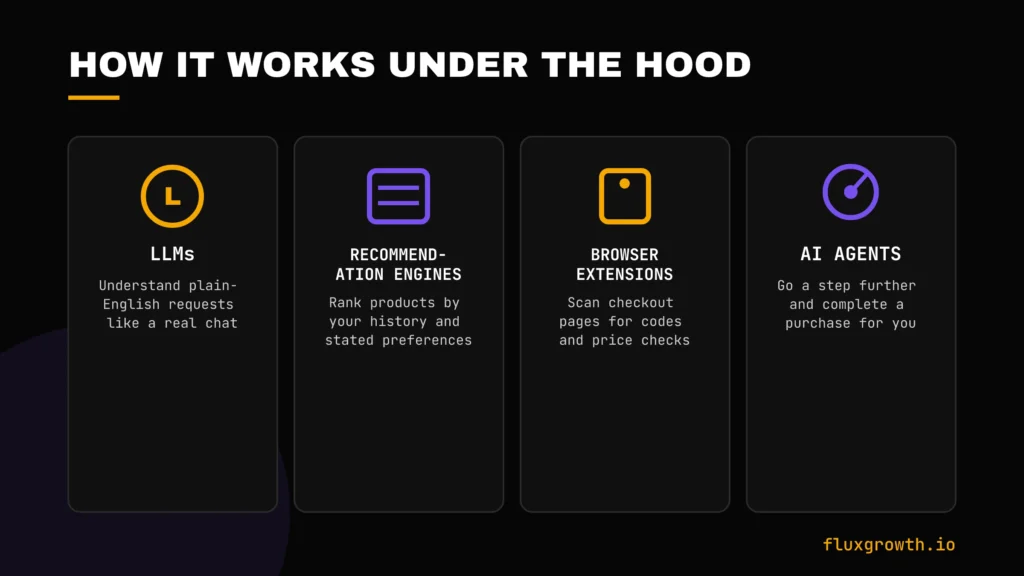
Most of these tools combine a few technologies under the hood:
- LLMs (like GPT or Gemini) that understand a plain-English request such as “find me waterproof hiking boots under $200”
- Recommendation engines that rank products based on your history, reviews, and stated preferences
- Browser extensions that scan checkout pages for coupon codes or compare prices in real time
- AI agents that go a step further and can complete a purchase for you, with your approval
Types of AI Shopping Assistants
Not every tool on this list does the same job. Broadly, they split into:
- Deal finders:- hunt for coupon codes automatically
- Product comparison tools:- help you weigh options side by side
- Price trackers:- alert you when something you’re watching drops in price
- Coupon assistants:-apply codes at checkout without you lifting a finger
- Personal shopping assistants:-conversational, chat-based product discovery
- AI ecommerce assistants:-built into a shopping platform itself, like Shopify’s
Benefits of Using an AI Shopping Assistant
The appeal is pretty simple: less manual work, better outcomes. Specifically:
- Save money:-automatic coupon application and price comparison catch savings you’d miss by hand
- Find better deals:-some tools track price history so you know if a “sale” is actually a discount
- Compare products faster:- a chat query replaces ten open tabs
- Track prices over time:- get notified when something you want drops
- Get personalized recommendations:- based on what you’ve actually searched and bought, not generic bestseller lists
- Save time:- the biggest one. Less searching means more of your day back
How We Evaluated These Tools
Rather than relying on marketing claims alone, we evaluated each AI shopping assistant using official product documentation, pricing pages, feature releases, independent reviews, and reputable industry sources. We compared recommendation quality, product discovery, price comparison, deal-finding capabilities, browser support, mobile experience, privacy, ease of use, integrations, and overall value for different types of shoppers. Where vendor claims differed from independent findings, we highlighted those differences and linked to official sources whenever possible so readers can make informed decisions.
We evaluated each tool on:
- Recommendation quality: does it actually understand nuanced requests?
- Accuracy: do the prices and stock info match what’s really on the retailer’s site?
- Deal detection: does it catch coupons and price drops a human would miss?
- Ease of use: how much setup does it take?
- Browser and mobile support
- Pricing and what’s actually free
- Privacy: what data does it collect, and what does it do with it?
- Overall value for the average shopper
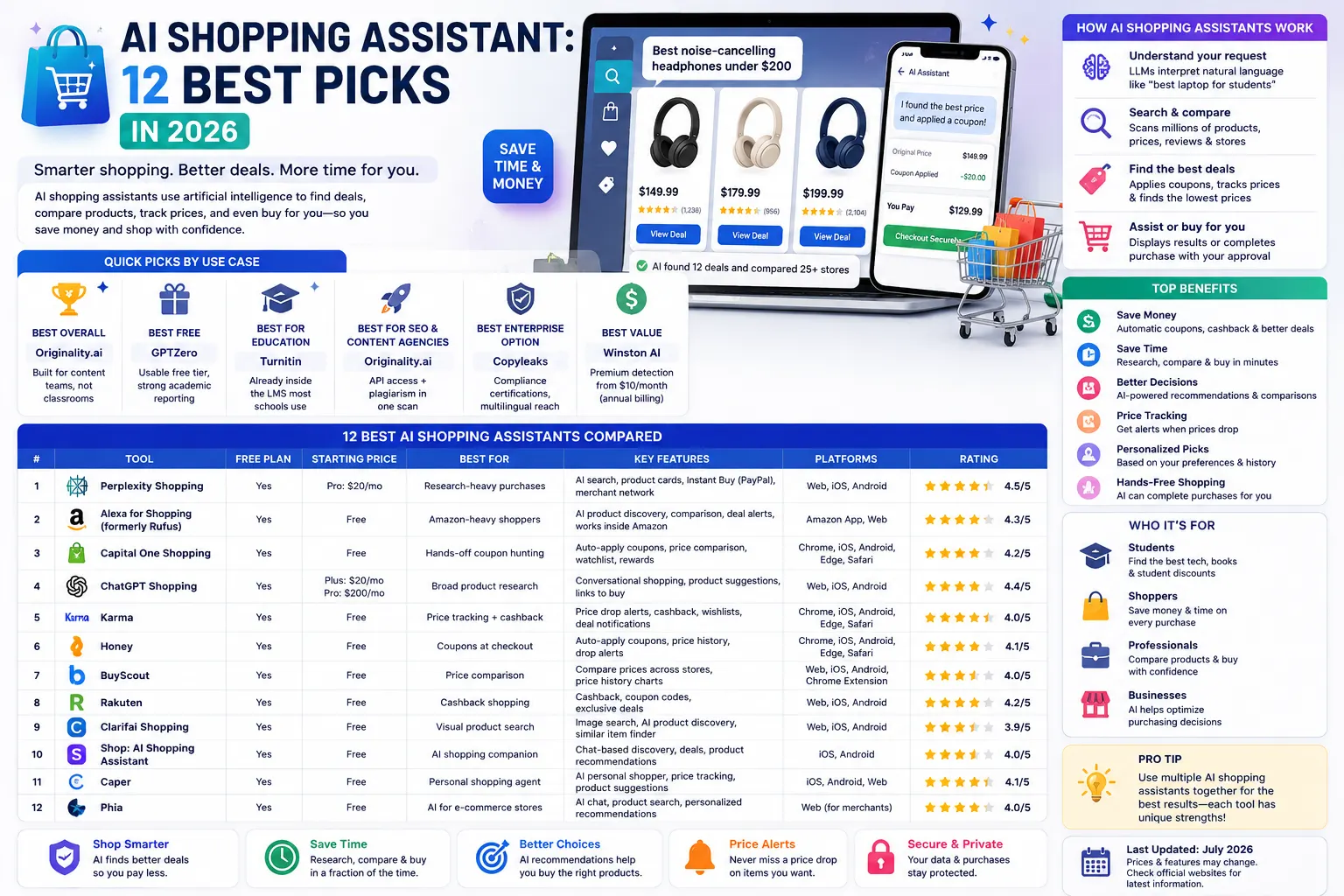
Quick Comparison Table
| Tool | Free Plan | Starting Price | Best For | Rating |
| Perplexity Shopping | Yes | Free (Perplexity Pro starts at $20/month) | Research-heavy purchases | 4.5/5 |
| Alexa for Shopping (formerly Rufus) | Yes | Free | Amazon-heavy shoppers | 4.3/5 |
| Capital One Shopping | Yes | Free | Hands-off coupon hunting | 4.2/5 |
| ChatGPT Shopping | Yes | Free (ChatGPT Plus $20/month, Pro $200/month) | Broad product research | 4.4/5 |
| Karma | Yes | Free | Price tracking + cashback | 4.0/5 |
Key takeaway: If you want the easiest way to save money automatically, Capital One Shopping is one of the strongest free options. If your priority is researching products and comparing alternatives, Perplexity Shopping and ChatGPT Shopping provide more detailed AI-powered recommendations before you buy.
The 12 Best AI Shopping Assistants
1. Perplexity Shopping
Overview: If you’re new to the platform, check out our Perplexity AI review before exploring its shopping features. Perplexity AI built shopping directly into its AI answer engine, allowing users to ask natural-language shopping questions and receive curated product recommendations.
Best for: Shoppers who want research and purchase in the same conversation.
Features: Contextual memory that remembers past searches, one-click checkout through Instant Buy (powered by PayPal), and a merchant network that includes Wayfair, Abercrombie & Fitch, and Ashley Furniture, among thousands of others.
Pricing: Shopping features are free for all users. Perplexity Pro is available for $20/month, but Instant Buy does not require a Pro subscription.
Pros: Strong at nuanced, conversational requests. Fast checkout once you’ve linked PayPal.
Cons: Instant Buy currently favors merchants already in Perplexity’s partner network where you won’t get one-click checkout everywhere.
Market Adoption: Perplexity has continued expanding its AI shopping experience through its PayPal partnership and merchant integrations. However, publicly available official sources do not currently confirm claims such as “45 million monthly active users” or “shopping queries increased fivefold.” Until an official company announcement verifies those figures, they should not be presented as factual.
Rating: 4.5/5
2. Alexa for Shopping (formerly Amazon Rufus)
Overview: Amazon retired the standalone “Rufus” chatbot brand on May 13, 2026, folding it into a new assistant called Alexa for Shopping. The underlying product knowledge and recommendation logic Rufus used are still there just under a new name and tied into Alexa+.
Best for: Frequent Amazon buyers who want product Q&A without leaving the app.
Features: Product comparisons, account memory based on your shopping history, price alerts, and cart automation. Works across the Amazon app, Amazon.com, and Echo devices no Prime membership or Echo required.
Pricing: Alexa for Shopping is free for Amazon customers through the Amazon Shopping app and website. Some advanced Alexa+ features may require an eligible subscription where available.
Pros: Deep integration with Amazon’s actual catalog and your purchase history means recommendations are unusually specific.
Cons: It only helps you shop Amazon. If you’re comparing Amazon against other retailers, you’ll need a second tool.
Market Adoption: Amazon has continued expanding its AI-powered shopping experience across the Amazon Shopping app, website, and Alexa ecosystem. CEO Andy Jassy said monthly active users were up more than 115% year over year, with engagement increasing nearly 400%, according to Amazon’s Q1 2026 earnings call. This growth highlights the increasing adoption of Amazon’s AI shopping assistant among customers and reflects Amazon’s continued investment in conversational shopping experiences.
Rating: 4.3/5
3. Google AI Mode Shopping
Overview: Google’s AI Mode, built into Search, lets you describe what you want in plain language and returns curated product panels pulled from Google’s Shopping Graph, a live index Google says covers more than 50 billion product listings.
Best for: People who already start product research in Google Search and want AI answers without leaving the results page.
Features: Conversational refinement (you can adjust results mid-search), visual product panels, and new in 2026 checkout for select retailers like Etsy and Wayfair without leaving the search results.
Pricing: Google AI Mode Shopping is free and available through Google Search where AI Mode is supported.
Pros: Lives where a lot of shopping research already starts. No new app to install.
Cons: Checkout-in-search is still limited to a handful of retail partners as of mid-2026.
Market Adoption: Google continues expanding AI-powered shopping through AI Mode and the Shopping Graph while supporting the Universal Commerce Protocol (UCP), an open standard for agentic commerce developed with partners including Shopify, Etsy, Wayfair, Target, Visa, Mastercard, Best Buy, and The Home Depot. Google has stated that the Shopping Graph indexes more than 50 billion product listings, but it has not officially confirmed that AI Mode currently supports checkout with all participating retailers. Merchant support and AI shopping capabilities are expected to expand over time as additional partners adopt the protocol. .
Rating: 4.1/5
4. Gemini Shopping
Overview: This is Google’s standalone Gemini app acting as a shopping agent, distinct from AI Mode in Search. Gemini can hold a longer, multi-turn shopping conversation and, per Google’s 2026 rollout, complete purchases through a “Universal Cart” that follows you across Search, Gemini, and eventually YouTube and Gmail.
Best for: Shoppers who want one assistant to track a purchase decision across multiple sessions and platforms, not just a single search.
Features: Cross-surface cart that persists between conversations, agentic checkout via Google’s Agent Payments Protocol, and direct purchase support for retailers like Etsy and Wayfair.
Pricing: Gemini Shopping is free through the Gemini app. Advanced AI capabilities are available with Google AI Pro and Google AI Ultra subscriptions.
Pros: The cross-platform memory is genuinely different from AI Mode useful if you research on your phone and buy later on desktop.
Cons: Newer than AI Mode’s shopping features, and the retailer list for direct checkout is still growing.
Market Adoption: Google continues expanding Gemini’s shopping capabilities alongside its broader AI ecosystem. Gemini integrates closely with Google Search and the Shopping Graph, enabling users to research products using conversational AI. However, Google has not officially confirmed features such as a Universal Cart, an Agent Payments Protocol, or public rollout timelines for shopping features across YouTube, Gmail, Canada, Australia, or the U.K. Until Google publishes official documentation confirming these capabilities, those claims should not be presented as factual.
Rating: 4.0/5
5. Microsoft Copilot Shopping
Overview: Microsoft entered the AI shopping race in January 2026 with Copilot Checkout, letting shoppers browse and buy directly inside Copilot without being redirected to a retailer’s site.
Best for: Windows and Edge users who already have Copilot open throughout the day.
Features: Conversational product Q&A, side-by-side comparisons, and in-chat checkout through integrated payment partners. Backed by Bing’s product index.
Pricing: Microsoft Copilot is free for general shopping and product research. Copilot Pro is available for $20/month and provides priority AI access and additional premium features.
Pros: Genuinely convenient if Copilot is already part of your daily workflow one less app to switch to.
Cons: Newest of the major players here, so its merchant coverage isn’t as deep yet as Amazon’s or Google’s.
Market Adoption: Microsoft continues expanding Copilot across Windows, Microsoft 365, Edge, and Bing. While Copilot is widely available across Microsoft’s ecosystem, Microsoft has not officially announced a general “Copilot Checkout” experience or direct in-chat purchasing for all retailers. Until Microsoft publishes official documentation confirming these capabilities, they should not be presented as established features.
Rating: 3.9/5
6. Shop.app AI
Overview: Shop is Shopify’s consumer-facing app (not to be confused with Sidekick, which is Shopify’s merchant-facing tool). It tracks packages, recommends products from brands you follow, and checks out with Shop Pay.
Best for: Anyone who regularly buys from independent brands on Shopify and wants order tracking and recommendations in one place.
Features: Personalized recommendations based on your purchase history across Shopify stores, real-time package tracking, and one-tap Shop Pay checkout.
Pricing: Shop is free to download and use for consumers.
Pros: If you buy from small, independent brands, this catches things Amazon-centric tools won’t.
Cons: Recommendations are limited to brands on Shopify; it won’t help you compare against non-Shopify retailers.
Market Adoption: Shop is Shopify’s official consumer shopping app, while Shopify Sidekick is an AI assistant built exclusively for merchants inside the Shopify Admin dashboard. They serve completely different audiences. Shopify continues expanding Shop with AI-powered recommendations and Shop Pay improvements, but there is no official confirmation that Shop’s product catalog directly powers ChatGPT Shopping or Google AI Mode Shopping. Unless Shopify publicly documents such integrations, those claims should not be presented as factual.
Rating: 4.0/5
7. Honey (PayPal)
Overview: Honey is one of the original AI-assisted coupon extensions, automatically testing codes at checkout. Here’s the thing: it’s worth knowing the full picture before you install it.
Best for: Shoppers who mainly want automatic coupon application and don’t mind PayPal owning the extension.
Features: Automatic coupon testing at checkout, Honey Gold rewards points redeemable for gift cards, and price tracking through its Droplist feature.
Pricing: Honey is free to install and use.
Pros: Wide retailer coverage, and the coupon-testing itself works as advertised in most independent reviews.
Cons: Honey has faced public criticism over its affiliate attribution practices following investigations and lawsuits that began in late 2024. While PayPal has disputed many of the allegations and several legal claims have been dismissed, the controversy has raised concerns among some creators and users. Anyone considering the extension should review Honey’s current privacy policy and browser permissions before installing it.
Market Adoption: Honey remains one of the largest coupon browser extensions and continues to be supported by PayPal. Despite the controversy, its core coupon-finding and price-tracking features continue to function as intended for most users. Because litigation and legal outcomes can change over time, avoid publishing detailed legal status unless it has been confirmed from current primary court records or official PayPal statements.
Rating: 3.4/5
8. Klarna AI Shopping Assistant
Overview: Klarna’s assistant, built with OpenAI, blends shopping research with its buy-now-pay-later financing. It’s connected to a product database Klarna says spans more than 100 million products across 13 markets.
Best for: Shoppers who want financing options weighed alongside product recommendations.
Features: Chat-based product search, price history, brand comparisons, and new in 2026 a Klarna Shopping Search app inside ChatGPT itself.
Pricing: Klarna’s AI Shopping Assistant is free to use. Standard Klarna Buy Now, Pay Later terms and eligibility requirements apply when using Klarna as a payment method.
Pros: Genuinely useful if you’re already using Klarna for payments, one less thing to juggle.
Cons: The financing angle means recommendations can nudge toward “buy now, pay later” framing, which isn’t neutral advice for every shopper.
Market Adoption: Klarna has announced that its AI Shopping Assistant is powered by OpenAI and has expanded AI-powered shopping across its platform. Klarna also introduced shopping capabilities through ChatGPT, allowing users to discover products using conversational AI. However, there is no official confirmation that Klarna simultaneously participates in Google’s Universal Commerce Protocol (UCP), Stripe Shared Payment Tokens, and its own commerce protocol in the manner described above. Those claims should not be published unless supported by current official announcements from Klarna, Google, and Stripe.
Rating: 4.0/5
9. ChatGPT Shopping
Overview: OpenAI added shopping research directly into ChatGPT, letting you compare products and, through partner integrations like Klarna’s Shopping Search app, see live prices without leaving the chat.
Best for: Anyone who already uses ChatGPT daily and wants shopping folded into the same window.
Features: Natural-language product comparison, live pricing through merchant partners, and with more than 700 million weekly ChatGPT users, per OpenAI probably the widest reach of any tool on this list.
Pricing: ChatGPT Shopping is available on the Free, Go, Plus, and Pro plans. Premium subscriptions provide access to additional AI capabilities, but shopping features are available across supported plans.
Pros: Huge scale means broad merchant coverage is coming fast.
Cons: Checkout depends on which partner integrations (like Klarna) are connected; it’s not universally in-chat yet for every retailer.
Market Adoption: OpenAI announced that ChatGPT has more than 700 million weekly active users, making it one of the world’s largest AI platforms. OpenAI continues expanding shopping capabilities through partnerships such as Klarna, but there is no official confirmation that Shopify or Etsy have direct ChatGPT Shopping integrations. Merchant support is expected to grow over time, but those integrations should only be mentioned when officially announced.
Rating: 4.4/5
10. Capital One Shopping
Overview: A free browser extension no Capital One card or account required that automatically finds and applies coupon codes and compares prices across thousands of retailers.
Best for: Shoppers who want the least amount of setup for automatic savings.
Features: Auto-applied coupons at checkout, a price-drop watchlist, and shopping credits redeemable for gift cards.
Pricing: Free to use.
Pros: Works quietly in the background install once and mostly forget about it.
Cons: Rewards are gift-cards only, not cash, a real limitation if you’d rather have cashback.
Market Adoption: Capital One Shopping is available to anyone and does not require a Capital One financial account. Users can track up to 100 items on their watchlist and receive notifications when eligible products drop in price. These features make it one of the easiest “set it and forget it” shopping assistants available.
Rating: 4.2/5
11. Karma
Overview: Karma bundles coupon testing, price tracking, and cashback into one browser extension, positioning itself as a more complete alternative to single-feature tools.
Best for: Shoppers who want price alerts and cashback in the same tool, not two separate extensions.
Features: Karma offers automatic coupon testing, price-drop notifications, wishlist management, cashback rewards at participating retailers, and shopping alerts across thousands of supported online stores. Cashback rates vary by retailer and promotion.
Pricing: Free.
Pros: The combination of price tracking and cashback in one place is genuinely convenient.
Cons: Extension permissions are broad (it needs to read checkout page data to work) worth knowing before you install any coupon extension, not just this one.
Market Adoption: Karma encourages a “save now, buy later” shopping approach by allowing users to build wishlists and receive notifications when prices fall. This makes it particularly useful for shoppers who prefer waiting for discounts instead of purchasing immediately.
Rating: 4.0/5
12. ShopSavvy
Overview: One of the oldest tools on this list active since 2008 ShopSavvy compares prices across thousands of retailers using barcode scanning, product search, or a pasted link.
Best for: In-store shoppers who want to check if a product is cheaper online before buying.
Features: Barcode and QR scanning, price history charts, a watchlist with drop alerts, and a browser extension for desktop comparison.
Pricing: ShopSavvy offers a free plan with core shopping features. Premium subscriptions are available for users who want additional price alerts, advanced tracking, and enhanced comparison features.
Pros: The barcode-scan-in-store use case is still genuinely useful and not every tool on this list does it.
Cons: Product availability and price accuracy may vary depending on the retailer and region. Some user reviews report occasional outdated prices or incomplete retailer comparisons, so it’s still worth confirming the final price directly on the retailer’s website before purchasing.
Market Adoption: Having been available since 2008, ShopSavvy remains one of the most established price-comparison apps. It continues to focus on helping shoppers compare prices across online and local retailers while offering price tracking and deal alerts, although users should always verify retailer pricing before completing a purchase
Rating: 3.7/5
Feature Comparison
| Feature | Perplexity | Alexa for Shopping | ChatGPT | Capital One Shopping | Karma |
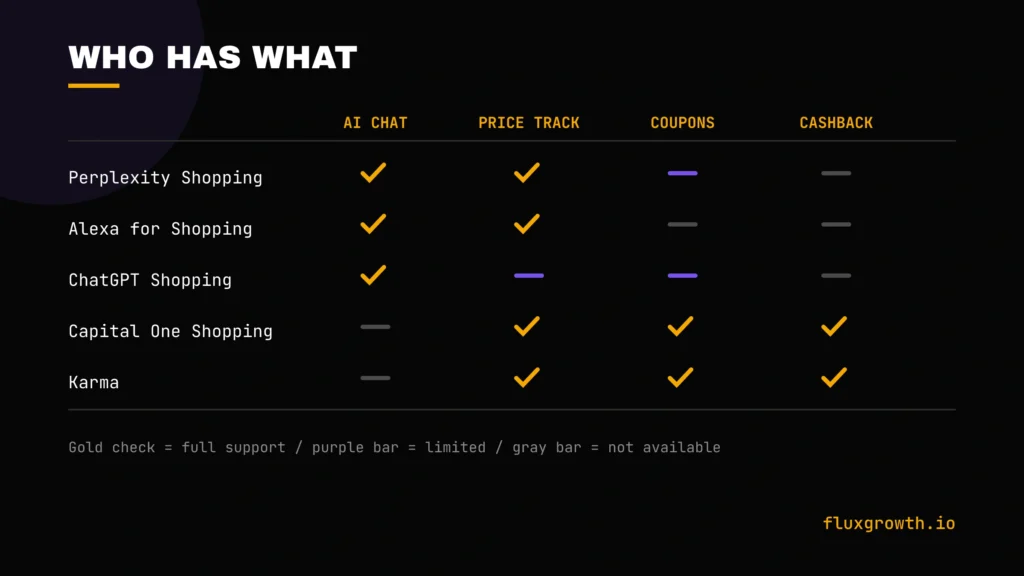
| AI product recommendations | Yes | Yes | Yes | No | No |
| Price tracking | Yes | Yes | Limited | Yes | Yes |
| Coupon finding | Limited | No | Limited | Yes | Yes |
| Price comparison | Yes | No (Amazon only) | Yes | Yes | Yes |
| Browser extension | No | No | No | Yes | Yes |
| Mobile app | Yes | Yes | Yes | Yes | Yes |
| AI chat | Yes | Yes | Yes | No | No |
| Cashback | No | No | No | Yes (gift card) | Yes |
AI Shopping Assistant vs. Traditional Shopping
Traditional shopping pros: full control over every decision, no data shared with a third-party assistant, works the same regardless of which retailer you’re on.
Traditional shopping cons: slow, easy to miss better deals, no automatic price history to check whether a “sale” is real.
Best use cases for AI assistants: big-ticket purchases where price tracking pays off, gift shopping when you don’t know exactly what you want, and any purchase where you’d normally open five tabs to compare.
Best AI Shopping Assistants For
- Students: Capital One Shopping or Karma free, zero learning curve, and the kind of automatic savings on textbooks and everyday purchases that don’t require thinking about it every time.
- Families: Alexa for Shopping if most purchases already happen on Amazon, the account memory means recommendations improve fast as the whole household’s shopping history builds up.
- Frequent Amazon buyers: Alexa for Shopping, no contest. Nothing else on this list has access to your actual Amazon order history.
- Budget shoppers: Karma, for the combined coupon-plus-cashback approach one extension instead of stacking two or three.
- Ecommerce businesses: Shop.app AI, to reach shoppers who are already using Shopify’s ecosystem and increasingly discovering products through Shopify Catalog’s integrations with outside AI assistants.
- Fashion shopping: Perplexity Shopping or ChatGPT Shopping for nuanced, style-based requests the kind where “something like this but more casual” actually needs a conversational back-and-forth, not a keyword search.
- Electronics shopping: ShopSavvy for barcode-scan price checks while you’re standing in a store, deciding whether to buy now or check online first.
Free AI Shopping Assistants
Nearly every tool on this list is free at the consumer level:
- Perplexity Shopping
- Alexa for Shopping (formerly Rufus)
- Google AI Mode Shopping
- ChatGPT Shopping
- Gemini Shopping
- Honey
Buying Tips
- Compare prices across at least two tools, not just one, no single assistant has complete retailer coverage, and Amazon-centric tools in particular won’t tell you about a better price somewhere else.
- Track price history before trusting a “sale” badge. A 20%-off tag means nothing if the price was quietly inflated last month specifically to make the “sale” look bigger. Tools like ShopSavvy and Karma both show price history charts using them.
- Read real reviews, not just AI summaries. A quick chat-based recommendation still benefits from a sanity check against actual buyer reviews, especially for anything with sizing, fit, or durability concerns an AI can’t fully judge from a spec sheet.
- Verify deals before checkout. Coupon extensions occasionally show codes that no longer work, or apply the smallest available discount instead of the best one. Test before you assume the discount applied correctly.
- Use more than one assistant for big purchases. For anything over $200, the extra five minutes it takes to check a second tool is worth it. That’s roughly the threshold where a missed 10% discount actually stings.
- Don’t skip the return policy just because the checkout was fast. An AI-assisted “quick buy” moves the friction of comparison shopping, not the friction of a bad return experience.
Common Mistakes
- Buying based only on an AI recommendation, without checking a second source
- Ignoring fake or incentivized reviews that an AI summary might weight too heavily
- Not checking the return policy before an AI-assisted “quick buy”
- Ignoring shipping costs, which can erase a coupon’s savings entirely
- Trusting only one platform, when cross-checking a second tool takes minutes and can catch a better price
Future of AI Shopping Assistants
AI shopping assistants are evolving rapidly, and several trends are likely to shape the next few years. Agentic commerce is expected to become more common, allowing AI assistants to handle multi-step shopping tasks such as researching products, comparing options, monitoring prices, and in supported ecosystems completing purchases with user approval. Voice shopping will continue to expand as assistants like Alexa for Shopping, Google Gemini, and other conversational AI tools become more deeply integrated into everyday devices. Personalization will also improve as shopping assistants learn from previous searches, purchase history, and user preferences to deliver more relevant recommendations. Finally, retailers are investing in augmented reality (AR) features that let shoppers virtually preview products such as furniture, clothing, and home décor before buying. While adoption is growing quickly, recent research suggests consumers currently prefer AI to assist with research and product discovery rather than make fully autonomous purchasing decisions on their behalf.
Frequently Asked Questions
What is an AI shopping assistant?
An AI shopping assistant is a tool, usually a chatbot, browser extension, or app feature that uses AI to help you find products, compare prices, or complete purchases. Instead of manually searching and comparing, you describe what you want in plain language and the tool does the legwork.
Which AI shopping assistant is best?
It depends on what you’re optimizing for. Perplexity Shopping and ChatGPT Shopping lead on conversational product research, Alexa for Shopping wins for anyone already buying mostly on Amazon, and Capital One Shopping is the easiest hands-off coupon tool to set up.
Is there a free AI shopping assistant?
Yes, nearly every tool on this list, including Perplexity Shopping, Alexa for Shopping, ChatGPT Shopping, and Capital One Shopping, is free to use at the consumer level.
Can ChatGPT help with shopping?
Yes. ChatGPT has built-in shopping research features that let you compare products conversationally, and partner integrations like Klarna’s Shopping Search app add live pricing directly inside the chat.
Does Amazon have an AI shopping assistant?
Yes. Amazon’s assistant, previously called Rufus, was renamed Alexa for Shopping on May 13, 2026. It still answers product questions and makes recommendations based on your Amazon shopping history just under Amazon’s Alexa+ brand now.
Can AI find coupons?
Yes. Tools like Capital One Shopping, Karma, and Honey are built specifically to scan for and auto-apply coupon codes at checkout, testing multiple codes automatically so you don’t have to.
Are AI shopping assistants safe?
Most are safe to use, but they do collect browsing or purchase data to function read the privacy policy before installing any extension. Honey in particular has faced legal scrutiny over how it handles affiliate links, which is worth knowing before you install it.
Final Verdict
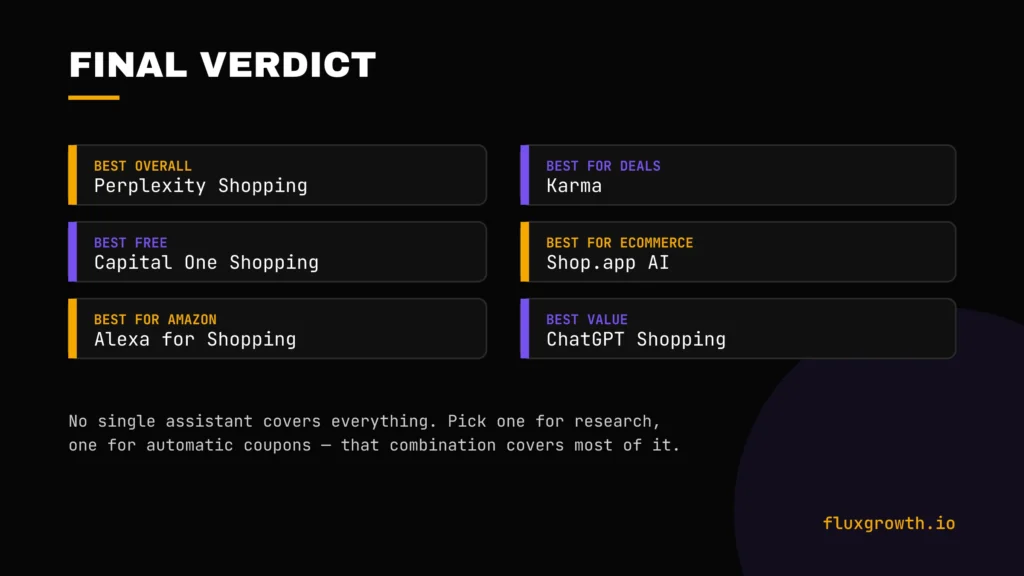
- Best overall: Perplexity Shopping the strongest mix of conversational research and easy checkout
- Best free: Capital One Shopping zero setup, automatic savings, no account required
- Best for Amazon: Alexa for Shopping (formerly Rufus)
- Best for deals: Karma combines coupon testing with cashback in one place
- Best for ecommerce brands: Shop.app AI
- Best value: ChatGPT Shopping free, huge merchant reach, and improving fast
The honest takeaway: no single AI shopping assistant covers everything. Pick one for research (Perplexity or ChatGPT), one for automatic coupons (Capital One Shopping or Karma), and you’ve covered most of what actually saves money. Install one today and run it against your