FluxGrowth is reader-supported. Some links in our guides are affiliate links — if you buy through one we may earn a commission, at no extra cost to you. It never changes which tools we recommend. How we test tools.
Your Playwright agent runs perfectly on your laptop. Then you deploy it to a cloud runner, and every request comes back 403. Not a timeout. Not a 500. A flat refusal, and nothing in the code changed.
When AI agents are blocked by websites, the cause is usually one of two things. Either something broke on your side, like an expired session or a runaway retry loop, or the site decided on purpose to keep automated traffic out.
Those need opposite fixes. Backing off solves a rate limit. Against a deliberate block, retrying just gets your IP flagged faster.
This guide covers how anti-bot systems spot automation, what each error code means, a step-by-step troubleshooting workflow, and where the U.S. legal lines sit as of October 2026.
What does “AI agents blocked by websites” actually mean?
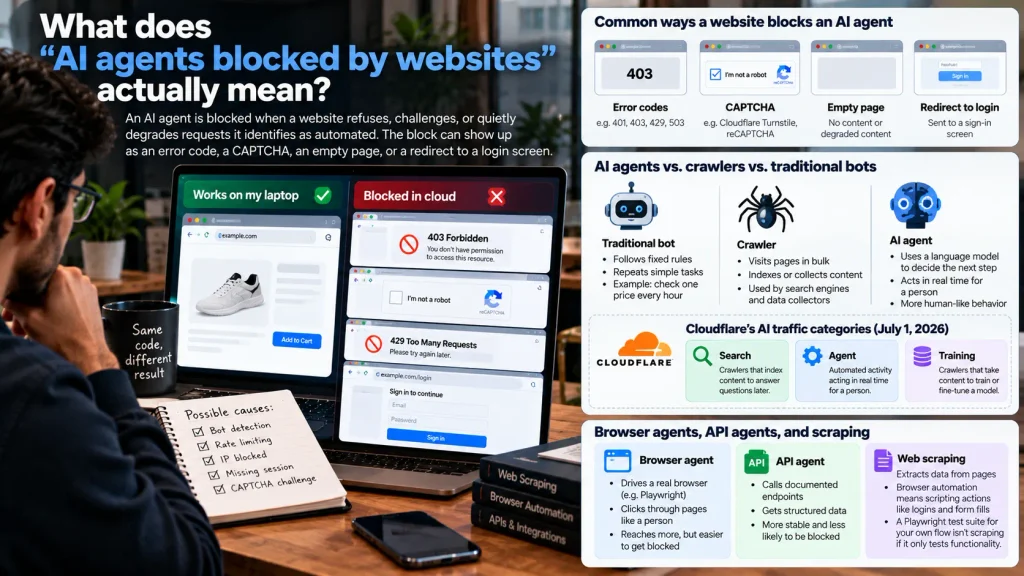
An AI agent is blocked when a website refuses, challenges, or quietly degrades requests it identifies as automated. The block can show up as an error code, a CAPTCHA, an empty page, or a redirect to a login screen.
What triggers it varies: the agent’s declared identity, its network, its behavior, or the purpose it serves.
AI agents vs. crawlers vs. traditional bots
A traditional bot follows fixed rules, like a script that checks one price every hour. A crawler visits pages in bulk to index or collect them. An AI agent uses a language model to decide its next step, usually in real time for one person.
Cloudflare now sorts AI traffic into three behaviors. Its July 1, 2026 change-log defines Search as crawlers that index content to answer questions later, Agent as automated activity acting in real time for a person, and Training as crawlers that take content to train or fine-tune a model.
Those labels matter more than your intent. A price-checking agent you wrote for one client still lands in the Agent bucket, and if the site blocks Agent traffic, it’s out.
Browser agents, API agents, and scraping
A browser-based agent drives a real browser, such as Chromium through Playwright, and clicks through pages like a person. An API-based agent calls documented endpoints and gets structured data back, so it reaches less but breaks far less often.
Web scraping means extracting data from pages. Browser automation means scripting actions like logins and form fills. A Playwright test suite for your own checkout flow is automation without any scraping at all.
Why do websites block AI agents?
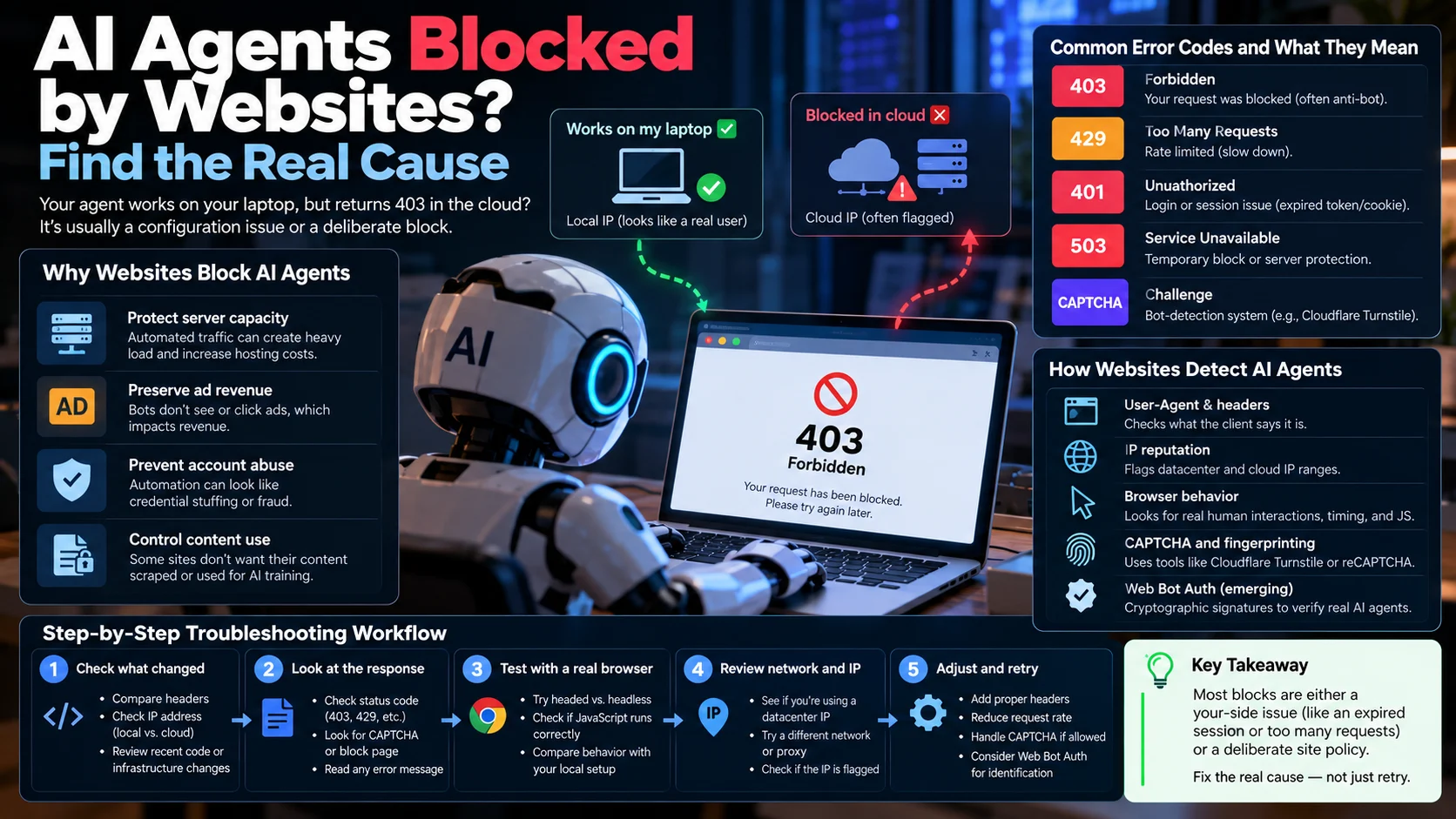
Websites block AI agents to protect server capacity, ad revenue, user accounts, and content they don’t want reused.
Here’s the thing a lot of these blocks were never about your agent. They’re default settings at the CDN that nobody on the site’s team ever looked at.
In its October 2026 post “The Internet has a second audience,” Cloudflare reported that AI training made up 22% of the crawler requests it saw in spring 2025 and 52% by June 2026. The same post says fewer than 1% of sites on Cloudflare block search crawlers, while 17% block training crawlers.
The reasons that come up most:
- Load and cost. An agent that pulls 10,000 product pages a day uses the bandwidth of 10,000 visitors and produces zero ad impressions.
- Ad economics. Since September 15, 2026, Cloudflare blocks Training and Agent bots by default on ad-supported pages for newly on-boarded domains. TechCrunch reported the defaults also cover new sites from existing customers and existing free-plan customers.
- Account security. An agent that signs into 40 accounts from one cloud IP in five minutes looks exactly like a credential-stuffing attack.
Cloudflare’s July 1, 2026 blog post also says “Verified” no longer means “allowed by default.” A verified bot is only let in within a category the site owner permits, so a well-known agent can still be refused.
In short: most blocks protect cost, revenue, or accounts, and many come from CDN defaults that changed in September 2026. A verified identity helps, but it doesn’t override a site owner’s settings.
How do websites detect AI agents and automated browsers?
Websites detect AI agents by stacking signals: what the client says it is, where the traffic comes from, how the browser behaves, and, increasingly, whether the request carries a cryptography signature. No single signal decides. Most bot-management systems combine them into a score.
Declared identity and network signals
The User-Agent header is the first thing a site checks, and honest crawlers name themselves (OpenAI’s search indexer sends “OAI-SearchBot”). Anyone can type any string into a header, though, so sites also weigh IP reputation, cloud and datacenter ranges, and request bursts.
That’s usually the answer to the “works on my laptop, fails in CI” mystery. Your home connection looks like a person. A shared cloud IP range has often been used by abusive scrapers before you got there.
Browser and behavior signals
JavaScript challenges run in the background to confirm a real browser is executing code. Cloudflare Turnstile and Google reCAPTCHA v3, for example, score visitors without showing a puzzle, and behavioral analysis adds timing and interaction patterns on top.
The bot-detection vendor cside argues that agents inside real browsers look human at the network layer, so detection has to happen in the browser. Those in-browser checks are why a headless run often gets flagged when the same script in a headed browser doesn’t.
Cryptographer identity: Web Bot Auth
Web Bot Auth is an emerging protocol that lets AI agents prove their identity by cryptographically signing HTTP requests. It builds on RFC 9421, and operators publish public keys at /.well-known/http-message-signatures-directory so websites can verify signatures.
According to Arcjet’s technical guide, ChatGPT Agent sends signed requests that can identify https://chatgpt.com as the operator. AWS announced Web Bot Auth support in AWS WAF on November 21, 2025, initially for CloudFront distributions.
The protocol remains an IETF draft, not a finalized standard. Web Bot Auth can help legitimate agents establish identity, but it does not guarantee access. The agent operator must support signing, and the website must verify the signature and decide whether to allow the request.
What do 401, 403, 429, and 503 mean for an AI agent?
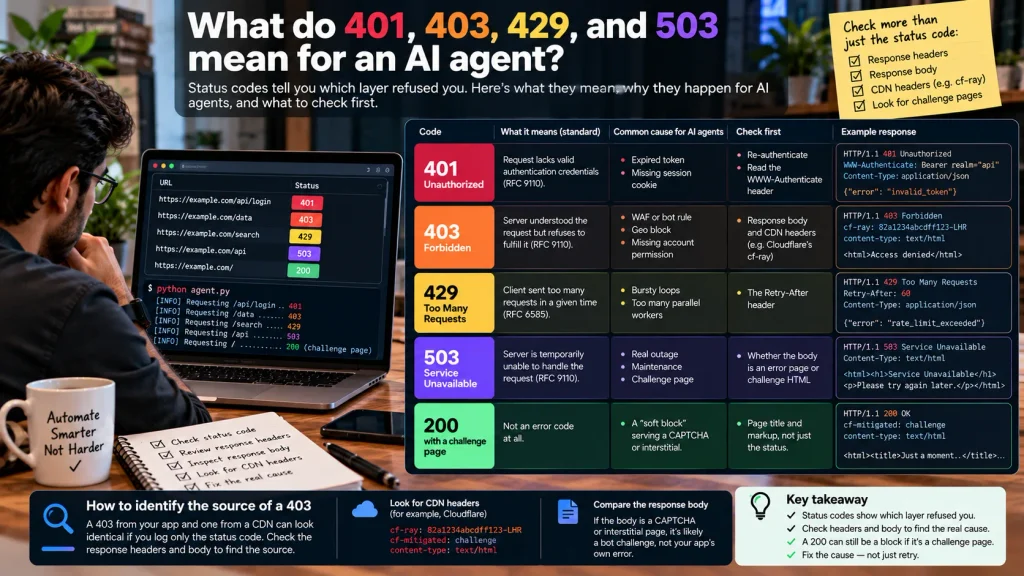
Status codes tell you which layer refused you. A 401 means authentication failed, a 403 means the server understood the request but won’t fulfill it, a 429 means you sent too many requests, and a 503 means the service is unavailable, sometimes genuinely and sometimes as a challenge.
| Code | What the standard says | Common cause for AI agents | Check first |
| 401 Unauthorized | Request lacks valid authentication credentials (RFC 9110) | Expired token, missing session cookie | Re-authenticate; read the WWW-Authenticate header |
| 403 Forbidden | Server understood the request but refuses to fulfill it (RFC 9110) | WAF or bot rule, geo block, missing account permission | Response body and CDN headers (for example, Cloudflare’s cf-ray) |
| 429 Too Many Requests | Client sent too many requests in a given time (RFC 6585) | Bursty loops, too many parallel workers | The Retry-After header |
| 503 Service Unavailable | Server is temporarily unable to handle the request (RFC 9110) | Real outage, maintenance, or a challenge page | Whether the body is an error page or challenge HTML |
| 200 with a challenge page | Not an error code at all | A “soft block” serving a CAPTCHA or interstitial | Page title and markup, not just the status |
A 403 response from your app and one from a CDN can look identical if you log only the status code. Check the response headers and body to identify the source. For example, Cloudflare challenge responses include cf-mitigated: challenge, and their content type is text/html.
How do you troubleshoot a blocked AI agent, step by step?
Capture the full response first, then rule out the causes you control (credentials, sessions, rendering, request rate) before concluding the site blocks automation on purpose. Here’s the order I’d go in.
- Capture everything. Log the URL, timestamp, status code, response headers, a short body excerpt, and the egress IP. In Playwright, use
page.on('response')and response-body methods or the Trace Viewer. In Selenium, use WebDriver BiDi network events where supported, or use authorized proxy logs to capture network details. - Reproduce it by hand. Open the same URL with the same account in a normal browser. If it works manually but fails automatically, the problem is automation-specific. If it fails both ways, it isn’t a bot problem.
- Separate authentication from bot protection. A 401 or a redirect to login points to credentials. A challenge page or CDN-branded block page points to bot protection.
- Read the rules. Fetch /robots.txt, look for your user agent’s group and any Content-Signal lines, then check the terms of service for automation clauses.
- Audit your request rate. Honor Retry-After, back off exponentially with jitter, and cache what you’ve already fetched.
- Check rendering and session state. If the data loads through a background request, there may be a documented endpoint to call instead. Reuse your own saved session, because frequent fresh logins trigger account-security checks.
- Decide. If the site intentionally blocks agents like yours, your options are an official API, a permission request, or stopping.
When your agent hits a CAPTCHA or access-denied page
Stop. A CAPTCHA is the site asking for a human, so pause the task and hand control back to the user. Log it, don’t retry in a loop, and skip CAPTCHA-solving services and rotating IPs entirely.
Example: a supplier portal that worked locally
A small e-commerce team’s agent checks stock on a supplier portal. It passes locally and fails with 403 on GitHub Actions.
The headers show the block comes from the supplier’s CDN, not the portal app: a cloud IP plus an automated browser, landing in the Agent category. Instead of fighting the CDN, the team emails the supplier, gets an API key for the inventory endpoint, and the flaky browser step disappears.
Which access approach fits your use case?
Choose the most official path the site offers: a documented API first, approved browser automation second, and a direct permission request when neither exists. Browser automation is the fallback for workflows no API covers, not the default.
| Approach | Best use case | Main limitation | Recommended next step |
| Official API | Supported programmatic access | API availability and permissions vary | Review official documentation |
| Authorized browser automation | Testing and permitted UI workflows | Vulnerable to UI and session changes | Use Playwright or Selenium responsibly |
| Authentication troubleshooting | Access to resources the user is authorized to use | Can’t resolve every anti-bot restriction | Verify credentials and permissions |
| Rate-limit adjustment | Reducing excessive or bursty requests | Doesn’t override access restrictions | Follow published limits and retry guidance |
| Requesting permission | Restricted sites or unsupported integrations | Approval isn’t guaranteed | Contact the website operator |
There’s no universal winner here. Pulling data at volume belongs to an API. End-to-end tests of your own app belong in browser automation inside an environment you control.
The hard case is a one-person agent working inside a user’s own account, like an assistant reordering groceries. That’s a legal gray zone right now, covered in the legal section below.
How do you configure Playwright or Selenium responsibly?
Configure browser automation to be transparent, rate-limited, and stateful. Identify your client, follow published rate limits, honor retry guidance, and reuse authorized sessions instead of repeatedly logging in.
- Identify yourself. For crawler-style jobs, use a descriptive user agent and provide contact information where appropriate. Never impersonate another company’s bot.
- Throttle requests. Start conservatively and follow the website’s published limits. GitHub’s REST API rate-limit documentation explains how to check quota using the
x-ratelimit-remainingresponse header. - Reuse your own session. Playwright’s
storageStatecan preserve cookies and local storage from an authorized login. Treat saved state files as credentials and never commit them to Git. - Test your own site safely. If staging uses Cloudflare, create a narrowly scoped WAF exception for your authorized CI runner rather than disabling security protections globally. See Cloudflare WAF custom rules.
Avoid stealth plugins designed to conceal automation from website operators. For legitimate integrations, prefer official APIs, documented access methods, and permission-based testing.
How do robots.txt, terms of service, and U.S. law fit together?
robots.txt states a site’s crawling preferences, terms of service set contractual rules, and U.S. law decides what counts as unauthorized access. None of them alone tells you an automated workflow is safe.
robots.txt is a request, not a permission slip
RFC 9309 (2022) standardized the Robots Exclusion Protocol and states that its rules aren’t a form of access authorization [VERIFY: exact wording]. An Allow line doesn’t authorize access to login-protected content, and a Disallow line doesn’t technically stop anyone.
Cloudflare’s Content Signals extend robots.txt with lines like search=yes,ai-train=no, plus a new use field added in July 2026.
Terms of service and the CFAA
Websites may prohibit automated access in their terms of service, and violations can create legal risks. In Van Buren v. United States (2021), the Supreme Court narrowly interpreted the CFAA’s “exceeds authorized access” provision, focusing on whether information was off-limits to the user. The 2022 hiQ v. LinkedIn decision addressed scraping public profiles, but neither case grants blanket permission to scrape websites.
Amazon v. Perplexity: the case to watch
Amazon sued Perplexity in November 2025 over its Comet browser agent. In March 2026, Judge Maxine Chesney granted a preliminary injunction after finding strong evidence that Comet entered users’ password-protected Amazon accounts with their permission but without Amazon’s authorization.
In August 2026, the Ninth Circuit vacated it, finding that on the current record the users, not Perplexity, accessed Amazon’s systems. The court limited its ruling to that record, and the case is back in district court.
Privacy and copyright apply too. State laws like California’s CCPA may cover personal data your agent handles, and copyright doesn’t disappear because a page is public.
This is general information, not legal advice. Talk to a lawyer before running agents against sites that haven’t given you permission.
FAQ
Why are AI agents blocked by websites?
Websites block AI agents to protect server capacity, ad revenue, user accounts, and content they don’t want reused. Many blocks are CDN defaults: since September 15, 2026, Cloudflare blocks Agent and Training bots on ad-supported pages for newly on-boarded domains.
How do websites detect AI agents?
Websites combine the declared user agent, IP reputation, request rate, browser-behavior checks, and increasingly cryptography signatures such as Web Bot Auth. Bot-management systems usually score these signals together rather than relying on one.
What does HTTP 403 mean for an AI agent?
HTTP 403 Forbidden means the server understands the request but refuses it, often because of a WAF or bot rule, a geo block, or a missing permission. Check the response headers and body to tell a CDN block from an application error.
How do I fix HTTP 429 errors in an AI agent?
HTTP 429 means your agent sent too many requests in a given window. Wait at least as long as the Retry-After header says, then reduce concurrency, add exponential backoff with jitter, and cache responses.
Can an AI agent access a website that uses CAPTCHA?
An AI agent shouldn’t try to solve or bypass a CAPTCHA, because the challenge is the site asking for a human. Pause and hand the task to the user, then look for an official API or ask the operator for approved access.
Is it legal to use AI agents to access websites?
It depends on the facts and the jurisdiction. In the U.S., the CFAA, terms of service, privacy laws, and copyright can all apply, and the Ninth Circuit’s August 2026 Amazon v. Perplexity ruling was limited to its record. This is general information, not legal advice.
The fix starts with a diagnosis
When AI agents are blocked by websites, the instinct is to change the code: new headers, a different browser, more retries. Hold off until you know why the request failed. A 401 needs credentials, a 429 needs patience, and a deliberate block needs a different path: an API, a permission request, or a decision to stop.
So the next time your agent fails, log the full response (status, headers, and the first chunk of HTML) and run it through the seven-step workflow above before you write new code.
If you’re building agents for marketing or research workflows, browse our AI search optimization guide for the site-owner side of the same problem.