FluxGrowth is reader-supported. Some links in our guides are affiliate links — if you buy through one we may earn a commission, at no extra cost to you. It never changes which tools we recommend. How we test tools.
Last updated: October 2026
This guide is part of our Social Media Growth hub — everything we have published on growing social accounts with AI tools, in one place.
You’ve got three weeks until move-out, a sofa that won’t fit in the new place, and no interest in renting a truck to haul it to a donation center. Facebook Marketplace was built for exactly that problem.
Facebook Marketplace is Meta’s free buy-and-sell section inside Facebook, where people list items for local pickup or, on eligible listings, nationwide shipping. According to Meta’s March 2026 announcement, more than 3.5 million listings go up every day in the US and Canada.
This guide covers how Marketplace works in the US as of October 2026: buying safely, selling, what Facebook charges, the scams to know, and what to do when Marketplace vanishes from your account. Check the date on any guide you read, though. Facebook doubled its shipped-order fee in April 2024, then rebuilt shipping and added AI seller tools in March 2026, so a lot of older advice is simply wrong.
What is Facebook Marketplace and how does it work?
Facebook Marketplace is a listings section inside the Facebook app and website where people post items for sale, message each other through Messenger, and either meet locally or complete an eligible purchase through Facebook’s checkout with shipping. Posting a listing costs nothing. Facebook only takes a cut on shipped orders paid through its checkout.
Here’s how a local deal usually goes. You set your location and a search radius, find a listing, and tap Message. You settle price and timing in Messenger. Then you either meet and pay in person, or buy through checkout and wait for the box.
Marketplace vs. Facebook Shops vs. buy-and-sell groups
These three run on different rules. Marketplace holds individual listings, mostly from regular people. Facebook Shops are business storefronts managed in Meta’s Commerce Manager, with their own fee schedule. Buy-and-sell groups are community posts, where group rules apply and Facebook’s checkout and Purchase Protection usually don’t.
Partner listings from eBay and Poshmark
Facebook Marketplace began testing eBay listings in the U.S., Germany, and France in January 2025. Poshmark listings were announced for U.S. users in May 2025. Meta’s November 2025 update confirms both integrations.
Partner listings display an icon, and buyers complete checkout on the partner’s website. The partner’s applicable payment, return, and purchase-protection policies govern the transaction.
Who can use Facebook Marketplace in the US?
Facebook Marketplace is generally available to users aged 18 or older in supported locations. Access depends on account eligibility and compliance with Meta’s policies. New accounts may have limited access.
Check the Facebook Help Center for current eligibility requirements.
How do you buy safely on Facebook Marketplace?
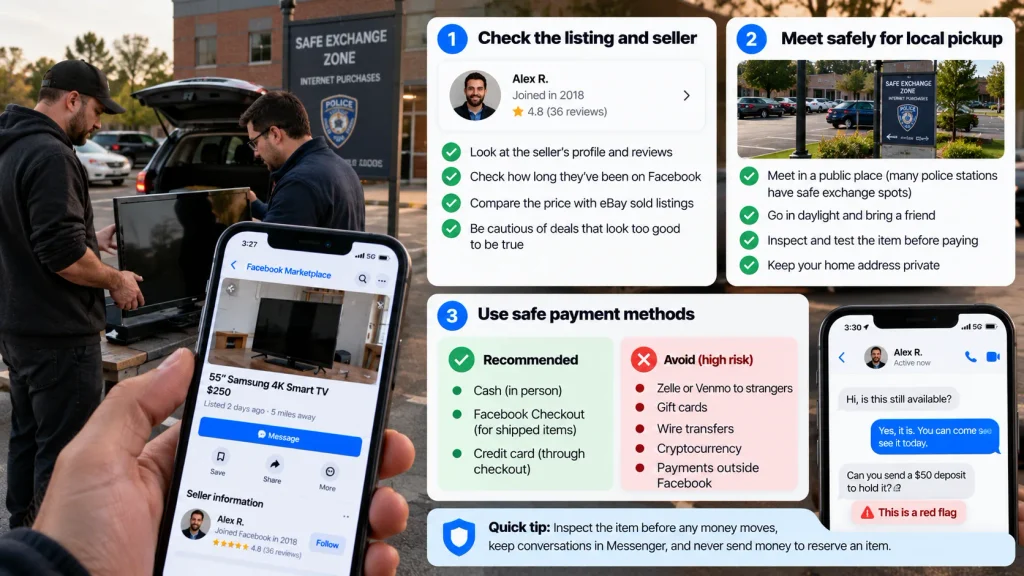
The safest way to buy on Facebook Marketplace is to inspect the item before any money moves, keep every conversation inside Messenger, and pay either in person at pickup or through Facebook’s checkout on shipped items. That order matters. Of the people who reported shopping scams that started on social media in 2025, most said the item never arrived at all, according to the FTC.
Vet the listing and the seller
Start with the profile. Since March 2026, Meta shows an AI-generated summary at the top of each Marketplace profile: how long the person has been on Facebook, their friend count, their listing history, and their seller ratings. If a two-week-old profile is selling a nearly new MacBook at half price, keep scrolling.
Then check the price against eBay’s sold listings for the same model, since Marketplace only shows asking prices. Picture a $400 standing desk listed at $90, with catalog photos and a seller who “just needs a deposit to hold it.” That’s three red flags in one listing: the price, the photos, and the deposit.
A local pickup checklist
- Meet somewhere public. Many US police departments have marked “safe exchange” spots in their lots.
- Go in daylight, and bring a friend for anything big or expensive.
- Test before paying. Power on electronics and check that a phone isn’t activation-locked.
- Confirm any app payment in your own app, not from a screenshot.
- Keep your home address private until you’re comfortable.
Which payments actually protect you?
Facebook’s Purchase Protection covers eligible purchases made through Facebook checkout, but generally excludes local pickup transactions paid directly to sellers and purchases completed on third-party websites. Check Meta’s Marketplace safety guidance for details.
Payments through Zelle, Venmo, or similar apps can be difficult to recover if you send money to a scammer. The FTC warns buyers to avoid sellers who insist on gift cards, wire transfers, cryptocurrency, or payment apps as the only payment method.
For shipped items, use eligible Facebook checkout when available and review the purchase-protection terms. For local purchases, inspect the item and pay at the hand-off rather than sending money in advance.
How do you sell something on Facebook Marketplace?
Selling on Facebook Marketplace takes about five minutes: add photos, a title, a price, a category, and a condition, choose local pickup or shipping, and publish. Nearby buyers see the listing in their feed and in search, and they message you directly.
- Open Marketplace in the app or on facebook.com and tap Sell or Create new listing.
- Choose Item for sale. Vehicles and rentals have their own listing types.
- Add photos, then the title, price, category, condition, and description.
- Pick local pickup, shipping (if your account and item qualify), or both.
- Publish, mark the item Pending once a sale is agreed, and mark it Sold after the hand-off.
(Button labels move around between app updates, so look for the closest match.)
Pricing, photos, and titles that get messages
Price from sold comparisons, not other asking prices. Check eBay’s sold listings for your exact model, then list a little above the number you’d actually accept. Expect a counteroffer.
Your title does most of the search work, so use brand, model, one key spec, and condition: “IKEA Kallax 4×4 shelf, white, great condition.” Shoot photos in daylight and photograph the flaws. Showing that scratch up front saves you an awkward conversation in a parking lot.
Meta AI listing drafts and auto replies: useful, but check them
Meta’s March 2026 Meta announced three AI-powered Facebook Marketplace features update gave sellers three AI tools. Meta AI can draft a listing from your photos and suggest a price based on similar items nearby. It can auto-reply when buyers ask if something is available, using your description, pickup location, and price. And your profile now opens with an AI summary of your selling history.
The catch? The suggested price comes from what similar items are listed for nearby, and asking prices tend to run above what things actually sell for. Treat it as your opening task.
An AI description can also skip the wobbly table leg you know about. On a shipped order, that’s exactly what a “not as described” complaint is made of, so read every draft before you hit Publish. The auto reply only confirms availability. Haggling is still your job.
Handling “Is this still available?”
“Is this still available?” is a pre-filled message Facebook offers buyers, which is why you’ll get so many of them. Answer with price and a pickup window in one message: “Yes! $120, I can meet Saturday 10 to 2 near Target on Main St.” A serious buyer replies with a time.
Local pickup or shipping: what does Facebook Marketplace cost?
Facebook Marketplace generally charges no selling fee for local pickup transactions completed outside Facebook checkout. For eligible shipped orders processed through Marketplace checkout, the selling fee is 10% of the transaction total, with a $0.80 minimum. The rate increased from 5% on April 15, 2024.
| Cost | Local pickup | Shipped via Facebook checkout |
| Listing fee | $0 | $0 |
| Selling fee | $0 | 10% of transaction total, $0.80 minimum |
| Payment processing | Not applicable to in-person payment | Included in the selling fee |
| Boosting a listing | Optional paid ad | Optional paid ad |
Here’s the math. You sell a $50 vintage lamp, and the buyer pays $8 shipping. Before sales tax, the selling fee is 10% of $58, or $5.80. The shipping label cost is a separate expense that reduces your final earnings.
Small items get hit hardest. On a $6 phone case with no additional shipping or tax, the $0.80 minimum equals 13.3% of the item price. Check your current seller fee details before listing, since eligibility and transaction terms can vary.
How shipping works on Facebook Marketplace now
Meta’s March 2026 update lets sellers generate prepaid shipping labels in a few clicks and track every shipped order Read Meta’s official shipping update from one dashboard. That reverses early-2025 reports that prepaid labels had been dropped. If you don’t see the shipping option, your account or item may not qualify yet.
Ship small, lightweight, valuable items like electronics, sneakers, or collectibles. Furniture, heavy items, and low-priced products may be better suited to local pickup because shipping labels and selling fees can reduce your earnings.
For sellers managing orders across multiple channels, our guide to AI automation for e-commerce explains how to automate order notifications, shipping updates, and inventory monitoring.
See also: Facebook login not working? 5 fixes
What are the most common Facebook Marketplace scams?
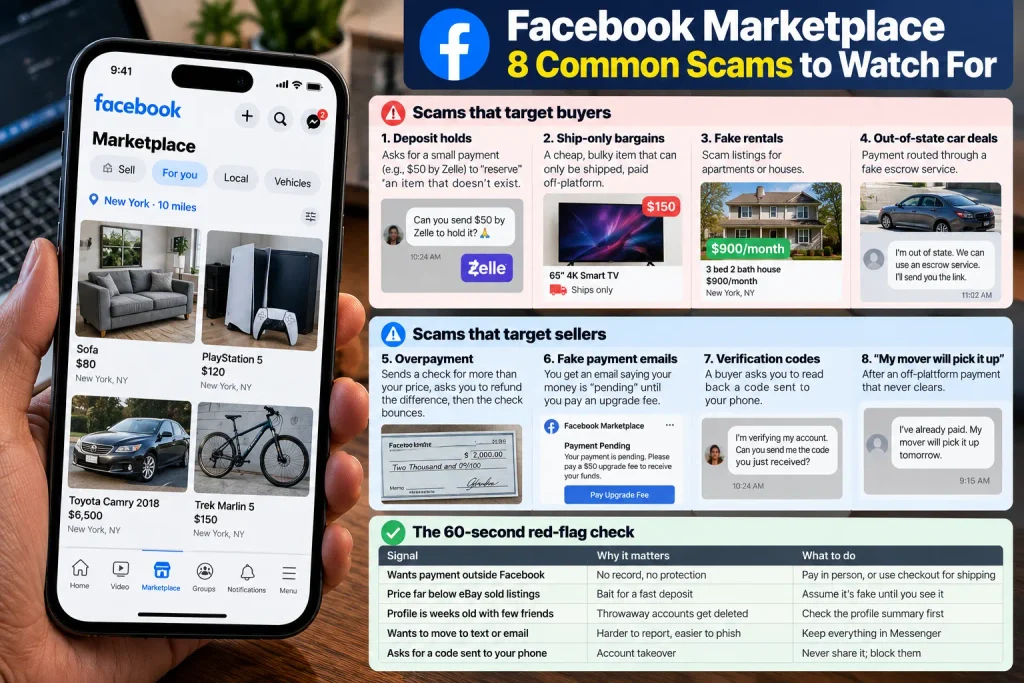
The most common Facebook Marketplace scams get buyers to pay before seeing an item, or trick sellers with fake payments and over-payments.
The FTC’s April 2026 Data Spotlight puts numbers on it. Americans reported losing $2.1 billion in 2025 to scams that started on social media, up from $261 million in 2020, and shopping scams were the most-reported type. Scams that began on Facebook cost people more than those on any other platform (that figure covers all of Facebook, not just Marketplace).
Scams that target buyers
- The deposit holds: $50 by Zelle to “reserve” an item that doesn’t exist.
- Ship-only bargains: a cheap, bulky item that can only be shipped, paid off-platform.
- Fake rentals: the FTC found about half of the fake rental listings it analyzed were posted on Facebook.
- Out-of-state car deals that route payment through a fake escrow service.
Scams that target sellers
- Overpayment: a check for more than your price, a request to refund the difference, then a bounce.
- Fake payment emails saying your money is “pending” until you pay an upgrade fee.
- Verification codes: a buyer asks you to read back a code sent to your phone. That code can hijack an account in your name.
- “My mover will pick it up,” after an off-platform payment that never clears.
The 60-second red-flag check
| Signal | Why it matters | What to do |
| Wants payment outside Facebook before meeting | No record, no protection | Pay in person, or use checkout for shipping |
| Price far below eBay sold listings | Bait for a fast deposit | Assume it’s fake until you see it |
| Profile is weeks old with few friends | Throwaway accounts get deleted | Check the profile summary first |
| Wants to move to text or email | Harder to report, easier to phish | Keep everything in Messenger |
| Asks for a code sent to your phone | Account takeover | Never share it; block them |
What to do if you’ve been scammed
Report the listing and profile inside the Marketplace. If you paid through checkout, open a Purchase Protection claim; if you paid by card or bank, call your issuer right away. Then file at ReportFraud.ftc.gov, and use IdentityTheft.gov if you shared personal details or a code.
Why isn’t Facebook Marketplace working for you?
When Facebook Marketplace won’t load or disappears, the cause is usually one of five things: the profile shows you as under 18, the account is too new, the region isn’t supported, Meta has restricted you over a policy issue, or the app needs an update. Try the easy fixes before you assume a ban.
The Marketplace icon is missing
Update the app, then check the full menu, since Marketplace sometimes moves out of the tab bar. Confirm your profile birthday shows 18 or older. If the account is new, keep using Facebook normally; new accounts often don’t get Marketplace right away.
“You can’t use Marketplace” or a removed listing
Facebook Marketplace listings may be removed for violating Meta’s Commerce Policies, which restrict items such as weapons, animals, certain drugs, and recalled products. Repeated violations may lead to Marketplace restrictions.
If you believe a removal was a mistake, open the notification and select Request review, if available. Check the Facebook Help Center for current appeal instructions.
You can’t message buyers or sellers
Facebook doesn’t publish its messaging limits. If you’re blocked from sending, slow down, write each reply instead of pasting the same one, and check your message requests folder, where first messages sometimes land.
How does Facebook Marketplace compare with Craigslist, eBay, and OfferUp?
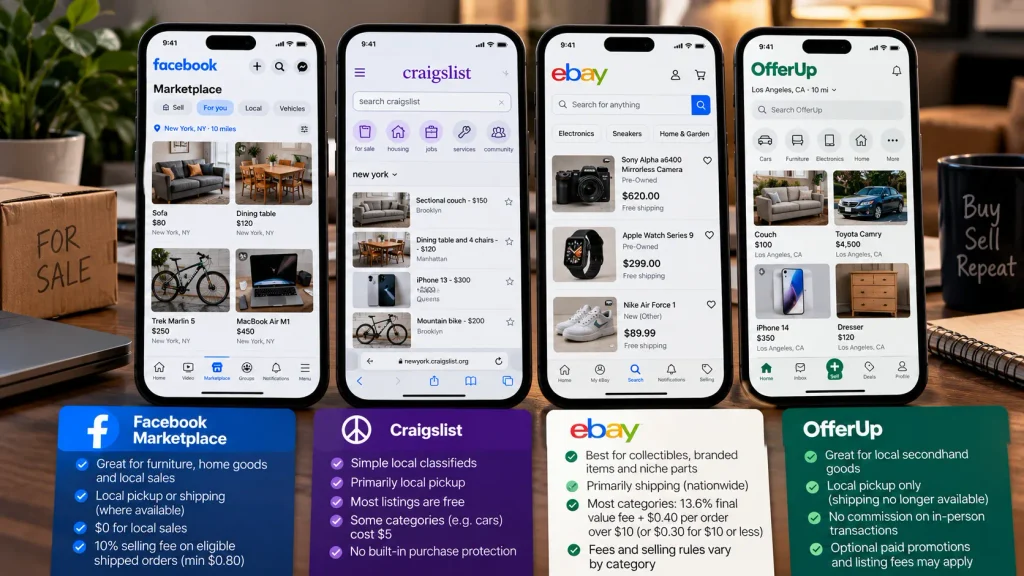
Facebook Marketplace and OfferUp are useful for local sales, Craigslist offers a straightforward local classified-listing model, and eBay is suited to reaching buyers nationwide. The best choice depends on what you’re selling, whether you want to ship, and how much you’re willing to pay in fees.
| Platform | Best for | Local pickup or shipping | Typical cost considerations (October 2026) | Main limitation |
| Facebook Marketplace | Furniture, home goods, quick local sales | Both, where shipping is available | Generally $0 for local sales; eligible shipped checkout orders may incur a 10% selling fee, with a $0.80 minimum | Protection depends on transaction eligibility and method |
| Craigslist | Local classifieds without a Facebook profile | Primarily local | Most personal listings are free; certain categories, including owner-listed cars and trucks, cost $5 | No standard integrated checkout or marketplace-wide purchase protection |
| eBay | Collectibles, branded products, niche parts | Primarily shipping | Most categories: 13.6% final value fee plus $0.40 per order over $10, or $0.30 for orders of $10 or less; category exceptions apply | Fees and selling rules vary by category |
| OfferUp | Local secondhand goods and neighborhood sales | Local pickup only | No commission on in-person transactions; optional paid promotions and listing fees may apply | Nationwide shipping is no longer supported |
Sources: Meta’s Facebook Help Center, Craigslist posting fees, eBay selling fees, and OfferUp’s shipping update.
Clearing out a house? Start with Facebook Marketplace or Craigslist for bulky furniture and household goods. Selling a collectible camera to buyers nationwide? eBay may be worth its higher fees. Consider OfferUp as another local-sales option, but remember that shipping is no longer available.
Facebook Marketplace FAQ
Is Facebook Marketplace free to use?
Yes. Facebook Marketplace is free for buying, listing, and local pickup sales. Sellers pay only when a shipped order goes through Facebook’s checkout, at 10% with a $0.80 minimum, and boosting a listing is an optional paid ad.
How much does Facebook Marketplace take when you ship an item?
Facebook Marketplace deducts 10% of the item price plus buyer-paid shipping, with a $0.80 minimum per order. Payment processing is included. You still pay for the shipping label.
Is Facebook Marketplace safe for buying and selling?
Facebook Marketplace is reasonably safe if you meet in public, inspect before paying, and use checkout for shipped orders. Scams are common, though: the FTC reported that in 2025, scams starting on Facebook cost people more than those on any other social platform.
Why can’t I see Facebook Marketplace on my account?
Usually the account is too new, the profile shows an age under 18, the region isn’t supported, or Meta has restricted access for a policy violation. Updating the app fixes some cases; for a restriction, use “Request review.”
Does Facebook Marketplace Purchase Protection cover Zelle or cash payments?
No. Purchase Protection applies to eligible purchases made through checkout on Facebook, not cash, local pickups, Messenger transactions, or outside apps like Zelle and Venmo. Those payments are hard to reverse.
Can Meta AI write my Facebook Marketplace listing for me?
Yes. From March 2026, Meta AI can turn your photos into a draft listing with a suggested local price and auto-reply to availability questions. Review every draft, since it can miss flaws or overprice.
Your next step
Facebook Marketplace is the cheapest, fastest way to sell bulky stuff locally, as long as money and conversations stay where you can see them. For anything you plan to ship, weigh the 10% fee and the scam risk against eBay first.
Want a weekend plan? Pick three items you’re done with, look up each one’s eBay sold price, photograph them in daylight, and list them for local pickup Friday evening. Set one Saturday pickup window at a public spot and take payment at the hand-off. Three listings, one afternoon, $0 in fees.
For more on growing an audience and selling through social platforms, browse our social media growth guides.