FluxGrowth is reader-supported. Some links in our guides are affiliate links — if you buy through one we may earn a commission, at no extra cost to you. It never changes which tools we recommend. How we test tools.
You can generate a usable logo in about four minutes. Owning it takes considerably longer.
This guide is part of our AI Marketing hub – everything we have published on AI marketing tools and content workflows, in one place.
Most roundups rank these tools on how good the output looks, then stop. Which leaves out the three things that actually decide whether the logo survives: whether the files print, whether the license lets you trademark it, and whether anyone can stop a competitor from copying it.
That last question got a real answer in March 2026. Almost nobody covering this topic has updated.
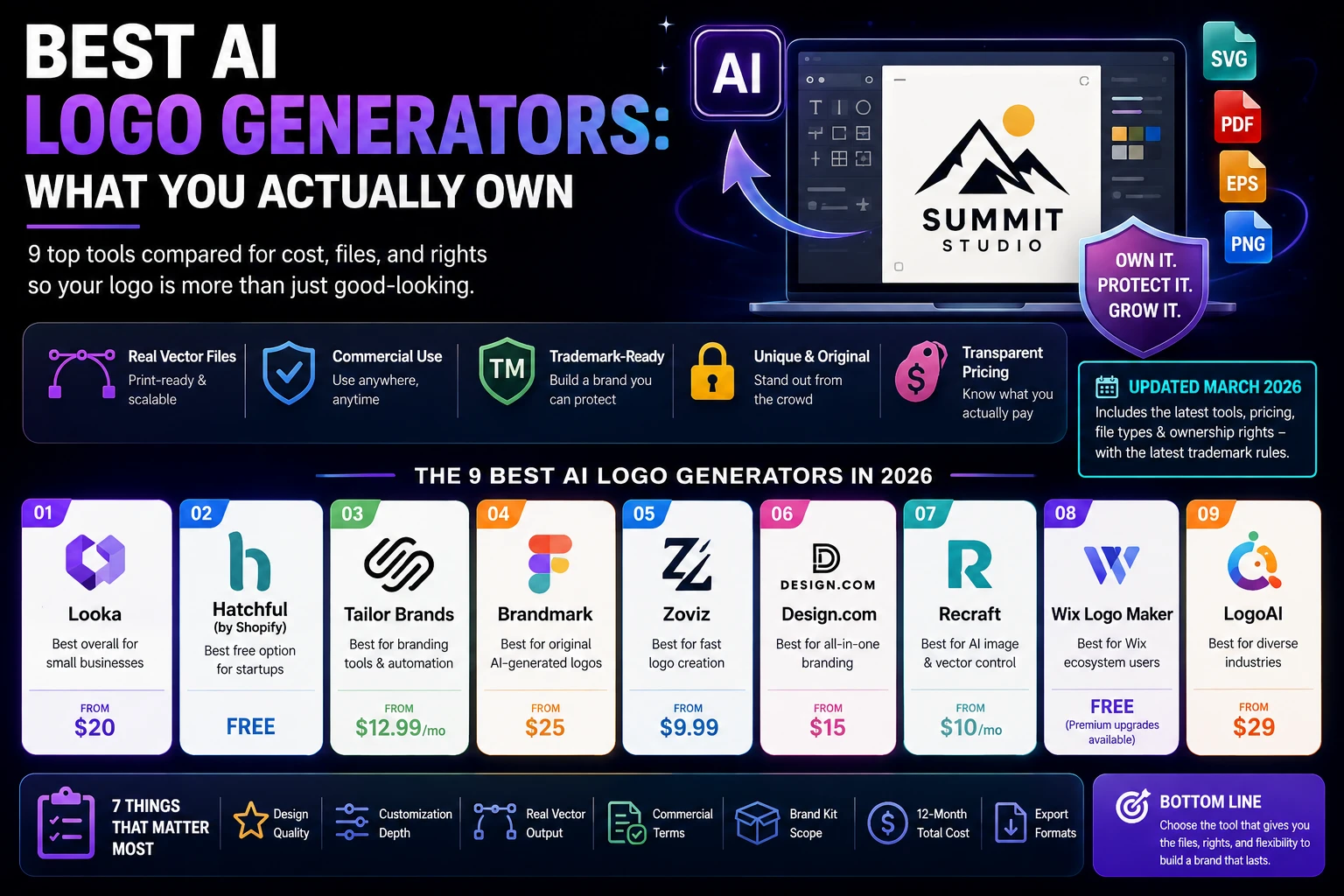
This guide covers nine AI logo generator platforms that U.S. small businesses, agencies, and creators actually use—covering what each costs, what files you get, and what rights come attached. If you’re also comparing tools for broader visual content, see our guide to Top AI Tools for Image Creation in 2026. It also corrects a claim several ranking pages state flatly and get wrong: that an AI-made logo can’t be trademarked in the United States. It can. Here’s what that takes.
What is an AI logo generator, and how does it actually work?
An AI logo generator is a web tool that produces logo concepts from a handful of inputs: your business name, your industry, a few style and color preferences instead of from a designer’s brief. You answer a short questionnaire, the tool returns dozens of options in under a minute, and you refine one in a built-in editor before downloading.
That’s the shared surface. Underneath, these tools split into two categories, and the split determines what you’re legally allowed to do with the result.
Template assembly vs. true generation
Most “AI” logo makers are template engines. They pair a pre-drawn icon from a licensed library with a font and a color palette, then arrange the pieces using layout rules.
canvas and wiz both work this way. The output can look excellent. But that icon lives in a shared library, which means other businesses can and do pull the same one.
True generative tools produce original shapes from a model rather than selecting from a catalog. brand-mark and redraft sit in this camp. The output is less predictable and sometimes obviously machine-made, though nobody else ends up with your exact mark.
Neither is automatically better. Template tools trade originality for polish; generative tools trade polish for originality. Which trade you want depends on whether this logo is a placeholder or a twenty-year asset.
Where the AI is actually doing work
Machine learning is real. It’s just doing a different job than you’d assume.
It reads your industry and narrows a library of thousands of icons down to a few dozen. It pairs a display font with a body font that won’t fight it. It ranks layouts by which ones people picked last time.
So the AI label isn’t only marketing. It’s doing duration, not drawing.
What actually matters when choosing an AI logo generator
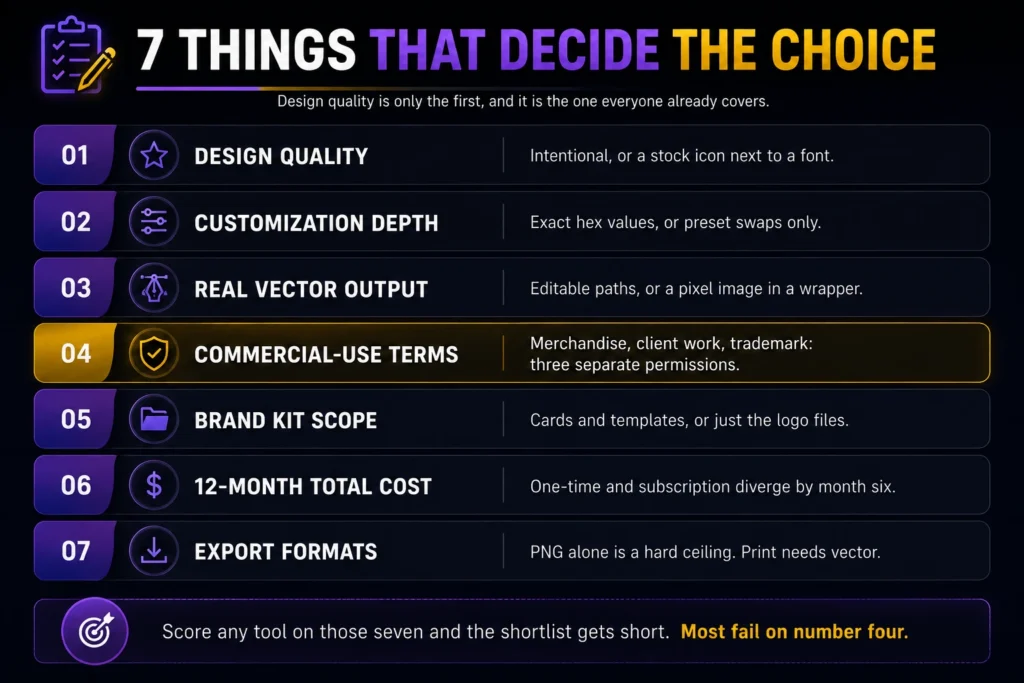
Seven factors separate a logo you can build a business on from one you’ll quietly replace in eight months. Design quality is only the first, and it’s the one every other roundup already covers.
Run each tool against the full list:
- Design quality — does the output look intentional, or does it look like a stock icon standing next to a font?
- Customization depth — can you move individual elements, adjust letter spacing, and set exact hex values? Or only swap presets?
- Real vector output — does the SVG contain editable paths, or a pixel image in a vector wrapper? (Section 6 has the thirty-second test.)
- Commercial-use terms — does the license permit merchandise, client work, and trademark registration? Those are three separate permissions, and tools grant them inconsistently.
- Brand kit scope — business cards, social templates, and brand guidelines, or just the logo files?
- Twelve-month total cost — a $65 one-time purchase and a $12/month subscription look identical on day one and diverge sharply by month six.
- Export formats — PNG alone is a hard ceiling. Print work needs vectors.
Score any tool on those seven and the shortlist gets short fast. Most fail on number four.
The 9 best AI logo generators in 2026
These nine run from free-and-fast to genuinely production-ready. Every figure below is U.S. pricing, and every figure below is worth checking yourself before you pay. This category reprices constantly, and a good share of the articles ranking for it are still quoting 2024 numbers.
1. Looka — best overall for small businesses
Looka is the default pick, and defaults usually earn it. The questionnaire takes about two minutes. The editor doesn’t assume you’ve ever opened Illustrator. And the output clears the bar most small businesses need not distinctive enough to win awards, good enough that nobody questions it.
Pricing: Looka’s Basic Logo Package starts at $20 and includes a low-resolution PNG. The Premium Logo Package costs $65 and includes high-resolution PNG, SVG, EPS, PDF, and multiple color variations. Businesses looking for ongoing branding tools can subscribe to the Brand Kit Subscription for $96/year, while the Brand Kit with AI-generated website starts at $129/year. Always check Looka’s official pricing page for the latest plans and features.
Before you buy, keep in mind that the Basic Logo Package only includes a low-resolution PNG, making it unsuitable for professional printing. For most businesses, the Premium Logo Package is the better choice because it includes high-resolution and vector files. Also, if you change your business name later, you’ll need to generate and purchase a new logo.
Best for: a small business that wants one solid logo plus matching collateral, without a subscription.
2. canvas AI Logo Generator — best free start, worst terms for a real brand
canvas‘s logo tool is free to start, and for a side project or a social avatar it’s hard to argue with. The editor is the same one millions of people already know, and the template library is enormous.
The problem is the license, not the design. canvas’s Content License Agreement prohibits using its Free or Pro content as part of a trademark, design mark, trade name, business name, service mark, or logo.
The biggest consideration isn’t the design quality—it’s licensing and trademark eligibility. According to canvas‘s Content License Agreement, canvas’s stock content (including many icons, graphics, photos, videos, and templates) cannot be used as part of a trademark, design mark, trade name, business name, service mark, or logo. If your logo relies on canvas’s licensed content, you may not be able to register it as a trademark.
There is an important exception. If you create a logo using only original content that you own or upload yourself, and use canvas simply as the design editor, those licensing restrictions generally do not apply because the finished logo doesn’t include canvas-licensed assets. Always review canvas’s official licensing and trademark guidance before using a logo as your permanent business identity.
Best for: placeholders, personal brands, and anything you don’t plan to trademark.
3. brand-mark — one-time pricing, genuinely generated marks
brand-mark generates original symbols instead of pulling from an icon library, which puts it in the small group producing marks nobody else can accidentally duplicate. Enter your name and a few keywords, get back dozens of concepts built from scratch.
Pricing: brand-mark uses one-time pricing rather than a subscription. The Basic package costs $35, the Designer package is $95, and the Enterprise package is $195. Higher-tier plans include source files, unlimited design revisions, brand guidelines, business card designs, one-page websites, and other branding assets
Output quality swings hard. Some concepts look like a studio made them; others are unmistakably algorithmic. Plan to generate a lot and throw most of it away.
Best for: founders who want an original logomark, one payment, no subscription.
4. Tailor Brands — logo plus the paperwork
Tailor Brands combines AI logo design with business formation services, making it a convenient choice for first-time entrepreneurs. In addition to creating a logo, the platform offers LLC formation, EIN registration assistance, registered agent services, domain registration, business email, and website tools, allowing you to build your brand and business from one dashboard.
Pricing: Tailor Brands offers Lite ($9.99/month), Essential ($19.99/month), and Elite ($49.99/month) plans when billed annually. Business formation services and state filing fees are priced separately, depending on your location and selected services. Always check Tailor Brands’ official pricing page for the latest plans and features.
Best for: brand-new U.S. businesses that want formation and branding handled in one place.
5. Adobe Express — for teams that need IP cover
Adobe Express includes logo templates powered by Firefly, Adobe’s generative model. The pitch isn’t design superiority. It’s provenance.
Pricing: Adobe Express offers a Free plan with basic design tools and limited generative AI credits. The Premium plan starts at $9.99/month (annual billing) and includes additional AI credits, premium templates, Adobe Stock assets, brand kits, and advanced export options. Enterprise plans add collaboration, administration, and security features. Always verify current pricing and features on Adobe’s official pricing page.
For most freelancers and small businesses, the free or Premium plan provides plenty of functionality. However, organizations with strict legal, compliance, or procurement requirements may appreciate Adobe’s commercially focused AI approach and enterprise protections when using Firefly-generated content.
Best for: teams inside the Adobe ecosystem, or anyone whose legal department reviews vendor terms.
6. redraft — the only one producing real vectors
redraft generates native SVG files. Not a PNG converted to SVG, not a raster image in a vector wrapper actual editable paths that open cleanly in Figma or Illustrator and stay sharp from a business card to a billboard. In a category where “SVG export” often means something much weaker, that’s the most useful technical difference on this list.
Pricing: redraft offers a Free plan with limited daily AI generations. The Basic plan starts at $10/month (annual billing) or $12/month (monthly billing), while the Advanced plan costs $27/month annually or $33/month monthly. Paid plans unlock private projects, higher generation limits, commercial usage rights, and additional AI features. Always verify the latest plans on redrafts official pricing page.
The catch is workflow. redraft isn’t a logo wizard, it’s a design tool. You’ll get concepts rather than a finished brand system, and you should plan on opening the SVG in a vector editor for cleanup.
Best for: designers and developers who need editable vector output and know what to do with it.
7. Fiverr Logo Maker — clearest commercial terms
Fiverr’s logo maker starts from designs made by human freelancers on the platform, then lets you customize them. The base artwork was drawn by a person, which changes the copyright picture materially compared to fully generated output.
Pricing: Fiverr Logo Maker lets you design logos for free. Downloading your final logo starts at $30 for a logo package, with higher-priced packages including high-resolution files, vector formats (SVG/EPS), social media assets, and brand guidelines. Pricing may vary depending on the selected package and optional add-ins. Always verify the latest plans on Fiverr’s official Logo Maker page.
Customization is shallower than Looka or redraft. You’re adjusting someone else’s design rather than directing your own.
Best for: buyers who want human-authored artwork and unambiguous licensing.
8. Ideogram — for typography-led wordmarks
Ideogram isn’t a logo tool. It’s an image model that happens to be unusually good at rendering readable text inside images, which makes it useful for wordmarks and lettering-driven marks where most generators produce garbled characters.
Pricing: Ideogram offers a Free plan with limited daily generations. Paid plans start at $8/month (Basic, annual billing) or $10/month (monthly billing). Plus plans start at $20/month annually ($24 monthly), with Pro plans available for users who need higher generation limits and advanced features. Always verify the latest pricing on Ideogram’s official pricing page.
Output is raster only. So anything you make here needs manual vectorizing before it’s print-ready, and you should read the license closely before using output commercially.
Best for: exploring typographic concepts you’ll rebuild properly in vector later.
9. wiz Logo Maker — if your site is already on wiz
wiz’s logo maker is a competent template tool whose main argument is integration. Build the logo and it drops straight into your wiz site, favicon, and social profiles without a file hand off.
Pricing: Creating a logo is free, but downloading it requires a paid plan. Logo packages start at $49 for the Basic Logo package and $99 for the Advanced Logo package, which includes high-resolution files, vector formats (SVG), social media logo files, and full commercial usage rights. Pricing and included assets may change, so check wiz‘s official Logo Maker pricing page for the latest details.
Standalone, there’s no strong reason to pick it over Looka. Inside the wiz ecosystem, the convenience is genuine.
Best for: existing wiz users who value one less integration step.
AI logo generator comparison table
| Tool | Starting price | Real vector output | Commercial rights | Brand kit | Best for |
| Looka | $20 (Basic) / $65 (Premium) | Yes, from $65 tier | Commercial use with paid packages | Yes (Brand Kit from $96/year) | Small businesses wanting one complete package |
| Canva | Free / Canva Pro $15/month | No — raster output | Commercial use allowed, but Canva licensed content generally can’t be trademarked | Yes, extensive | Placeholders and personal brands you won’t trademark |
| Recraft | Free / $10/month (annual) | Yes — native SVG paths | Commercial license on paid tiers only | Brand style system | Designers and developers needing editable vectors |
| Tailor Brands | From $9.99/month (annual) | Yes (paid plans) | Commercial use on paid plans | Yes, plus LLC filing | First-time U.S. founders bundling formation |
| Adobe Express | Free / $9.99/month | Yes | Commercial use; Adobe Firefly trained on licensed/public-domain content | Yes, via Creative Cloud | Teams with procurement or legal review |
The one-line verdict: Looka is the best overall choice for most small businesses, redraft is the strongest option for true editable vector logos, Adobe Express is ideal for organizations that prioritize commercially safe AI workflows, Tailor Brands is great for founders launching a new business, and canvas works best for quick logo concepts and social branding rather than trademark-ready business logos.
Can you legally own an AI-generated logo?
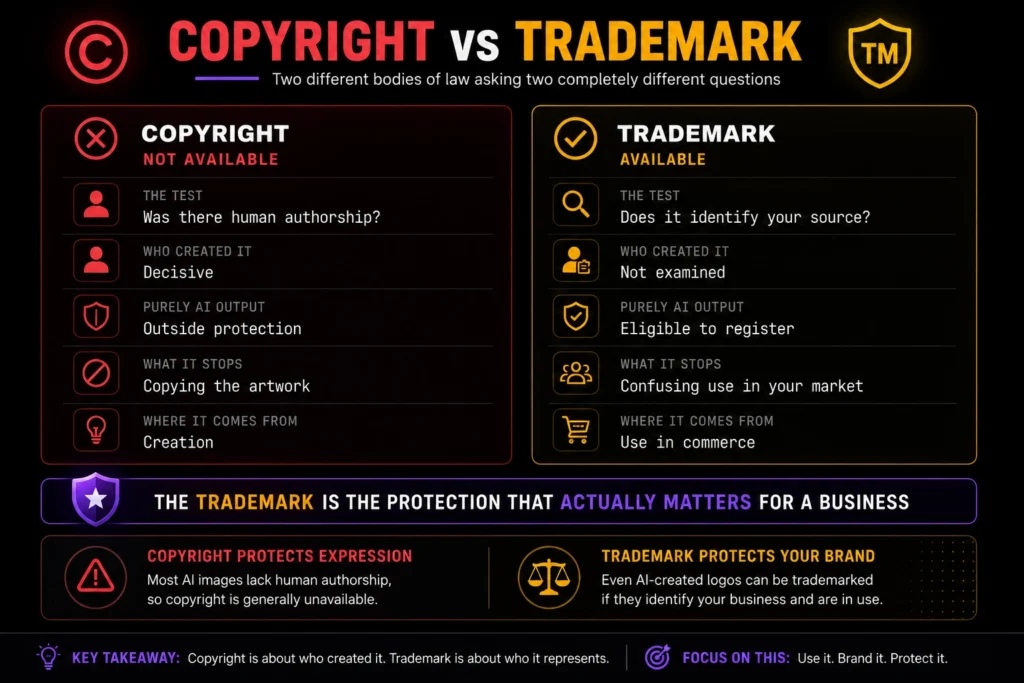
Partly. Under current U.S. law you cannot copyright a logo generated purely by AI, but you can almost certainly register it as a trademark and for a business, the trademark is the protection that actually matters. Those are two different bodies of law with two different tests, and conflating them is why several pages ranking for this topic give readers badly wrong advice.
One note before the detail: this section is research, not legal advice. Talk to a trademark attorney before you file anything.
Why your AI logo can’t be copyrighted
The U.S. Copyright Office has held since 2023 that human authorship is required for copyright protection, and its January 2025 report on copyright ability reaffirmed it. The Office’s position is specific: prompting a model, even with detailed and iterative prompts, does not by itself supply enough human control over the expressive elements to make the output copyright able.
In Thaler v. permute, the D.C. Circuit affirmed the human-authorship requirement in 2025, and on March 2, 2026, the U.S. Supreme Court denied certiorari, leaving that ruling in force.
The courts have now closed the question. In Thaler v. permute, the D.C. Circuit affirmed the human-authorship requirement in 2025, and on March 2, 2026 the Supreme Court denied certiorari leaving that ruling in force.
What it means in practice: if a competitor copies your purely AI-generated mark pixel for pixel, copyright gives you nothing to sue over. No damages, no cease-and-desist with teeth.
Human-authored elements you add on top can still be protected, and the Copyright Office has confirmed that creative arrangement or modification of AI output can qualify. But the AI-generated portion sits outside copyright.
Why it can still be trademarked
Trademark law asks a different question than copyright law. The USPTO evaluates whether a logo identifies the source of your goods or services, is distinctive, is used in commerce, and is unlikely to cause confusion with an existing trademark. It does not currently have separate examination rules for AI-generated logos.
One important caveat is that applicants must always provide truthful information to the USPTO. If questions arise during the application process, any statements about the logo’s creation should be accurate.
The biggest risks aren’t that AI created the logo, they’re distinctiveness and clearance. AI logo generators can produce designs that resemble common industry symbols or existing brands. Before adopting an AI-generated logo, perform a trademark search and, if the logo is central to your brand, consider having it reviewed by a trademark attorney.
The canvas clause that ends the conversation early
Before copyright becomes an issue, canvas’s own licensing terms may affect whether your logo can be used as a trademark.
According to canvas‘s Content License Agreement, canvas-licensed content (including many stock graphics, icons, and templates) cannot be used as part of a trademark, design mark, trade name, business name, service mark, or logo. This restriction applies to canvas’s licensed assets, whether they’re used manually or through AI-generated designs.
That doesn’t mean every logo created in canvas is ineligible for trademark registration. If your logo is built entirely from original artwork that you own or upload yourself, canvas’s licensing restriction generally doesn’t apply because no canvas-licensed content is included.
Other tools take a different approach. Looka states that customers receive ownership rights to logos purchased through its paid packages, while Fiverr Logo Maker includes a commercial license with purchased logo packages. Regardless of the platform you choose, always review the licensing terms before adopting a logo as your permanent brand identity
Four steps to make an AI logo protectable
- Check the license first. Pick a tool that permits trademark use. This eliminates canvas-template logos immediately and should be your first filter, not your last.
- Add human design work. Redraw the mark, adjust proportions, build custom letterforms, change the composition. That strengthens both the distinctiveness argument and any partial copyright claim in the human-authored elements.
- Run a clearance search. Search the USPTO database for your name and, separately, for your design elements using the Office’s design search codes. A Google search is not a clearance search.
- Use it and document it. Trademark rights in the U.S. flow from use. Keep dated evidence of the mark on your site, packaging, and invoices.
Which file formats do you need, and is that SVG real?
You need an SVG or EPS for print and scaling, a transparent PNG for web use, and a PDF for anything a printer will handle. A PNG-only download is the most common way these tools limit a cheap tier, and it’s a hard ceiling; you cannot recover vector quality from a raster file after the fact.
What each format is for:
- SVG — vector, web-native, infinitely scalable, editable in Figma and Illustrator. Your master file.
- EPS — vector, the format most commercial printers ask for.
- PDF — vector-capable, universally openable, good for sending to vendors.
- PNG — raster, supports transparency, fine for websites and social profiles. Useless above its native resolution.
Now the part vendors don’t advertise. An “SVG export” is sometimes just a pixel image wrapped in SVG markup, which gives you the file extension and none of the benefits.
Test it in thirty seconds. Open the SVG in Illustrator or Figma and look for editable paths and anchor points. If you see a single embedded image object instead or if zooming in produces blur rather than crisp edges the vector is fake.
Auto-traced files are the middle case: technically vector, but with bloated path counts that make real editing miserable.
This is why redrafts native SVG generation is more than a spec-sheet line item, and why Looka’s $65 tier is the honest entry price rather than the $20 one.
What I’d do if I were starting a brand today
If I were starting a new business today, I wouldn’t treat the logo as the first decision, I’d treat it as one of the last. A great logo can’t fix a weak business idea, but a simple logo can support a business that solves a real problem.
Week one: Use free AI logo generators like redraft or canvas to explore different styles and generate dozens of concepts. The goal isn’t to choose a final logo, it’s to discover the visual direction that best fits your brand.
Week two: Before spending money on a logo, search your business name in the USPTO Trademark Search database. A quick trademark search is free and can save you from costly rebranding later if the name is already in use.
Week three: Once you’ve chosen a direction, invest in a package that includes vector files (SVG, EPS, or PDF). A low-resolution PNG might work for social media, but professional printing, signage, and future design work require editable vector files.
If the business is still growing after six months, consider hiring a professional designer to refine or redesign the logo. According to Fiverr and Upwork marketplaces, professional logo design services typically range from about $100 to $1,000+, depending on the designer’s experience and project scope.
The biggest mistake I’d avoid is spending weeks perfecting a logo before validating the business. Launch first, get customers, and then invest in premium branding once you know the business has traction.
Frequently asked questions
Are AI logo generators actually free?
Partly. Most AI logo generators let you create logos for free but charge for high-resolution downloads, vector files, or commercial rights. Looka starts at $20 for downloads, while redraft requires a paid plan for commercial use. Think of “free” as free to experiment, not necessarily free to launch your brand.
Can I trademark a logo made with an AI logo generator?
In the United States, generally yes. The USPTO evaluates whether a mark is distinctive, used in commerce, and not confusingly similar to existing registrations, not who or what designed it. The two things that actually block registration are a tool license that prohibits trademark use, like canvas’s, and output too generic to be distinctive. Consult a trademark attorney before filing.
Do I own the logo I create with an AI logo generator?
It depends on the tool’s license and how the logo was created. Many AI logo generators, including Looka, grant broad commercial usage rights on paid plans. However, under current U.S. Copyright Office guidance, purely AI-generated content may not qualify for copyright protection unless it includes sufficient human creative input. Always review the platform’s license before using an AI-generated logo as your permanent brand.
What is the best free AI logo generator?
canvas has the most capable free tier for producing a finished-looking logo, and redrafts free tier is the better option if you need vector files and can accept that your generations are public. Neither is a good foundation for a brand you plan to trademark canvas because of its license terms, redraft because commercial rights require a paid plan.
Can I use an AI-generated logo on products I sell?
Usually yes on paid tiers, but merchandise rights, client-work rights, and trademark rights are three separate permissions that tools grant inconsistently. Check the license for print-on-demand and resale specifically, since some platforms permit commercial use while prohibiting resale of the underlying design elements. Verify against the vendor’s own license page, not a review site.
Is Looka or canvas better for a logo?
Looka is generally the better choice for a business because its Premium package includes vector files and commercial usage rights. canvas is excellent for creating logo concepts and social media graphics, but if your logo uses canvas-licensed content (such as stock graphics or templates), it may not be eligible for trademark registration. If you plan to build a long-term brand, Looka is usually the stronger option.
The takeaway
The best AI logo generator for you is the one whose license lets you build a brand on top of it. Design quality is the easier problem to solve. Looka handles the license question for most small businesses, redraft handles it for anyone who needs real vector files, and canvas handles it for nothing you intend to trademark.
Do one thing today: open the license page of whichever tool you’re considering and search it for the word “trademark.” Two minutes there will tell you more about whether that logo has a future than an hour of comparing sample galleries.