FluxGrowth is reader-supported. Some links in our guides are affiliate links — if you buy through one we may earn a commission, at no extra cost to you. It never changes which tools we recommend. How we test tools.
Chrome doesn’t do much for you anymore. It opens tabs. That’s about it.
This guide is part of our GEO & AI Search hub – everything we have published on getting cited by AI search engines, in one place.
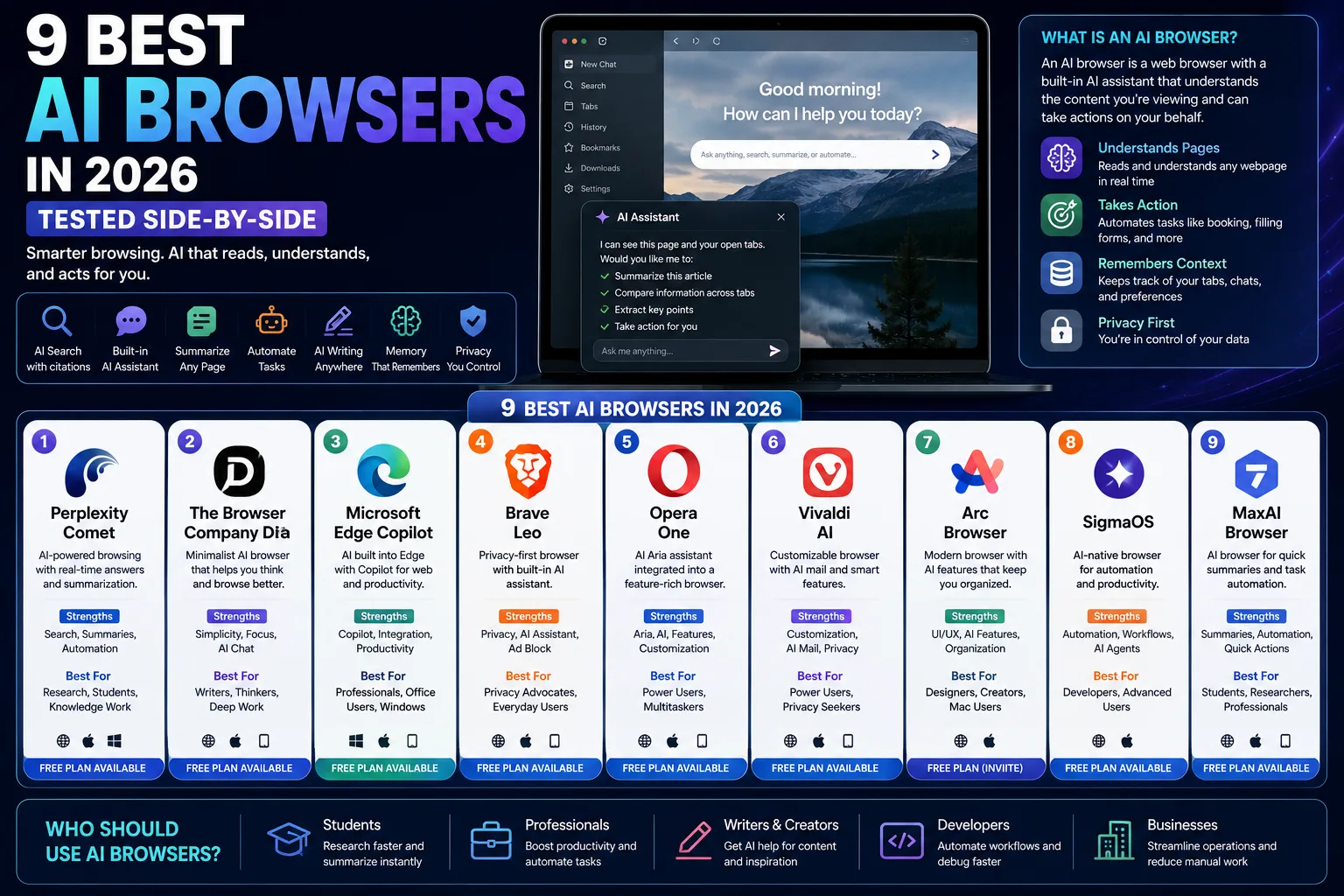
The best AI browser in 2026 does something Chrome never will: it reads the page with you, remembers what you were working on three tabs ago, and can actually go do things on your behalf, book a flight, fill out a form, pull ten product pages into one comparison. This guide tests and ranks the browsers actually worth switching to, plus the ones that got a lot of hype and didn’t earn it.
Like most people, I started this comparison using Google Chrome as my primary browser alongside ChatGPT in a separate tab. My workflow constantly involved copying information between tabs, switching back and forth for summaries, and juggling dozens of open pages during research. Testing AI browsers showed how much friction that created. Browsers with built-in AI assistants, page awareness, and integrated search reduced those context switches dramatically, making research and content planning noticeably faster. The biggest difference wasn’t raw AI quality, it was having the AI built directly into the browsing experience instead of treating it as a separate tool.
Here’s what you’ll get: a plain-English explainer of what an AI browser actually is, hands-on notes on nine real contenders, a use-case breakdown so you don’t have to read all nine reviews, and a straight answer on what happened to ChatGPT Atlas (short version: it’s getting shut down in about three weeks, and nobody’s talking about it enough).
What Is an AI Browser?
An AI browser is a web browser with a large language model built into the core browsing experience not bolted on as an extension, but wired into search, tabs, and page content directly.
That’s the one-sentence version. Here’s what it means in practice.
AI Browser vs. Traditional Browser
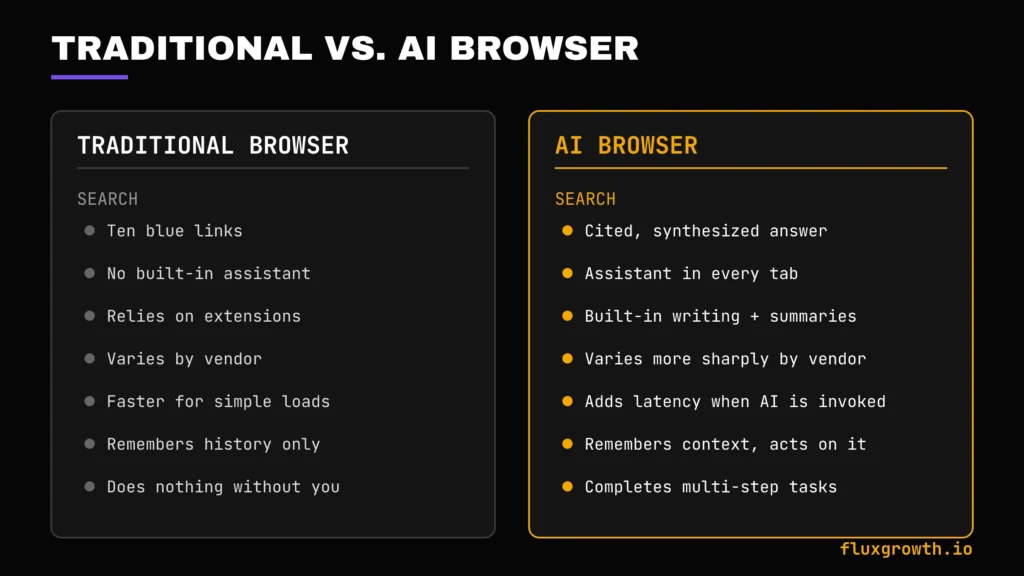
A traditional browser (Chrome, Safari, old-school Firefox) shows you pages and lets you click around. It doesn’t know what’s on the page unless you read it yourself. An AI browser reads the page, holds context across your open tabs, and can answer questions about content you haven’t even scrolled to yet.
The practical difference shows up the first time you’re researching something with 12 tabs open. In Chrome, you’re the one cross-referencing all 12. In an AI browser like Comet or Dia, you can ask “which of these has the lowest total cost after year one” and get an answer pulled from every tab at once.
Core AI Browser Features
Most AI browsers in 2026 ship some combination of these:
- AI search — answers with citations instead of ten blue links
- Built-in chatbot/sidebar — a persistent assistant that reads whatever tab you’re on
- Web summarization — condenses a long article or PDF into key points
- Browser automation — the AI actually clicks, types, and submits on your behalf
- AI writing — drafts emails, comments, or documents inside any text field
- Memory — recalls what you looked at last week without you re-searching
- Research assistance — synthesizes across multiple open tabs or sources
No single browser does all seven equally well. That’s the whole point of this comparison.
How AI Browsers Work
Under the hood, it’s simpler than the marketing copy makes it sound. An AI browser pairs a large language model (usually some mix of Anthropic, OpenAI, and Google models) with what’s called browser context awareness, a way of reading the actual code of the page you’re on and feeding it straight into the model.
Most do this through a sidebar. A panel that sits next to your tabs, quietly holding the assistant. Ask it something and it’s not out there blind-searching the open web; it already has your current page loaded. Sometimes your whole tab group.
Then there’s the more advanced layer: agentic automation. Here’s the thing: instead of just answering questions, the AI agent can actually navigate to a new page, click a button, fill out a form, and hit submit. It’s the same plan-act-observe-adjust loop that powers coding tools like Browser Use, just without you writing a line of code to set it up.
In short: the browser feeds page content to an LLM in real time, and depending on the product, that LLM either answers questions about what you’re looking at or takes actions on the page for you.
A note on ChatGPT Atlas
If you’ve been hearing about Atlas and expected to see it ranked here, here’s the situation.
OpenAI launched ChatGPT Atlas in October 2025 as a standalone AI browser built around ChatGPT, quickly becoming one of the highest-profile challengers to Google Chrome and Perplexity Comet. On July 9, 2026, OpenAI announced that Atlas would be discontinued, with the browser scheduled to stop working on August 9, 2026.
Rather than maintaining a separate browser, OpenAI is folding Atlas’s browsing capabilities into the ChatGPT desktop app and bringing many of its AI browsing features to a Chrome extension and other ChatGPT experiences.
That’s why Atlas isn’t included in the rankings below. By the time most readers discover this guide, the standalone browser will already be gone, while its core capabilities will continue to live on inside the broader ChatGPT ecosystem. We’ll cover the transition in more detail in the FAQ.
Why Use an AI Browser?
The pitch isn’t “AI is cool, put it everywhere.” It’s specific time savings on tasks you already do every day.
- Faster research. Cross-tab summarization turns a 45-minute research sprint into 10 minutes.
- Less manual copy-paste. The AI reads the page so you don’t have to paste URLs into ChatGPT separately.
- Built-in writing help. Draft a reply or a comment without switching to a separate AI tool.
- Smarter search. Cited, synthesized answers instead of clicking through five results yourself.
- Automation for repetitive browsing. Form fills, price comparisons, and multi-step bookings run in the background.
None of this replaces judgment. If you’re doing anything with real stakes: a purchase, a legal filing, sending an email you can’t take back, you still check the AI’s work before it submits.
How We Tested These AI Browsers
Every browser below was evaluated against the same criteria so the comparisons are apples-to-apples:
- Ease of setup — how fast from download to first useful task
- Speed — page load and AI response latency
- AI quality — accuracy and usefulness of answers
- Search accuracy — whether answers cite trustworthy, verifiable sources
- Productivity features — tab management, writing tools, memory, and built-in assistants
- Automation — ability to complete multi-step tasks rather than simply answer questions
- Privacy — data collection policies, transparency, and available privacy controls
- Memory — whether the browser recalls previous conversations or browsing context in a useful way
- Extension support — compatibility with Chromium extensions or equivalent ecosystems
- Cross-platform support — availability across Windows, macOS, Linux, Android, and iOS where applicable
- Overall value — how much functionality the free plan offers compared with the paid upgrade
Note : –To keep testing consistent, every browser was installed on the same Windows PC and evaluated over several sessions using identical real-world tasks rather than synthetic benchmarks. Each browser was used for competitor research, summarizing long articles, comparing products across multiple tabs, answering follow-up questions about open pages, drafting content, organizing research notes, and testing any available AI automation or browser-agent features. Where a browser supported memory or autonomous actions, those capabilities were tested with practical workflows such as comparing pricing across multiple websites or generating research summaries from several sources. Pricing, supported platforms, privacy policies, and feature availability were verified against each vendor’s official documentation before publication.
Quick Comparison Table
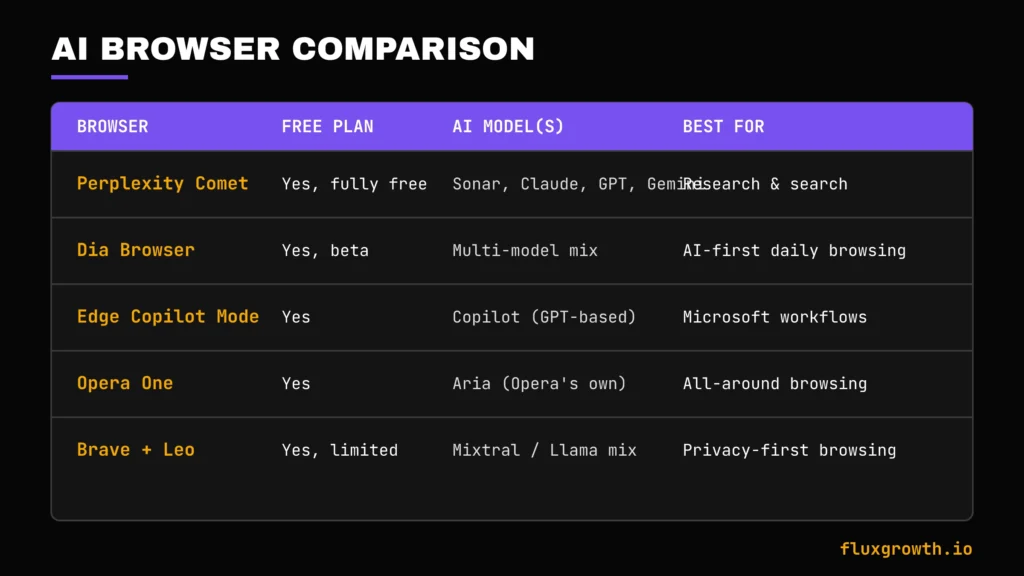
| Browser | Free Plan | AI Model(s) | Best For | Platforms |
| Perplexity Comet | Yes, fully free | Sonar, Claude, GPT, Gemini (Max tier) | Research and search | Mac, Windows, iOS, Android |
| Dia Browser | Yes, beta | Multi-model (unspecified mix) | AI-first daily browsing | macOS (Apple Silicon only) |
| Edge Copilot Mode | Yes | Copilot (GPT-based) | Microsoft/Office workflows | Windows, Mac |
| Opera One | Yes | Aria (Opera’s own) | All-around browsing + built-in AI | Windows, Mac, Linux |
| Brave + Leo | Yes, limited | Multiple models including Llama, Mixtral, and others depending on the selected provider | Privacy-focused AI browsing | Windows, Mac, Linux, iOS, Android |
Note: AI model availability, platform support, and free-plan limits evolve frequently. Before publishing, verify the latest details on each vendor’s official website, especially for beta products such as Dia and recently updated AI features.
The 9 Best AI Browsers
1. Perplexity Comet
Overview: Comet is Perplexity’s Chromium-based browser, built around an AI assistant (creatively named Comet Assistant) that lives in the sidebar. It launched in July 2025 behind a $200/month paywall, Perplexity Max only. Then the company just… dropped it. Free, worldwide, no catch.
Best For: Researchers, writers, and anyone who spends hours a day reading and cross-referencing sources.
AI Features: Comet combines Perplexity’s citation-first search engine with an AI browsing assistant. Higher-tier subscriptions support access to multiple frontier models including OpenAI, Anthropic, and Google models though the exact model lineup changes over time. The assistant can summarize pages, answer follow-up questions, compare multiple sources, and maintain context across tabs.
Search Experience: Citation-first. Every answer links back to the source it pulled from, which matters if you’re using this for anything you’ll later have to defend.
Automation Features: Agent tasks handle form fills, basic purchases, and email drafting, but these consume credits. The free tier’s allocation is small enough that you’ll hit the ceiling if you lean on automation daily.
Privacy: Perplexity states that users can manage many privacy settings directly within the browser. Like most AI browsers, some browsing activity may be processed to provide AI features. Security researchers have previously reported prompt-injection attacks targeting early versions of Comet, and Perplexity has released updates to address reported issues. As with any AI browser, avoid granting unnecessary access to sensitive accounts.
Pricing: A functional free tier is available. Perplexity Pro costs $20/month, while Perplexity Max costs $200/month, unlocking higher usage limits, premium AI models, and advanced agent capabilities.
Free Plan: Yes genuinely usable as a daily driver, not a stripped demo.
Pros:
- Free tier includes the full core AI experience
- Model Council gives multi-perspective answers on high-stakes research
- Strong citation discipline
Cons:
- Documented security vulnerabilities, including a successful phishing exploit reported by The Hacker News in March 2026
- Business model raises real privacy questions
- Heavy automation use requires a paid tier
Real-World Use Case: During competitor research for a long-form buying guide, Comet can summarize multiple product pages, extract key differences, and answer follow-up questions without leaving the browser. Instead of manually opening dozens of tabs and copying notes into a separate document, you can compare features, pricing, and reviews directly inside the browser, significantly reducing the time spent on the research phase.
2.Dia Browser
Overview: Dia is The Browser Company’s AI-first browser, the same team that built Arc, which is now in maintenance mode while the whole team focuses on Dia. Atlassian acquired The Browser Company for $610 million in October 2025.
Best For: Mac users (specifically Apple Silicon) who already lean on AI for research-heavy daily browsing.
AI Features: The omnibox doubles as a chat interface, type a URL and it navigates, type a question and it opens the AI sidebar with read access to your open tabs. Custom shortcuts called “Skills” let you build reusable prompts, and a Memory feature pulls personal context from tabs you’ve had open.
Search Experience: Conversational rather than citation-heavy; better suited to open-ended exploration than to fact-checking with sources.
Automation Features: Lighter than Comet’s Dia leans into research and synthesis rather than autonomous task completion.
Privacy: The Browser Company states that users can control AI features and memory settings. Because privacy policies continue to evolve during the beta period, review Dia’s latest privacy documentation before relying on memory features for sensitive work.
Pricing: Dia is currently available as a free beta. The Browser Company has not finalized long-term public pricing for all users, so any future paid tiers should be verified before publication.
Free Plan: Yes, but access is invite/beta-gated as of this writing.
Pros:
- Genuinely novel interface the AI chat replaces the address bar rather than sitting beside it
- Skills feature lets power users automate repeat research prompts
- Backed by Atlassian’s resources post-acquisition
Cons:
- macOS Apple Silicon only. No Windows, Linux, Intel Mac, or mobile app as of today, and Windows has no announced release date.
- Missing some Arc power-user features (no Spaces, no traditional command bar)
- Smaller extension compatibility than Chrome-based competitors
Real-World Use Case:Dia works particularly well for content planning. While researching a long-form article, you can keep multiple reference pages open, ask Dia to compare competing viewpoints, summarize each source, and generate an outline without switching between your browser and a separate AI chatbot. That reduces context switching and keeps the entire research process inside a single workspace.
3. Microsoft Edge Copilot Mode
Overview: Microsoft’s answer bakes Copilot directly into Edge, leaning on its deep hooks into Windows, Office, and Outlook.
Best For: Anyone already living in Microsoft 365 Word, Excel, Outlook, Teams.
AI Features: Copilot Mode surfaces page summaries, drafts replies inline in Outlook web, and can pull data from open tabs into an Excel Online sheet without you copy-pasting.
Search Experience: Bing-powered with AI-generated summaries above the traditional results.
Automation Features: Task automation is improving but still trails Comet and Dia for open-web tasks; it’s strongest specifically inside Microsoft’s own ecosystem.
Privacy: Microsoft provides enterprise-grade security, including support for major compliance standards such as SOC, ISO 27001, GDPR, HIPAA, and other Microsoft 365 compliance programs. Organizations also benefit from centralized admin controls, data governance, and enterprise identity management.
Pricing: Core Copilot features in Microsoft Edge are available free with a Microsoft account. Advanced business features including Microsoft 365 Copilot across Office apps require a separate Microsoft 365 Copilot subscription.
Free Plan: Yes, core features are free.
Pros:
- Best integration if your workflow already runs through Office and Outlook
- Enterprise-grade privacy and compliance posture
- No separate app to learn if you’re already an Edge user
Cons:
- Feels like a bolt-on for anyone outside the Microsoft ecosystem
- Automation lags behind AI-native browsers for general web tasks
Real-World Use Case: While reviewing industry research for a client presentation, Edge Copilot can summarize multiple reports, compare findings across open tabs, rewrite key insights into presentation-ready bullet points, and draft an executive summary without leaving the browser. For Microsoft 365 users, this significantly reduces the time spent switching between the browser, Word, and PowerPoint during research-heavy projects.
4. Opera One
Overview: Opera’s flagship browser ships with Aria, its own built-in AI assistant, alongside Opera’s long-standing tab-island management and free built-in VPN.
Best For: Users who want AI features without abandoning a browser built for heavy multitasking.
AI Features: Aria can answer questions, summarize web pages, rewrite text, generate content, translate languages, and assist with research directly from the browser sidebar. Rather than relying on a single proprietary model, Aria uses multiple AI providers including OpenAI and Google Gemini depending on the feature.
Search Experience: Aria-generated summaries alongside standard search, not a full agentic search replacement.
Automation Features: Limited compared to Comet or Dia Opera’s automation strengths are more traditional (tab islands, workspaces) than AI-agentic.
Privacy: Opera has a long track record as a privacy-conscious browser (built-in ad blocker, free VPN), which carries into Opera One.
Pricing: Free.
Free Plan: Yes, fully free with no paid tier gating core AI features.
Pros:
- Strong tab and workspace management on top of the AI layer
- Free built-in VPN, a real differentiator
- Cross-platform (Windows, Mac, Linux)
Cons:
- Aria’s automation capability is basic next to purpose-built AI browsers
- Smaller extension ecosystem than Chrome
Real-World Use Case:Opera One is particularly useful when juggling multiple projects. During content planning, you can organize competitor research into separate Tab Islands, use Aria to summarize each website, rewrite notes into article outlines, and keep everything inside a single browser window without constantly switching between tabs and external AI tools.
5. Brave Browser + Leo
Overview: Brave layers its Leo AI assistant on top of its already-strict privacy defaults built-in ad and tracker blocking, no first-party data collection by default.
Best For: Anyone whose top priority is privacy first, AI features second.
AI Features: Leo answers questions, summarizes pages and YouTube video transcripts, and can browse via Brave Search’s independent index rather than relying on Bing or Google’s index.
Search Experience: Brave Search operates its own index, a genuine differentiator from browsers that just wrap someone else’s search engine.
Automation Features: Minimal Brave has not prioritized agentic task automation the way Comet or Dia have.
Privacy: Privacy remains Brave’s strongest selling point. By default, the browser blocks ads, trackers, third-party cookies, and fingerprinting attempts. Brave states that Leo conversations are processed with privacy in mind and are not used to build advertising profiles for users.
Pricing: Leo is available with a free tier that includes limited AI usage. Leo Premium costs $14.99/month, providing higher usage limits, additional AI models, and priority access.
Free Plan: Yes, with daily query caps on Leo.
Pros:
- Best-in-class privacy defaults, independent of the AI features
- Own search index reduces dependence on Big Tech infrastructure
- Cross-platform including full mobile support
Cons:
- Free-tier Leo query limits are noticeable if you use it heavily
- No meaningful browser automation yet
Real-World Use Case: Brave works well when researching sensitive topics or handling client work where privacy matters. You can summarize long articles with Leo, compare information across multiple sources using Brave Search, and draft notes without exposing your browsing history to the advertising ecosystem that powers many mainstream browsers. For users who value privacy first and AI second, it’s one of the strongest options available.
6. Arc Search (Mobile)
Overview: Arc Search is The Browser Company’s mobile app, distinct from the desktop Arc browser (which is now in maintenance mode as the company’s engineering focus shifted to Dia). Arc Search remains a separate, actively used mobile product for quick AI-summarized search.
Best For: Mobile-first users who want fast, synthesized search results without opening ten browser tabs on a phone.
AI Features: “Browse for me” generates a synthesized, readable summary page pulled from multiple sources for a given query closer to an AI-written mini-article than a results list.
Search Experience: This is the whole product. Type a question, get a synthesized answer page instead of blue links.
Automation Features: None in the agentic sense this is a search-and-summarize tool, not a task-completion one.
Privacy: Arc Search follows The Browser Company’s privacy policy and processes AI requests through its cloud services to generate summaries. Users should review the latest privacy policy before using AI features with sensitive information.
Pricing: Completely free.
Free Plan: Yes. All core browsing and AI search features are available without a subscription.
Pros:
- Fastest way to get a synthesized answer on mobile
- Clean, readable output format
- No account required to start
Cons:
- Desktop Arc’s uncertain future (maintenance mode, no new features) raises questions about long-term investment in the mobile app too
- Not a full-featured daily-driver browser closer to a smart search tool
Real-World Use Case: Arc Search is particularly useful when researching on a phone. Instead of opening ten search results to compare information, you can use Browse for Me to generate a single, well-organized summary of multiple sources in seconds. It’s especially effective for quick product comparisons, travel planning, learning a new topic, or gathering background information while away from a desktop.
7. Google Chrome + Gemini
Overview: Chrome remains the default browser for most of the internet, and Google has been layering Gemini into it via a side panel rather than rebuilding Chrome from scratch.
Best For: Anyone who wants light AI assistance without leaving the browser they already trust and whose extensions they already rely on.
AI Features: Gemini can summarize web pages, answer questions about your current tab, help draft emails or documents, explain code, and assist with research. Eligible users also gain access to more advanced AI capabilities through Google AI Pro, including deeper Gemini integration across Google Workspace.
Search Experience: Standard Google Search with AI Overviews layered on top, not a Comet-style agentic replacement.
Automation Features: Improving but still behind Comet and Dia; Google’s approach so far has been conservative compared to competitors racing toward full agentic browsing.
Privacy: Google’s data practices are well documented and, for many users, already a known trade-off they’ve accepted for Gmail, Search, and Android.
Pricing: Chrome is free. Core Gemini features are available without charge, while Google AI Pro starts at $19.99/month in the United States and unlocks higher usage limits, premium Gemini models, and additional AI capabilities.
Free Plan: Yes, core Gemini features are free.
Pros:
- Unmatched extension ecosystem and developer tooling still the gold standard for anyone who lives in DevTools
- Zero switching cost if you already use Chrome
- Deep integration with Gmail, Docs, and Calendar
Cons:
- Least “AI-native” of the major options; feels like AI added to an existing browser rather than built around one
- Auto-browse and agentic features remain more limited and regionally gated than competitors
Real-World Use Case: Chrome with Gemini works particularly well for everyday productivity. While researching a topic, you can summarize long articles, ask follow-up questions about the current page, draft emails based on your findings, and move directly into Google Docs or Gmail without leaving the Google ecosystem. For users already invested in Google’s services, it offers one of the smoothest AI-assisted workflows available without requiring a new browser.
8. Firefox + AI Chat
Overview: Mozilla added an AI Chatbot sidebar to Firefox that lets you plug in a provider of your choice (ChatGPT, Claude, Gemini, or others) rather than shipping one proprietary model.
Best For: Privacy-conscious users and open-source advocates who want AI features without Chromium underneath.
AI Features: The sidebar chat works with whichever AI provider you connect, and Firefox is not tracking your queries the way an ad-funded assistant might.
Search Experience: Standard Firefox search, with the AI chat as a separate, optional panel rather than an integrated search replacement.
Automation Features: None this is an add-on chat panel, not an agentic browser.
Privacy: Firefox’s long-standing non-Chromium, privacy-first reputation carries over directly; Mozilla is not building a business model around your browsing data.
Pricing: Free (though whichever AI provider you connect may have its own subscription cost).
Free Plan: Yes.
Pros:
- Only major non-Chromium option on this list, which matters for engine diversity and reduces Google’s control over the open web
- Choice of AI provider instead of lock-in to one model
- Strong existing privacy reputation
Cons:
- The AI features are additive, not architecturally central the way they are in Comet or Dia
- No native automation or agentic capability
Real-World Use Case: Firefox AI Chat works well for users who already depend on ChatGPT or Claude but don’t want to switch browsers. While reading technical documentation or academic papers, you can highlight difficult sections, open the AI Chat sidebar, ask for a plain-English explanation or summary, and continue reading without copying and pasting content into a separate browser tab. It’s a simple workflow that saves time while preserving Firefox’s privacy-focused browsing experience.
9. Opera Neon
Overview: Opera’s separate, more experimental agentic browser project, distinct from Opera One. Neon leans further into autonomous task execution than Opera’s flagship product.
Best For: Users who want to try agentic browsing (the AI actually doing tasks, not just answering questions) without committing to Comet’s or Dia’s platform limitations.
AI Features:Opera Neon focuses on AI agents capable of understanding natural-language requests, researching information, generating text and code, and completing browser-based tasks with minimal user input. Opera describes Neon as a browser where AI doesn’t just answer questions it actively works for you.
Search Experience: Secondary to its automation focus; search functions more as an entry point into agentic tasks than a standalone product.
Automation Features: This is Neon’s core bet more automation-forward than Opera One.
Privacy: Opera states that Neon incorporates the company’s existing security and privacy technologies, but because many AI features run through cloud services, users should review Opera’s latest privacy documentation before using the browser with sensitive information.
Pricing: Opera has announced that Neon will be offered as a premium subscription product, but complete pricing and feature tiers should be confirmed on Opera’s official website before publication.
Free Plan: No permanent free plan has been officially announced. Interested users can currently join the waitlist or access program as Opera expands availability.
Pros:
- One of the more automation-forward products in the category
- Backed by Opera’s existing browser engineering, not a from-scratch startup
Cons:
- Newer and less battle-tested than Comet or Dia
- Feature set and stability still maturing as of this writing
Real-World Use Case: Imagine planning a business trip. Instead of manually researching flights, hotels, meeting locations, and local transportation across dozens of tabs, you give Neon a single prompt describing your itinerary. The browser researches options, compares prices, summarizes recommendations, and prepares a draft itinerary for review—turning what would normally be an hour of browsing into a guided AI workflow that still keeps you in control of the final decisions.
Comparison Table
| Browser | Free Plan | AI Search | Browser Automation | Privacy | Best For |
| Perplexity Comet | Yes | Strong, citation-first | Strong (paid tiers) | Weak security concerns disclosed | Research |
| Dia Browser | Yes (beta) | Moderate | Light | User-controlled AI features | Mac AI-first browsing |
| Edge Copilot Mode | Yes | Moderate | Light-moderate | Strong (enterprise-grade) | Microsoft workflows |
| Opera One | Yes | Light | Light | Strong (built-in VPN, ad block) | All-around multitasking |
| Brave + Leo | Yes (capped) | Independent index | Minimal | Strongest overall | Privacy-first users |
Best AI Browser by Use Case
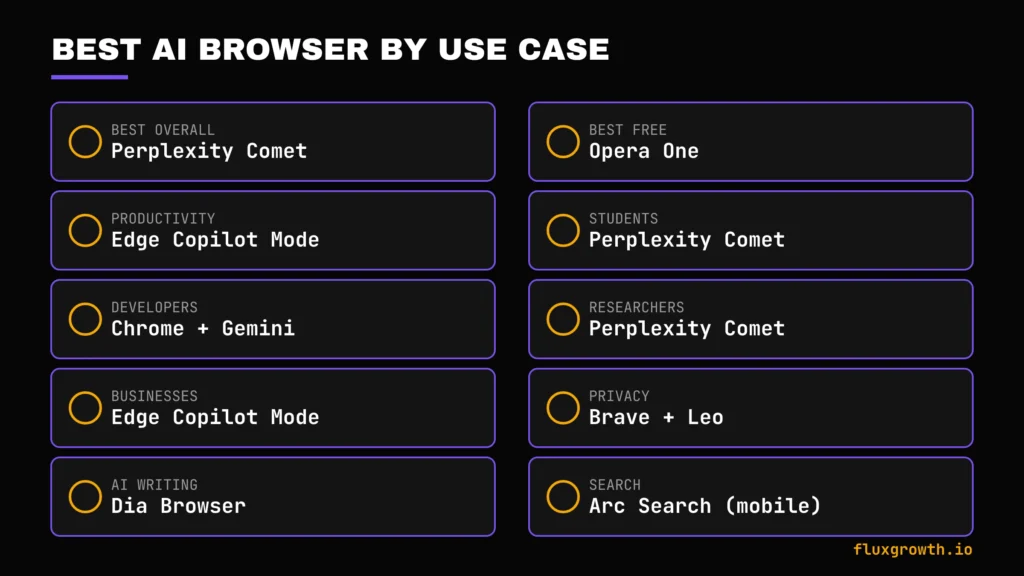
- Best Overall: Perplexity Comet for the free, fully functional feature set, if you can accept the privacy trade-offs.
- Best Free AI Browser: Opera One full AI features, zero paywall, and a free built-in VPN.
- Best AI Browser for Productivity: Microsoft Edge Copilot Mode if your day already runs through Office and Outlook.
- Best AI Browser for Students: Perplexity Comet free Model Council access is a genuine research advantage on a student budget.
- Best AI Browser for Developers: Google Chrome + Gemini unmatched DevTools and extension support still wins for technical work.
- Best AI Browser for Researchers: Perplexity Comet citation-first answers and multi-model cross-checking.
- Best AI Browser for Businesses: Microsoft Edge Copilot Mode enterprise compliance and Microsoft 365 integration.
- Best AI Browser for Privacy: Brave + Leo no contest; privacy is the whole product thesis.
- Best AI Browser for AI Writing: Dia Browser Skills and the omnibox-as-chat interface make drafting genuinely fast.
- Best AI Browser for Search: Arc Search (mobile) for quick, synthesized answers on a phone.
AI Browser vs. Traditional Browser
The difference isn’t cosmetic. A traditional browser is a window onto pages you have to read and act on yourself. An AI browser adds a layer that reads, remembers, and in the more advanced products acts for you.
- Search: Traditional gives you ten links; AI browsers give you a synthesized, cited answer.
- AI Assistant: Traditional has none built in; AI browsers have one wired into every tab.
- Productivity: Traditional relies on extensions; AI browsers bake summarization and writing help into the core product.
- Privacy: This cuts both ways some AI browsers (Brave) are more private than traditional Chrome; others (Comet) raise new privacy questions traditional browsers didn’t have.
- Speed: Traditional browsers are generally faster for simple page loads; AI features add latency when invoked.
- Extensions: Chrome and Chromium-based AI browsers (Comet, Dia, Brave, Opera) support the existing extension ecosystem; Firefox has its own.
- Memory: Traditional browsers remember history; AI browsers remember context and can act on it.
- Automation: The single biggest gap traditional browsers do nothing without you; the best AI browsers can complete multi-step tasks unsupervised.
Free vs. Paid AI Browsers
| Feature | Free | Paid |
| AI searches | Usually limited by daily messages, credits, or fair-use quotas | Higher or unlimited usage depending on the plan |
| Premium models | Typically limited to standard or lightweight models | Access to premium models such as GPT-5.x, Claude Opus/Sonnet, Gemini Pro, or multiple model choices |
| Automation | Basic AI assistance; autonomous browser actions are often unavailable or heavily restricted | automation, and multi-step task execution |
| Memory | Limited session memory or basic context retention | Longer-term memory, persistent projects, or cross-session context (where supported) |
| Browser agents | Available only in limited previews or not included | Often included in premium plans or higher subscription tiers |
| File uploads | Usually supported with lower limits on file size, number of uploads, or supported formats | Larger upload limits, more supported file types, and higher processing capacity |
| Priority access | Standard response queue during peak demand | Faster response times, priority access, and earlier access to new AI features |
Note: Features vary significantly between browsers. Some products (such as Opera One and Firefox AI Chat) offer their core AI features completely free, while others reserve advanced AI models, browser agents, or automation for paid subscriptions. Always verify the latest pricing and feature limits on each vendor’s official pricing page before publishing.
How to Choose the Right AI Browser
- Budget. Most people don’t need to pay for any of this. Comet, Opera One, Brave, and Firefox all cover the basics free paid tiers mostly matter once you want heavy automation.
- AI quality. Test the sidebar on a real research task, not a toy question, before committing.
- Search quality. Citation-first (Comet) matters more than conversational (Dia) if you need to defend your sources.
- Privacy. Actually read the privacy policy. Not the marketing page, the policy. Comet and Brave sit at nearly opposite ends of this spectrum, and that gap matters more than any feature checkbox above.
- Browser speed. AI features add latency; test on your actual hardware before assuming it’ll feel snappy.
- Ecosystem. If you live in Microsoft 365 or Google Workspace, that ecosystem fit outweighs a marginally smarter AI elsewhere.
- Automation needs. Only Comet and Dia currently offer meaningful agentic task completion; the rest are assistants, not agents.
- Extensions. Chromium-based options (Comet, Dia, Brave, Opera) keep your existing extensions; Firefox does not.
- Cross-device sync. Dia’s Mac-only limitation rules it out immediately if you switch between Windows and Mac.
Common Mistakes to Avoid
- Choosing based on hype. Atlas had enormous buzz for nine months and is gone in three weeks hype is not a stability signal.
- Ignoring privacy policies. Comet’s data model has drawn real scrutiny; read past the feature list before switching your daily browser.
- Paying before testing the free plan. Every browser on this list has a usable free tier; use it before you subscribe to anything.
- Using multiple AI browsers unnecessarily. Pick one as your daily driver; running three fragments of your history and memory features across all of them.
- Ignoring browser performance. A slick AI sidebar doesn’t matter if the browser itself lags on your actual machine.
- Forgetting extension compatibility. If you rely on a specific Chrome extension, confirm it works before switching away from Chrome entirely.
- Not checking AI usage limits. Free-tier caps (Brave’s Leo limits, Comet’s agent credits) can surprise you mid-task.
Future of AI Browsers
No one knows exactly what AI browsers will look like two years from now, but the direction of travel is already becoming clear based on where browser companies and AI vendors are investing. Much of that innovation is happening alongside the rapid rise of AI agents, which are increasingly powering autonomous browsing, workflow automation, and decision-making. If you’re new to the concept, see our guide on Best AI Agents in 2026 before diving into the browser trends below.
AI agents will replace tab overload
Today’s browsers still revolve around tabs. The next generation is increasingly centered on goals instead of pages. Rather than opening twenty tabs to compare products or research a topic, you’ll describe what you want to accomplish, and the browser will gather information, organize it, and present the result.
More autonomous browsing
AI browsers are steadily moving beyond answering questions toward completing tasks. Expect more support for scheduling, form filling, research, shopping assistance, and repetitive workflows that can run with minimal supervision while still allowing human approval when needed.
AI shopping assistants will become mainstream
Price comparison, product research, coupon discovery, and purchase recommendations are becoming native browser capabilities instead of requiring separate extensions. Expect AI to handle more of the shopping process from research through checkout.
Better long-term memory
Most AI browsers currently remember conversations only within a session or project. Future releases are likely to improve persistent memory, allowing browsers to remember your preferences, ongoing projects, and frequently used workflows across devices.
Multi-model AI experiences
Instead of relying on a single language model, future browsers will increasingly combine multiple AI models behind the scenes, selecting the best model for research, writing, coding, or reasoning based on the task at hand.
Enterprise AI browsers
Business-focused AI browsers are becoming their own category. Microsoft, Google, and enterprise AI vendors are investing heavily in secure browsing experiences that integrate with productivity suites, compliance controls, identity management, and internal knowledge bases.
Privacy will become a competitive advantage
As AI browsers collect more context to provide better assistance, users will pay closer attention to how that data is stored and processed. Privacy, local processing, transparent data policies, and user control are likely to become major differentiators alongside AI capabilities.
The AI browser market is still evolving rapidly. New products launch frequently, pricing changes often, and features move quickly from experimental to mainstream. Choose the browser that solves your workflow today rather than chasing whichever product generates the most headlines.
Frequently Asked Questions
What is an AI browser?
An AI browser is a web browser with a large language model built directly into search, tabs, and page content not added as an extension. It can answer questions about the page you’re viewing, summarize content, and in more advanced versions, complete multi-step tasks on your behalf.
Which AI browser is best?
There’s no single best browser for everyone; it depends on what you need. Perplexity Comet leads for free, citation-first research; Microsoft Edge Copilot Mode leads for Microsoft-ecosystem productivity; Brave + Leo leads if privacy is your top priority.
Is there a free AI browser?
Yes, Perplexity Comet, Opera One, Brave (with Leo), and Firefox’s AI Chat sidebar are all free with no required paid tier for core AI features. Some, like Comet, cap heavier automation features behind a paid plan.
Is Chrome an AI browser?
Not natively, but Google has added Gemini as a side panel inside Chrome, which brings page summarization and basic task automation to the browser most people already use. It’s less AI-native than purpose-built options like Comet or Dia.
Does Microsoft Edge have AI?
Yes. Edge’s Copilot Mode integrates Microsoft Copilot directly into the browser, with especially strong ties into Outlook, Word, and Excel for anyone already using Microsoft 365.
Which AI browser protects privacy best?
Brave, paired with its Leo assistant, has the strongest privacy track record on this list with no ad-funded data model and an independent search index. Perplexity Comet sits at the opposite end, with a publicly discussed ad-targeting business model and a disclosed security vulnerability.
What happened to ChatGPT Atlas?
OpenAI launched ChatGPT Atlas in October 2025 and announced on July 9, 2026 that it’s discontinuing the standalone browser, with Atlas set to stop working on August 9, 2026. Its browsing and agent features are moving into the ChatGPT desktop app and a new Chrome extension instead of a dedicated browser product.
Final Verdict
The single biggest thing to take away: the AI browser category moves fast enough that a nine-month-old product with huge hype (Atlas) can be discontinued while you’re reading this so test the free tier before you commit to any of these as your daily driver.
- Best Overall AI Browser: Perplexity Comet
- Best Free AI Browser: Opera One
- Best AI Browser for Productivity: Microsoft Edge Copilot Mode
- Best AI Browser for Research: Perplexity Comet
- Best AI Browser for Privacy: Brave + Leo
- Best AI Browser for Businesses: Microsoft Edge Copilot Mode
Final Recommendation
If I were recommending AI browsers to clients today, I’d keep it simple:
- Perplexity Comet is the best choice for researchers, marketers, writers, and anyone whose work depends on finding accurate information quickly. Its citation-first approach and AI-powered research tools make it the strongest all-around AI browser available today.
- Opera One is the easiest free upgrade for most people. You get a capable built-in AI assistant without changing the way you browse or paying for a subscription.
- Microsoft Edge Copilot Mode is the clear winner for organizations already invested in Microsoft 365. The integration with Word, Excel, Outlook, Teams, and SharePoint delivers the most value in business environments.
- Brave + Leo remains the recommendation for users who prioritize privacy over advanced automation. It offers the strongest privacy defaults while still providing useful AI features.
Ultimately, the “best” AI browser isn’t the one with the most marketing hype, it’s the one that saves you time every single day. Choose the browser that fits your existing ecosystem, use its free plan for a week, and only pay when the productivity gains clearly outweigh the subscription cost.
Conclusion
The AI browser that wins isn’t the one with the flashiest demo, it’s the one that fits how you already work and doesn’t quietly sell your browsing habits to advertisers while you’re not looking. Comet, Dia, and Edge Copilot Mode each do something genuinely useful that Chrome alone can’t. Download the free tier of whichever one matches your platform today and run it against one real task before you decide anything else.Which one are you testing first?