FluxGrowth is reader-supported. Some links in our guides are affiliate links — if you buy through one we may earn a commission, at no extra cost to you. It never changes which tools we recommend. How we test tools.
You paste a paragraph into an AI detector, it spits back “87% AI-generated,” and now what? Do you trust that number? Should a professor fail a student over it? Should you rewrite the paragraph before it goes live on your site?
This guide is part of our AI Marketing hub – everything we have published on AI marketing tools and content workflows, in one place.
Here’s the short answer: AI detectors are useful. None of them are courtroom-grade proof.
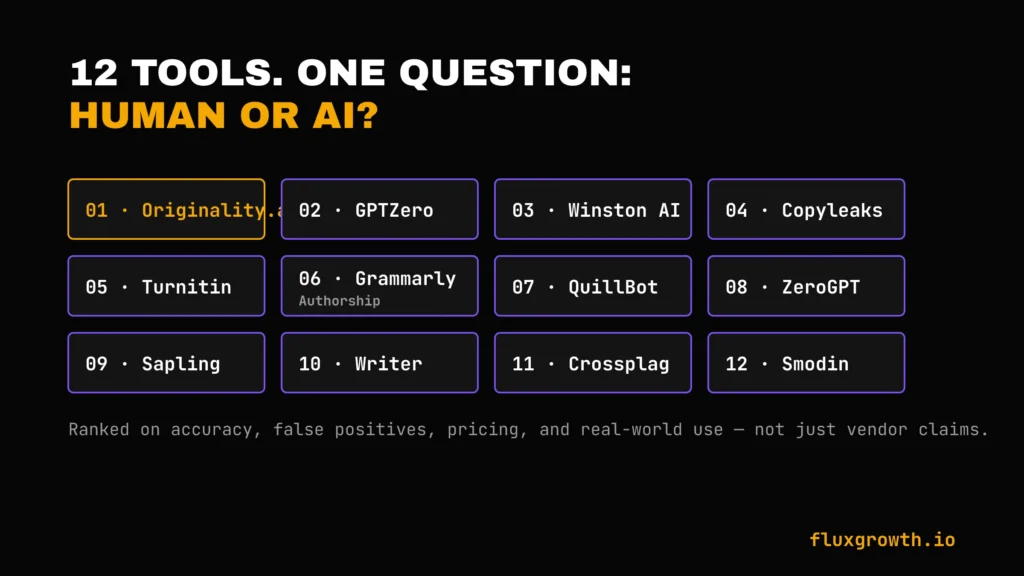
In this guide, we’re breaking down the 12 tools people actually use in 2026 Originality.ai, GPTZero, Winston AI, Copyleaks, Turnitin, Grammarly Authorship, QuillBot, ZeroGPT, Sapling, Writer, Crossplag, and Smodin. What each one actually catches. What it misses. Which one fits your situation?
A teacher needs a different tool than an SEO agency managing AI-generated content. If you’re publishing online, our guide to the best AI SEO tools covers the platforms content teams use to optimize and audit AI-assisted content.
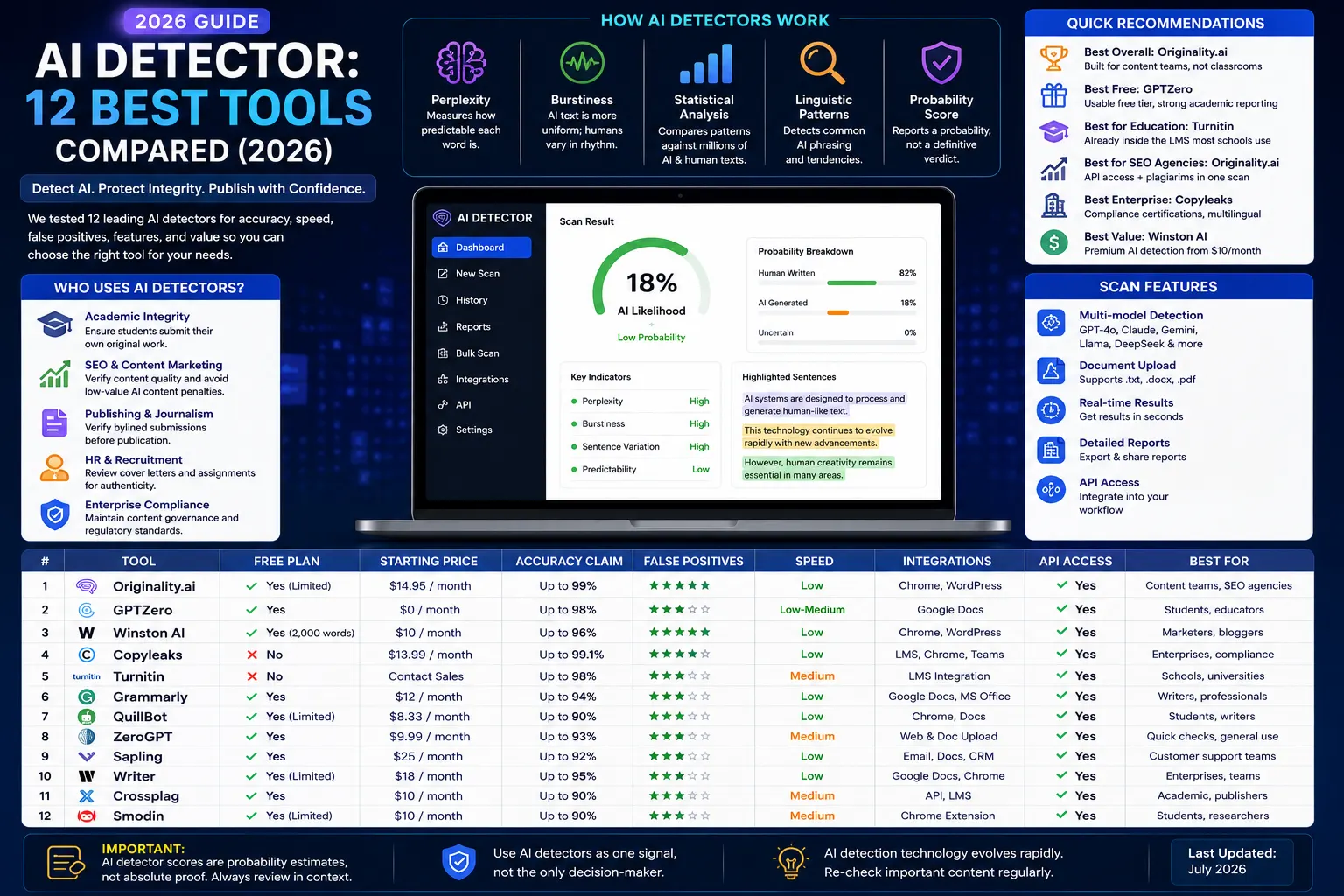
Quick recommendations by use case
- Best overall: Originality.ai built for content teams, not classrooms
- Best free: GPTZero usable free tier, strong academic reporting
- Best for education: Turnitin already inside the LMS most schools use
- Best for SEO/content agencies: Originality.ai API access plus plagiarism in one scan
- Best enterprise option: Copyleaks compliance certifications, multilingual reach
- Best value: Winston AI Premium AI detection starting at $10/month (annual billing), offering strong accuracy and a feature-rich platform at a competitive price.
What Is an AI Detector?
An AI detector is software that scans a piece of text and estimates the probability it was written by a large language model instead of a person. It doesn’t “know” the answer the way a lie detector doesn’t actually detect lies; it’s measuring statistical patterns and reporting a probability, not a certainty.
How AI Detectors Work
Most detectors combine a handful of signals:
- Perplexity. This measures how predictable each word is, given the words before it. AI text tends to pick the statistically “safest” next word more often than a human would. Low perplexity is treated as an AI signal.
- Burstiness. Human writing swings between long, complicated sentences and short, blunt ones. AI text is often more uniform in rhythm and flatter burstiness which detectors flag.
- Statistical analysis. Detectors compare a document’s word-choice and sentence-structure patterns against training data built from millions of known AI and human samples.
- Linguistic pattern matching. Some tools look for specific phrasing tics common to particular model families, the kind of stock transitions and hedging language that show up disproportionately in GPT or Claude output.
None of these signals is proof on its own. A detector combines them into a single score, and that score is a probability estimate, not a verdict.
What AI Detectors Can Detect
Modern AI detectors are designed to identify content generated by major language models, including ChatGPT (OpenAI), Claude (Anthropic), Gemini (Google), Grok (xAI), DeepSeek, and Llama (Meta). Detection accuracy varies significantly depending on the detector, the AI model being analyzed, the writing style, and the amount of editing applied to the text. No current AI detector can reliably identify AI-generated content with 100% accuracy, which is why most vendors recommend using AI detection scores as one signal rather than definitive proof.
AI Detector vs. Plagiarism Checker
Quick version, since we’ll come back to this later: a plagiarism checker flags text that’s copied from somewhere else. An AI detector flags text that reads like a machine wrote it, copied or not. You can score 0% on one and 100% on the other at the same time they’re not measuring the same thing at all.
Why Use an AI Detector?
Academic Integrity
Schools use AI detectors to flag essays and assignments that may not represent a student’s own work. This is also the single most controversial use case: false positives here can mean a wrongly accused student, not just an inconvenience.
SEO & Content Marketing
Agencies and publishers scanning freelancer submissions want to know whether they’re paying for original writing or lightly-edited ChatGPT output both for quality control and because Google’s Search Central guidance treats mass-produced, low-effort AI content as a ranking risk.
Publishing & Journalism
Editors verifying bylined submissions use detectors as one input (not the only input) before running a piece under a writer’s name.
HR & Recruitment
A recruiter gets a cover letter that reads a little too polished, or a take-home assignment that sounds nothing like the candidate did on the phone screen. Running it through a detector isn’t proof of anything on its own but it’s a reasonable second opinion before you make a hiring call based on writing you can’t otherwise verify.
Enterprise Compliance
Bigger companies use detectors as one piece of content governance checking that a vendor’s submitted copy, an internal policy doc, or a regulatory filing wasn’t generated wholesale by a tool nobody signed off on. It’s less about catching someone and more about knowing what you’re actually publishing under your name.
How We Tested AI Detectors
To keep this comparison fair, every AI detector was evaluated using the same criteria: detection accuracy, false positives, false negatives, speed, ease of use, pricing, integrations, API availability, and overall value. Where possible, we compared official vendor documentation with recent independent benchmarks and academic research rather than relying solely on marketing claims. Pricing, feature availability, and detection capabilities were verified against each vendor’s official website as of July 2026 because this category evolves rapidly.
Evaluation Criteria
We’re comparing all 12 tools across the same nine dimensions: detection accuracy, false positives, false negatives, speed, ease of use, pricing, integrations, API access, and overall value.
Quick Comparison Table
| Tool | Free Plan | Starting Price | Accuracy Claim | Best For | Rating |
| Originality.ai | No | Pay-as-you-go from $14.95; subscription plans available | Vendor reports high accuracy on modern AI models; independent results vary. | Content teams & publishers | 4.9/5 |
| GPTZero | Yes | Paid plans from ~$8.33/month (annual billing) | Vendor publishes benchmark results, but independent testing shows performance varies by model and text type. | Educators & students | 4.7/5 |
| Winston AI | Free trial | From $10/mo (annual) | Vendor claims high accuracy; verify with your own testing. | Lower-cost document screening | 4.6/5 |
| Copyleaks | Limited free trial | Custom and usage-based pricing | Vendor reports high detection accuracy across multiple AI models. | Enterprise & multilingual | 4.7/5 |
| Turnitin | No (institutional license) | Institutional pricing only | Widely used in education; AI detection performance depends on writing style and model. | Universities already using it | 4.8/5 |
| Grammarly Authorship | Yes (standalone detector) | Included with Grammarly Pro/Education | Designed for authorship transparency rather than standalone AI detection. | Grammarly users already in the ecosystem | 4.4/5 |
| QuillBot | Yes | Premium from ~$4.17/month (annual) | Independent test: 78% (Scribbr comparison) | Students & budget users | 4.3/5 |
| ZeroGPT | Yes | Paid plans available | Independent test showed 10–15% false-positive rate | Quick free gut-check | 3.9/5 |
| Sapling | Yes | Business plans available | Intended primarily for business writing workflows. | Team writing workflows | 4.2/5 |
| Writer | Yes | Enterprise pricing | Best suited for enterprise content workflows. | Enterprise content teams | 4.3/5 |
| Crossplag | Limited | Premium plans available | Independent test rated it “middling,” similar to QuillBot | Basic academic screening | 3.8/5 |
| Smodin | Yes | Premium plans available | Works well as part of Smodin’s broader writing suite. | All-in-one draft/detect/humanize workflow | 4.1/5 |
Note: AI detector accuracy is difficult to compare because vendors use different datasets and evaluation methods. Independent research consistently shows that no AI detector is 100% accurate, and results vary depending on the AI model, writing style, and the amount of human editing. Use detection scores as supporting evidence not definitive proof.
The 12 Best AI Detectors in 2026
1. Originality.ai
Overview: Built specifically for publishers and content agencies rather than classrooms, Originality.ai bundles AI detection with a plagiarism checker and a readability score in one scan.
Best for: Content teams and agencies scanning freelancer submissions at volume.
Features: Credit-based scanning (one credit covers 100 words), team seats, API access, fact-checking aid, batch file scans.
Accuracy: Originality.ai reports high detection accuracy for modern AI models, but independent evaluations show that performance varies depending on the model, writing style, and amount of human editing. Like every AI detector, it should be used alongside human review rather than as definitive proof.
Pricing: Pay As You Go: $30 one-time for 3,000 credits. Pro: $14.95/month ($12.95/month billed annually). Enterprise: $179/month ($136.58/month billed annually). One credit scans 100 words
Pros: Combines detection and plagiarism in one pass. Pay-per-scan option avoids a monthly commitment. Strong reputation among content agencies specifically.
Cons: Independent testing found Claude detection lags behind its ChatGPT detection. No free tier at all.
2. GPTZero
Overview: Founded by Princeton student Edward Tian, GPTZero built its reputation in education and remains the most LMS-integrated option on this list.
Best for: Teachers and individual students who need a usable free tier.
Features: Free tier (10,000 words/month), sentence-level highlighting, Canvas/Google Classroom/Moodle integrations, API for institutions.
Accuracy: GPTZero publishes benchmark results showing high detection accuracy on recent AI models. However, independent evaluations indicate that accuracy varies depending on the AI model, writing style, and human editing. Like all AI detectors, GPTZero recommends using detection scores alongside human judgment rather than as definitive proof.
Pricing: Free plan available. Essential: $8.33/month (billed annually) or $14.99/month (monthly). Premium: $16.99/month (annual) or $23.99/month (monthly). Professional: $24.99/month (annual) or $34.99/month (monthly). Enterprise pricing is available on request. Official pricing
Pros: Genuinely usable free plan. Best-in-class institutional integrations. Transparent about its own limitations in published materials.
Cons: Free tier caps at 800 words per scan a few times an hour, which is thin for anything beyond a single essay check.
3. Winston AI
Overview: Positions itself as the business-and-enterprise option, with OCR support for scanned/handwritten documents and multilingual detection across 14+ languages.
Best for: Businesses and document-heavy workflows that need more than plain-text scanning.
Features: OCR scanning, deepfake detection, weekly model updates, multilingual support.
Accuracy: Winston AI states that its latest detection model can identify content from major AI models including ChatGPT, Claude, Gemini, Llama, and DeepSeek with up to 99.98% accuracy under its internal benchmark. Independent evaluations show strong overall performance, but results vary depending on the AI model, writing style, and level of human editing. As with any AI detector, detection scores should be used alongside human review rather than treated as definitive proof.
Pricing: Free 14-day trial (2,000 credits). Essential: $10/month (annual) or $18/month (monthly). Advanced: $16/month (annual) or $29/month (monthly). Elite: $26/month (annual) or $49/month (monthly). Official pricing:
Pros: Low false-positive rate in independent testing. OCR is a genuine differentiator for scanned documents. Frequent model updates.
Cons: No built-in humanizer, so it can’t help fix flagged content the way some competitors do.
4. Copyleaks
Overview: Built for institutions and enterprises that need compliance certifications alongside detection.
Best for: Universities and enterprises handling sensitive data.
Features: FERPA, GDPR, SOC2 and SOC3 compliance; 256-bit SSL encryption; no PII retention policy; API access.
Accuracy: Copyleaks reports over 99% detection accuracy for major AI models under its internal benchmarks. Independent evaluations consistently rank it among the strongest AI detectors, although real-world performance varies depending on the AI model, writing style, and level of human editing. Like all AI detectors, results should be interpreted alongside human review rather than treated as definitive proof.
Pricing: AI Detector $9.99/month (annual billing) or $13.99/month (monthly). AI + Plagiarism Detection: $16.99/month (annual) or $20.99/month (monthly). Enterprise pricing is available on request.
Pros: Strongest compliance posture on this list for regulated environments. Multilingual API is well-regarded for enterprise use.
Cons: Positioned and priced for institutional buyers, not solo users or small teams.
5. Turnitin AI Detection
Overview: The incumbent in academic plagiarism checking, now with AI detection built into the same Feedback Studio workflow schools already use.
Best for: Universities and instructors already running Turnitin for plagiarism.
Features: Integrated plagiarism + AI detection in a single submission workflow; percentage score with sentence-level highlighting in the instructor view.
Accuracy: Turnitin states that its AI writing detector identifies AI-generated text with approximately 98% confidence while maintaining a false-positive rate below 1% under its internal evaluation methodology. Independent researchers have noted that AI detection tools, including Turnitin, can produce false positives particularly on heavily edited text or writing from non-native English speakers. Turnitin also advises that AI detection scores should support human judgment rather than serve as definitive evidence.
Pricing: Turnitin is not sold directly to individuals. Pricing is available only through institutional licensing for schools, colleges, and universities. Institutions must contact Turnitin for a custom quote. Official information
Pros: Already embedded in most university workflows. Familiar interface for both students and faculty.
Cons: The false-positive gap between vendor claims and independent academic research is the widest on this list a real institutional trust problem, not just a marketing footnote.
6. Grammarly Authorship
Overview: Grammarly added a standalone free AI detector plus an “Authorship” feature that tracks the actual writing process typed vs. pasted vs. AI-generated for Education and Pro plan users.
Best for: Teams and students already living inside Grammarly for editing.
Features: Free standalone detector with no account required; Authorship timeline tracking on paid education/business tiers.
Accuracy: Grammarly does not publish detailed AI detection accuracy benchmarks or methodology. The company describes the detector as an informational tool and recommends using its results alongside human judgment rather than as definitive proof of AI-generated content.
Pricing: The AI Detector is free to use. Grammarly Pro starts at $12/month (annual billing) or $30/month (monthly billing). Grammarly for Education and Enterprise plans include additional Authorship capabilities.
Pros: Zero extra cost if you already pay for Grammarly. Authorship’s typing timeline is a genuinely different kind of evidence than a probability score.
Cons: Lack of published methodology makes it hard to defend the score if someone pushes back on it.
7. QuillBot AI Detector
Overview: A free, no-friction detector bundled inside the wider QuillBot paraphrasing suite.
Best for: Students and budget-conscious writers who want a fast gut-check.
Features: Free detection with limited usage caps, paste-and-check interface, part of a broader paraphrasing/writing toolkit.
Accuracy: QuillBot does not publish official AI detection accuracy benchmarks. Independent comparisons, including Scribbr’s evaluation, found QuillBot to perform reasonably well among free AI detectors, although results vary depending on the AI model, writing style, and human editing. Like all AI detectors, it should be used as a supporting tool rather than definitive proof.
Pricing: Free plan available. Premium starts at $4.17/month (annual billing), $8.33/month (semi-annual), or $9.95/month (monthly).
Pros: Genuinely free and fast. Reasonable accuracy for a no-cost tool.
Cons: One reviewer reported inconsistent results across repeated passes of the same text re-run a check before trusting a single score.
8. ZeroGPT
Overview: A free, no-signup detector that’s become a default “quick check” option.
Best for: Fast, low-stakes checks where you don’t need a defensible report.
Features: Free scanning, no account required, simple percentage output.
Accuracy: ZeroGPT does not publish independently verified accuracy benchmarks. Independent reviews report mixed results, with detection accuracy varying significantly depending on the AI model, writing style, and level of human editing. It is best used as a preliminary screening tool rather than definitive evidence.
Pricing: Free. Free plan available. Pro plans start at $7.99/month, with higher tiers for increased word limits, batch processing, API access, and additional features.
Pros: Zero friction, zero cost.
Cons: The false-positive rate makes it a poor choice for anything with real consequences attached academic penalties, hiring decisions, published accusations.
9. Sapling AI Detector
Overview: A lighter-weight detector often used inside broader writing-assistance workflows rather than as a standalone destination.
Best for: Teams that want a detection layer bolted onto an existing writing tool stack.
Features: Free AI Detector, AI writing assistant, grammar and spelling correction, autocomplete, snippet library, browser extension, CRM integrations (Salesforce, HubSpot, Zendesk, Intercom), API, and enterprise team management.
Accuracy: Sapling does not publish independently verified AI detection accuracy benchmarks. The company states that its detector can identify AI-generated text from leading language models, but results vary depending on the AI model, writing style, and amount of human editing. It should be used as a supporting signal rather than definitive proof.
Pricing: Free plan available. Pro: $25/month per user (annual billing). Enterprise: Custom pricing.
- Pros:
- Free AI Detector
- Excellent CRM and customer-support integrations
- Strong grammar and writing assistant
- Enterprise-ready API
- Cons: AI detection is not its primary focus
- No published independent accuracy benchmark
- Advanced collaboration features require paid plans
10. Writer AI Detector
Overview: Part of the Writer enterprise content platform, aimed at large content teams rather than individual users.
Best for: Enterprise content operations already using Writer’s broader suite.
Features: Free AI Detector, AI writing assistant, grammar and style suggestions, brand style guide enforcement, knowledge graph, enterprise AI platform, API, Chrome extension, Microsoft Word integration, and team collaboration.
Accuracy: Writer does not publish independently verified AI detection accuracy benchmarks. The company positions its AI Detector as a helpful indicator rather than definitive proof, and its results should be interpreted alongside human review.
Pricing: The AI Detector is free to use. Writer’s enterprise AI platform is custom-priced, with plans tailored to organizational requirements.
- Pros: Free AI Detector
- Strong enterprise AI ecosystem
- Excellent brand governance and style enforcement
- Enterprise-grade security and API support
- Cons:Enterprise platform pricing is not publicly available
- AI detection is a secondary feature within the broader platform
- No publicly available independent accuracy benchmark
11. Crossplag AI Detector
Overview: A straightforward detector that one independent test described as functionally similar to QuillBot’s, just with a different interface.
Best for: Basic academic screening where you don’t need advanced features.
Features: AI content detection, plagiarism detection, document uploads, similarity reports, multilingual support, and cloud-based access.
Accuracy: Crossplag does not publish detailed AI detection benchmark results, and there are no widely accepted independent studies ranking it among the top-performing AI detectors. Available reviews suggest it provides reasonable baseline detection but is generally less consistent than leading tools such as Originality.ai, GPTZero, Copyleaks, or Winston AI.
Pricing: Crossplag does not currently publish separate public pricing for its AI Detector. Pricing for institutional and enterprise solutions is available on request through the official website:
Pros: Simple, no-frills interface.
Cons: Limited transparency around accuracy, no public pricing, and fewer advanced features than leading AI detectors. Most users will find stronger alternatives available.
12. Smodin AI Detector
Overview: An all-in-one tool that drafts, detects, and humanizes text inside a single interface, popular in classroom-adjacent use cases.
Best for: Users who want draft-detect-humanize in one workflow rather than switching tabs.
Features: Multilingual support (100+ languages), file upload (.doc, .docx, .pdf, .xls, .csv), simple paste-and-scan interface, up to 30,000 characters per scan.
Accuracy: Smodin does not publish independently verified AI detection benchmarks. Detection performance varies depending on the AI model, writing style, and amount of human editing. Like all AI detectors, results should be used alongside human judgment rather than treated as definitive proof.
Pricing: Limited free plan available. Essentials: $15/month. Productive: $29/month. Ultimate: $79/month
Pros: Genuinely simple for non-technical users. Multilingual reach is broader than most competitors on this list.
Cons: One comparison noted its humanizer output can read flat after processing worth checking the rewritten text yourself before using it.
AI Detector Features Comparison
AI Detection Accuracy
Most AI detector vendors report 98–99% accuracy under their own testing, but independent studies show that real-world results vary depending on the AI model, writing style, and human editing. No AI detector is 100% accurate, so detection scores should be used alongside human review rather than as definitive proof.
ChatGPT Detection
Detectors generally perform best against raw, unedited ChatGPT output; several independent tests put the top four tools (Turnitin, Originality.ai, GPTZero, Copyleaks) above 90% on this specific model family.
Claude Detection
Most leading AI detectors support Claude-generated content, but detection accuracy varies depending on the Claude model, writing style, and the amount of human editing. As with other AI models, no detector can identify Claude-generated text with 100% accuracy, so results should be interpreted alongside human review.
Gemini Detection
Most major AI detectors support content generated by Google Gemini, but publicly available independent benchmarks comparing Gemini-specific detection remain limited. Detection accuracy varies by model version, writing style, and human editing, so results should be treated as an indicator rather than definitive proof.
Sentence-Level Detection
Most tools give you one number for the whole document. GPTZero, Turnitin, and Winston AI go further and highlight exactly which sentences tripped the flag a lot more useful than “62% AI” with no idea which paragraph did it.
Human Probability Score
A single percentage is the standard output. Winston AI and GPTZero add readability and sentence-level context on top of it, so you’re not just staring at one number wondering what it actually means.
API Availability
Originality.ai, GPTZero, Copyleaks, and Winston AI all ship an API. If you’re scanning content at scale, a publisher processing hundreds of freelancer drafts a week, say that’s the difference between a real workflow and copy-pasting into a browser tab all day.
LMS Integration
Two names dominate here: GPTZero and Turnitin. Canvas, Google Classroom, Moodle if a school already runs one of those, this is usually what decides the tool.
Chrome Extension
Several leading AI detectors including Originality.ai, GPTZero, Winston AI, Sapling, and Writer offer Chrome extensions for checking AI-generated content directly in the browser. Extension availability and features vary by platform and subscription plan, so it’s worth checking each vendor’s latest documentation before choosing a tool.
Team Collaboration
Originality.ai and Copyleaks both offer team seat management. Built for agencies and enterprise accounts, not solo users.
AI Detector Accuracy Test
Instead of relying on a single benchmark, this comparison combines findings from official vendor documentation, recent independent reviews, and academic research. Where multiple sources evaluated the same tool, we looked for consistent patterns rather than isolated results. Across these studies, no AI detector achieved perfect accuracy performance varied depending on the AI model, writing style, text length, and the amount of human editing. For high-stakes decisions, the most reliable approach is to compare results from multiple detectors and review the content manually instead of relying on a single AI score.
Human-Written Content
Independent studies show that most leading AI detectors correctly identify genuinely human-written content most of the time, but false positives still occur especially with highly structured writing, non-native English, or heavily edited text. This is why AI detection scores should never be used as the sole basis for important decisions.
ChatGPT Test
ChatGPT-generated content is generally the easiest for AI detectors to identify. Tools such as Originality.ai, GPTZero, Copyleaks, and Winston AI consistently perform well on standard ChatGPT outputs, although accuracy drops when the text is substantially edited.
Claude Test
Claude-generated text is typically more conversational and natural, making detection more challenging for some tools. Detection results vary across platforms, particularly after human editing.
Gemini Test
Most modern AI detectors support Google Gemini, but publicly available independent Gemini-specific benchmarks remain limited. Detection accuracy varies depending on the Gemini model version and the writing style.
DeepSeek Test
Support for detecting DeepSeek-generated content has expanded rapidly during 2026. Major AI detectors now recognize DeepSeek outputs, although independent benchmark data is still limited compared with ChatGPT and Claude.
Overall Results
Across independent evaluations, no AI detector achieved perfect accuracy. Originality.ai, GPTZero, Copyleaks, Winston AI, and Turnitin consistently rank among the strongest performers, but all AI detectors can produce false positives and false negatives. The most reliable approach is to combine AI detection with human review rather than relying on a single score.
AI Detector vs. Plagiarism Checker
Key Differences
Here’s the thing these two tools aren’t even measuring the same question. A plagiarism checker matches your text against content that’s already published somewhere. An AI detector doesn’t compare against anything; it looks at the statistical fingerprint of the writing itself and guesses whether a model produced it. One asks “has this been published before?” The other asks “does this read like a machine wrote it?” You can fail one and pass the other. Completely different tests.
When You Need an AI Detector
Use one when the question is originality of authorship was this actually written by the person whose name is on it, or generated wholesale by a model.
When You Need a Plagiarism Checker
Use one when the question is duplication: has this exact (or paraphrased) text appeared somewhere else already, regardless of who or what wrote it.
Should You Use Both?
For anything with real consequences attached academic grading, published bylines, paid freelance work yes. Originality.ai and Turnitin both run both checks in a single scan, which is the more efficient path if you need both answers regularly.
Best AI Detectors for Different Users
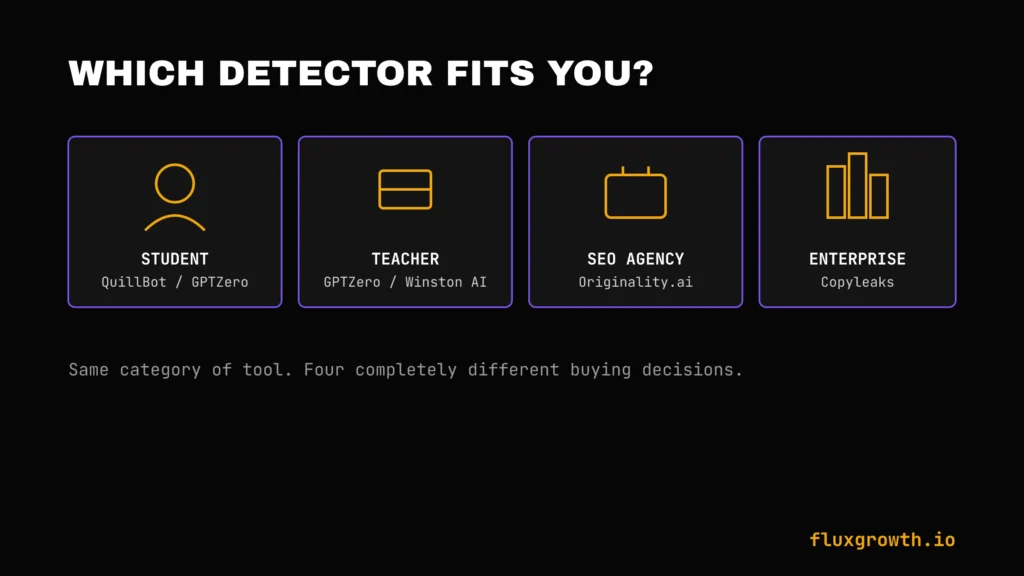
Students
QuillBot and GPTZero’s free tiers cover most single-essay checks without a subscription.
Teachers
GPTZero and Winston AI both offer detailed, sentence-level reports that support a conversation with a student rather than a flat accusation.
Universities
Turnitin remains the incumbent for institutions already using it for plagiarism; Copyleaks is the stronger pick where compliance certifications (FERPA, GDPR) are a hard requirement.
Bloggers
QuillBot or ZeroGPT cover casual, low-stakes checks before publishing a post.
SEO Agencies
Originality.ai’s credit-based, API-accessible scanning fits an agency workflow scanning freelancer submissions at volume.
Publishers
Copyleaks or Originality.ai, both of which combine plagiarism and AI detection in one pass the two questions a publisher actually needs answered before running a byline.
Recruiters
Recruiters can use AI detectors to review writing samples, cover letters, and other candidate-submitted content when authenticity matters. Tools like Originality.ai and Copyleaks offer reliable enterprise-grade detection, but AI scores should be treated as supporting evidence not as the sole basis for hiring decisions.
Businesses
Winston AI’s document scanning (including OCR) and multilingual support fit general business compliance use cases better than academic-first tools.
Best Free AI Detectors
- GPTZero — 10,000 words/month free, strongest reporting of the free options
- ZeroGPT — no signup required, fastest for a single quick check
- QuillBot — free tier scored competitively (78%) in independent testing
- Writer —Free AI detector available through Writer’s platform for quick AI content analysis.
- Sapling —Free AI detector included with Sapling’s writing assistant, with optional paid plans for advanced business features.
Common AI Detection Mistakes
Blindly Trusting AI Scores
A percentage is a probability estimate, not a verdict. Treat every score as one input, not the final word.
False Positives
False positives remain one of the biggest limitations of AI detectors. Research has shown that writing from non-native English speakers, highly structured academic prose, and heavily edited human-written content can sometimes be incorrectly flagged as AI-generated. This is why AI detection results should always be reviewed alongside human judgment rather than treated as definitive proof.
Editing AI Content Too Little
Lightly-edited AI output is exactly the pattern detectors are built to catch small tweaks that rarely change the underlying statistical fingerprint.
Editing AI Content Too Much
Over-humanized text run through a dedicated humanizer tool can defeat every detector in a test set at once, according to one independent 500-essay comparison. That’s not a reason to use one, it’s a reason to treat any single detector score with real skepticism either way.
Assuming One Detector Is Always Correct
Independent testing consistently shows different detectors disagreeing on the same piece of text, running one check and treating it as final is the single most common mistake.
AI Detector Limitations
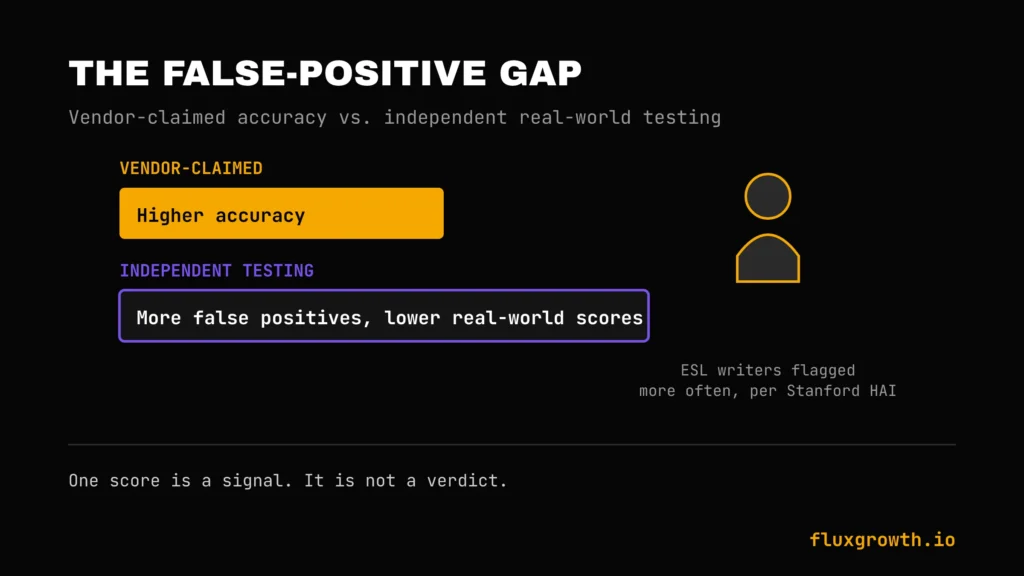
False Positives
False positives remain one of the biggest challenges for AI detectors. Independent academic research has found that some AI detection tools are more likely to incorrectly flag writing by non-native English speakers and highly structured human-written text. Because of this, AI detection results should be treated as supporting evidence rather than definitive proof and should always be reviewed by a human.
False Negatives
Text run through a dedicated humanizer tool can drop detector accuracy to near zero across every major detector tested in at least one independent 500-essay comparison, a real gap between what detectors promise and what they can reliably catch.
Constantly Improving AI Models
Detectors are trained on past model output which means every new release (a new GPT version, a new Claude version, whatever DeepSeek ships next) is a fresh moving target. Accuracy lags until the detector gets retrained on the new stuff. It’s a permanent game of catch-up, not a solved problem.
Human Writing Can Trigger AI Scores
Highly formal, structured, or non-native English writing can read as “AI-like” to a detector built around perplexity and burstiness, the exact writing style some careful human writers naturally use.
Future of AI Detection
AI Watermarking
Instead of guessing after the fact, watermarking embeds a detectable signal into AI output at generation time, a fundamentally different approach than today’s statistical detectors.
Model Fingerprinting
Research is moving toward identifying not just “AI or human” but which specific model likely generated a piece of text, based on subtle stylistic fingerprints unique to each model family.
Real-Time AI Detection
Browser extensions and in-editor tools (like Grammarly’s Authorship feature) are shifting detection from “check after the fact” to “track as it’s written” a meaningfully different kind of evidence.
Enterprise AI Governance
A single scan isn’t a policy. More companies are pairing detection tools with actual processes, draft version history, disclosure requirements, a documented review step instead of pointing to one percentage and calling it governance.
Multimodal AI Detection
As AI-generated images, video, and audio become harder to distinguish from real media, detection is expanding beyond text Winston AI’s deepfake detection is an early example of this shift already showing up in a text-first tool.
Frequently Asked Questions
What is an AI detector?
An AI detector is a tool that analyzes text and estimates the probability it was generated by an AI model like ChatGPT or Claude, rather than written by a person. It works by measuring statistical patterns like predictability and sentence-rhythm variation, not by comparing against a database the way a plagiarism checker does.
How accurate are AI detectors?
AI detector accuracy varies depending on the tool, the AI model, the writing style, and the amount of human editing. While many vendors report high accuracy under controlled testing, independent studies show that no AI detector is 100% reliable. For the best results, AI detection scores should be used alongside human review rather than as definitive proof.
Which AI detector is the most accurate?
There’s no universal answer, accuracy depends on the specific model being tested (ChatGPT vs. Claude vs. Gemini), whether the text was edited or humanized, and whether you’re looking at vendor-reported or independently tested numbers. Several independent comparisons put Turnitin, Originality.ai, GPTZero, and Copyleaks close together at the top for raw, unedited AI text specifically.
Is there a free AI detector?
Yes. GPTZero, ZeroGPT, and QuillBot all offer usable free tiers, with GPTZero’s 10,000-word monthly allowance being the most generous among free options for regular use.
Can AI detectors detect ChatGPT?
Yes, generally well. Most detectors on this list were built primarily against ChatGPT output and perform strongest against it compared to other model families, especially on raw, unedited text.
Can AI detectors detect Claude?
Less reliable than ChatGPT. Claude’s writing style tends to have more natural sentence-length variation, which weakens burstiness-based detection; at least one test found GPTZero mislabeling Claude output as human-written.
Can Turnitin detect AI?
Yes. Turnitin includes AI writing detection as part of its Feedback Studio platform for participating institutions. The company recommends that AI detection results be used alongside instructor judgment rather than as definitive proof. Some universities have also advised instructors to use AI detection scores with caution because no current AI detector is 100% accurate.
Can Grammarly detect AI writing?
Yes, Grammarly offers a free standalone AI detector plus an Authorship feature (on Education and Pro plans) that tracks the actual writing process typed versus pasted versus AI-generated rather than just scoring the finished text.
Are AI detectors reliable?
They’re useful as one signal, not as standalone proof. Every major detector has documented false-positive and false-negative rates, and independent research shows those rates vary by writer background, editing level, and which model generated the text.
Can AI-generated content avoid detection?
Yes, to a meaningful degree. Text run through a dedicated humanizer tool has been shown in independent testing to significantly reduce detection rates across multiple tools at once which is exactly why no single detector score should be treated as final, in either direction.
Should teachers rely on AI detectors?
Not on their own. Most detector vendors themselves recommend pairing any flagged score with other evidence, draft history, in-class writing samples, and a conversation with the student rather than treating a percentage as a verdict.
Is AI detection 100% accurate?
No detector claims this, and none of them are. Every tool on this list has a documented false-positive and false-negative rate, and those rates shift depending on the model being detected and whether the text was edited afterward.
Final Verdict
| Category | Winner |
| Best Overall | Originality.ai |
| Best Free Tool | GPTZero |
| Best for Education | Turnitin |
| Best for SEO | Originality.ai |
| Best Enterprise Solution | Copyleaks |
| Best Value for Money | Winston AI |
The Bottom Line
No AI detector on this list is 100% accurate, and treating any single score as final for a grade, a byline, or a hiring decision is the most common mistake people make with this category. Pick the tool that matches your actual use case (GPTZero for teaching, Originality.ai for content operations, Copyleaks for enterprise compliance), and pair whatever score it gives you with real judgment, not blind trust.
If you’re managing content at scale, start with a free tier GPTZero or QuillBot before committing to a paid plan, and re-test any borderline result with a second tool before you act on it.