Last updated: September 27, 2026
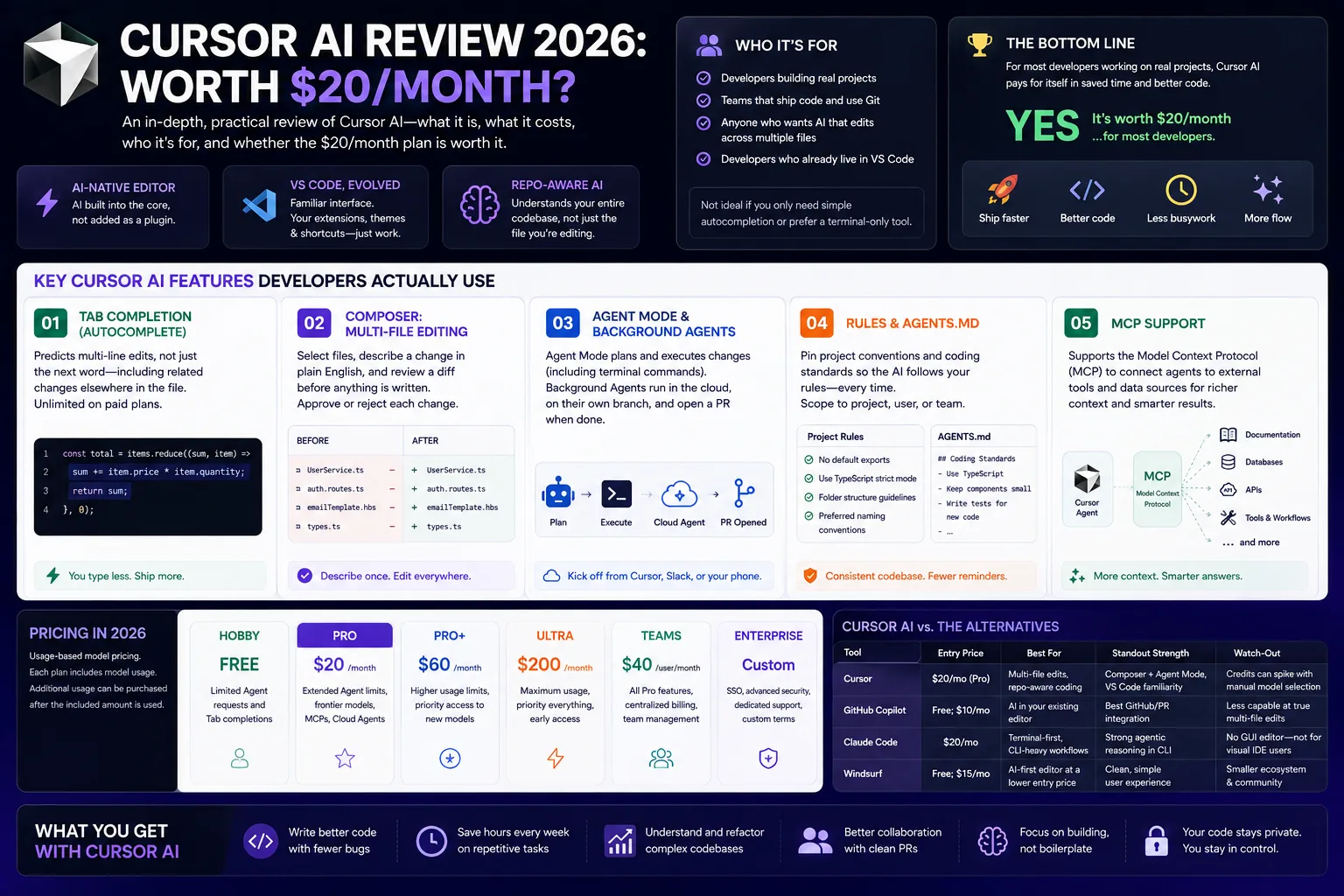
If you’re weighing Cursor AI against GitHub Copilot, Claude Code, or just sticking with plain VS Code, you’re really asking one question: does the $20-a-month plan (or more) actually pay for itself in shipped code? Short answer for most developers working on real projects, yes. But “most” isn’t “all,” and the details matter more than the marketing.
This review breaks down what Cursor AI actually is, what it costs in 2026, who it fits, and where it falls short. No sponsored placements, no affiliate math nudging you toward one plan over another, just what a developer needs to know before signing up.
Cursor is an assistant rather than an agent. If you want tools that run whole tasks unattended, we put fifteen of them through the same brief in our guide to the AI agents we tested in 2026.
What Changed With Cursor in 2026
If you read a Cursor review from early 2026, four things are now out of date:
- New owner. SpaceX closed its acquisition of Cursor’s parent company, Anysphere, on August 14, 2026, in an all-stock deal valued at about $60 billion. As of this update, the individual plan prices below have not changed.
- Cheaper in-house models. Composer 2 launched in March 2026, and Composer 2.5 is now listed at $0.50 per million input tokens and $2.50 per million output tokens. That is far cheaper than frontier models, so sticking to Composer or Auto stretches your included usage.
- Teams pricing split (June 2026). Standard seats now have one pool for Cursor’s own models and one for third-party models, which add a $0.25 per million token Cursor Token Rate. A Premium seat costs 3x a Standard seat for 5x the usage.
- Auto is metered, not unlimited. Auto now has Cost, Balance and Intelligence modes, and all of them draw from your plan’s usage pool. Older posts that call Auto “free and unlimited” are wrong.
Source for model rates and pools: Cursor’s models and pricing docs, checked September 27, 2026.
What Is Cursor AI?
Cursor is an AI-native code editor. It’s a fork of VS Code, but any sphere wove AI into the core editing experience instead of adding it as an extension. That’s the one-sentence version. Here’s the longer one.
Most “AI coding tools” fall into a few buckets, and people throw the terms around loosely.
- AI coding assistant — suggests code as you type (think Tab-complete). GitHub Copilot started here.
- AI coding agent — takes a task description and writes, edits, and tests code across multiple files with less hand-holding.
- AI-powered IDE — a full code editor with AI capabilities built into the core, not added on top. Cursor is this.
- Terminal-based coding agent — runs from the command line instead of a GUI editor. Claude Code and Aider are examples.
- Repository-aware AI — understands your whole code base (file structure, dependencies, conventions), not just the file you have open.
In practice, it’s all of the above at once confusingly. That’s part of why it’s hard to compare Cursor against single-purpose tools. It doesn’t compete in one category. It rolls the whole category into one editor.
Because it’s a VS Code fork, your extensions, themes, and keyboard shortcuts carry over. If you already live in VS Code, the switch feels closer to a software update than a new tool to learn.
In short: this is VS Code with AI built into the foundation, not bolted on as a plugin. That’s the core difference between Cursor and Copilot.
Key Cursor AI Features Developers Actually Use
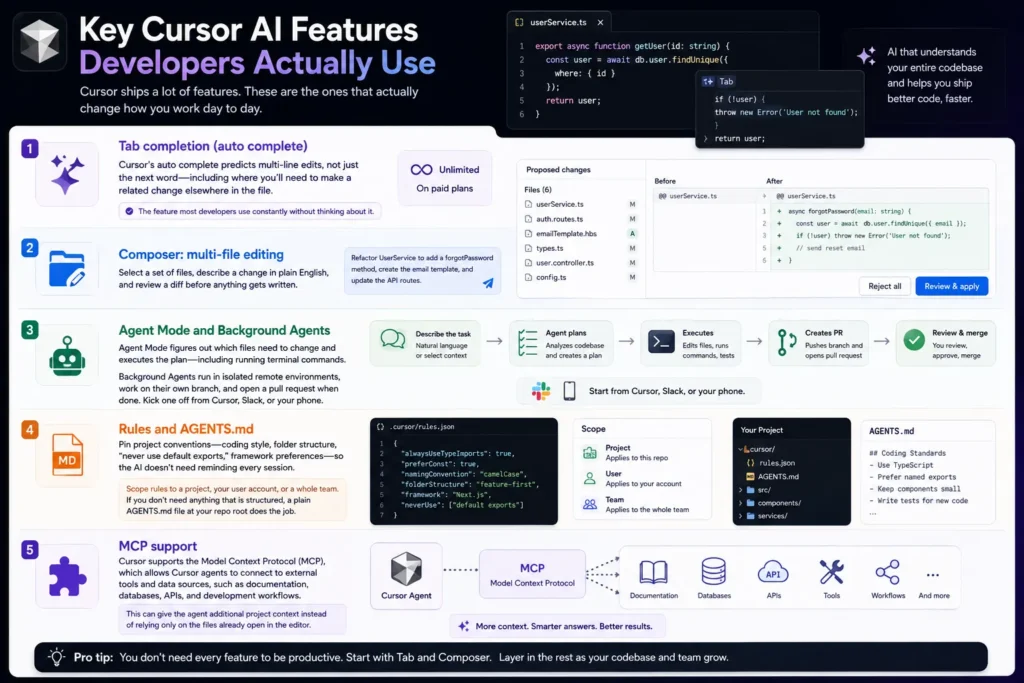
Cursor ships a lot of features. These are the ones that actually change how you work day to day.
Tab completion (autocomplete)
Cursor’s autocomplete predicts multi-line edits, not just the next word including where you’ll need to make a related change elsewhere in the file. It’s the feature most developers use constantly without thinking about it. On paid plans, it’s unlimited.
Composer: multi-file editing
Composer lets you select a set of files, describe a change in plain English, and review a diff before anything gets written. Say something like “refactor UserService to add a forgotPassword method, create the email template, and update the API routes.” Composer proposes edits across every file that needs to change. You approve or reject each one.
Agent Mode and Background Agents
Agent Mode goes further. Instead of you picking the files, Cursor figures out which files need to change and executes the plan including running terminal commands.
Background Agents (sometimes called Cloud Agents) push that further still. They run in isolated remote environments, work on their own branch, and open a pull request when done. Kick one off from Cursor, Slack, or your phone. Come back later to a PR waiting for review.
Rules and AGENTS.md
One of the more useful, less flashy features: Rules let you pin project conventions coding style, folder structure, “never use default exports,” framework preferences so the AI doesn’t need reminding every session. Scope rules to a project, your user account, or a whole team. If you don’t need anything that is structured, a plain AGENTS.md file at your reported root does the job.
MCP support
Cursor supports the Model Context Protocol (MCP), which allows Cursor agents to connect to external tools and data sources, such as documentation, databases, apis, and development workflows. This can give the agent additional project context instead of relying only on the files already open in the editor.
Note: Keep this as a feature description unless you have personally tested Cursor MCP. Don’t add firsthand-testing claims without actual testing.
Cursor AI Pricing in 2026 — What You Actually Pay
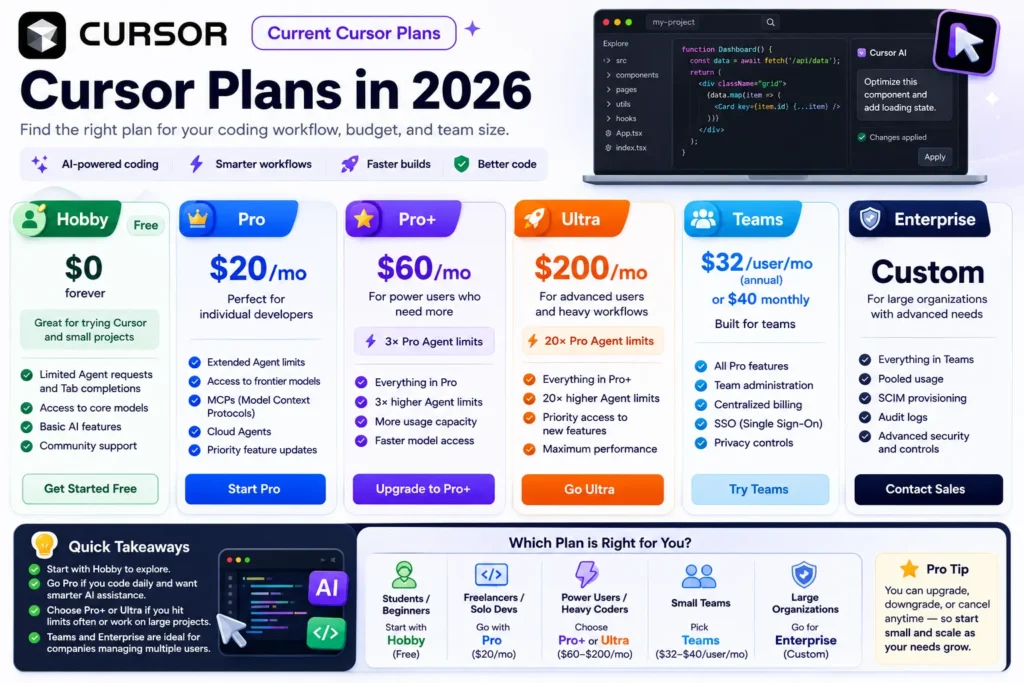
Cursor’s pricing has moved toward usage-based model pricing, so the subscription price alone doesn’t tell you how much heavy agent use can cost. Cursor says each plan includes a set amount of model usage, while additional on-demand usage can be purchased after the included amount is consumed.
Current Cursor plans
| Plan | U.S. price | What you get |
| Hobby | Free | Limited Agent requests and Tab completions |
| Pro | $20/mo | Extended Agent limits, frontier models, MCPs, Cloud Agents |
| Pro+ | $60/mo | 3× Pro Agent limits |
| Ultra | $200/mo | 20× Pro Agent limits, priority access to new features |
| Teams | $32/user/mo annual or $40 monthly | Team administration, billing, SSO, privacy controls |
| Enterprise | Custom | Pooled usage, SCIM, audit logs, advanced controls |
All paid individual and team plans include unlimited Tab completions, access to every supported model, Background/Cloud Agents, and bug bot (Cursor’s AI pull-request review tool). Teams adds an admin dashboard, centralized billing, and single sign-on.
How the credit system actually works
Cursor’s current pricing uses two usage pools: one for Cursor’s first-party models and another for third-party models. Your model choice affects how quickly your included usage is consumed, so the subscription price alone doesn’t tell you how much agent coding you can do each month.
What heavy users really pay: Cursor’s own docs say daily Tab users typically stay inside their included usage, while daily Agent users typically run $60 to $100 a month in total usage. If you live in Agent mode, budget for Pro+ rather than Pro.
For Pro, the Other Models pool includes $20 of third-party model usage per month. Pro Plus includes $70 and Ultra includes $400. When you exceed your included usage, you can either purchase additional usage at the applicable API rates or upgrade to a higher plan.
Cursor’s Auto feature now has three modes: Auto Cost, Auto Balance, and Auto Intelligence. Auto Cost uses a fixed token rate, while Auto Balance and Auto Intelligence charge based on the model selected by Cursor and the actual usage.
Bottom line: Pro at $20/month is the sensible starting point for most solo developers. Cursor says limited agent users often stay within the included $20, while daily agent users typically consume more and may be better served by a higher plan or additional usage
Is Cursor AI Right for Your Workflow?
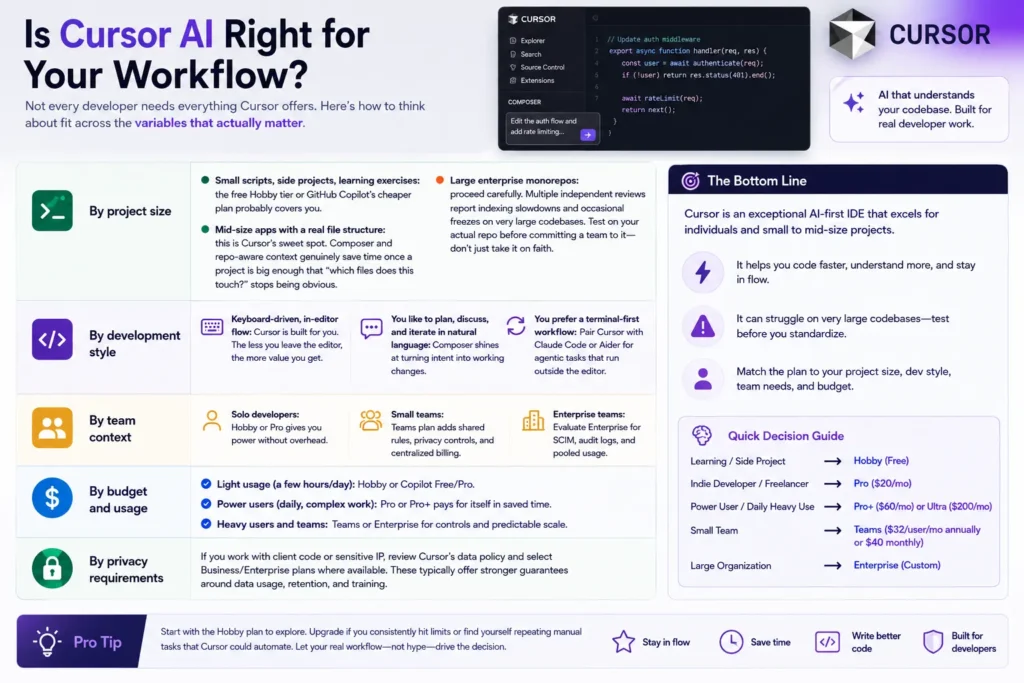
Not every developer needs everything Cursor offers. Here’s how to think about fit across the variables that actually matter.
By project size
- Small scripts, side projects, learning exercises: the free Hobby tier or GitHub Copilot’s cheaper plan probably covers you.
- Mid-size apps with a real file structure: this is Cursor’s sweet spot. Composer and reported-aware context genuinely save time once a project is big enough that “which files does this touch?” stops being obvious.
- Large enterprise monorails: proceed carefully. Multiple independent reviews report indexing slowdowns and occasional freezes on very large code bases. Test on your actual reported before committing a team to it, don’t just take it on faith.
By language and stack Cursor works across essentially any language VS Code supports JavaScript, TypeScript, Python, Java, PHP, and more since it inherits the VS Code extension ecosystem. Model quality for a given language depends more on which underlying model you pick than on Cursor itself.
By experience level If you’re a coding student or early-career developer, Cursor can accelerate boilerplate and syntax lookup. It’s not a substitute for understanding what the generated code does, though. Every developer who’s used it seriously for a while says some version of the same thing: you still have to review the diffs. Treat it like a fast junior collaborator, not an autopilot.
By IDE and terminal preference Attached to a different editor JetBrains, Neovim or prefer working entirely from the command line? Cursor’s GUI-first, VS-Code-fork design won’t fit. That’s a real point in favor of terminal-native tools instead.
By team size and budget
- Solo developer, budget-conscious: Pro at $20/month, staying in Auto mode.
- Small team wanting shared conventions: Teams at $40/user/month adds admin controls and centralized billing worth the premium once you’re coordinating more than one or two people.
- Regulated or enterprise environment: Enterprise pricing with pooled usage and audit logs. Talk to sales rather than estimating from the public tiers.
GitHub Integration and reps-aware Development
Cursor integrates with GitHub so Cloud/Background Agents can work on repositories, test changes, and produce merge-ready pull requests. Cursor automation can also trigger agents from GitHub events and open PRs, making AI-generated changes easier to fit into an existing code-review workflow
That matters because the agent’s output can fit into an existing pull-request review workflow instead of requiring developers to review changes in a completely separate system. Cursor’s cloud agents can also test their changes in isolated environments and attach artifacts such as screenshots, videos, and logs to help with review.
Privacy, Data Security, and Team Considerations
For a startup founder or engineering manager, privacy can matter as much as Cursor’s coding features when proprietary or client code is involved.
Cursor offers Privacy Model Individual users can turn it on themselves, or a team or enterprise administrator can enforce it organization-wide. When Privacy Mode is enabled, Cursor says customer data is not used for training by Cursor or its model providers, and Cursor maintains zero-data-retention agreements with its providers. Some safety or abuse-detection systems may still retain data temporarily when triggered.
Privacy Mode does not mean your code stays entirely on your computer. Cursor is a cloud-connected service, and requests can be processed by Cursor and its model providers. Cursor says its models are hosted on U.S.-based infrastructure by providers, trusted partners, or Cursor, although the exact provider depends on the model and configuration.
Cursor AI vs. the Alternatives
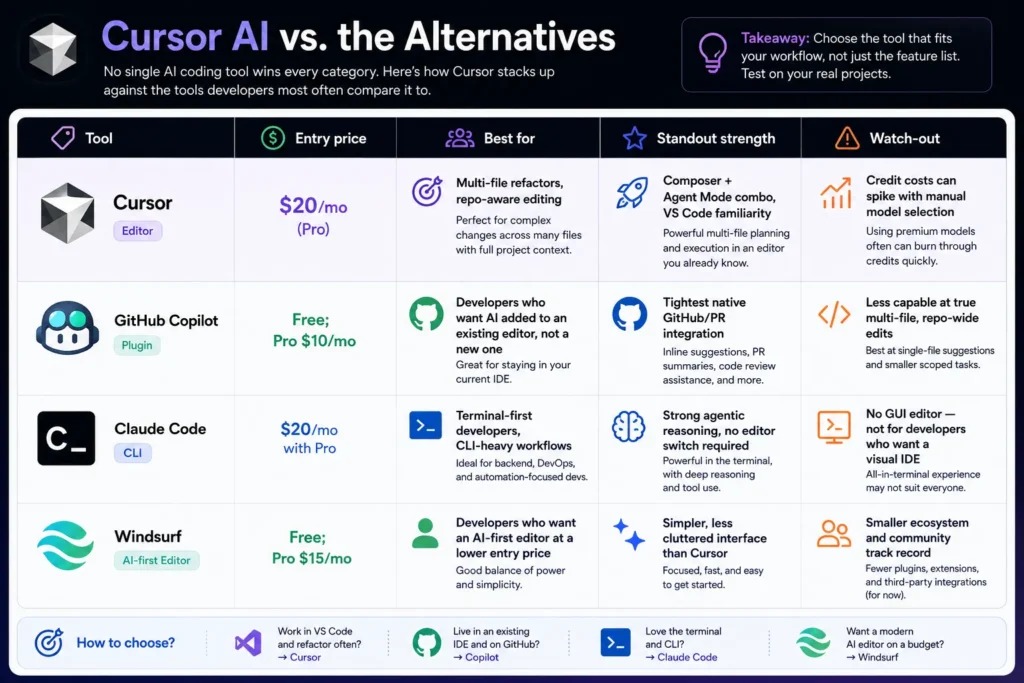
No single AI coding tool wins every category. Here’s how Cursor stacks up against the tools developers most often compare it to.
| Tool | Entry price | Best for | Standout strength | Watch-out |
| Cursor | $20/mo (Pro) | Multi-file refactors, repo-aware editing | Composer + Agent Mode combo, VS Code familiarity | Credit costs can spike with manual model selection |
| GitHub Copilot | Free; Pro $10/mo | Developers who want AI added to an existing editor, not a new one | Tightest native GitHub/PR integration | Less capable at true multi-file, repo-wide edits |
| Claude Code | $20/mo with Pro | Terminal-first developers, CLI-heavy workflows | Strong agentic reasoning, no editor switch required | No GUI editor — not for developers who want a visual IDE |
| Windsurf | Free; Pro $15/mo | Developers who want an AI-first editor at a lower entry price | Simpler, less cluttered interface than Cursor | Smaller ecosystem and community track record |
If you want AI built directly into your editor and you’re comfortable with a VS Code-style workflow, Cursor is one of the strongest options to consider. If you want AI added to an existing GitHub/IDE workflow, GitHub Copilot is a lower-friction choice. Terminal-heavy developers may prefer Claude Code, while Windsurf is another AI-first editor worth comparing.
Honest Limitations
No AI coding tool is finished software, and Cursor has real rough edges worth knowing before you commit a subscription or a team roll out to it.
- Performance on large code bases. Indexing and responsiveness can degrade on very large monorails. Test on your actual project size before assuming it’ll scale.
- Credit unpredictability. Your actual monthly cost can vary meaningfully depending on which models you select and how often. Budget with some slack, especially in month one.
- The AI still makes mistakes. Edge cases, subtle logic errors, and security-sensitive code auth, payments, permissions all need human review. Nothing here replaces code review discipline.
- A learning curve exists. Getting real value out of Rules, Plan Mode, and knowing when to use Composer versus Agent Mode versus plain Tab completion takes a week or two of deliberate use, not five minutes.
None of these are deal breakers on their own. But they’re real and it’s better to know about the indexing lag on a sprawling code base before your team’s three weeks into a roll out, not after.
What I’d Recommend If You’re Starting Today
Start with Cursor’s free Hobby plan and test it on a real project not a toy repository. Try a genuine multi-file task such as a refactor, bug fix, or feature that you would normally complete manually. That will tell you more about whether Cursor fits your workflow than a benchmark score alone.
If Cursor saves you meaningful time, move to Pro at $20/month and monitor your Agent usage before considering Pro+ or Ultra. Cursor currently recommends Pro+ for developers who use Agent daily and Ultra for heavy Agent users, so upgrading should be based on your actual usage rather than assumptions.
For teams, start with a small pilot before rolling Cursor out across the organization. Test the Teams plan’s administration, centralized billing, usage analytics, privacy controls, SSO, and shared agent/automation features against your team’s requirements first.
Bottom line: start free, test Cursor on real work, measure how much time it actually saves, and upgrade only when your usage justifies the cost
FAQ
Is Cursor AI free?
Yes, Cursor offers a free Hobby plan with limited Agent and Tab usage. It is useful for trying Cursor before paying, but developers doing regular AI-assisted coding may need a paid plan as their usage increases.
Is Cursor AI worth $20 a month?
For developers working on real, multi-file projects several hours a week, most reviewers and users find the time saved on refactors and reported-aware editing justifies the cost. For occasional or single-file coding, the free tier or a cheaper tool like GitHub Copilot may cover your needs just as well.
What’s the difference between Cursor and GitHub Copilot?
Cursor is a full standalone editor built around AI from the ground up, while Copilot adds AI features into an editor you already use (VS Code, JetBrains, and others). Cursor generally offers deeper multi-file and agent editing; Copilot offers a lower entry price and tighter integration if you don’t want to switch editors.
Does Cursor AI work with Python, Java, and PHP?
Yes. Since Cursor is built on VS Code, it supports any language VS Code supports, including Python, Java, PHP, JavaScript, and TypeScript. Model quality for a specific language depends more on the underlying AI model you select than on Cursor’s editor itself.
Is my code private with Cursor AI?
Cursor offers a Privacy Mode that, when enabled, keeps your code data out of training data for Cursor and its model providers. It’s a setting you need to confirm is turned on, not a default guarantee teams with strict data requirements should verify current data-handling policies directly with Cursor.
Can teams use Cursor AI?
Yes. Cursor offers dedicated Teams and Enterprise plans for organizations. The current Teams plan has a Standard seat at $40/user/month and a Premium seat at $120/user/month, with Premium providing 5× the Agent usage of Standard. Teams includes centralized billing and administration, usage analytics, team-wide Privacy Mode, SAML/OIDC SSO, shared team rules and workflows, bug bot, and Cloud Agents/automation.
How is Cursor different from an AI coding agent like Claude Code?
Cursor is a full graphical IDE with agent capabilities built in, while tools like Claude Code run from the terminal without a visual editor. If you want a GUI-based coding experience, Cursor fits. If you’re comfortable working entirely from the command line, a terminal-native agent may fit your workflow better.
Who owns Cursor now?
SpaceX. It completed the acquisition of Anysphere, the company behind Cursor, on August 14, 2026. Cursor still runs as its own product with the same Hobby, Pro, Pro+, Ultra, Teams and Enterprise plans.
Bottom Line
Cursor AI earns its subscription price for developers working on real, multi-file code bases who stay disciplined about which models they select. The tool is genuinely capable but the credit system rewards understanding how it bills before you rely on it daily.
Start with the free tier. Test it on an actual project this week. Upgrading only once you’ve confirmed it saves you real time on your own code, not someone else’s review of it.