
FluxGrowth is reader-supported. Some links in our guides are affiliate links — if you buy through one we may earn a commission, at no extra cost to you. It never changes which tools we recommend. How we test tools.
Online tools for project management are web-based apps that keep a team’s tasks, deadlines, files, and progress in one shared place. Picking one comes down to three questions: how many people will use it, how your team works, and how the vendor charges.
This guide is part of our AI Automation hub – everything we have published on automating a small business with AI, in one place.
This guide is for U.S. teams, freelancers, and business owners choosing a first tool or replacing one that stopped fitting. You’ll get plain definitions, seven tools with verified pricing where vendors publish it, a way to choose by team type, and the free-plan limits most roundups skip.
What are online tools for project management?
Online project management tools are cloud-based platforms where a team plans work, assigns tasks, sets deadlines, and tracks progress from any browser or phone. As a result, everyone sees the same live version of the project. For a lot of small teams, that replaces a shared Google Sheet and a Slack thread nobody can search.
How online project management software works
Each project lives in a shared workspace, split into tasks. Every task gets an owner, a due date, and a status.
As people comment, attach files, and mark tasks done, the software rolls that activity into boards, timelines, and dashboards. The vendor hosts it all, so there’s nothing to install or patch.
Project management vs. task management vs. collaboration tools
The labels overlap, and plenty of tools fit more than one row. Here’s what each usually means:
| Term | What it means | Typical example |
| Project management software | Plans multi-step projects with dates, dependencies, and reporting | Asana, monday.com |
| Task management software | Tracks individual to-dos and owners, with lighter planning | Trello |
| Team collaboration platform | Built around messages, docs, and discussion; tasks are secondary | Basecamp, Notion |
| Work management software | Covers projects plus ongoing requests and operations across departments | monday.com, Asana |
| Agile project management tool | Built for sprints, backlogs, and iterative releases | Jira |
| Kanban tool | Shows work as cards moving across columns (To Do, Doing, Done) | Trello |
| Gantt chart software | Plots tasks as bars on a timeline, with dependencies between them | ClickUp, monday.com |
| Resource management software | Shows who has capacity and who’s overloaded | Asana, Wrike |
Which features matter most in project management software?
The features that matter are the ones your team will touch every week. That means tasks with clear owners and due dates, at least two views of the same work, comments and files on each task, and integration with the apps you already use.
Anything beyond that list is a tiebreaker.
Tracking and views
A Kanban board shows status at a glance. A timeline or Gantt view shows whether the dates actually hold up. Most teams need both.
Here’s the thing: the view you need for deadlines isn’t always free. Trello, for example, puts its Timeline, Calendar, and Dashboard views on the Premium plan, not Free or Standard, according to Trello’s pricing page (October 2026).
Collaboration, file sharing, and communication
Look for comments on tasks, @mentions, file attachments, and guest access for clients or contractors. Then read the guest rules. On Trello, a guest who sits on more than one board in a Workspace is billed at the same rate as a full member.
Time tracking and resource management
Time tracking and resource-management features are often limited to higher plans or paid add-ons. For example, Asana offers Timesheets and Budgets as a separate add-on, while workload and capacity features vary by plan
Automation, AI, integration, and reporting
Automation is metered, and the caps are smaller than the marketing suggests. Jira’s Free plan includes 150 automation steps per month for the whole subscription, while Standard includes 400 steps per user per month (Atlassian pricing page, October 2026).
Trello’s Free plan includes 250 Workspace command runs per month. Check the cap against one real workflow, not a demo.
What are the best online project management tools?
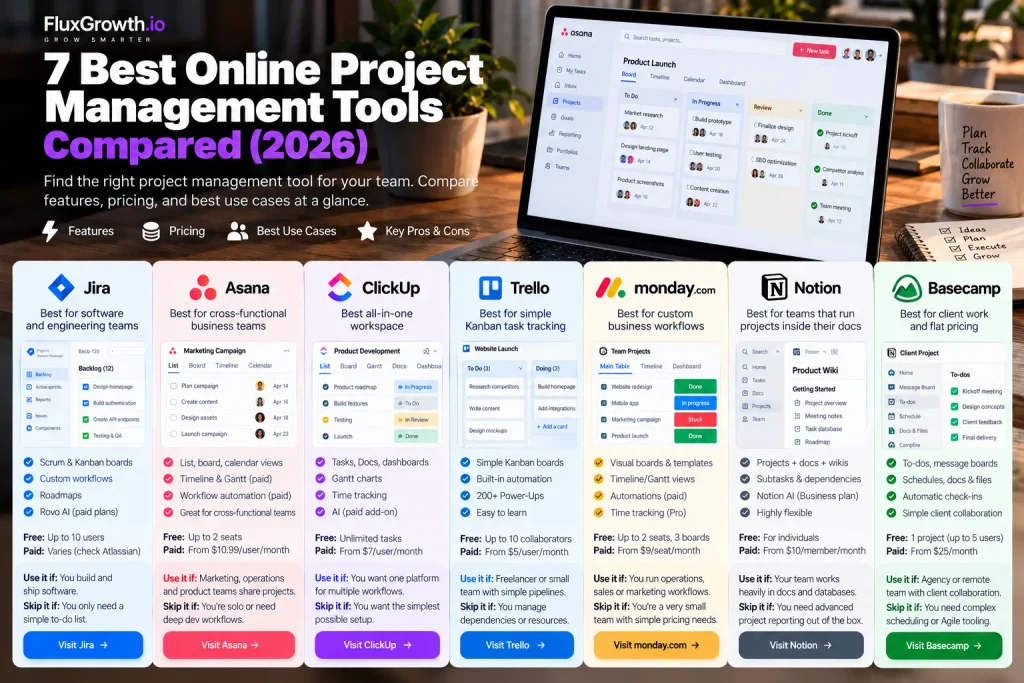
The best online project management tool is the one built for your team’s workflow. Jira fits software teams, Asana fits cross-functional business teams, and ClickUp fits teams that want everything in one app.
For other needs, Trello handles simple boards, monday.com handles custom business workflows, Notion suits doc-heavy teams, and Base-camp suits client work. Each of the seven owns a distinct use case and publishes its pricing.
Jira: best for software and engineering teams
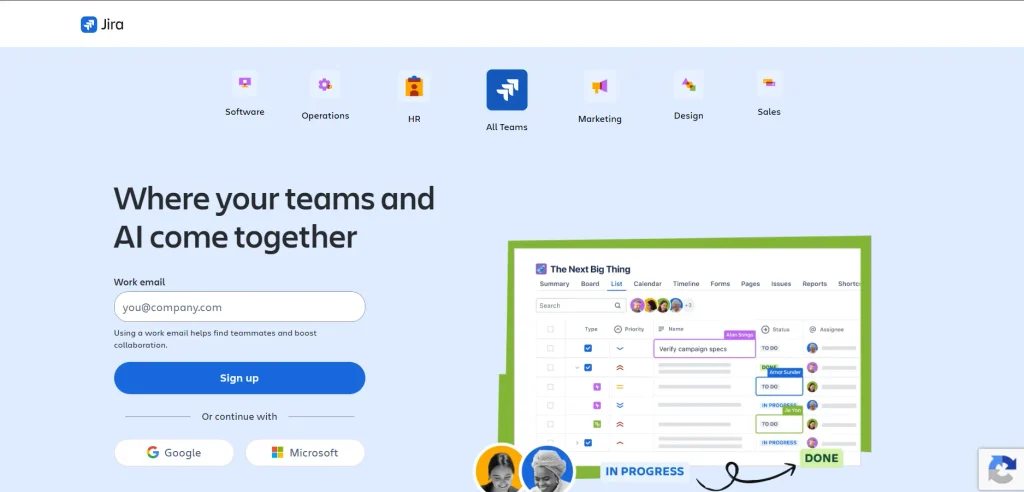
Free option: Up to 10 users, with 2 GB of storage and Community Support. (Source: Atlassian)
Starting price: Standard and Premium pricing varies by billing option and user count, so check Atlassian’s pricing calculator for your team size. (Source: Atlassian)
Strengths: Jira includes Scrum/Kanban boards, backlogs, customizable workflows, roadmaps, and integration. Rovo AI is available on paid Jira Cloud plans. (Source: Atlassian)
Limitations: Jira can require more setup and configuration than simpler task-management tools.
Use it if: You build and ship software. Skip it if: You only need a simple shared to-do list.
Asana: best for cross-functional business teams
Free option: Asana Personal is free and currently supports up to 2 seats per project/team. (Source: Asana Help Center)
Starting price: Starter starts at $10.99/user/month and Advanced at $24.99/user/month; verify the billing option when publishing pricing. (Source: Asana Help Center)
Strengths: Asana offers list, board, calendar, timeline, and Gantt views, making it suitable for cross-functional teams. (Source: Asana)
Limitations: Timeline/Gantt views and workflow automation are paid features, while resource management and time tracking are available on Advanced and higher tiers. (Source: Asana)
Use it if: Marketing, operations, and product teams share projects. Skip it if: You’re solo or need deep software-development workflows.
ClickUp: best all-in-one workspace
Free option: Free Forever includes unlimited tasks and members, with 60 MB of storage and limits on some advanced features. (Source: ClickUp)
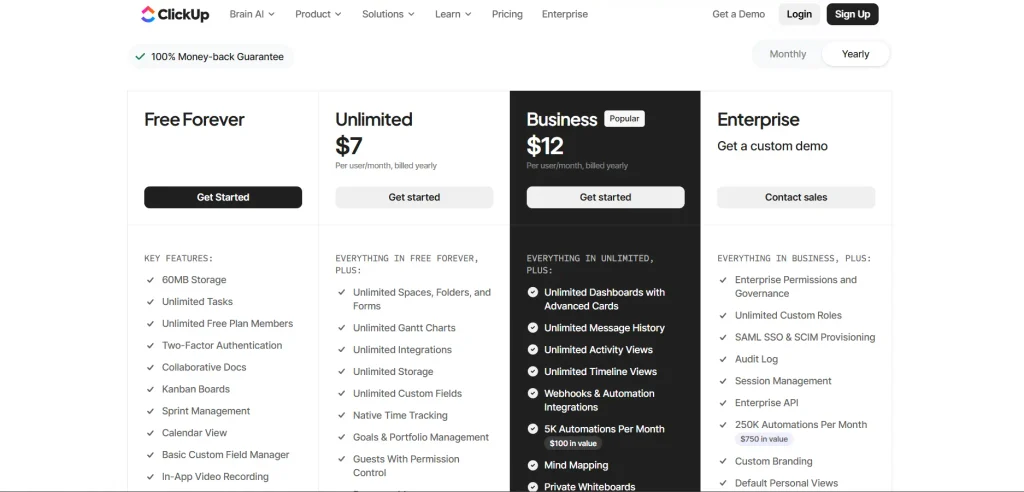
Starting price: Unlimited is $7/user/month and Business is $12/user/month, billed annually. (Source: ClickUp)
AI: ClickUp Brain AI is a paid add-on; current pricing lists Brain AI at $9/user/month. Free and paid plans also receive limited AI trial usage. (Source: ClickUp)
Strengths: ClickUp combines tasks, Docs, dashboards, Gantt charts, time tracking, and resource management in one workspace. (Source: ClickUp)
Limitations: Its extensive customization can require more setup than simpler project-management tools.
Use it if: You want one platform for multiple workflows. Skip it if: Your team wants the simplest possible setup.
Trello: best for simple Kanban task tracking
- Free option: Free for up to 10 collaborators per Workspace, with 10 boards per Workspace, 250 command runs a month, and 10 MB per file.
- Starting price: Standard is 5peruser/monthbilledannually(6 monthly). Premium is 10billedannually(12.50 monthly) (Trello pricing page, October 2026).
- Strengths: Trello is learnable in minutes, with built-in automation and 200+ Power-Ups.
- Limitations: Free stops at 10 boards per Workspace, so an 11th project means archiving one or paying. Timeline views need Premium.
- Use it if you’re a freelancer or small team with simple pipelines. Skip it if you manage dependencies or resources.
monday.com: best for custom business workflows
Free option: Up to 2 seats and 3 boards. (Source: monday.com)
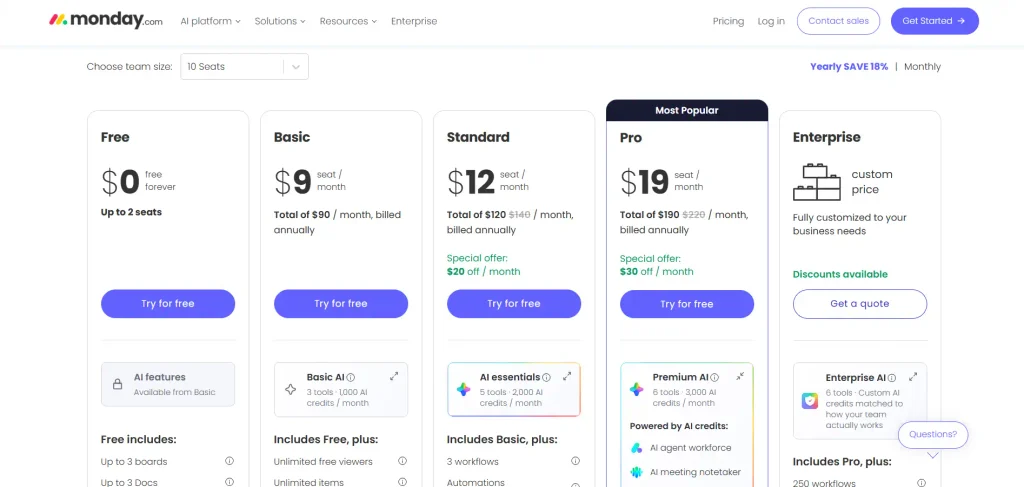
Starting price: Basic is $9, Standard $12, and Pro $19 per seat/month, billed annually. Paid plans use seat bundles, starting at 3 seats and increasing in groups of 5, so a six-person team needs the 10-seat plan. (Source: monday.com)
Strengths: Visual boards, templates, Timeline/Gantt views, automations, integration, and time tracking on Pro. (Source: monday.com)
Limitations: Automations start on Standard, and bucket pricing can make monday.com more expensive for small teams. (Source: monday.com)
Use it if: You run operations, sales, or marketing workflows. Skip it if: You’re a very small team that needs simple, flexible pricing.
Notion: best for teams that run projects inside their docs
Free option: Free for individuals, but collaborative use has limits, including limited blocks for workspaces with 2+ members. (Source: Notion)
Starting price: Plus is $10/member/month and Business is $20/member/month. Both are listed on Notion’s current pricing page. (Source: Notion)
AI: Notion AI is included on Business and Enterprise plans, while Free and Plus users get limited AI trials. (Source: Notion)
Strengths: Notion combines project databases with docs, wikis, meeting notes, subtasks, and dependencies. (Source: Notion)
Limitations: Notion is flexible but can require more setup than dedicated project-management tools.
Use it if: Your team already works heavily in docs and databases. Skip it if: You need advanced project reporting and resource planning out of the box.
Base-camp: best for client work and flat pricing
Free option: One free project for personal use, with up to 5 users. Base-camp
Starting price: Freelancer is $25/month; Pro is $99/month; Unlimited is $299/month billed annually, with unlimited users and projects. Base-camp
Strengths: Projects include to-dos, message boards, schedules, chat, docs/files, Card Tables, and automatic check-ins. Clients can also be invited to projects. Base-camp
Limitations: Base-camp focuses on simple project coordination rather than advanced sprint planning or native Gantt-chart workflows.
Use it if: You’re an agency or remote team that values simple communication and client collaboration. Skip it if: You need complex scheduling or developer-focused Agile tooling.
How do the top tools compare?
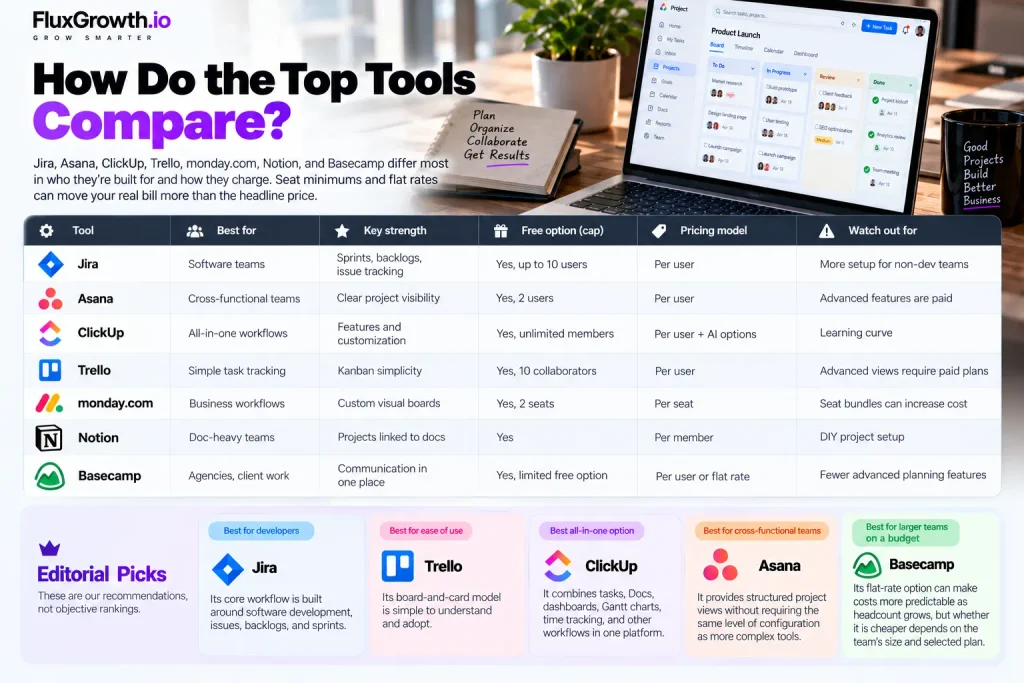
Jira, Asana, ClickUp, Trello, monday.com, Notion, and Base-camp differ most in who they’re built for and how they charge. Seat minimums and flat rates can move your real bill more than the headline price.
| Tool | Best for | Key strength | Free option (cap) | Pricing model | Watch out for |
| Jira | Software teams | Sprints, backlogs, issue tracking | Yes, up to 10 users | Per user | More setup for non-dev teams |
| Asana | Cross-functional teams | Clear project visibility | Yes, 2 users | Per user | Advanced features are paid |
| ClickUp | All-in-one workflows | Features and customization | Yes, unlimited members | Per user + AI options | Learning curve |
| Trello | Simple task tracking | Kanban simplicity | Yes, 10 collaborators | Per user | Advanced views require paid plans |
| monday.com | Business workflows | Custom visual boards | Yes, 2 seats | Per seat | Seat bundles can increase cost |
| Notion | Doc-heavy teams | Projects linked to docs | Yes | Per member | DIY project setup |
| Basecamp | Agencies, client work | Communication in one place | Yes, limited free option | Per user or flat rate | Fewer advanced planning features |
Editorial picks. These are our recommendations, not objective rankings:
- Best for developers: Jira. Its core workflow is built around software development, issues, backlogs, and sprints.
- Best for ease of use: Trello. Its board-and-card model is simple to understand and adopt.
- Best all-in-one option: ClickUp. It combines tasks, Docs, dashboards, Gantt charts, time tracking, and other workflows in one platform. (Source: ClickUp)
- Best for cross-functional teams: Asana. It provides structured project views without requiring the same level of configuration as more complex tools. (Source: ClickUp Help)
- Best for larger teams on a budget: Basecamp. Its flat-rate option can make costs more predictable as headcount grows, but whether it is cheaper depends on the team’s size and selected plan. For more AI-focused tools, see our guide to the best AI tools in 2026.
How do you choose the right online project management tool?
Choose by ruling tools out, not by stacking feature lists side by side. Start with team size and workflow type, which usually leaves two or three candidates.
Then check the free plan or trial against your real headcount, and run a live project in your top two. A week of real use tells you more than an hour of demo videos.
- Team size: Check free-plan caps and seat minimums against your actual headcount.
- Project complexity: Dependencies and milestones point to Gantt-capable tools.
- Workflow: Sprints, campaigns, client projects, or operations.
- Required features: List the five you’ll use weekly. Ignore the rest.
- Integrations: Slack, Google Workspace, GitHub, your CRM.
- Budget: Price the plan you’ll need in six months, not today.
- Ease of adoption: If half the team won’t log in, nothing else matters.
- Security: SSO, permissions, and data residency for regulated work.
- Scalability: Admin controls and reporting across many projects.
Recommendations by team type
- Individuals and students: Trello Free or Notion Free.
- Freelancers: Trello, or Base-camp if clients need to see progress.
- Small businesses: Asana or monday.com for shared business projects.
- Software teams: Jira, or a developer-focused tool like Linear.
- Marketing teams: Asana or monday.com for campaign calendars and approvals.
- Agencies: Base-camp for client communication, ClickUp if you also need time tracking.
- Remote teams: Base-camp or Asana for async updates.
- Large organizations: Jira or Asana on enterprise plans, with SSO and admin controls.
The short version: team size and workflow cut the list to two or three tools. A real project picks the winner.
Are free project management tools good enough?
Free project management plans work well for individuals and small teams, up to a point. Every free plan has a hard cap on users, boards, storage, or automations.
What matters is what happens the day you go over it. Mid-project. With a deadline on Friday.
What free plans include and where they stop
Free plans usually cover basic task management, but limits vary significantly:
- Jira: Up to 10 users, with 2 GB of storage. If you exceed 10 users, Atlassian automatically starts a 7-day Standard trial. (Source: Atlassian)
- Trello: Up to 10 collaborators and 10 boards per Workspace.
- monday.com: Up to 2 seats, 3 boards, and 200 items. (Source: Monday Support)
- ClickUp: Unlimited members, but storage and some advanced features are limited.
Note: I would remove the claim about Trello’s exact behavior when you add an 11th collaborator unless you verify it directly from Trello’s current support documentation.
Per-user vs. per-workspace pricing
Most tools charge per user, so costs increase as your team grows. monday.com uses seat-based pricing, while Base-camp offers flat-rate plans with unlimited users on eligible plans.
The takeaway: Compare the total cost for your actual team size. Flat-rate pricing can become more attractive for larger teams, but the best value depends on the features and plan you need.
When upgrading makes sense
Upgrade when you hit a cap you’ll keep hitting: an automation limit that runs out before the month does, a timeline view your clients keep asking for, or guests you need on more than one board. Not for features nobody has asked for yet.
What should developers look for in a project management tool?
Developers should look for issue tracking, backlogs, sprint planning, and integration that connect project work with code. Jira can link GitHub branches, commits, pull requests, builds, and deployments directly to Jira work items. (Source: Atlassian Support)
The checklist:
- GitHub or GitLab integration
- Bug tracking with priority and severity
- Backlogs, sprints, and roadmaps
- CI/CD and deployment status
- Automation triggered by code events
Jira also supports Rovo Dev actions in automation, including generating code and creating pull requests from connected repositories. Human review can still be part of the pull-request workflow. (Source: confluence.atlassian.com)
Note: I would remove the specific “Atlassian pricing FAQ, October 2026” citation from this claim because the current official documentation supports the Rovo Dev automation capability, but not that exact wording.
Which features matter most for remote teams?
Remote teams need tools that work asynchronously. Every task has one owner and a due date, decisions live in comments instead of meetings, and progress is visible without asking.
What makes that possible:
- One named owner per task, with a due date.
- Threaded comments and @mentions.
- Files attached to the task itself.
- Notification controls, so people aren’t buried.
- Meeting follow-ups turned into tasks the same day.
What can AI in project management tools actually do?
AI in project management tools is good at summarizing and drafting. It can turn meeting notes into tasks, write status updates, summarize long threads, and find information across projects.
It doesn’t replace a project manager’s judgment about priorities, trade-offs, or people.
What AI helps with today
Today’s AI features handle:
- Creating tasks from notes or emails.
- Summarizing projects and threads.
- Drafting status updates and documentation.
- Suggesting priorities.
- Answering “where is X?” questions across a workspace.
Trello’s paid plans, for example, include AI that generates checklists, adds due dates, and summarizes card comments, according to Trello’s pricing page.
AI-assisted vs. autonomous project management
AI-assisted project management helps draft, summarize, or automate work while a person remains in control. More autonomous features can perform multi-step tasks, but human review is still important for higher-risk actions.
How AI is priced
AI pricing varies by tool:
- Jira: Rovo is available with eligible Atlassian plans; avoid publishing the specific 25/70-credit figures unless verified for the exact current Jira plans. (Source: support.atlassian.com)
- ClickUp: Brain AI is a paid add-on starting at $9/user/month. (Source: clickup.com)
- Notion: Notion AI is included on Business and Enterprise plans, with usage allowances for some AI features. (Source: notion.com)
Takeaway: Compare AI pricing separately from the base project-management plan because AI can materially change the total cost.
If you want AI to handle the busywork around your projects, such as status updates, handoffs, and reminders, start with our AI automation guide. Developer teams can also compare the best AI coding tools ranked by workflow.
Frequently asked questions
What are online tools for project management?
Online tools for project management are web-based apps where teams plan tasks, assign owners, set deadlines, and track progress in one shared workspace. Popular examples include Jira, Asana, ClickUp, Trello, monday.com, Notion, and Base-camp.
What is the best online project management tool?
The best online project management tool depends on your team. In our editorial view, Jira suits software teams, Asana suits cross-functional business teams, Trello suits simple task tracking, and ClickUp suits teams that want one all-in-one workspace. Test two finalists with a real project before paying.
What is the best free project management tool?
Trello and Jira have two of the most usable free plans for small teams. Trello Free supports up to 10 collaborators per Workspace, and Jira Free supports up to 10 users (official pricing pages, October 2026). ClickUp’s free plan allows unlimited members but caps storage and some features.
What project management tool is best for software developers?
Jira is the standard choice for software developers because it’s built around backlogs, sprints, and issue tracking, with code integration. Teams that want a lighter developer-focused tool sometimes choose Linear instead.
Can project management tools be used for remote teams?
Yes. Online project management tools suit remote teams because tasks, comments, files, and status updates live in one place everyone can reach from any time zone. Look for clear ownership, async comments, and automatic progress reports.
What is the difference between project management and task management software?
Project management software plans multi-step work with timelines, dependencies, and reporting across a team. Task management software tracks individual to-dos and who owns them, with lighter planning. Trello leans toward task management, while Asana and monday.com cover full project management.
Are online project management tools secure?
Major online project management tools publish security certifications, but protection depends on your plan and settings. Trello, for example, states it is SOC 2 Type 2 and ISO/IEC 27001 certified. Single sign-on (SSO) usually requires a higher tier or a separate add-on like Atlassian Guard.
The bottom line
The best online tools for project management fit your team’s size, workflow, and budget. Feature count comes a distant fourth.
So shortlist two or three tools from this guide, set up one real project in each, and run it for a week. The one your team opens without being reminded is your answer. Compare them side by side before you put a credit card down.