FluxGrowth is reader-supported. Some links in our guides are affiliate links — if you buy through one we may earn a commission, at no extra cost to you. It never changes which tools we recommend. How we test tools.
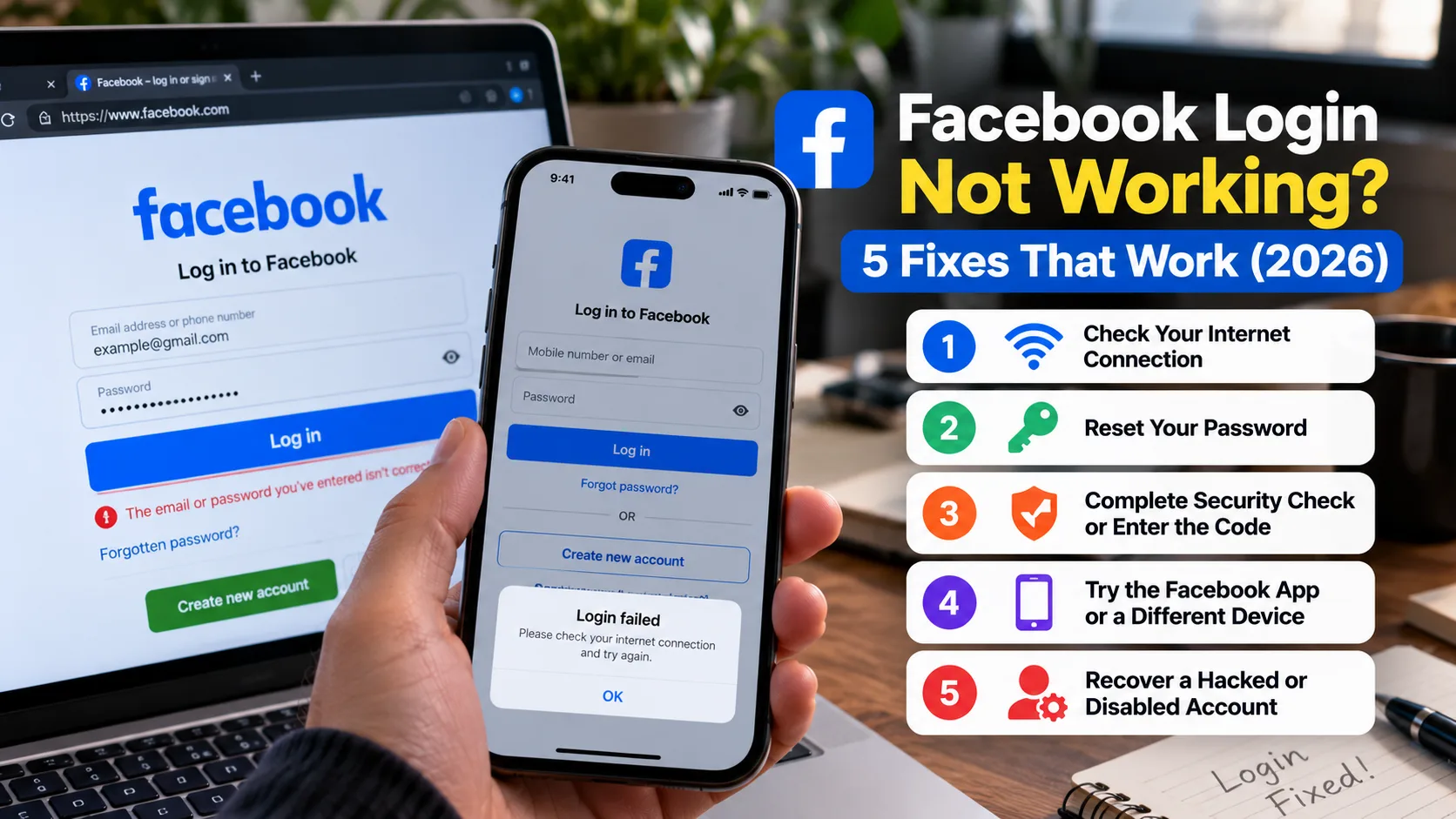
Facebook login means signing in to your Facebook account, usually at facebook.com or in the Facebook app, with your email or phone number and password. When that fails, the fix depends on why it failed. A forgotten password, a hacked account, a missing code, and a disabled account each need a different path.
This guide is part of our Social Media Growth hub — everything we have published on growing social accounts with AI tools, in one place.
This guide walks through every one of those paths using Meta’s official tools only. That matters, because the search results for Facebook account recovery are full of fake “support” numbers. One honest note before you start: no tool, including Meta’s, can guarantee that every account comes back.
What Is Facebook Login?
Facebook Login has two meanings. Most people mean signing in to their own Facebook account. The second meaning is the “Continue with Facebook” button on other apps and websites, which uses your Facebook account to sign you in somewhere else. This guide covers both, starting with the first.
A few terms get mixed up a lot, so here’s the short version:
- Logging in opens an account that already exists. Creating an account is a separate sign-up flow.
- A personal account is your profile. A Facebook Page (for a business or creator) is managed through a personal account, so losing the account usually means losing Page access too.
- Accounts Center is Meta’s central settings area for passwords, security, and linked accounts across Facebook, Instagram, and Messenger.
How to Log In to Facebook on Any Device
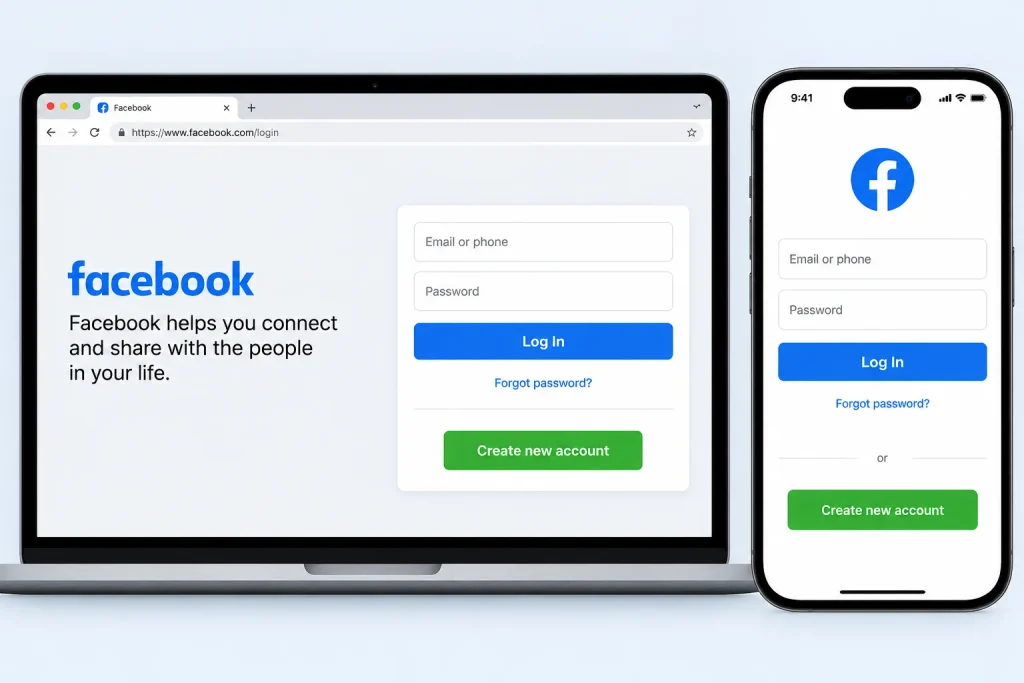
To log in to Facebook, go to facebook.com or open the official Facebook app, enter the email address or mobile number on your account, type your password, and select Log In. If Facebook doesn’t recognize the device, it may ask for a code or a security check before letting you in.
On a computer
- Type facebook.com into the address bar yourself. Don’t click a login link from an email or a DM.
- Enter your email address or mobile phone number.
- Enter your password and click Log In.
- If two-factor authentication is on, enter the code or approve the login on a device you’re already signed in on.
In the Facebook app (iPhone or Android)
Download Facebook from the Apple App Store or Google Play. Open the app, enter your email address or phone number and password, then tap Log In. If you’ve logged in on that device before, Facebook may show a saved profile that lets you sign in more quickly, depending on your settings and app version.
In a mobile browser
No app? Open Safari or Chrome and go to facebook.com. You’ll get the mobile site, and the steps are the same as on a computer. This route also works when the app keeps crashing.
With a passkey
A passkey lets you sign in to Facebook using your device’s fingerprint, face recognition, or screen-lock PIN instead of entering your password. Meta introduced Facebook passkeys in June 2025 for iOS and Android, with setup and management available through Accounts Center. Your password remains an alternative on supported login flows and devices. Read Meta’s official passkey announcement.
How Do You Reset a Forgotten Facebook Password?
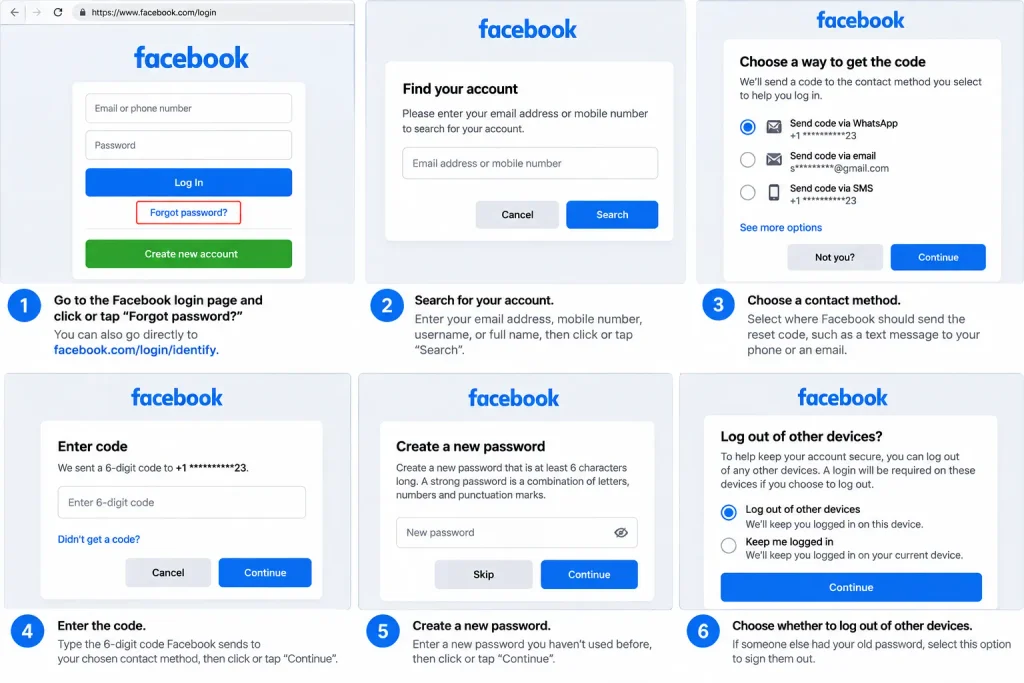
To reset a forgotten Facebook password, visit Facebook’s account recovery page and follow the instructions to find your account and verify your identity. The available recovery methods depend on your account settings and the contact information you can access.
- Open the Find Your Account page or tap Forgot password? on the login screen.
- Enter the information requested to identify your account.
- Select an available recovery method, if prompted.
- Enter the verification code or follow the instructions Facebook provides.
- Create a new, strong password and follow any additional security prompts.
A password-reset code is different from a two-factor authentication code. A reset code helps you change your password, while a two-factor authentication code verifies your identity during sign-in.
If you don’t receive a code, check your spam folder, confirm your contact details, and follow Facebook’s on-screen troubleshooting instructions. If you can no longer access the listed recovery methods, visit the Facebook Help Center.
How Do You Recover a Facebook Account Without Your Email or Phone Number?
You can sometimes recover a Facebook account without your old email or phone number, but it depends on what’s still attached to the account and which identity checks Meta offers you. Start by trying every old contact method, then work on getting your email account back, then use any verification option Facebook shows you.
Try every email and number you’ve ever used
People often add a second email or an old work address years ago and forget about it. Run the reset search with each one. Facebook may list a contact method you still control.
Get your email account back first
If you signed up with Gmail, Outlook, or Yahoo, use that provider’s own account recovery first. Once you’re back in your inbox, the normal Facebook reset works again. This is usually faster than any Facebook-side workaround.
Use the identity checks Facebook offers
Meta rebuilt its recovery flow in December 2025. The new flows adjust to your situation, and in some cases you can verify your identity by recording a short selfie video, according to Meta’s announcement and TechCrunch’s coverage. The video is compared against photos on the account. You may also be asked for a photo ID instead. Which option appears depends on your account, so don’t be surprised if you don’t see one.
What nobody can promise
If no contact method works and Facebook can’t confirm your identity, you may not get the account back. Anyone who says they can guarantee it, for a fee, is not working for Meta.
Why Can’t I Log In to Facebook? Fixes for Common Errors
Most Facebook login problems come from one of two places: your device (an old app, bad cookies, a VPN) or Facebook’s security system (a check triggered by an unfamiliar login). Device problems you can usually fix in five minutes. Security checks you have to complete, not work around.
“Incorrect password” when you know it’s right
Check Caps Lock first, then try typing the password into a notes app so you can see it. Password managers sometimes auto-fill an old saved password. If it still fails, reset it. Here’s the red flag, though: if Facebook says the password was recently changed and you didn’t change it, treat it as a hack and go to the hacked-account section.
The login page won’t load or keeps looping
A login loop means you enter your details and land right back on the login screen. Try these in order:
- Update the Facebook app, or delete and reinstall it.
- Clear your browser’s cookies and cache for facebook.com. This doesn’t touch your account.
- Turn off your VPN or ad blocker for a moment.
- Try a different browser or switch from Wi-Fi to mobile data.
The verification code never arrives
Facebook verification codes may be sent by text, email, or another available verification method, depending on your account settings. Check your spam folder, confirm that your contact details are correct, and look for an option to resend the code or use another method if Facebook offers one.
If you use an authenticator app for two-factor authentication, open the app to retrieve your code instead of waiting for a text message. If you still can’t verify your identity, follow the instructions in the Facebook Help Center.
Facebook says it’s running a security check
Facebook sometimes pauses a login it finds unusual, like a new city or a new device. Follow the on-screen steps. Do them once, carefully, instead of retrying over and over.
You got a suspicious-login alert
If you receive an alert about a login you don’t recognize, follow the security instructions provided or open Facebook directly to review your account activity. Avoid clicking links in unexpected emails. If the login wasn’t yours, change your password, review active sessions, and sign out of unfamiliar devices. Visit the official Facebook hacked-account recovery page if you suspect your account has been compromised.
Related: Facebook Marketplace scams to avoid
Which Facebook Recovery Path Fits Your Situation?
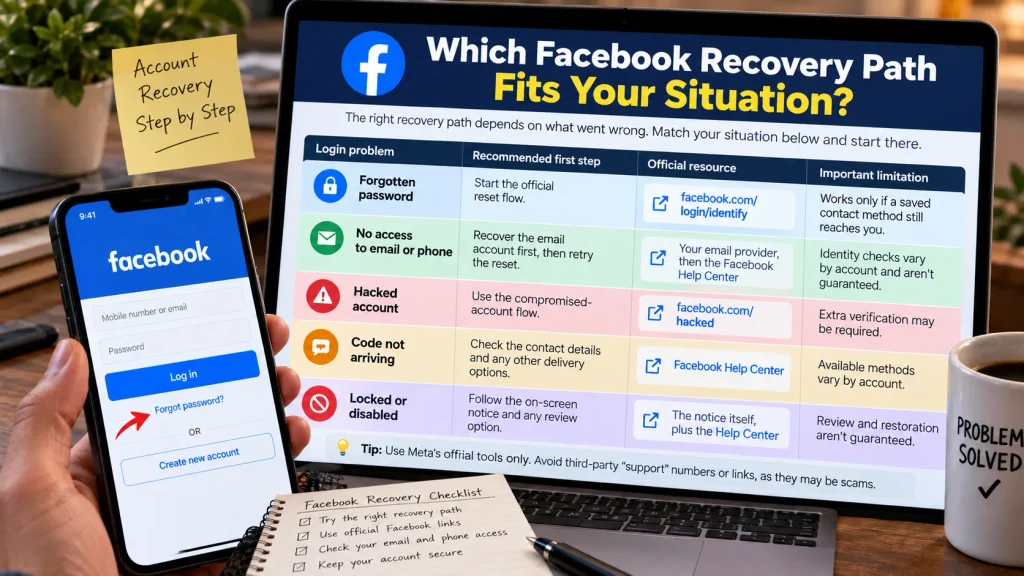
The right Facebook recovery path depends on what went wrong, not on how urgent it feels. Match your situation to a row below and start there.
| Login problem | Recommended first step | Official resource | Important limitation |
| Forgotten password | Start the official reset flow | facebook.com/login/identify | Works only if a saved contact method still reaches you |
| No access to email or phone | Recover the email account first, then retry the reset | Your email provider, then the Facebook Help Center | Identity checks vary by account and aren’t guaranteed |
| Hacked account | Use the compromised-account flow | facebook.com/hacked | Extra verification may be required |
| Code not arriving | Check the contact details and any other delivery options | Facebook Help Center | Available methods vary by account |
| Locked or disabled | Follow the on-screen notice and any review option | The notice itself, plus the Help Center | Review and restoration aren’t guaranteed |
Here’s how to read it. Forgot your password but still have your phone? The reset takes minutes. If your email is gone, fix the email first, because Facebook’s reset depends on it. If you see changes you didn’t make, use the hacked flow rather than a plain reset, since it also helps you undo what the attacker changed. And a disabled account is a policy decision, so the notice on your screen is your only real starting point.
How to Recover a Hacked Facebook Account
To recover a hacked Facebook account, secure your linked email account first, then visit Facebook’s official hacked-account recovery page and follow the instructions. After regaining access, change your password, remove unfamiliar account details, and sign out of suspicious sessions.
Warning signs include unexpected password or contact-detail changes, unfamiliar login alerts, or suddenly being unable to log in. The FTC’s identity-theft recovery resource can help if your personal information was also compromised.
- Secure your email. Change its password and enable two-factor authentication.
- Visit facebook.com/hacked on a device you’ve previously used to access Facebook.
- Follow the recovery instructions and complete any requested verification.
- Change your Facebook password and enable two-factor authentication.
- Review logged-in devices under Accounts Center → Password and security → Where you’re logged in, if available.
- Remove unfamiliar email addresses, phone numbers, and connected apps.
- If you manage a Facebook Page, review its access and administrator list.
- Warn friends about suspicious messages sent from your account.
Meta reported that the relative success rate of hacked-account recovery increased by more than 30% in the U.S. and Canada in 2025. This is a company-reported figure, not an independently verified result. Read Meta’s December 2025 announcement.
Locked vs. Disabled Facebook Account: What’s the Difference?
A locked Facebook account is usually restricted for security reasons, while a disabled account has been restricted under Meta’s policies. The recovery process depends on the reason for the restriction and the options Meta provides.
- Locked account: Facebook may ask you to verify your identity, change your password, or review suspicious activity before restoring access.
- Disabled account: Follow the notice’s instructions and use the available appeal or Request review option, if offered. The wording and review process may vary.
For either situation, use the Facebook Help Center and follow the official instructions. Meta’s Terms of Service govern account use, so don’t attempt to bypass restrictions with another account or pay unofficial services promising an unban. Appeals are not guaranteed, and resolution times can vary.
Does Facebook Have a Customer Service Phone Number?
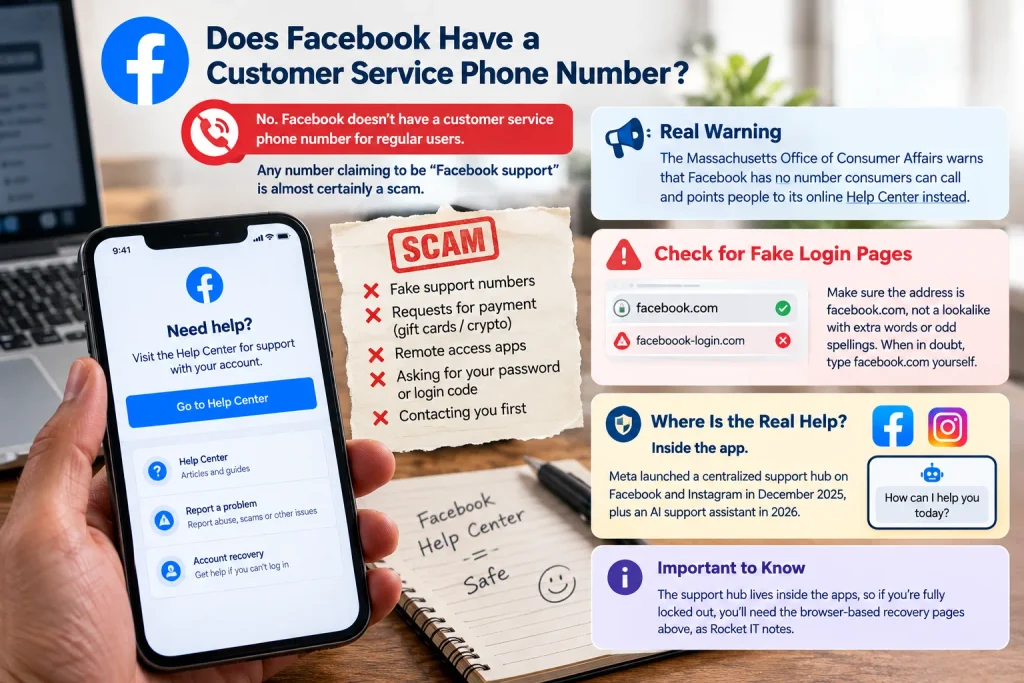
No. Facebook doesn’t have a customer service phone number for regular users, and any number claiming to be “Facebook support” is almost certainly a scam. Meta handles account problems online instead, through the Facebook Help Center and its centralized account support hub.
This isn’t a small problem. When I researched this article, several pages ranking for “recover Facebook account without email” were spam documents repeating fake toll-free numbers in almost every sentence. They’re built to catch you at the exact moment you’re locked out and desperate.
The warning signs of a fake support contact:
- They ask you to pay, especially with gift cards or crypto, to “unlock” or “verify” your account.
- They want you to install a remote-access app on your phone or computer.
- They ask for your password or a login code. Treat that request as a scam every time.
- They reached out to you first, often in replies to a public post asking for help.
Fake login pages work the same way. Before you type your password, check that the address is facebook.com, not a lookalike with extra words or odd spellings. When in doubt, type facebook.com yourself.
So where is the real help? Inside the app. Meta launched a centralized support hub on Facebook and Instagram in December 2025, plus an AI support assistant in 2026 (Meta). The catch: the hub lives inside the apps, so if you’re fully locked out, you’ll need the browser-based recovery pages above, as Rocket IT notes.
How to Make Your Facebook Login More Secure
The single best upgrade to your Facebook login is two-factor authentication (2FA), which asks for a second proof, like a code from an app, whenever someone logs in from a new device. Turn it on in Settings > Accounts Center > Password and security > Two-factor authentication, per Malwarebytes’ October 2025 walkthrough.
Facebook offers three kinds of second factors. Here’s how I’d rank them:
- A security key, which is a small USB or Bluetooth device. Strongest, but you have to buy and carry one.
- An authentication app like Google Authenticate or Authy. Free, and the best choice for most people.
- Text message or WhatsApp codes. Better than nothing. But a scammer who hijacks your phone number can receive them too.
Save the recovery codes Facebook gives you when you set up 2FA, somewhere other than your phone. Lose the phone without them and you’ll be locked out by your own security.
The rest of the checklist:
- Use a long, unique password, ideally stored in a password manager. Never reuse your email password.
- Set up a passkey if your phone supports it.
- Keep your recovery email and phone number current. Update them the day you change numbers, not the day you get locked out.
- Review where you’re logged in every few months and remove old phones and laptops.
- On a shared or library computer, use a private browser window, don’t let the browser save your password, and log out when you’re done.
Is Facebook Login Safe for Other Apps and Websites?
Facebook Login for other apps is generally safe as a sign-in method, because the app never sees your Facebook password. It does not make the app itself trustworthy, though. The app gets whatever information you approve, and it keeps that access until you remove it.
Here’s what happens when you tap “Continue with Facebook”: Facebook confirms who you are, then shows a permission screen listing what the app wants, such as your name, email, or profile photo. You approve it once, and you’re signed in.
Three habits keep this safe:
- Read the permission screen. A quiz game has no reason to need your friend list.
- Only use it on sites you already trust. A fake “Log in with Facebook” pop-up is a common phishing trick, so check that the window shows facebook.com.
- Clean out old apps. Remove access you no longer use from the Apps and Websites settings.
There’s one trade-off worth knowing. If you lose your Facebook account, every service you signed into with it can lock you out too. For anything important, like banking, work tools, or your website, add a separate email login as a backup.
Facebook Login FAQ
What is the official Facebook login page?
The official Facebook login page is facebook.com, and the direct login address is facebook.com/login. Type it into your browser yourself rather than clicking a link in an email or message. Lookalike addresses are a common way scammers steal passwords.
Can I log in to Facebook with my phone number instead of an email?
Yes, you can log in to Facebook with a mobile number if that number is saved on your account. Enter it in the same field where you’d type your email. If the number was never added, or you removed it, Facebook won’t recognize it.
Why does Facebook keep asking me for a verification code?
Facebook may request a verification code when you log in from an unfamiliar device, browser, or location, or when two-factor authentication is enabled. To reduce repeated prompts, use the same trusted device and browser and avoid frequently clearing cookies. If Facebook offers a “Save this browser” option, select it only on a device you control. Verification may still be required for security reasons.
How long does Facebook account recovery take?
Meta doesn’t publish a standard timeline for account recovery. A simple password reset with a working email or phone takes a few minutes. Recovery that needs identity verification or a review can take longer, and some cases don’t succeed.
Will deleting the Facebook app log me out or delete my account?
Deleting the Facebook app only removes it from your phone. Your account, posts, and friends stay exactly as they were. You’ll need your login details to sign back in, so check that you know your password before you uninstall.
Can a third-party service recover my Facebook account for a fee?
No outside service has special access to Facebook’s recovery system. Paid “recovery experts” can only use the same public tools you can, and many are scams. Use facebook.com/login/identify or facebook.com/hacked directly, for free.
The Bottom Line on Facebook Login
Every Facebook login problem has an official fix, and none of them involve a phone number or a payment.
If you forgot your password, start at facebook.com/login/identify. If something changed that you didn’t change, go straight to facebook.com/hacked and secure your email first. If you’re back in, take ten minutes today to turn on two-factor authentication and update your recovery email and phone number. That’s the step that turns the next lockout into a five-minute reset.
Managing Facebook for a business or creator brand? Our social media growth guides cover the next steps, from content to account safety.