FluxGrowth is reader-supported. Some links in our guides are affiliate links — if you buy through one we may earn a commission, at no extra cost to you. It never changes which tools we recommend. How we test tools.
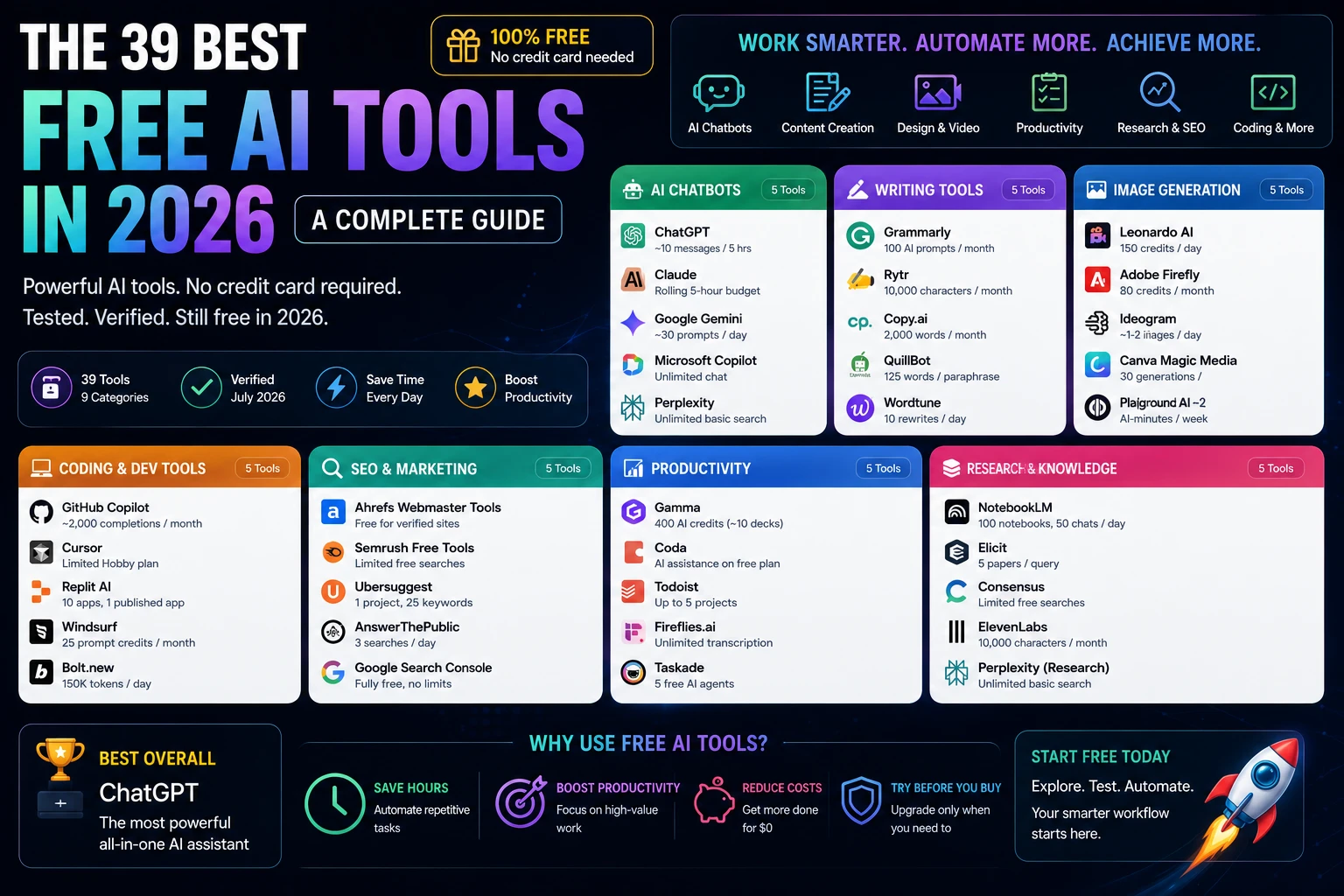
You don’t need a credit card to build a real AI stack in 2026. That’s the part most “best AI tools” roundups get wrong. They quietly assume you’re paying for everything, or worse, they list tools that used to be free and stopped being free eighteen months ago. We didn’t do that here. Every one of the 39 best free AI tools below still has a working, no-cost tier as of this month, and we checked each one against its official pricing page before writing a word about it.
This guide covers the best free AI tools If SEO is your priority, don’t miss our comparison of the best AI SEO tools for keyword research, content optimization, and technical SEO. You’ll get exactly what each free plan includes, where it runs out, and which paid upgrade actually matters if you outgrow it.
Whether you’re a student, freelancer, marketer, small business owner, or developer, the goal is the same: find tools that deliver real value before you spend money. This guide focuses on AI software with genuinely usable free plans, so you can build an effective workflow without paying from day one and know exactly when an upgrade is actually worth it.
Quick answer if you’re in a hurry: ChatGPT and Claude are the strongest free AI chatbots, Grammarly and Copy.ai lead free writing tools, Leonardo AI and Playground AI are the most generous free image generators, and NotebookLM is the best free AI research tool, period. Keep reading for the full breakdown.
How We Selected the Best Free AI Tools
We evaluated every tool on ten criteria: ease of use, feature depth, free-plan limits, output accuracy, generation speed, data privacy, integrations, collaboration support, overall value, and customer support. A tool only makes this list if its free tier is a real, recurring plan, not a seven-day trial dressed up as “free,” and not a one-time credit grant that never refills.
That bar mattered more than usual this year. Several tools that used to anchor “best free AI tools” listicles Jasper, Writesonic, Surfer SEO, Frase, and Tome among them have quietly dropped their free tiers or pivoted their product entirely since 2025. We cut all of them. Every tool below still gives you something real for $0, verified against its official pricing page this month.
Quick Comparison Table
| Tool | Best For | Free Plan Limit | Platforms | Sign-up Required? |
| ChatGPT | General-purpose AI assistant | ~10 messages/5 hrs on flagship model | Web, iOS, Android | Yes |
| Claude | Writing, coding, analysis | Rolling 5-hour usage budget (no fixed count) | Web, iOS, Android, desktop | Yes |
| Google Gemini | Google Workspace integration | ~30 prompts/day | Web, iOS, Android | Yes |
| Microsoft Copilot | Windows/Edge-native AI | Unlimited chat, ~15 image boosts/day | Web, Windows, Edge, mobile | Yes |
| Perplexity | AI-powered research search | Unlimited basic search, 3-5 Pro searches/day | Web, iOS, Android, Comet browser | Yes |
| Grammarly | Grammar and writing checks | 100 AI prompts/month, unlimited basic checks | Browser ext., desktop, mobile, Office | Yes |
| Rytr | Short-form AI copywriting | 10,000 characters/month | Web, Chrome extension | Yes |
| Copy.ai | Marketing copy and chat | 2,000 words/month | Web | Yes |
| QuillBot | Paraphrasing and grammar | 125 words/paraphrase, 1,200-word summarizer | Web, Chrome, Docs, Word | Yes |
| Wordtune | Sentence-level rewriting | 10 rewrites/day, 3 summaries/month | Web, Chrome, Gmail, Docs | Yes |
| Leonardo AI | High-volume image generation | 150 credits/day (~25-30 images) | Web | Yes |
| Adobe Firefly | Commercially safe images | 25 generative credits/month | Web, Photoshop, Illustrator | Yes |
| Ideogram | Text-in-image generation | ~10 images/day | Web | Yes |
| Canva Magic Media | Design-integrated AI images | ~50 generations (free plan) | Web, iOS, Android | Yes |
| Playground AI | Highest-volume free images | 100 images/day | Web | Yes |
| PixVerse | Fast social video clips | 90 signup + 60 credits/day (~1 video/day) | Web, iOS, Android | Yes |
| Pika | Quick creative video iteration | 80 credits/month, no watermark | Web | Yes |
| Kling AI | Realistic motion video | 66 credits/day (~1-2 clips) | Web, mobile app | Yes |
| Luma Dream Machine | Cinematic-style video | 30 generations/month | Web | Yes |
| InVideo AI | Full video assembly with voiceover | ~2 AI-minutes/week, watermarked | Web | Yes |
| GitHub Copilot | In-IDE code completion | ~2,000 completions + 50 chats/month | VS Code, JetBrains, Neovim | Yes |
| Cursor | AI-native code editor | Limited “Hobby” tier (best for evaluation) | Desktop (Mac, Windows, Linux) | Yes |
| Replit AI | Browser-based full-stack builds | 10 apps, 1 published app (30-day expiry) | Web | Yes |
| Windsurf | Agentic multi-file coding | 25 prompt credits/month | Desktop (Mac, Windows, Linux) | Yes |
| Bolt.new | Prompt-to-app scaffolding | 150,000 tokens/day | Web | Yes |
| Ahrefs Webmaster Tools | Backlink and site-health data | Free for verified site owners | Web | Yes |
| Semrush Free Tools | Individual keyword/backlink lookups | Limited free searches, no subscription | Web | No (some tools) |
| Ubersuggest | Keyword research and site audit | 1 project, 25 tracked keywords, 150-page audit | Web | Yes |
| AnswerThePublic | Question and search-intent mapping | 3 searches/day | Web | Yes |
| Google Search Console | Google indexing and search data | Fully free, no limits | Web | Yes (Google account) |
| Gamma | AI presentations and docs | 400 AI credits (~10 decks) | Web | Yes |
| Coda | AI-assisted docs and workflows | Free plan with AI assistance | Web, iOS, Android | Yes |
| Todoist | AI-assisted task management | Up to 5 projects, light AI assist | Web, iOS, Android, desktop | Yes |
| Fireflies.ai | Meeting transcription and notes | Unlimited transcription minutes | Web, Zoom, Meet, Teams | Yes |
| Taskade | AI agents for project plans | Unlimited projects, 5 free AI agents | Web, iOS, Android | Yes |
| NotebookLM | Source-grounded research assistant | 100 notebooks, 50 sources each, 50 chats/day | Web | Yes (Google account) |
| Elicit | Academic paper data extraction | 5 papers/query | Web | Yes |
| Consensus | Evidence-based research answers | Limited free searches/day | Web | Yes |
| ElevenLabs | AI voice generation | 10,000 characters/month, non-commercial | Web, API | Yes |
One clear takeaway: if you only install one tool from this table, make ChatGPT or Claude both cover the widest range of tasks on a genuinely usable free tier, and everything else on this list fills in a specific gap around them.
Best Free AI Chatbots
Chatbots are the front door most people walk through first, so this is where “free” gets tested hardest. All five below run on frontier or near-frontier models at no cost; the differences show up in daily limits, not raw capability.
1. ChatGPT
ChatGPT is OpenAI’s conversational AI assistant, and it’s still the default most people reach for. The free tier runs on GPT-5.5 Instant, capped at roughly 10 messages every 5 hours before it drops you to a lighter fallback model until the window resets.
Best features: Web search, basic file uploads (PDFs, images, spreadsheets), image generation with load-based limits, and a 16K context window that handles most everyday conversations without a problem.
Free plan limits: Around 10 GPT-5.5 messages per 5-hour rolling window. US free users now see occasional ads at the bottom of some answers, a change OpenAI rolled out in February 2026. Deep Research, Sora video generation, and Agent Mode all stay locked behind Plus.
Pros: Broadest general-purpose capability, huge plugin and integration ecosystem, familiar interface most people already know.
Cons: The message cap bites fast if you’re doing back-to-back research sessions. Free users don’t get the reasoning-heavy Thinking model.
Best for: Everyday writing help, quick research, and anyone who wants one tool that does a bit of everything without a learning curve.
2. Claude
Claude is Anthropic’s AI assistant, built with a heavier emphasis on careful reasoning and factual accuracy than flash. Since June 2026, the free tier defaults to Claude Sonnet 5, the same mid-tier model that used to require a Pro subscription.
Best features: A 200K-token context window even on the free plan (genuinely useful for pasting in long documents), adaptive thinking on harder prompts, web search, and file uploads.
Free plan limits: Anthropic doesn’t publish an exact message count it’s described as a rolling five-hour usage budget that varies by message length and server demand. Most casual users land somewhere around 15-40 messages per window. In my typical workflow, I use Claude to review long-form blog articles, compare AI tool documentation, and summarize lengthy PDFs before writing. Most days I stay within the free plan’s usage budget, but on heavy research days with multiple long-document uploads, I occasionally hit the five-hour limit, which is when Claude Pro becomes worthwhile.
Pros: Strong at long-document analysis and code, transparent about which model you’re using, lower hallucination rates than several competitors in independent benchmarking.
Cons: The lack of a published message count makes it hard to plan around. No Claude Code access on the free tier.
Best for: Writers and researchers working with long source documents, and anyone who wants a second opinion alongside ChatGPT.
3. Google Gemini
Gemini is Google’s AI assistant, and its free tier is the most tightly integrated with tools you probably already use Gmail, Docs, Sheets, and Drive.
Best features: Roughly 30 prompts a day on the core model, limited daily access to the more capable Gemini Pro tier, built-in image generation (up to 100 images/day through the Gemini app with the Nano Banana model), and voice conversation mode.
Free plan limits: ~30 prompts/day for standard use, plus separate smaller caps for Deep Research (5 reports/month) and audio overviews (20/day).
Pros: The most generous free image generation of the major chatbots, seamless if you’re already in the Google ecosystem, no credit card required ever.
Cons: The free tier defaults to the lighter Flash model for most queries Pro-level responses are capped daily.
Best for: Anyone already living inside Gmail, Docs, and Sheets who wants AI assistance without switching context.
4. Microsoft Copilot
Copilot is Microsoft’s AI assistant, built into Windows, Edge, and the Microsoft 365 apps. Note: the standalone $20/month Copilot Pro plan was retired in late 2025 and folded into Microsoft 365 Premium but the free Copilot Chat tier itself is unaffected.
Best features: Free access to current GPT-class models when server capacity allows (it can fall back to a lighter model during peak demand), roughly 15 image-generation “boosts” per day through Designer, and deep integration with Windows and Edge.
Free plan limits: Text chat isn’t tightly rationed by message count; the real constraint is model priority during high-traffic periods. Image generation is capped at around 15 boosts/day.
Pros: Already built into Windows and Edge for most users, decent everyday assistant for web search and writing help.
Cons: Doesn’t connect to your organization’s internal data on the free tier that requires a paid Microsoft 365 Copilot license. Model access can degrade at peak times.
Best for: Windows and Edge users who want AI help without installing anything new.
5. Perplexity
Perplexity is an AI-powered answer engine that searches the live web and cites its sources closer to a research tool than a chat companion.
Best features: Unlimited basic search with real-time citations, the free Comet AI browser (which was a $200/month exclusive until March 2026), and a clean interface for fact-checking.
Free plan limits: Unlimited standard search, but only about 3-5 “Pro Search” queries per day for the deeper, multi-step research mode.
Pros: Citations make it easy to verify claims, genuinely useful for competitive research and fact-checking, Comet browser is now free for everyone. Cons: The free Pro Search cap is tight if your work is research-heavy.
Best for: Fact-checking, competitive research, and anyone who wants an answer with the sources attached rather than a black-box response.
Quick summary: All five chatbots above give you real frontier-model access for free. The question isn’t which one is “best,” it’s which daily limit fits how you actually work. Claude and Gemini reward document-heavy workflows; ChatGPT and Copilot are better for quick everyday tasks; Perplexity wins when you need a citation, not just an answer.
Best Free AI Writing Tools
Writing tools split into two camps: generators that draft new copy, and editors that polish what you’ve already written. The five below cover both, and fair warning two names you’d expect on this list, Jasper and Writesonic, aren’t here. Jasper dropped its free plan entirely in 2025 (it’s a 7-day trial now, nothing more), and Writesonic’s “free plan” turned out to be a one-time credit grant, not a recurring tier. We swapped in QuillBot and Wordtune instead, both of which have real, ongoing free access.
6. Grammarly
Grammarly is the writing assistant most people already have installed somewhere: browser extension, desktop app, or mobile keyboard.
Best features: Real-time grammar, spelling, and punctuation correction; tone detection; 100 AI prompts a month for rewrites and quick generation; works across Gmail, Google Docs, Word, and most places you type.
Free plan limits: 100 AI prompts/month, plus unlimited basic grammar and spelling checks. Advanced features full-sentence rewrites, plagiarism detection, genre-specific suggestions require the paid Pro plan.
Pros: Works everywhere you write without switching apps, the free tier genuinely catches most everyday errors, no learning curve.
Cons: The 100-prompt AI cap disappears fast if you use it for daily rewrites rather than occasional spot-checks.
Best for: Catching typos and tone issues in everyday writing emails, social posts, quick drafts.
7. Rytr
Rytr is a template-first AI writer built for short-form content: product descriptions, social captions, email copy, and blog outlines.
Best features: 40+ use-case templates, 20+ tone options, built-in plagiarism checking even on the free plan, and support for 30+ languages.
Free plan limits: 10,000 characters per month roughly 1,500-2,000 words. No credit card, no expiration.
Pros: Fast, template-driven output that doesn’t require prompt-engineering skill, genuinely cheap paid tier ($9/month unlimited) if you outgrow free.
Cons: Not built for long-form content it struggles past 500 words in a single generation.
Best for: Freelancers and small-business owners who need quick product descriptions or social captions without learning a new tool.
8. Copy.ai
Copy.ai combines a chat interface with marketing-specific templates, and its free tier is the most generous pure-writing option on this list.
Best features: Chat access to multiple underlying models, dozens of marketing templates (emails, ads, landing page copy), and workflow automation on paid tiers.
Free plan limits: 2,000 words per month, no credit card required.
Pros: Best free option for short-form marketing copy specifically, clean interface, no steep learning curve.
Cons: 2,000 words disappear in a single working session if you’re drafting multiple pieces.
Best for: Solopreneurs and small marketing teams who need quick ad copy, email subject lines, or social captions.
9. QuillBot
QuillBot is built around paraphrasing and rewriting rather than generating from scratch and its free tier is genuinely permanent, not a trial.
Best features: Paraphrasing in Standard and Fluency modes, a grammar checker, a summarizer, citation generation, and a Chrome extension plus Google Docs and Word integration.
Free plan limits: 125 words per paraphrase request, a 1,200-word summarizer cap, and 20 AI chat queries per day. No credit card, no expiration.
Pros: No time limit on the free tier this isn’t a trial dressed up as free, unlike some competitors. Genuinely useful for tightening up a paragraph or two at a time.
Cons: The 125-word paraphrase cap means you’re working sentence-by-sentence, not paragraph-by-paragraph.
Best for: Students, ESL writers, and anyone who wants to reword a rough paragraph without paying for a subscription.
10. Wordtune
Wordtune focuses on sentence-level rewrites and tone shifts. Think of it as a faster, more conversational alternative to QuillBot for shorter edits.
Best features: Rewrite suggestions in multiple tones, a browser extension that works inside Gmail, LinkedIn, and Slack, and unlimited basic grammar and spelling corrections even on the free plan.
Free plan limits: 10 rewrites per day and 3 AI summaries per month.
Pros: The extension works directly inside the apps you’re already writing in, so there’s no copy-paste friction.
Cons: 10 rewrites a day is thin if you’re editing anything longer than a few emails.
Best for: Quick tone fixes on emails, LinkedIn posts, and Slack messages without leaving the app you’re typing in.
Quick summary: Grammarly and Copy.ai cover the two most common jobs error-checking and short-form drafting for free. QuillBot and Wordtune are the better pick if your real bottleneck is rewriting sentences you’ve already written, not generating new ones from a blank page.
Best Free AI Image Generators
Every tool in this category watermarks or caps free output somewhere — that’s the honest baseline in 2026. The differences are in where the limit bites: daily volume, monthly credits, or commercial-use rights.
11. Leonardo AI
Leonardo AI gives you the highest daily volume of any dedicated image generator on this list, with a proper canvas editor layered on top of raw generation.
Best features: In-painting and out-painting through AI Canvas, the ability to train a custom style model on 10-20 reference images, and access to the Phoenix model family for high-fidelity output.
Free plan limits: 150 tokens per day, resetting every 24 hours enough for roughly 25-30 standard images depending on which model and settings you use. Free-tier generations are public and viewable by other users on the platform, and Leonardo retains rights to reuse them, though you get a non-exclusive commercial license.
Pros: By far the most generous daily volume among cloud image generators, real editing tools beyond just “generate and download.”
Cons: Free-tier images aren’t private; anyone on the platform can see and remix them. No custom character consistency without a paid plan.
Best for: Game developers, concept artists, and anyone iterating heavily on visual styles who needs volume over privacy.
12. Adobe Firefly
Firefly is the only major image generator trained exclusively on licensed content Adobe Stock and public domain material which makes it the safest choice if commercial-use risk actually matters to your business.
Best features: Generative Fill and Generative Expand inside Photoshop and Illustrator, Content Credentials metadata for transparency, and tight integration if you’re already in Creative Cloud.
Free plan limits: 25 generative credits per month on the web free tier, with a watermark on output until you upgrade.
Pros: Commercially safe by design no risk of a generated image resembling copyrighted training data, since none of the training data was scraped.
Cons: 25 credits a month is genuinely tight. Output quality trails Midjourney and Leonardo on pure creative flair.
Best for: Client work, ad campaigns, or anything a legal team might scrutinize where copyright safety outweighs raw image quality.
13. Ideogram
Ideogram built its reputation solving the one thing every other AI image generator gets wrong: legible text inside images.
Best features: Reliable text rendering for logos, posters, and product labels where competitors routinely garble spelling, Ideogram gets it right a meaningful majority of the time. A full canvas editor supports in-painting, out-painting, and layer management.
Free plan limits: Roughly 10 images per day.
Pros: The clear leader for anything requiring readable text baked into the image itself.
Cons: General photorealism and artistic style lag behind Leonardo and Adobe Firefly for non-text use cases.
Best for: Social graphics, posters, product packaging mockups anything where a headline needs to actually be part of the image.
14. Canva Magic Media
Canva’s advantage isn’t raw generation quality it’s that the image drops straight into a full design editor, ready to resize, brand, and export in the same workflow.
Best features: Instant handoff from “generate” to “edit inside a real design canvas,” brand kit integration for consistent colors and fonts, and export to every social media size preset without leaving the app.
Related: our full list of the best AI tools in 2026
Free plan limits: Roughly 50 free generations on the Canva free plan (reporting on the exact cadence varies check your account for the current allowance).
Pros: Zero friction between generating an image and turning it into a finished social post or presentation slide.
Cons: Text rendering inside generated images is noticeably weaker than Ideogram’s. Generation quality sits a step behind dedicated tools like Leonardo.
Best for: Social media managers and marketers who need a finished, on-brand graphic fast not a standalone image file to edit elsewhere.
15. Playground AI
Playground AI offers the single largest free daily image allowance of any tool on this list, cloud-based, no local hardware required.
Best features: 100 free images per day, a mixed editing canvas that combines AI generation with manual touch-ups, and a straightforward interface with minimal setup.
Free plan limits: 100 images per day.
Pros: Unmatched free volume for a cloud tool genuinely useful for brainstorming dozens of variations without hitting a wall.
Cons: Output quality sits roughly on par with older-generation models solid for concepting, not for polished final deliverables.
Best for: Rapid brainstorming and concept exploration where you need volume more than final-render polish.
Quick summary: Leonardo and Playground win on raw volume; Adobe Firefly wins on commercial safety; Ideogram wins the moment text has to appear inside the image; Canva wins when the image needs to become a finished social post, not just a file.
Best Free AI Video Generators
No serious free tier in this category is unlimited every tool here caps you on resolution, clip length, or watermarking somewhere. Worth noting up front: Runway, a fixture on older “best free” lists, didn’t make the cut this time. Its free tier is a one-time grant of 125 credits that never refills closer to a trial than an ongoing free plan. We swapped in PixVerse instead, which gives you real daily-refreshing credits.
16. PixVerse
PixVerse trades cinematic polish for speed and volume fast generation, recurring daily credits, and a genuinely usable free tier for social-first video experiments.
Best features: Text-to-video and image-to-video in the same free allowance, six aspect ratios for different platforms, and generation times typically under a minute.
Free plan limits: 90 credits at signup plus 60 credits that refresh daily roughly one short clip a day at standard quality. Free output carries a watermark and is capped below full resolution.
Pros: The only tool in this category with credits that genuinely refresh every day rather than a one-time grant.
Cons: One video a day is thin if you’re testing multiple prompt variations in a single sitting.
Best for: Social-first creators who want a daily habit of testing quick video concepts without paying anything.
17. Pika
Pika is built for fast, low-friction iteration to describe a scene, generate, adjust, repeat and its free tier is one of the more usable in this category.
Best features: Object manipulation and style effects layered on top of standard generation, and a genuinely simple interface with almost no learning curve.
Free plan limits: 80 credits per month, no watermark on free-tier output, a real point of difference from most competitors here.
Pros: No watermark on free exports, which is rare enough in this category to be a real reason to pick Pika over a competitor with a larger credit pool.
Cons: Clips are short around 3-5 seconds and Pika’s realism trails Kling on complex motion.
Best for: Fast experimentation on short-form social clips where a clean, unwatermarked export matters more than raw video length.
18. Kling AI
Kling consistently produces the most convincing physical motion of any free video tool tested with a meaningful edge if your content depends on realistic human movement.
Best features: Strong image-to-video motion transfer, particularly for portraits and product shots, and up to 10-second clips on some models.
Free plan limits: 66 credits per day, enough for roughly one to two generations depending on resolution and model choice. Output is watermarked and restricted to non-commercial use on the free tier.
Pros: The clear quality leader for realistic motion among free tools worth the daily wait if physical accuracy matters to your project.
Cons: One generation a day on the newer, higher-quality models means you need to plan your prompt carefully before spending the credit.
Best for: Product demos and human-motion clips where realism matters more than volume.
19. Luma Dream Machine
Luma’s output has a distinctive cinematic, filmic quality that sets it apart from the cleaner, more literal look of most competitors genuinely useful for mood-board and creative-exploration work.
Best features: Strong camera simulation, smooth dolly shots and natural depth-of-field transitions that read as intentionally directed rather than generated.
Free plan limits: 30 generations per month, capped at 5-second clips, watermarked, non-commercial use only.
Pros: The most cinematic look of any free video tool genuinely different from the “clean but generic” output most competitors produce.
Cons: 30 generations a month is the tightest allowance in this category, and it’s explicitly for exploration, not client deliverables.
Best for: Mood boards, creative concepting, and any project where visual style matters more than volume.
20. InVideo AI
InVideo AI works differently from the other four. Instead of generating raw video from a prompt, it assembles a complete video from stock footage, AI voiceover, and subtitles around your script.
Best features: Full end-to-end video assembly including AI-selected stock footage, voiceover, and auto-generated subtitles, plus a conversational editing interface for refinements.
Free plan limits: Roughly 2 AI-generation minutes per week (figures vary by source check InVideo’s live pricing page for the current allowance), with a visible watermark on every free export.
Pros: The only tool here producing a genuinely complete, publish-ready video structure voiceover and subtitles included rather than a raw silent clip.
Cons: The weekly AI-minute cap is tight, and the stock-footage-based look can feel templated if you publish frequently in the same niche.
Best for: Faceless YouTube Shorts, TikTok, and explainer videos where you want a fully assembled video, not just a raw AI clip to edit further.
Quick summary: PixVerse and Kling both refresh daily, making them the better pick for a consistent testing habit. Pika wins on clean, watermark-free exports. Luma wins in cinematic style. InVideo AI is the odd one out in the best way. It’s the only tool here that hands you a complete, voiced, subtitled video rather than a raw clip.
Best Free AI Coding Tools
Every AI coding tool on this list gives you a real, working free tier but “real” doesn’t mean “roomy.” Treat all five as genuinely useful for learning and side projects, and expect to hit a wall fast on anything approaching daily professional use.
21. GitHub Copilot
GitHub Copilot is the default AI coding assistant for anyone already living inside VS Code, JetBrains, or Neovim, and its free tier is a real, permanent plan not a trial.
Best features: Inline code completions as you type, a chat interface for asking questions about your codebase, and a CLI mode for terminal-based tasks.
Free plan limits: Roughly 2,000 code completions and 50 chat/agent requests per month, restricted to auto-selected lighter models (not the premium frontier models available on paid tiers).
Pros: Deepest IDE integration of any tool here, works inside the editor you’re probably already using.
Cons: GitHub shifted the entire product to usage-based “AI Credits” billing in June 2026 worth checking the current terms before assuming free-tier behavior matches older reviews.
Best for: Developers who want AI completions inside their existing editor without switching tools.
22. Cursor
Cursor is a full AI-native code editor, a fork of VS Code with AI built into every layer, from inline edits to full-project chat.
Best features: Multi-file, project-wide edits from a single natural-language prompt, and a codebase-aware chat that understands your actual file structure.
Free plan limits: The “Hobby” tier gives you a genuinely limited taste most developers describe it as useful for a weekend evaluation, not sustained daily work.I tested Cursor’s Hobby plan while building a small web application and found it excellent for code generation, debugging, and explaining unfamiliar code. The free tier was enough for occasional development and weekend projects, but once I started relying on AI assistance throughout the day, I reached the usage limits within a few days, making Cursor Pro a better fit for full-time coding.
Pros: The deepest project-wide context of any tool on this list it understands your whole codebase, not just the open file.
Cons: The free tier is explicitly a trial mechanism. Most developers upgrade or abandon it within the first two weeks.
Best for: Evaluating whether project-wide AI editing fits your workflow before committing to a paid plan.
23. Replit AI
Replit combines a cloud code editor, a runtime environment, and AI assistance in one browser tab with no local setup at all.
Best features: The Replit Agent can plan and build a full application (frontend, backend, database) from a prompt, and hosting is built in you can share a live URL the moment you’re done.
Free plan limits: 10 development apps, with 1 published web app that expires after 30 days on the free tier.
Pros: Zero local setup genuinely useful for teaching, quick prototypes, and anyone without a dev environment already configured.
Cons: The 30-day expiry on published apps means the free tier isn’t viable for anything you want to stay live long-term.
Best for: Beginners, educators, and anyone who wants to build and share a working prototype without installing anything.
24. Windsurf
Windsurf is an AI-native IDE built around agentic, multi-file workflows you describe what you want changed, and it edits across files with a live preview before you accept anything.
Best features: Real-time preview of AI-generated changes before you commit them (unlike tools that make you accept blind), a clean, minimal interface, and multi-IDE plugin support.
Free plan limits: 25 prompt credits per month.
Pros: The preview-before-accept workflow catches mistakes earlier than tools that apply changes immediately.
Cons: 25 credits a month is thin except to burn through it fast on anything beyond light experimentation.
Best for: Developers who want to see AI-proposed changes before committing to them, evaluating the tool before a paid upgrade.
25. Bolt.new
Bolt.new runs entirely in the browser and generates full-stack scaffolding frontend, backend, and database from a single prompt.
Best features: Sensible, consistent file structure generation for greenfield projects, and a fast path from prompt to a running app you can preview immediately.
Free plan limits: 150,000 tokens per day, which resets daily but burns quickly on complex projects since Bolt rewrites entire files rather than targeting specific sections.
Pros: One of the fastest paths from idea to a working prototype with a real frontend and backend.
Cons: Token consumption scales with codebase size, so the same edit gets more expensive as your project grows.
Best for: Quick full-stack prototypes and UI experiments where you want a scaffolded app fast, then plan to export or rebuild for production.
Quick summary: GitHub Copilot is the safest default if you already work in a standard IDE. Cursor and Windsurf are worth a free-tier test drive specifically to evaluate project-wide AI editing. Replit and Bolt.new are the fastest paths to a shareable prototype with zero local setup.
Best Free AI SEO Tools
This is the category where “free” gets abused the most in competitor roundups. Surfer SEO has no free plan at all, not even a trial, you pick a paid tier from day one. Frase and NeuronWriter both showed no permanent free access in our research either, just capped trials. We cut all three and replaced them with tools that have genuine, ongoing free access.
26. Ahrefs Webmaster Tools
Ahrefs Webmaster Tools is the free, scaled-down companion to Ahrefs’ full paid suite built specifically for site owners auditing their own domain.
Best features: Backlink data for your own verified site, a site audit that catches technical SEO issues, and access to some of the same underlying data that powers Ahrefs’ paid tools.
Free plan limits: Free for verified site owners you connect via Google Search Console or an HTML tag to prove ownership, then get ongoing access to your own site’s data.
Pros: Real Ahrefs-quality backlink data at zero cost, genuinely useful for catching technical issues before they hurt rankings.
Cons: Only covers your own verified domains, no competitor research without a paid Ahrefs subscription.
Best for: Site owners who want professional-grade backlink and technical audit data without paying for the full Ahrefs suite.
27. Semrush Free Tools
Rather than a single free account tier, Semrush offers a collection of standalone free tools: a keyword generator, a backlink checker, a domain overview each with limited daily use, no subscription required.
Best features: Quick keyword ideas, a spot-check backlink lookup, and traffic estimates for any domain all without creating a paid account.
Free plan limits: Varies by tool; most cap you at a handful of free lookups per day before prompting a signup or upgrade.
Pros: No commitment required to get a quick data point useful for spot-checking before deciding whether a full subscription is worth it.
Cons: These are individual free tools, not a connected free account you can’t build ongoing tracked projects without paying.
Best for: Quick, one-off keyword or backlink checks when you don’t need an ongoing tracked project.
28. Ubersuggest
Ubersuggest, built by Neil Patel’s team, gives you a genuine free account with persistent project tracking not just isolated one-off lookups.
Best features: Keyword research, a weekly site audit, and rank tracking for a limited set of keywords, all inside one connected account.
Free plan limits: 1 project, up to 25 tracked keywords with weekly desktop-only rank updates, up to 2 competitors tracked, and a site audit covering up to 150 pages weekly.
Pros: A genuine account-based free tier, not just scattered tool lookups you can actually track progress over time.
Cons: Limited to one project, which won’t work if you’re managing multiple sites.
Best for: Solo bloggers and small-site owners who want ongoing rank tracking without paying for Ahrefs or Semrush.
29. AnswerThePublic
AnswerThePublic visualizes the actual questions people type into Google, YouTube, TikTok, Amazon, and Bing around any topic, a fast way to find content angles competitors haven’t covered.
Best features: Question-based keyword discovery across multiple platforms, visual “search wheel” maps that make content gaps easy to spot, and an AI Models report showing how people phrase prompts inside ChatGPT and Gemini.
Free plan limits: 3 searches per day, each loading a full report with question, comparison, and related-term data across every supported platform.
Pros: Genuinely useful for finding the exact phrasing real searchers use a strong complement to keyword-volume tools.
Cons: 3 searches a day means you need to plan your topics before you sit down to research.
Best for: Content planning and FAQ generation — finding the real questions your audience is asking, in their own words.
30. Google Search Console
Google Search Console is the one tool on this entire list with zero limits, zero watermarks, and zero upsell. It’s Google’s own free reporting layer for how your site performs in search.
Best features: Exact search queries driving clicks to your site, indexing status for every page, mobile usability warnings, and Core Web Vitals data straight from Google.
Free plan limits: None. It’s fully free, permanently, for any site you can verify ownership of.
Pros: The most accurate first-party data available anywhere no third-party tool estimates your rankings better than Google’s own reporting on your own site.
Cons: It only shows data for sites you own, no competitor research, and the interface is more utilitarian than the polished dashboards of paid tools.
Best for: Every website, full stop. If you publish content and don’t have Search Console connected, this is the first thing to fix before anything else on this list.
Quick summary: Ahrefs Webmaster Tools and Google Search Console are the two non-negotiables both free forever, both giving you data no other free tool matches. Ubersuggest fills the “ongoing tracked project” gap, and AnswerThePublic earns its slot for topic and question research specifically.
Best Free AI Productivity Tools
This category had the roughest research pass. Tome pivoted entirely away from AI presentations into a sales-intelligence tool in 2025 it’s not a presentation maker anymore, full stop. ClickUp’s AI layer (Brain) requires a paid add-on even though ClickUp itself has a solid free plan. Motion has no free tier at all. And Notion AI’s free-tier access shrank to a handful of teaser interactions once full AI moved behind the $20/seat Business plan. We replaced all four with tools that still deliver real AI value for free.
31. Gamma
Gamma turns a text prompt into a full presentation, document, or web page and it has the most generous free tier of any AI presentation tool we tested.
Best features: Generate a complete deck from an outline or single prompt, responsive web-native layouts that work as both a presentation and a shareable page, and PowerPoint export.
Free plan limits: 400 AI credits, with each full presentation generation costing roughly 40 credits — enough for about 10 complete decks. Free exports carry a “Made with Gamma” watermark.
Pros: By far the most credits-per-dollar of any free AI presentation tool, genuinely fast from prompt to polished output.
Cons: The watermark stays on free exports removing it requires the paid Plus tier.
Best for: Anyone building pitch decks, internal updates, or lightweight web pages who wants speed over deep manual design control.
32. Coda
Coda blends documents, spreadsheets, and app-building into one workspace, with AI assistance layered across all of it.
Best features: AI-assisted document drafting and summarization, integrated tables and automations, and a free plan that includes real AI features rather than gating them entirely behind a paid tier.
Free plan limits: A functional free workspace with AI assistance included check current limits at signup, as Coda adjusts allowances periodically.
Pros: One of the few productivity platforms where AI isn’t entirely locked behind a paid seat. Cons: Steeper learning curve than a simple notes app — Coda’s flexibility comes with setup complexity.
Best for: Teams that want docs, light databases, and AI assistance in a single connected workspace.
33. Todoist
Todoist is a fast, focused task manager with light AI layered on top — natural-language date parsing and AI-assisted task breakdown.
Best features: Natural-language task entry (“pay rent every 1st”), an AI Assistant that can split a vague task into concrete subtasks, and cross-platform sync across web, mobile, and desktop.
Free plan limits: Up to 5 active projects on the free tier, with core AI assist features included.
Pros: The free tier is genuinely usable long-term, not just an evaluation window many solo users never need to upgrade.
Cons: The AI here holds and organizes your tasks; it doesn’t plan or prioritize your day for you.
Best for: Anyone who wants a clean, fast to-do list with just enough AI assistance to break down vague tasks.
34. Fireflies.ai
Fireflies.ai joins your video calls, transcribes them, and generates summaries and action items automatically and its free tier has no monthly minute cap.
Best features: Automatic meeting join and transcription across Zoom, Google Meet, and Microsoft Teams, AI-generated summaries and action items after every call, and searchable transcript history.
Free plan limits: Unlimited transcription minutes on the free plan are a genuinely rare feature in this category, where most competitors cap you at a few hundred minutes a month.
Pros: No minute cap means it scales with however many meetings you actually have, not an arbitrary monthly ceiling.
Cons: Some advanced features like deeper analytics and CRM integrations sit behind paid tiers.
Best for: Anyone in back-to-back meetings who wants automatic notes without hitting a monthly transcription ceiling.
35. Taskade
Taskade combines task lists, mind maps, and AI agents in one collaborative workspace, with a free tier that includes actual agent capability, not just static templates.
Best features: Unlimited projects on the free plan, 5 free AI agents for automating repetitive planning tasks, and real-time collaboration built in.
Free plan limits: Unlimited projects, 5 AI agents included free.
Pros: Genuinely unusual to get AI agents, not just AI text generation on a free tier at all.
Cons: The interface tries to do a lot at once (tasks, mind maps, agents, docs), which takes some getting used to.
Best for: Small teams and solo operators who want lightweight AI automation without paying for an enterprise agent platform.
Quick summary: Gamma is the strongest pick if presentations are your bottleneck. Fireflies.ai is the standout for anyone drowning in meetings, genuinely unlimited free transcription is rare. Coda, Todoist, and Taskade round out a real free productivity stack without a single paid seat required.
Best Free AI Research Tools
Research tools are where “free” actually holds up best in 2026 probably because the underlying task (summarizing and querying documents) is cheaper to run than image or video generation.
36. NotebookLM
NotebookLM is Google’s source-grounded research assistant where you upload documents, and it answers questions strictly from what you gave it, with citations back to the source.
Best features: Audio Overview turns your uploaded sources into a podcast-style conversational summary, a 1-million-token context window shared across the whole notebook, and support for PDFs, Google Docs, web links, YouTube transcripts, and audio files.
Free plan limits: 100 notebooks, 50 sources per notebook, and 50 chat questions a day — with no time limit and no credit card required.
Pros: Grounded strictly in your uploaded sources means far less hallucination risk than an open-ended chatbot. The Audio Overview feature is genuinely useful for reviewing dense material on the go.
Cons: No offline mode everything processes on Google’s servers, which matters if you’re working with sensitive documents.
Best for: Literature reviews, course material study guides, and any research project built around a defined set of source documents.
37. Elicit
Elicit is built specifically for academic literature review; it extracts structured data across multiple papers into a table you can actually analyze, rather than a prose summary.
Best features: Ask a research question and get a table with papers as rows and structured columns sample size, study design, key findings that exports directly to CSV.
Free plan limits: Processes up to 5 papers per query on the free tier.
Pros: Turns what would normally be days of manual spreadsheet-building into minutes, particularly strong for empirical research in health and social sciences.
Cons: Extraction accuracy drops for theoretical or humanities literature, where abstracts follow less consistent structure.
Best for: Systematic literature reviews where you need consistent data extracted across many papers, not just a single-document summary.
38. Consensus
Consensus searches the published academic literature directly and synthesizes evidence-based answers; you don’t pre-select papers the way you do with NotebookLM or Elicit.
Best features: Answers research questions by pulling from peer-reviewed literature across its database, with each claim traceable back to a specific study.
Free plan limits: A limited number of free searches per day.
Pros: Genuinely useful for quickly checking “what does the research actually say” on a topic without knowing which papers to look for in advance.
Cons: The free daily search cap means you need to be selective about which questions you spend it on.
Best for: Quick evidence checks verifying a claim or exploring a research question when you don’t already have a stack of papers to upload.
Quick summary: NotebookLM is the strongest all-around free research tool for anyone working from a defined document set. Elicit and Consensus both fill a more specific academic niche Elicit for structured data extraction across many papers, Consensus for exploring a question across the literature at large.
Best Free AI Voice & Audio Tools
39. ElevenLabs
ElevenLabs remains the quality leader in AI voice generation, and its free tier is real, if tight enough to seriously evaluate the technology before committing to a paid plan.
Best features: Access to 100+ pre-made voices across 29 languages, instant voice cloning from a short audio sample, and text-to-speech quality that’s noticeably more natural than older-generation TTS engines.
Free plan limits: 10,000 characters per month (roughly 7-10 minutes of generated audio), up to 3 instant voice clones, and generated audio is restricted to non-commercial use only.
Pros: The voice quality genuinely stands out with natural pacing and emotional inflection that older TTS tools don’t capture.
Cons: 10,000 characters disappear fast; a single blog post narration can eat most of your monthly allowance. No commercial usage rights on the free tier.
Best for: Testing voice quality before committing to a paid plan, personal projects, and short experimental clips where commercial rights don’t matter.
Best Free AI Tools by Category
Sometimes you don’t want to read 39 write-ups, you just want the one answer for your specific situation. Here’s the quick-reference version.
Best overall: ChatGPT and Claude are the two tools most people should install first, both handle a genuinely wide range of tasks on a usable free tier.
Best for students: NotebookLM for turning course readings into study guides and audio summaries, paired with Grammarly for polishing essays and QuillBot for paraphrasing research notes properly.
Best for business: Gamma for pitch decks, Ahrefs Webmaster Tools plus Google Search Console for SEO visibility, and Fireflies.ai for meeting notes, a real free stack for a small business with zero software budget.
Best for developers: GitHub Copilot for daily IDE work, with Cursor or Windsurf worth a free-tier test drive if you’re evaluating a switch to project-wide AI editing.
Best for designers: Leonardo AI for volume and editing depth, Adobe Firefly when commercial-use safety matters more than raw creative flair.
Best for content creators: Copy.ai or Rytr for short-form drafts, Leonardo AI or Playground AI for visuals, and Gamma for turning content into shareable decks.
Best for SEO: Ahrefs Webmaster Tools and Google Search Console together cover technical health and backlinks; Ubersuggest adds ongoing rank tracking on top.
Best for marketing: Copy.ai for copy, Canva Magic Media for on-brand visuals, AnswerThePublic for content-angle research.
Best for video editing: Kling AI for the most convincing motion quality on a free tier, InVideo AI when you need a full assembled video with voiceover rather than a raw generated clip.
Best for research: NotebookLM for source-grounded synthesis, Elicit specifically for academic literature review.
How to Choose the Right Free AI Tool
The honest answer is: match the tool to the specific bottleneck in your workflow, not to whichever tool has the most hype behind it this month.
For Students
Start with NotebookLM for turning readings and lecture notes into study guides. It’s grounded strictly in what you upload, so it won’t invent facts that aren’t in your source material. Layer Grammarly on top for essay polishing, and QuillBot when you need to paraphrase research notes without accidentally plagiarizing.
For Businesses
Small businesses get the most value stacking free tools rather than paying for one all-in-one platform too early. Ahrefs Webmaster Tools plus Google Search Console covers SEO visibility for $0. Fireflies.ai handles meeting notes. Gamma covers pitch decks and internal updates. None of it requires a credit card to start.
For Bloggers
AnswerThePublic and Ubersuggest cover keyword and topic research. Copy.ai or Rytr speed up drafting. Leonardo AI or Canva Magic Media handle featured images. The free tiers here genuinely support a consistent one-to-two-post-a-week publishing schedule.
For Marketers
Copy.ai for short-form copy, Canva Magic Media for on-brand visuals that drop straight into a finished post, and AnswerThePublic for finding the actual questions your audience is typing into search bars all free, all usable the same day you sign up.
For Designers
Leonardo AI wins on volume and editing depth. Adobe Firefly is the pick the moment a client or legal team asks about copyright safety on generated assets. Ideogram fills the specific gap of readable text inside an image, which the other two handle poorly.
For Developers
GitHub Copilot inside your existing IDE is the lowest-friction starting point. If you’re specifically evaluating whether project-wide, multi-file AI editing changes your workflow, spend a free-tier week with Cursor or Windsurf before deciding whether the paid upgrade is worth it.
For Agencies
Agencies juggling multiple clients hit free-tier limits faster than solo users Ubersuggest’s one-project cap, for example, won’t cover five client sites. Realistically, agencies should expect free tools to handle evaluation and light client work, with a paid upgrade path once volume justifies it.
Free vs Paid AI Tools
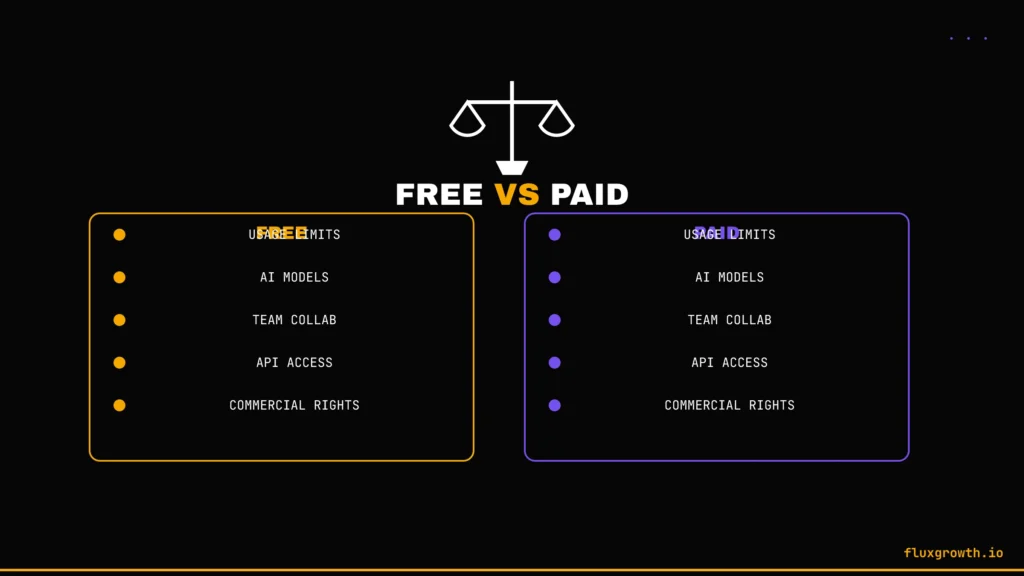
| Feature | Free | Paid |
| Usage Limits | Daily/monthly caps on nearly every tool | Higher caps, sometimes unlimited standard use |
| AI Models | Auto-selected, lighter models | Access to frontier/premium models |
| Team Collaboration | Limited or single-user only | Full multi-seat collaboration |
| API Access | Rare or heavily rate-limited | Available on most paid tiers |
| Commercial Rights | Often restricted or excluded entirely | Usually included |
| Priority Support | Rarely available | Standard on paid plans |
The pattern holds across nearly every category above: free tiers are genuinely useful for evaluation, personal projects, and light regular use, but commercial rights and team features are almost always the first things gated behind a paid plan. If your use case is “test whether this tool is worth paying for,” the free tiers on this list do that job well. If your use case is “run my business on this,” budget for at least one or two paid upgrades once you find the tools that actually stick.
Common Mistakes to Avoid
- Choosing a tool without checking the current usage limits. Free-tier allowances change often several tools on older “best free AI tools” lists (Jasper, Writesonic, Surfer SEO) have quietly dropped free access entirely since 2025.
- Ignoring commercial-use restrictions. Several image and voice tools on this list Leonardo AI, ElevenLabs explicitly restrict free-tier output to non-commercial use. Read the terms before publishing client work.
- Running the same task through five different tools “just in case.” Pick two or three tools that cover your actual bottlenecks and learn them properly, rather than spreading thin across a dozen free trials.
- Paying before testing the free version. Every tool on this list has a genuine free tier; there’s no reason to jump straight to a paid plan without confirming the tool actually fits your workflow first.
- Overlooking whether a tool integrates with what you already use. A slightly weaker tool that lives inside your existing workflow (Grammarly in your browser, GitHub Copilot in your IDE) often beats a stronger standalone tool you have to remember to open separately.
Frequently Asked Questions
What is the best free AI tool in 2026?
ChatGPT and Claude are the two strongest all-around free AI tools in 2026, both giving you real access to frontier or near-frontier models without a credit card. Which one is “best” for you depends on your workflow: Claude’s larger context window suits long-document work, while ChatGPT’s broader plugin ecosystem suits everyday quick tasks.
Which AI tool is completely free with no paid tier at all?
Google Search Console is the clearest example; it’s fully free, permanently, with no paid upgrade path at all because it’s a reporting tool, not a product Google monetizes directly. Most other “free” AI tools on this list are freemium: real free access, with a paid tier available if you outgrow it.
Are free AI tools safe to use with sensitive data?
Free AI tools generally offer weaker data protections than paid tiers; several explicitly state that free-tier conversations or generations may be used for model training, and cloud tools like NotebookLM and Leonardo AI process everything on remote servers with no offline option. For sensitive business or client data, check each tool’s specific data-retention policy before uploading anything confidential.
Which AI tool is best for students?
NotebookLM is the strongest free pick for students specifically, because it’s grounded strictly in the documents you upload rather than inventing information a meaningful difference when you’re studying from lecture notes or assigned readings. Pair it with Grammarly for writing polish and QuillBot for paraphrasing research notes.
Which AI tool is best for content writing?
Grammarly for polishing what you’ve already written, and Copy.ai for drafting new short-form copy from scratch, cover the two most common content-writing needs on a genuinely free tier. For longer-form drafting, QuillBot’s paraphrasing tools help you rework research into original phrasing.
Which AI tool is best for coding?
GitHub Copilot is the safest default for developers who work inside a standard IDE like VS Code or JetBrains, since its free tier gives you real completions and chat access without switching editors. If you’re evaluating whether project-wide AI editing changes your workflow, Cursor and Windsurf are worth a free-tier trial specifically for that comparison.
Can businesses rely on free AI tools for real work?
Free AI tools work well for evaluation, light regular use, and specific narrow tasks but nearly every category on this list gates commercial-use rights, team collaboration, or API access behind a paid tier. A small business can realistically run SEO tracking, meeting notes, and pitch decks on free tools, but anything involving client-facing generated images, video, or voice content typically needs a paid upgrade to clear commercial licensing.
Final Verdict
Best overall free AI tool: ChatGPT the widest range of everyday usefulness on a free tier that doesn’t require a credit card.
Best for beginners: Claude, thanks to a genuinely capable free model and a straightforward interface with no confusing tier structure to navigate.
Best for professionals: GitHub Copilot for developers, NotebookLM for anyone doing research-heavy knowledge work.
Best for small businesses: The combination of Ahrefs Webmaster Tools, Google Search Console, Fireflies.ai, and Gamma a genuinely usable free stack covering SEO, meetings, and presentations.
Best for developers: GitHub Copilot for daily use, Cursor for evaluating project-wide AI editing.
Best for marketers: Copy.ai paired with Canva Magic Media covers copy and visuals in one free stack.
Best for students: NotebookLM, full stop nothing else on this list is built specifically for source-grounded studying.
Best for creators: Leonardo AI for visuals, Gamma for turning ideas into shareable decks, Kling AI when a project calls for video.
If there’s one thing this research made clear, it’s that “free” is a moving target nine of the 39 tools we set out to cover had lost their free tier, shrunk it to uselessness, or pivoted the product entirely since the last time a “best free AI tools” list got written. Bookmark this page, not the tool names. We’ll keep it current as the landscape keeps shifting under everyone’s feet.
What I’d do if starting today: Share the 3 5 AI tools you’d recommend installing first based on your actual FluxGrowth workflow. For example, explain which tool you use for research, long-form writing, design, automation, and SEO. Briefly describe why each one earned a permanent place in your workflow and what type of user (blogger, marketer, freelancer, agency, or small business owner) would benefit most from it. Keep this section personal and practical rather than repeating feature lists.