FluxGrowth is reader-supported. Some links in our guides are affiliate links — if you buy through one we may earn a commission, at no extra cost to you. It never changes which tools we recommend. How we test tools.
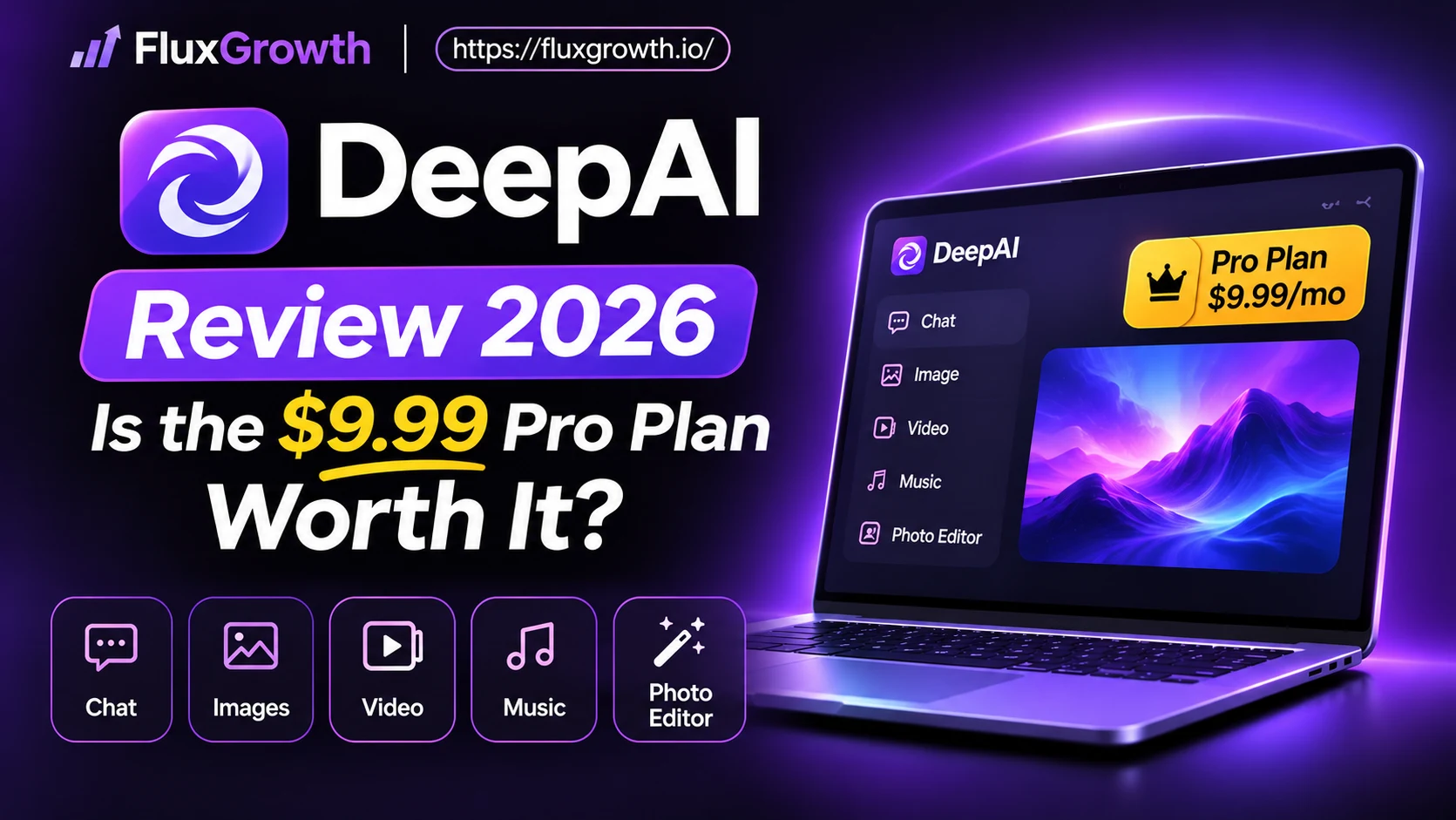
Quick answer: DeepAI is worth it if you want a cheap, wide toolbox: several leading chat models, 500 HD images, music and a fast photo editor for $9.99 a month. It suits students, bloggers, small business owners and developers who need a simple image or background-removal API, but the plan limits are real, so check the allowances and overage fees first.
You’re paying for a chatbot, an image generator, and maybe a video tool, and you’re wondering if one subscription could replace all three. That’s the pitch behind DeepAI. DeepAI is a browser-based platform from Deep AI, Inc. that bundles AI chat, image generation, short video, music, and photo editing into one Pro plan, with a developer API on top.
This guide covers every DeepAI tool, exact pricing and caps, the API, privacy issues, and the alternatives that beat it for specific jobs. Prices come from DeepAI’s own documentation unless I name another source.
What Is DeepAI?
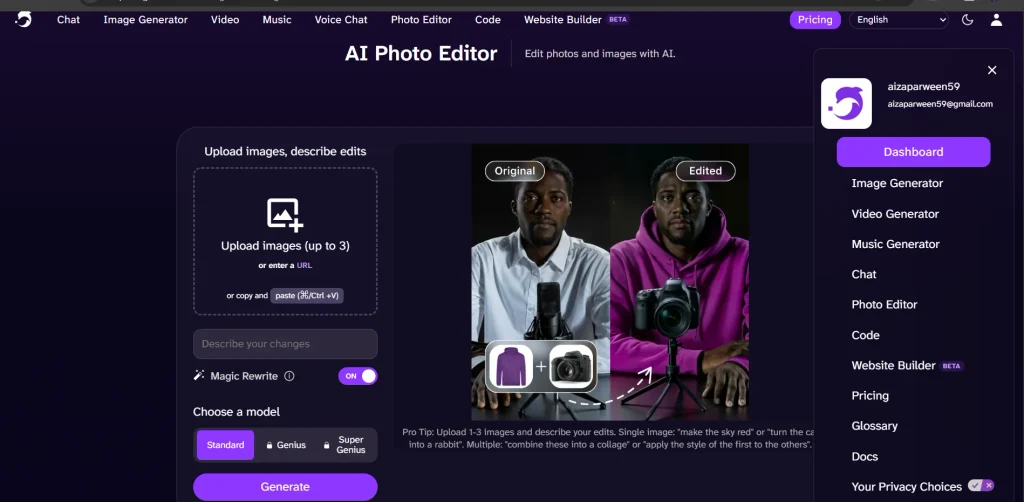
DeepAI is an all-in-one generative AI platform at deepai.org for chatting with AI models, creating images and short videos, generating music, and editing photos from one account. It’s run by Deep AI, Inc., founded by Kevin Baragona.
Most reviews skip this part: DeepAI’s chat runs largely on other companies’ models. Its pricing page lists Claude Opus 5.5, GPT-5.2, and Gemini 4 Argon among the models included in Pro. DeepAI is an access layer, not an AI lab like OpenAI or Anthropic. That’s how it offers several leading models for under $10.
This guide is part of our AI Automation hub, where we collect everything we publish on this topic in one place.
DeepAI vs. DeepSeek vs. DeepMind
- DeepAI is the platform this article covers.
- DeepSeek is a Chinese AI lab that builds its own language models.
- Google DeepMind is Google’s AI research lab, the team behind Gemini.
- Deep learning is the machine-learning technique behind all of them, not a company.
How Does DeepAI Work?
DeepAI works like a menu: pick a tool, choose a quality mode, and type a prompt. As a result, each generation reduces your allowance, while additional Pro usage is billed to a prepaid wallet.
AI tool types in plain English
- AI chatbot: a text conversation with a large language model (LLM), software that reads your message and writes a reply.
- Text-to-image or text-to-video: you describe what you want in words, and the model creates a picture or short clip.
- AI image editor: changes an existing photo from an instruction like “remove the car.”
- AI API: lets developers send requests from their own app instead of using the website.
- AI model platform: one account that gives you models from several makers. DeepAI is this plus a creative tool.
Standard, Genius, and Super Genius modes
Standard (HD for images) is fast and cheap. Genius and Super Genius use more capable models, and Super Genius images come out at 2K. Allowances shrink as you go up: Pro includes 2,000 standard chat messages a month but only 30 Super Genius messages.
In short, DeepAI is one dashboard over many models. You pay in allowances, and premium modes burn through them fast.
What AI Tools Does DeepAI Offer?
As of November 2026, DeepAI offers chat, image generation, video, music, photo editing, and voice chat, plus a few beta tools. Status labels come from DeepAI’s pricing page and API docs. For hands-on quality, I’m citing GPTZero’s May 2026 review. GPTZero sells competing AI tools, so read its verdicts with that in mind.
DeepAI AI chat (available)
Chat with a choice of models. However, memory and live web browsing are available only with Pro, not the free plan. GPTZero found chat fine for casual questions and short content but behind Claude and ChatGPT for writing, and said it forgot earlier messages in longer chats.
My Experience with DeepAI Chat
For my FluxGrowth workflow, I would use DeepAI Chat for quick content ideas, basic SEO research, and short drafts, while relying on ChatGPT or Claude for detailed blog writing and more complex tasks.
DeepAI image generator (available)
Text-to-image comes in HD, Genius, and Super Genius 2K, with 500, 60, and 10 images a month respectively on Pro. GPTZero rated results as mixed and noted that users often need several prompts to get a usable image. If image quality matters most, compare it with the best AI image generators in 2026.
AI video and Hollywood Mode (Pro only)
DeepAI supports text-to-video and image-to-video, but not on the free plan. Pro includes 25 seconds of HD video and 8 seconds of Hollywood Mode (2K) a month. GPTZero reported 5- to 12-second clips and user complaints about weak prompt-following. For longer or higher-quality clips, a dedicated AI video generator is the better choice
Photo editor and background removal (available)
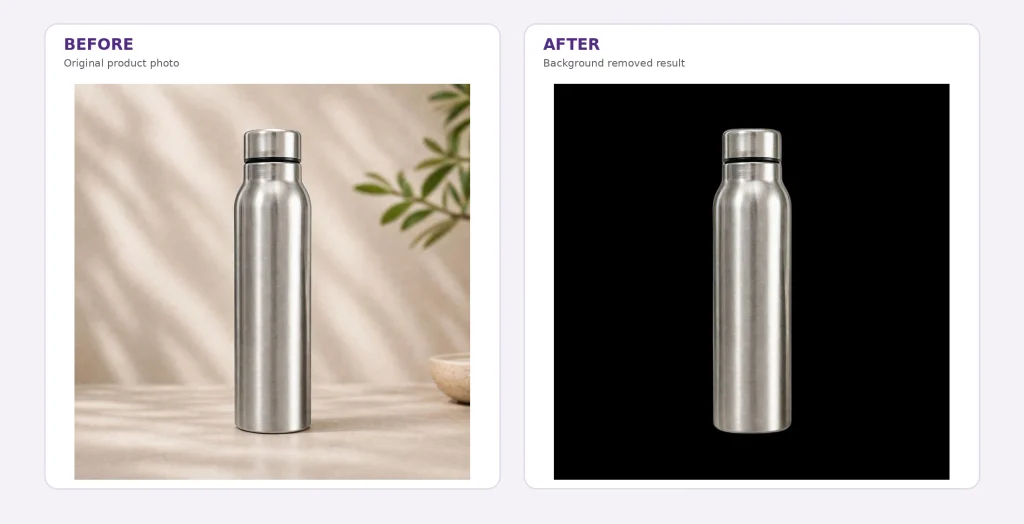
The photo editor adds or removes objects from a text instruction. DeepAI also offers a background remover, colorizer, and upscalers, all of which are in the API too. GPTZero called the photo editor DeepAI’s strongest tool. For more options, see our AI background remover comparison.
AI music and voice chat (available)
Pro includes 100 songs a month. GPTZero rated the output as good, though every track it played ran 1:35, which suggests a length cap DeepAI hasn’t confirmed. Free accounts get 60 seconds of voice chat a day.
Beta and unverified tools
- AI Website Builder: beta, 20 credits a month on Pro.
- DeepAI Code: a coding tool metered in “Theos,” 200 a day on Free and 400 a day on Pro.
- AI humanizer: returned errors in every GPTZero test. Treat it as unreliable.
How to Use DeepAI Step by Step
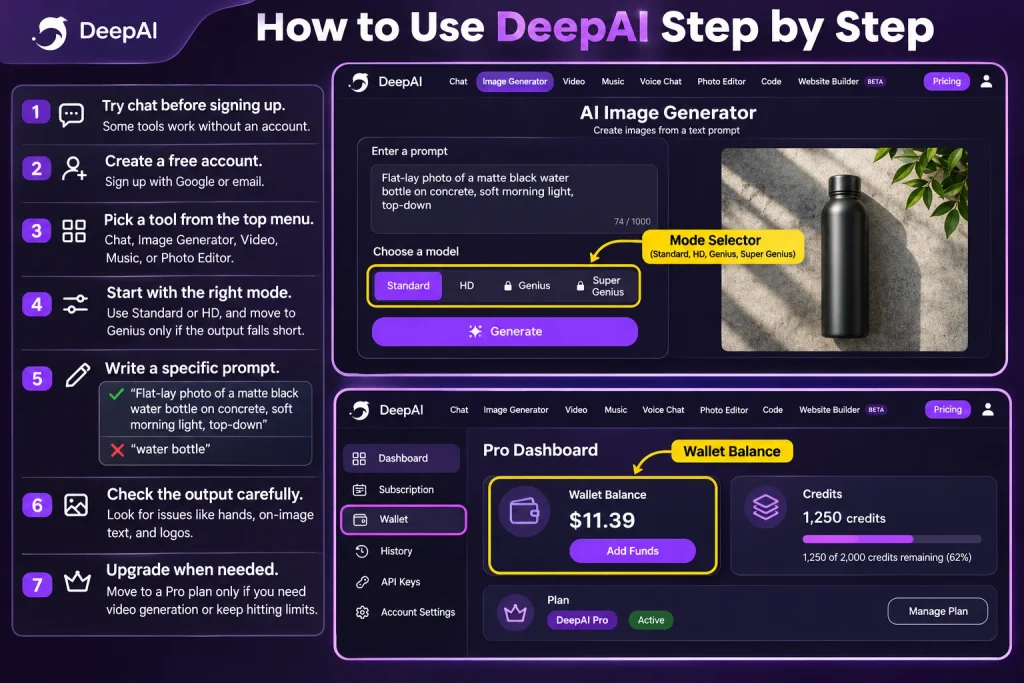
- Try chat before signing up. Some tools work without an account.
- Create a free account with Google or email.
- Pick a tool from the top menu: Chat, Image Generator, Video, Music, or Photo Editor.
- Start in Standard or HD mode, and move to Genius only if the output falls short.
- Write a specific prompt. “Flat-lay photo of a matte black water bottle on concrete, soft morning light, top-down” beats “water bottle.”
- Check hands, on-image text, and logos, since that’s where image models usually fail.
- Upgrade only when you need video or keep hitting limits.
Is DeepAI Free?
Yes, DeepAI has a $0 plan, but it’s sized for testing. Free includes limited HD images, standard chat, music, and photo editing, 60 seconds of voice chat a day, and 200 Theos a day in DeepAI Code. It has no video, no memory, and no web browsing, and it shows ads. GPTZero saw an ad after every chat reply. It’s fine for testing, not content production.
DeepAI Pricing and Subscription Plans
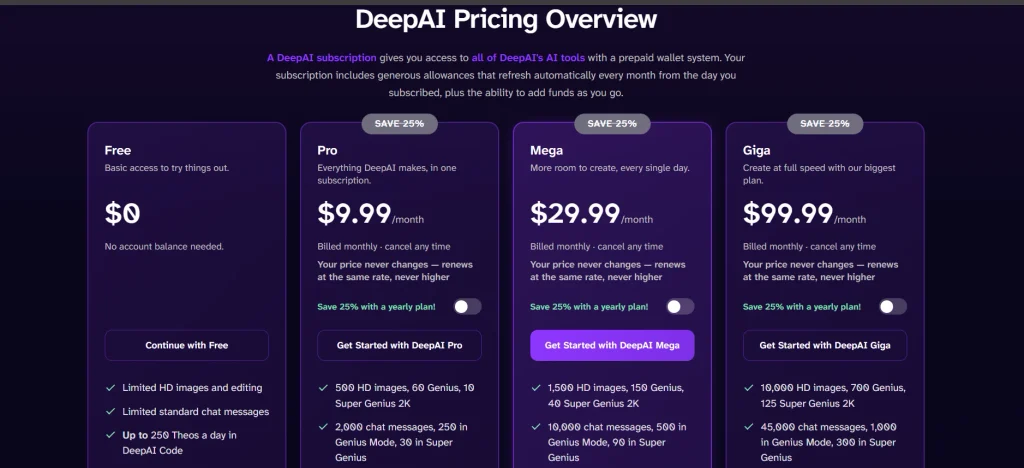
DeepAI Pro costs $9.99 a month or $89.99 a year, about $7.50 a month.Additionally, DeepAI says Pro includes access to every model available on the platform.
| Feature | Free | Pro (per month) |
| Standard chat | Limited | 2,000 messages |
| Genius / Super Genius chat | Not listed | 250 / 30 messages |
| HD images | Limited | 500 |
| Genius / Super Genius 2K images | Not listed | 60 / 10 |
| HD video | Not included | 25 seconds |
| Hollywood Mode (2K) | Not included | 8 seconds |
| AI music | Limited | 100 songs |
| DeepAI Code | 200 Theos/day | 400 Theos/day |
| Memory and web browsing | No | Yes |
| Ads | Yes | No |
Source: DeepAI pricing page, checked November 14, 2026.
How the wallet works
Allowances reset every month on the date you subscribed. After that, usage bills to a prepaid wallet, which can top itself up automatically. HD images cost 1¢ each and Super Genius 2K images 25¢. A standard chat message costs about 0.3¢ and a Super Genius message 6¢. HD video costs 20¢ a second, Hollywood Mode 30¢ a second, and songs 10¢ each. When the wallet hits zero, generation stops.
What a creator would actually pay
This example is math from DeepAI’s published rates, not a test. Say a solo creator makes 30 HD images, drafts 100 captions in Genius chat, and makes four 8-second HD clips in a month. Images and chat stay inside the allowance. Video comes to 32 seconds, so 7 extra seconds at 20¢ adds $1.40, for a total of $11.39.
The video is where it climbs. Twenty 8-second clips is 160 seconds, which adds $27 in overage for a total of $36.99.
Pro auto-renews and is non-refundable, though you keep access through the paid period after canceling. One quirk: the pricing table shows only the annual price, while $9.99 monthly appears in the FAQ and at checkout.
DeepAI API for Developers
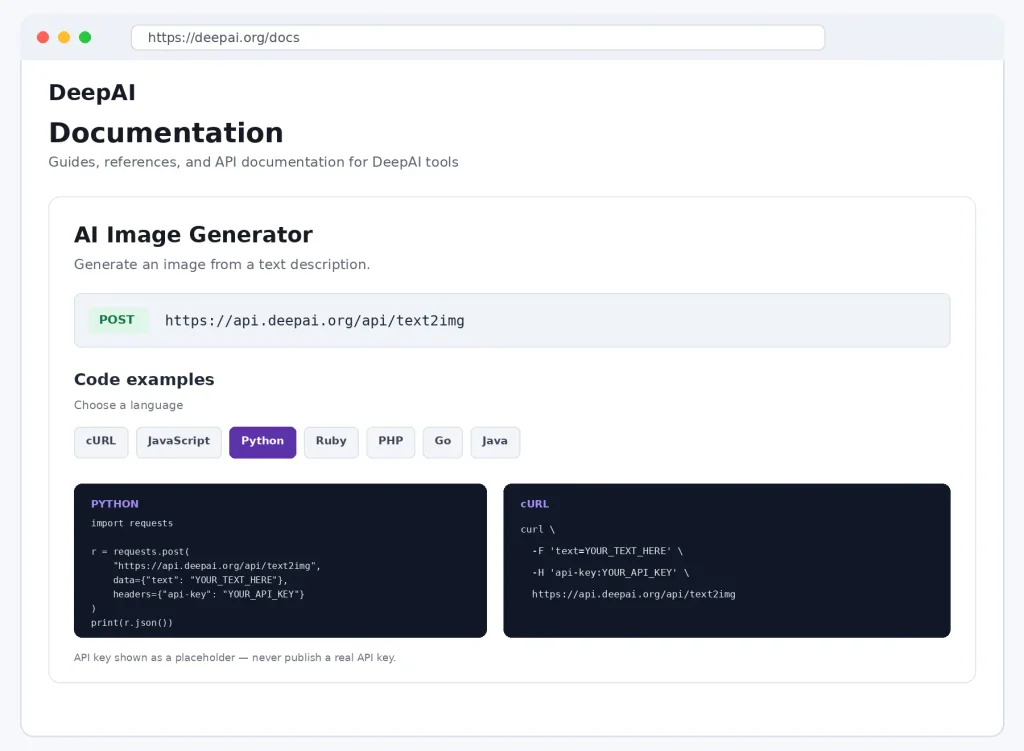
DeepAI provides a REST API for image editing and video models, and API access requires a Pro subscription. There’s no separate API plan. Therefore, API calls use your monthly allowance first before charging the prepaid wallet. Here’s what the API docs cover:
- Image APIs (synchronous): DeepAI offers
text2img,image-editor,background-remover,colorizer,torch-srgan, andcreative-upscale. Each uses a POST request to. - Video endpoints (asynchronous): text2video and img2video. You submit a job, then poll a status endpoint.
- Authentication: an api-key header on every call, kept out of client-side code.
- Code samples in 14 languages, including Python, JavaScript, Go, Swift, and Rust.
Additionally, the platform offers keyless pay-per-call pricing through the x402 or MPP payment protocols, which let software, such as AI agents, pay per request automatically. HD images and background removal each cost $0.01.
What Developers Should Plan For
DeepAI developers should consider these API limitations before using it in production:
- Video billing: Credits are released if video generation fails.
- API errors: 402 indicates a payment or balance issue. 410 means the requested model has been removed.
- Data privacy: DeepAI may collect prompts and uploaded content and use them to improve its AI models. Avoid submitting sensitive data.
- Rate limits and up-time: No general published rate limits or contractual up-time SLA were found.
In short: DeepAI is useful for prototypes and experiments. Production applications should include error handling, model fall-backs, and alternative providers.
Sources: API Docs | Privacy Policy
DeepAI Use Cases for Developers, Creators, and Businesses
- Developers: background removal at about 1¢ an image, and quick image or video features in prototypes.
- Bloggers and creators: header images, photo cleanup, and background music for short videos.
- Marketers: rough ad concepts and caption variations.
- Small business owners: product-photo cleanup without a separate design subscription.
DeepAI is the wrong tool for brand-critical design, long writing projects, and client video work.
DeepAI Pros and Cons
Pros:
- One of the cheapest bundles of chat, images, video, and music at $9.99 a month.
- Published allowances and overage rates, which many AI tools hide.
- Models from several AI labs in one account.
- A fast, simple photo editor.
- API included with Pro.
Cons:
- Only 25 seconds of HD video a month.
- Mixed image and video quality in third-party testing.
- The free tier is ad-supported, and how its ads were targeted drew criticism in 2026.
- No refunds.
Is DeepAI Safe to Use?
As a U.S. company, DeepAI has published terms and a privacy policy with published terms and a privacy policy. For this reason, avoid sharing sensitive information when using its free, ad-supported chatbot.
What DeepAI’s Terms Say
DeepAI’s Terms of Service, last updated September 19, 2025, state that users own their inputs and AI-generated outputs and may use generated content commercially, provided they follow the terms.
However, DeepAI may use User Content to provide, maintain, develop, and improve its services.
Its Privacy Policy, updated April 18, 2026, also states that collected information may be used to train AI models. Users can opt out through the website’s ImageYour Privacy Choices settings.
Users under 18 must use DeepAI under the supervision of a parent or legal guardian.
The 2026 Ad-Targeting Report
In March 2026, The Capitol Forum tested DeepAI with 52 prompts involving sensitive topics. Ads appeared in 45 conversations, often matching the topics discussed, even for logged-out users.
DeepAI’s founder said user messages are not shared with advertisers. DeepAI Pro offers an ad-free experience.
Practical rules:
- Never enter passwords, client data, or sensitive personal information into the chatbot.
- Keep API keys on your server when building business applications.
- AI-generated content is not automatically copyright-able. The U.S. Copyright Office explains that meaningful human creative contributions may qualify for copyright protection.
This is educational information, not legal advice.
DeepAI Alternatives
| DeepAI | ChatGPT | Google Gemini | Leonardo AI | Adobe Firefly | |
|---|---|---|---|---|---|
| Primary purpose | All-in-one creative AI platform | AI assistant | AI assistant and Google ecosystem | AI image and video generation | Creative AI for design workflows |
| Main AI capabilities | Multi-model chat, images, video, music, photo editing, API | Chat, image creation, Deep Research, Codex | Chat, Deep Research, NotebookLM, image and video generation | Image generation, video, upscaling, image guidance | Image, video, audio, Photoshop Generative Fill |
| Free access | Yes, limited usage | Yes, limited | Yes, limited | Yes, 150 daily tokens | Yes, limited credits |
| Pricing (US) | Free; Pro $9.99; Mega $29.99; Giga $99.99/mo | Free; Go $8; Plus $20; Pro from $100/mo | Free; AI Plus $4.99; Pro $19.99; Ultra $99.99–$199.99/mo | Free; Essential $12; Premium $30; Ultimate $60/mo | Free; Standard $9.99; Pro $19.99; Pro Plus $49.99; Premium $199.99/mo |
| Best use case | Affordable variety of AI tools | Writing and research | Google app integration | Image generation control | Professional creative design |
Prices are in USD per month. DeepAI Pro costs $89.99/year; Mega and Giga also offer annual billing. Prices and promotional offers may change.
Winner by use case: DeepAI for creative-tool variety; ChatGPT Plus for writing and research; Gemini for Google integration; Leonardo AI for image generation control; and Adobe Firefly for professional creative design.
Official pricing sources: DeepAI · ChatGPT · Google AI · Leonardo AI · Adobe Firefly
Who Should Use DeepAI?
DeepAI suits light-to-moderate users who want variety more than depth: students, hobbyists, bloggers who need occasional images, and developers who want a cheap image API. Skip it if your work depends on top-quality video, long writing sessions, or brand-consistent design.
What I’d do if I were starting today
- Spend a week on the free plan testing only the two tools you’d really use. For most creators, that’s the photo editor and HD images.
- If you upgrade, start with a monthly Pro. It’s non-refundable, so give it a month before committing to $89.99.
- Keep a dedicated chatbot like ChatGPT or Claude for writing, and use DeepAI as your cheap utility drawer.
In my FluxGrowth workflow, I would use DeepAI for quick image generation and photo editing, while relying on specialized tools for SEO, content strategy, and consistent client branding.
DeepAI FAQ
What is DeepAI used for?
DeepAI is used to chat with AI models, generate images, short videos, and music, and edit photos from one account at deepai.org. Developers use the DeepAI API for image generation, background removal, and video inside their own apps. It’s popular with students, bloggers, and hobbyists who want many AI tools for one low price.
Is DeepAI free to use?
DeepAI has a free plan with limited HD images, standard chat, music, photo editing, and 60 seconds of voice chat a day. The free plan shows ads and doesn’t include video. DeepAI Pro costs $9.99 a month or $89.99 a year and removes ads.
Is DeepAI safe?
DeepAI is a legitimate platform run by Deep AI, Inc., with published terms of service and a privacy policy. Its free chatbot is ad-supported, and a March 2026 Capitol Forum report found ads matched to sensitive prompt topics. Avoid entering personal or confidential information, or use the ad-free Pro plan.
Is DeepAI better than ChatGPT?
DeepAI isn’t better than ChatGPT for writing, research, or long conversations, according to third-party testing in 2026. DeepAI is the better fit if you want images, short video, music, and chat in one cheaper subscription. Many people use ChatGPT for text and DeepAI for occasional visuals.
Does DeepAI offer an API?
Yes. The DeepAI API covers text-to-image, image editing, background removal, colorizing, up-scaling, and text-to-video, and it requires a DeepAI Pro subscription. API usage draws from Pro’s monthly allowance first, then from a prepaid wallet.
Can I use DeepAI images commercially?
DeepAI’s Terms of Service, last updated September 19, 2025, say users own their outputs and may use generated content commercially if they follow the terms. Owning an image under a platform’s terms isn’t the same as copyright protection, which U.S. law generally limits for purely AI-generated work. For high-stakes uses, check the current terms and talk to a lawyer.
The Bottom Line on DeepAI
DeepAI is worth it if you want a cheap, wide toolbox: several leading chat models, 500 HD images, music, and a fast photo editor for $9.99 a month. It suits students, bloggers, small business owners, and developers who need a simple image or background-removal API.
The limits are real. Video allowances are tiny, image and video quality is uneven, the free tier’s ads drew criticism in 2026, and Pro is non-refundable. Think of DeepAI as a utility drawer, not a replacement for specialist tools.
Your next step: take the one AI task you do most, run it on DeepAI’s free plan for a week, and compare the result with what you use now. Whichever tool wins that test is the one worth paying for.