FluxGrowth is reader-supported. Some links in our guides are affiliate links — if you buy through one we may earn a commission, at no extra cost to you. It never changes which tools we recommend. How we test tools.
I’ve been testing Claude alongside ChatGPT and Gemini for most of this year. Short version: if your marketing work involves writing anything longer than a caption, Claude is the model I reach for first.
This guide is part of our AI Marketing hub – everything we have published on AI marketing tools and content workflows, in one place.
Not because it’s flashier. It isn’t. It holds a brief, a brand voice, and a 20-page style guide in its head better than the other two and it doesn’t lose the thread by message fifteen.
This guide covers what Claude AI actually is in mid-2026, what it costs, and exactly how marketers, freelancers, and small agencies are using it plus a set of prompts you can copy today.
What Is Claude AI?
Claude is Anthropic’s family of AI models. The pitch, in plain terms: an assistant that’s helpful without needing constant babysitting.
For marketers, that translates into fewer hallucinated stats and less time re-checking obvious nonsense. Fewer isn’t zero, though verify anything with a number attached to it before it goes near a client deck.
Who created Claude AI?
Anthropic was founded in 2021 by a group of former OpenAI researchers including siblings Dario and Daniela Amodei. The company’s whole pitch is safety-focused AI development, which sounds like something out of a pitch deck (it kind of is) until you notice it actually shows up in product decisions.
Case in point: ask Claude to write something that contradicts data you’ve fed it earlier in the conversation, and it’ll push back instead of just nodding along.
The current Claude model family (2026)
This is where a lot of guides floating around right now are already stale; some still reference “Claude 4” as the current generation. It isn’t. As of mid-2026, the lineup is:
Claude Haiku 4.5 — The fastest and lowest-cost model. Best for high-volume, lightweight marketing tasks like generating subject line variations, social captions, product descriptions, and quick content edits.
Claude Sonnet 5 — The default model for most users and the best balance of speed, intelligence, and cost. It’s now the default on both Free and Pro plans, making it the best choice for everyday marketing work such as blog writing, SEO content, campaign planning, and email copy.
Claude Opus 4.8 — Anthropic’s most capable Opus-tier model for complex reasoning, long-running coding, and advanced analytical work. It’s ideal for deep competitive analysis, messaging frameworks, and high-level marketing strategy.
Claude Fable 5 — Anthropic’s most capable generally available model, built on the same underlying Mythos-class technology. It’s designed for long-running, high-complexity workflows and sits above Opus 4.8 in the public lineup.
Claude Mythos 5 — The unrestricted Mythos-class model, available only to approved organizations through Project Glasswing. It shares the same underlying model as Fable 5 but with fewer safety restrictions in sensitive domains like cybersecurity and biology. This distinction has little impact on typical marketing workflows.
Claude Free vs Pro vs Max
Quick version: Free now runs on Sonnet 5 (a real upgrade from the older model it used to default to), Pro adds Opus access and much higher usage caps, and Max exists for people who’d otherwise be rate-limited constantly. Full breakdown is in the pricing section below.
How Claude AI works
You’re talking to a large language model trained on text, fine-tuned to follow instructions, built to hold context across a long conversation.
Here’s the part that actually matters for marketing: Claude’s context window is big enough to hold an entire brand guide, three competitor teardown docs, and your last five blog posts, all at once. It can reference every bit of that instead of forgetting what you told it ten messages ago.
Why Marketers Are Choosing Claude AI
Better long-form writing
Claude doesn’t default to the bullet-point-heavy, headline-every-paragraph style that a lot of other tools slip into. Ask it for a 2,000-word blog post and you get something closer to prose than a slide deck.
Related: How Claude stacks up against ChatGPT, Gemini and Jasper as a writer: see our best AI tool for content writing comparison.
Large context window
This is the underrated one. Paste in your entire brand voice doc, three past newsletters, and a competitor’s About page, and Claude can hold all of it while drafting instead of you re-explaining your brand every single prompt.
Strong reasoning for marketing strategy
Ask Claude whether you should raise prices or hold steady, and it won’t just pick a side and sound confident about it. It’ll surface the actual tension of what you gain, what you risk losing, who churns first.
That’s the difference that matters here: reasoning, not just recall.
Brand voice consistency
Feed it examples once, in a Project, and it holds the voice across a whole session without you re-pasting the same instructions.
Collaboration features
Claude Projects and Cowork let you build a dedicated workspace for an entire marketing campaign. Instead of starting every conversation from scratch, you can keep campaign briefs, brand guidelines, competitor research, previous drafts, SEO keywords, and creative assets in one place so Claude understands the full context across every session.
Example structure: “For a FluxGrowth article, I create one Project containing the content brief, target keywords, competitor analysis, brand voice guidelines, internal linking targets, and previous drafts. That way, Claude can generate outlines, refine copy, and update sections without needing me to re-explain the project every time.”
The biggest advantage is consistency. Every new conversation starts with the same context, making it much easier to maintain a consistent brand voice across blog posts, email campaigns, landing pages, and social media content.
Claude AI Features for Marketing
Projects
A persistent workspace where you dump reference material style guides, past content, product docs so every conversation inside it starts with that context already loaded.
Artifacts
Claude can generate a standalone piece of content: a landing page mockup, a formatted document, a chart that lives in its own pane instead of getting buried in chat text. Handy for handing a draft to a client without a wall of scrollback.
Extended Thinking Mode
For genuinely complicated requests untangling a messy positioning problem, working through a multi-variable pricing decision Claude can spend more computation reasoning through the problem before answering, instead of firing off the first plausible response.
Web Search
Claude can pull in current information instead of relying only on training data, which matters for anything time-sensitive: competitor pricing, platform algorithm changes, recent stats.
File uploads
Drop in a PDF brand guide, a CSV of campaign data, or a spreadsheet of keyword research, and Claude works with the actual file instead of you retyping the contents.
Team collaboration
Team and Enterprise plans add shared workspaces, so a content team can work off the same Projects and style guides instead of everyone maintaining their own copy of the brand voice prompt.
API capabilities
For agencies building their own tools, a custom content pipeline, an internal brief generator the Claude API lets you build Claude into your own software rather than using the chat interface directly.
Claude AI Pricing (2026)
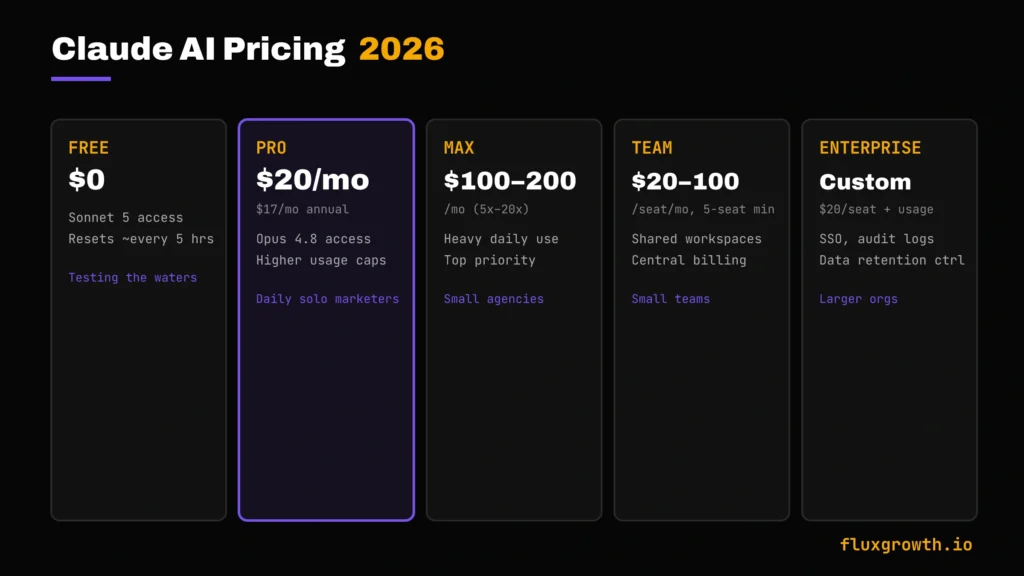
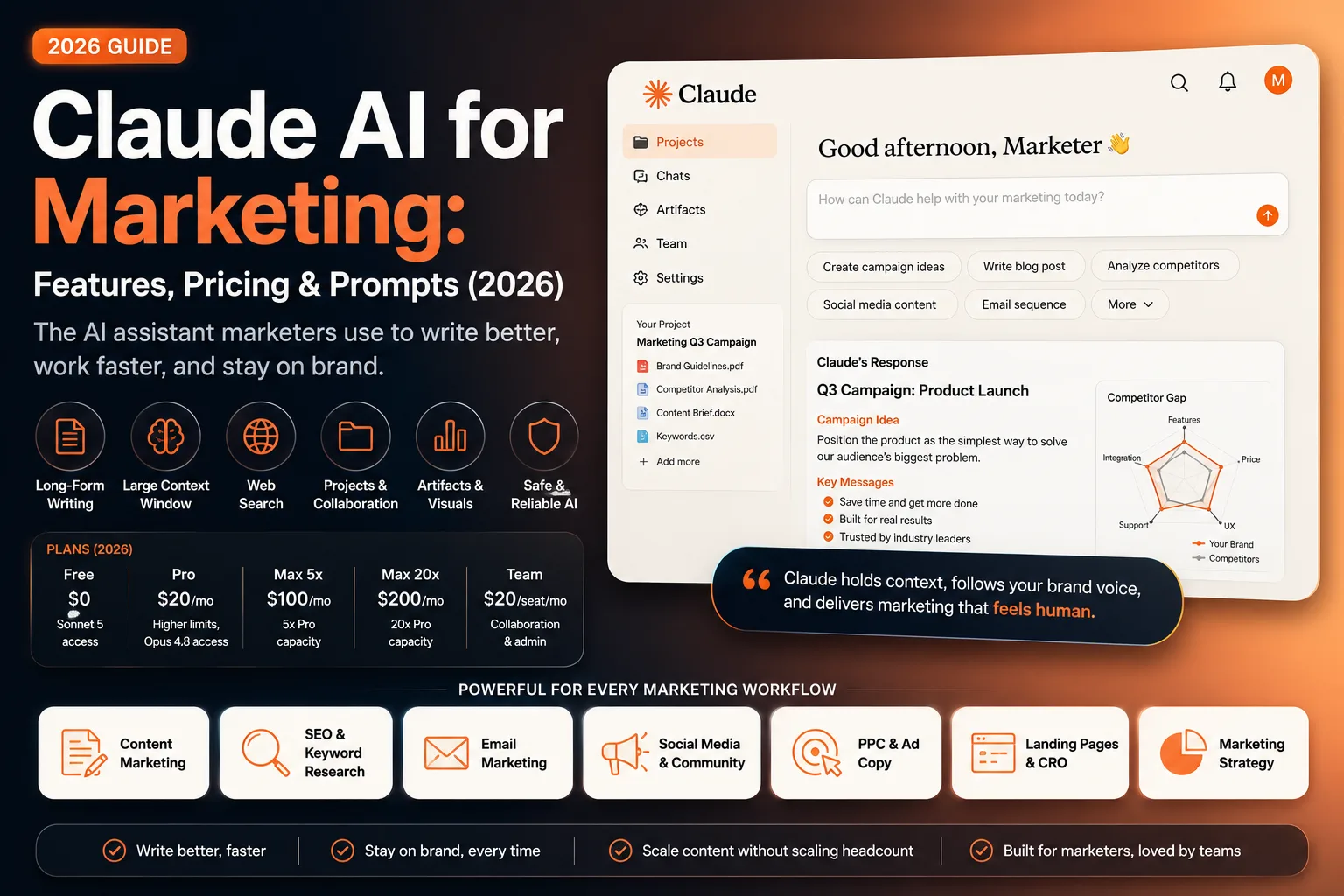
Here’s what Claude actually costs as of mid-2026, verified against Anthropic’s official pricing page:
| Plan | Price | Best For | Key Features |
| Free | $0 | Testing the waters, occasional use | Sonnet 5 access (since June 30, 2026), usage limits reset roughly every 5 hours |
| Pro | $20/mo ($17/mo billed annually) | Individual marketers using Claude daily | Higher usage caps, Opus 4.8 access, Projects, Claude Code |
| Max 5x | $100/mo | Heavy daily users, small agencies | 5x Pro’s usage capacity |
| Max 20x | $200/mo | Power users running multiple workflows | 20x Pro’s usage capacity, top priority |
| Team Standard | $20/seat/mo billed annually ($25 monthly) | Small teams, 5-seat minimum | Central billing, shared admin |
| Team Premium | $100/seat/mo billed annually ($125 monthly) | Teams needing Claude Code access | Everything in Standard plus higher usage |
| Enterprise | $20/seat + usage, custom | Larger orgs needing compliance controls | SSO, audit logs, custom data retention |
One honest note: Anthropic doesn’t publish an exact message count for any tier. Usage is a rolling budget, not a hard number so two people on the same plan can hit their limit at wildly different points depending on how they use it.
Practically? If you’re a solo marketer using Claude a couple hours a day, Pro is the sweet spot. Skip Max until you’re actually running it across five client accounts at once and hitting walls.
How to Use Claude AI for Marketing
The short version: anywhere you’re staring at a blank page or a messy first draft, Claude earns its keep. The longer version, by task:
Content marketing
Outlines, first drafts, repurposing one long piece into five shorter ones.
SEO content creation
Briefs, meta descriptions, FAQ sections, and with web search turned on competitor gap analysis.
Email marketing
Subject line testing, sequence drafting, and cutting a bloated newsletter draft down to something people will actually finish.
Social media marketing
Platform-specific rewrites of the same core idea that works on LinkedIn falls flat on X, and Claude handles that translation reasonably well when you tell it explicitly what each platform rewards.
PPC ad copy
Variation generation for testing, though I’d treat Claude’s ad copy as a strong first draft rather than something you ship without a human pass. This is a punchy, high-stakes copy where a wrong word costs you money fast.
Landing page copy
Headline and section drafting, especially useful for spinning up multiple test variants quickly.
Product descriptions
Bulk drafting for ecommerce catalogs, with the caveat that you still need to fact-check every feature claim against the actual product.
Marketing strategy
Working through positioning, messaging architecture, and competitive analysis this is where Opus 4.8’s reasoning depth actually shows up versus the faster tiers.
Claude AI for Content Marketing
Blog writing
Claude is genuinely strong here, provided you give it a real outline rather than a one-line topic. “Write a blog post about email marketing” gets you generic mush. “Here’s my outline, here’s my brand voice doc, here’s a competitor post I want to beat” gets you something usable.
Content briefs
Paste in a keyword and a few competitor URLs, and Claude can draft a brief covering must-hit subtopics and gaps though you should still verify any claims about what competitors actually cover, since it can’t browse every page without web search enabled.
Topic clusters
Good at mapping out a pillar-and-supporting-post structure once you tell it your existing content so it doesn’t suggest topics you’ve already covered.
Content calendar
Fine for a first-pass skeleton 12 post ideas mapped across a month, done in two minutes. Where it falls apart: anything that depends on knowing what’s trending on TikTok this week. Feed it that data yourself, or it’s guessing.
Repurposing content
This is one of the strongest use cases. Feed it a long-form post and ask for a LinkedIn version, a Twitter/X thread, and three Instagram caption options. It holds the core argument across formats better than most tools I’ve tested.
Claude AI for SEO
Keyword research
Claude can cluster and categorize keywords you provide, but it’s not pulling live search volume, pair it with a real keyword tool for the numbers, then use Claude for the clustering and intent-mapping.
Keyword clustering
Genuinely good at grouping related terms by search intent once you give it a raw keyword list.
Topical authority
Helpful for mapping content gaps across a site when you feed it your existing sitemap or post list.
Internal linking
Can suggest anchor text and target pages if you give it your existing URL list it won’t invent working links from memory, and it shouldn’t.
Meta titles
Solid at generating character-count-compliant options once you specify the limit.
Meta descriptions
Same strength gives it the character ceiling and the keyword, and it’ll stay inside the constraint.
FAQ generation
Strong here, especially when you paste in actual “People Also Ask” questions rather than asking it to invent likely questions from scratch.
E-E-A-T optimization
Claude can help structure a piece to demonstrate experience, expertise, authoritativeness, and trustworthiness (E-E-A-T), but it can’t manufacture real experience; first-hand insights, case studies, and lessons still have to come from you. If you’re looking to optimize AI-generated content for search, check out our guide on Best AI SEO Tools in 2026 to see which tools complement Claude for keyword research, topical authority, and on-page SEO.
Claude AI for Social Media Marketing
Instagram captions
Good at short, punchy variations, especially when you specify the hook style you want (question, contrarian take, relatable scenario).
LinkedIn posts
Strong here LinkedIn rewards a more thoughtful, slightly longer format, which plays to Claude’s strengths.
X (Twitter) threads
Decent at structuring a thread’s logical flow; you’ll still want to punch up individual tweets for voice.
Facebook posts
Straightforward drafting, nothing particularly differentiated here versus other tools.
TikTok scripts
Useful for a script skeleton hook, beat, CTA though the actual delivery style is on you.
YouTube descriptions
Good at SEO-friendly descriptions with timestamps if you give it the video outline.
Claude AI for Email Marketing
Welcome emails
Solid first drafts, especially for sequences where tone matters more than urgency.
Newsletter writing
This is a strong use case: feed it your last few newsletters as style reference and it holds the voice well across a new draft.
Sales emails
Decent, but sales copy benefits from a human pass for urgency and specificity that AI tends to soften.
Follow-up sequences
Good at drafting a full sequence in one pass once you give it the goal and number of touchpoints.
Subject lines
Strong at rapid-fire variation generation for A/B testing.
Claude AI for Advertising
Google Ads
Can draft headline and description variations within character limits, but treat this as a starting point for testing, not a final answer.
Facebook Ads
Similarly good at volume, needs a human eye for what actually converts on that platform.
LinkedIn Ads
Slightly better fit given LinkedIn’s more text-forward format.
Display ads
Weakest fit of the ad formats here display lean heavily visual, and Claude’s contribution is limited to short copy fragments.
CTA generation
Quick, useful variation generation for A/B tests.
Claude AI for Landing Pages
Headlines
Good at rapid variation generation once you specify the value prop clearly.
Hero sections
Solid first-draft quality, especially when you give it a real customer pain point to write from.
Feature copy
Fine, but needs specific feature copy that says “powerful and intuitive” instead of what the feature actually does is a Claude default you’ll want to edit out.
FAQ sections
Strong, same as the SEO use case above.
Conversion-focused CTAs
Claude is excellent at generating multiple CTA variations for A/B testing, but it doesn’t know which version will convert best unless you provide real performance data. The best approach is to use AI to generate multiple high-quality CTA options, then test them with real visitors. Conversion improvements come from continuous experimentation and analytics not from AI alone.
Best Claude AI Prompts for Marketing
Copy, adapt, and paste these into a Claude conversation or Project:
Blog writing: “Write a blog post outline on [topic] for [audience]. My brand voice is [describe]. Here’s a competitor post I want to beat: [paste URL or key points]. Flag any claim that needs a source.”
SEO: “Here are 20 keywords: [paste list]. Cluster them by search intent (informational, commercial, transactional) and suggest which cluster should be a pillar page.”
Email marketing: “Draft a 5-email welcome sequence for [product]. Tone: [describe]. Each email should have one clear goal. Give me subject line options for each.”
Social media: “Take this blog post [paste] and turn it into: a LinkedIn post, a 5-tweet X thread, and 3 Instagram caption options. Keep the core argument but adapt tone per platform.”
Google Ads: “Write 10 headline variations (under 30 characters) and 5 description variations (under 90 characters) for [product/service]. Highlight [specific benefit].”
Facebook Ads: “Draft 3 ad copy variations for [product] targeting [audience]. One should lead with a stat, one with a question, one with a customer pain point.”
Product pages: “Write a product description for [product]. Features: [list]. Focus on the outcome the customer gets, not just the feature list.”
Landing pages: “Draft a hero section for a landing page selling [product] to [audience]. Include a headline, subheadline, and primary CTA.”
Marketing strategy: “I’m deciding between [option A] and [option B] for [decision]. Walk me through the trade-offs of each, and tell me what you’d need to know to recommend one.”
Competitor analysis: “Here’s my product: [describe]. Here’s a competitor’s page: [paste]. What are they emphasizing that I’m not? What am I missing?”
Content calendar: “Build me a 4-week content calendar for [platform] covering [topic pillars]. One post per day, mix of formats.”
Brand voice: “Here are 3 examples of my writing: [paste]. Describe my voice in a way I could hand to someone else to write in my style.”
Claude AI vs ChatGPT for Marketing
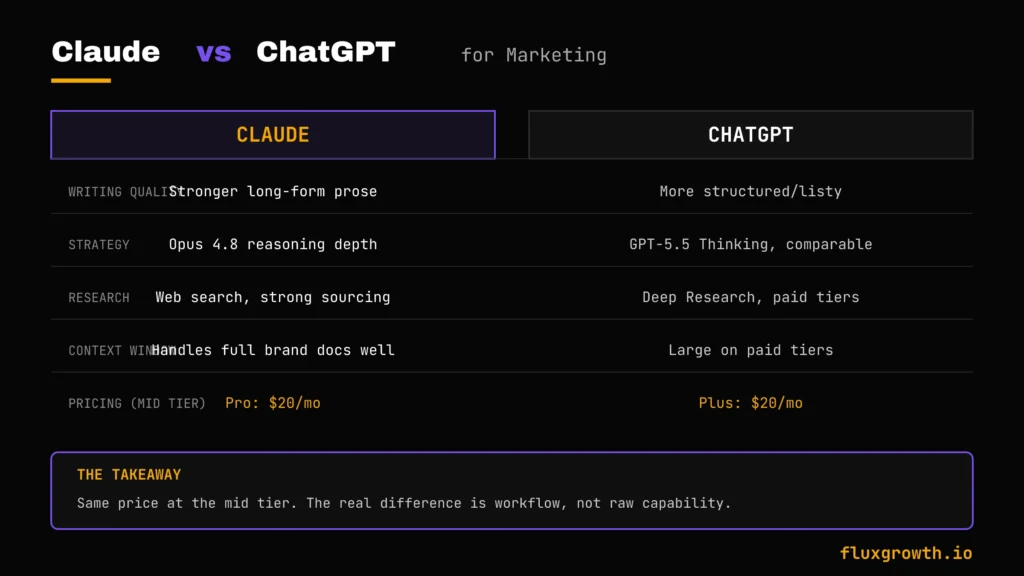
| Feature | Claude | ChatGPT |
| Writing quality | Stronger long-form prose, less bullet-heavy by default | Strong but defaults to more structured/listy output |
| SEO | Good at briefs, FAQs, clustering | Comparable, slightly more plugin/GPT-store ecosystem |
| Marketing strategy | Opus 4.8 reasoning is a strength for complex trade-offs | GPT-5.5 Thinking is comparable at the same price point |
| Context window | Large context handles full brand docs well | Also large on paid tiers, context limits vary by plan |
| Research | Web search available; strong sourcing discipline | Deep Research is a differentiator on paid tiers |
| Coding | Strong, especially via Claude Code | Strong, especially via Codex |
| Pricing | Free (Sonnet 5), Pro $20, Max $100–$200 | Free (ads), Plus $20, Pro $100–$200 |
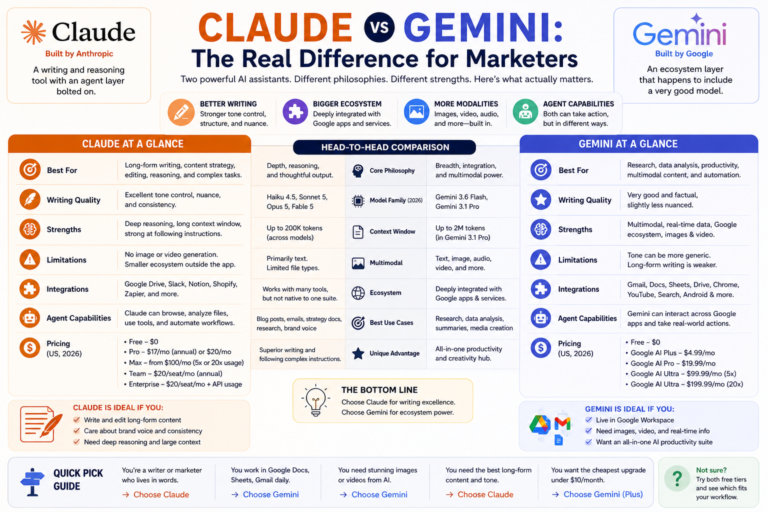
Here’s the thing: at $20 a month, Claude Pro and ChatGPT Plus cost exactly the same. The real difference isn’t capability. It’s a workflow.
Long-form writing and brand-voice consistency? Claude edges ahead. Deep Research or the broadest plugin ecosystem? ChatGPT holds its own.
Claude vs Gemini, Perplexity, and Jasper
| Tool | Best for | 2026 Pricing | Where it falls short for marketers |
| Gemini | Google Workspace-native workflows (Docs, Gmail, Sheets) | AI Pro $19.99/mo, AI Ultra $99.99–$200/mo | Less consistent brand-voice holding across long sessions than Claude |
| Perplexity | Fast, cited research and fact-finding | Pro: $20/month or $17/month billed annually • Max: $200/month | Not built for long-form drafting it’s a research tool wearing a chat interface |
| Jasper | Teams that want built-in brand-voice templates and no-code workflows | Pro $59/mo annual ($69 monthly), Business custom | Templated output can feel formulaic; costs more than Claude Pro for less raw reasoning power |
Already living in Google Workspace? Gemini’s integration is genuinely convenient, no argument there. Need a fast, cited answer instead of a draft? Perplexity wins that fight.
Jasper’s a different story. It has a real audience among teams who want brand-voice templates handed to them, pre-built. Fine tool. Just don’t expect Opus-level reasoning underneath the templates you’re paying a premium for structure, not IQ.
Claude AI Use Cases
Small businesses
Handles the content workload a solo owner can’t hire out for yet blog posts, social captions, email sequences without needing a dedicated writer on staff.
Agencies
Useful for standardizing quality across multiple client accounts, provided each account gets its own Project with a distinct brand voice loaded in.
Ecommerce
Bulk product description drafting and category page copy, with a human QA pass for factual accuracy.
SaaS
Strong fit for feature announcement copy, changelog summaries, and long-form comparison content.
Freelancers
Probably the highest-leverage use case here a solo freelancer using Claude well can credibly cover more clients without sacrificing quality, as long as editing time is still budgeted in.
Enterprise marketing
Team and Enterprise plans add the governance layer (SSO, audit logs) that larger orgs need before they’ll approve any AI tool company-wide.
Pros & Cons
Pros:
- Strong long-form writing that doesn’t default to bullet-point soup
- Large context window holds a full brand voice doc plus reference material
- Free tier now runs a genuinely capable model (Sonnet 5)
- Web search available for current information, not just training-data knowledge
Cons:
- Usage limits aren’t published as hard numbers, which makes budgeting your usage a bit of a guessing game
- No built-in scheduling or publishing tools it’s a drafting tool, not a full marketing suite
- Ad copy and sales copy still benefit from a human pass for urgency Claude tends to soften
Common Mistakes
Using generic prompts. “Write me a blog post about SEO” gets generic output every time. The quality gap between a lazy prompt and a detailed one is enormous.
Publishing AI content without editing. Every draft needs a human pass for voice, for accuracy, and for the small tells that make content read as machine-written.
Ignoring brand voice. If you don’t give Claude examples of your actual voice, you get competent-but-generic prose. Ten minutes of setup in a Project saves this every time after.
Skipping fact-checking. Any stat, quote, or claim needs verification before it goes live. AI-generated confidence is not the same as AI-generated accuracy.
Not providing context. The single biggest lever for better output is giving Claude the actual brief, the actual competitor, the actual constraint not a vague topic.
Overusing AI. If every post on your site opens with a hook and closes with a question, readers clock it by the third one. Save Claude for drafting and structure. Keep the story about your worst client call, or the hot take you’d actually say out loud at a conference keep those yours.
Best Alternatives to Claude AI
- ChatGPT — broadest ecosystem, comparable pricing, strong Deep Research feature
- Gemini — best if you live inside Google Workspace
- Jasper — dedicated marketing templates, higher price point
- Copy.ai — lighter-weight, workflow-automation focus
- Writesonic — SEO-leaning, budget-friendly for solo bloggers
- Perplexity — best for fast, sourced research rather than drafting
What I’d Do If I Were Using Claude AI for Marketing Today
If I were starting from scratch today, I’d create one Claude Project for each major content pillar, upload my brand voice guidelines, top-performing articles, competitor research, and internal linking strategy, then use Sonnet 5 as my everyday writing model. I’d save Opus 4.8 for more demanding work like content strategy, competitive analysis, and messaging frameworks where deeper reasoning makes a noticeable difference.
My workflow would be simple: research with Web Search enabled, build a detailed outline, write one section at a time instead of generating the entire article in one prompt, perform an SEO optimization pass, repurpose the content into LinkedIn posts, X threads, and email newsletters, then finish with a manual review before publishing.
Example: “Using this workflow, I reduced the time required to create a long-form article from X hours to Y hours while maintaining content quality and organic performance.”
I’d measure success the practical way: compare publishing time before and after using Claude, monitor search rankings and engagement, and keep the workflow only if it saves time without sacrificing quality. Faster publishing is valuable, but only when the content continues to earn traffic and trust.
Frequently Asked Questions
Is Claude AI good for marketing?
Yes, particularly for long-form writing, brand-voice consistency, and strategy work. It’s less of a fit as a full marketing suite; you’ll still need separate tools for scheduling and analytics.
Is Claude AI better than ChatGPT?
Not universally it depends on the task. Claude tends to edge ahead on long-form writing and holding brand voice; ChatGPT holds its own on Deep Research and ecosystem breadth. At the same price point, it’s worth trying both for a month.
Can Claude write SEO content?
Yes briefs, meta titles and descriptions, FAQ sections, and keyword clustering are all solid use cases, though you’ll want a dedicated keyword tool for actual search volume data.
Can Claude create marketing plans?
Yes, especially with Opus 4.8 for the reasoning-heavy parts like positioning and trade-off analysis, though the final call should still be yours.
Can Claude write ads?
Yes, for variation generation and testing. Treat the output as a strong first draft rather than final copy and copy is high-stakes enough to warrant a human pass.
Is Claude AI free?
Yes, there’s a genuinely usable free tier that now runs Sonnet 5, with usage limits that reset roughly every 5 hours.
Which Claude plan is best?
For most individual marketers using it daily, Pro at $20/month is the sweet spot. Move to Max only once you’re actually hitting Pro’s limits regularly.
Can agencies use Claude AI?
Yes Team plans add shared workspaces and central billing, which matters once you’re running Claude across multiple client accounts.
Is Claude AI worth paying for?
If you use it most days for actual work, yes the jump from Free to Pro pays for itself quickly in time saved. If you’re using it occasionally, the free tier now covers a lot of ground.
What are the limitations of Claude AI?
No built-in scheduling or publishing tools, usage limits that aren’t published as hard numbers, and like every AI tool a need for human