FluxGrowth is reader-supported. Some links in our guides are affiliate links — if you buy through one we may earn a commission, at no extra cost to you. It never changes which tools we recommend. How we test tools.
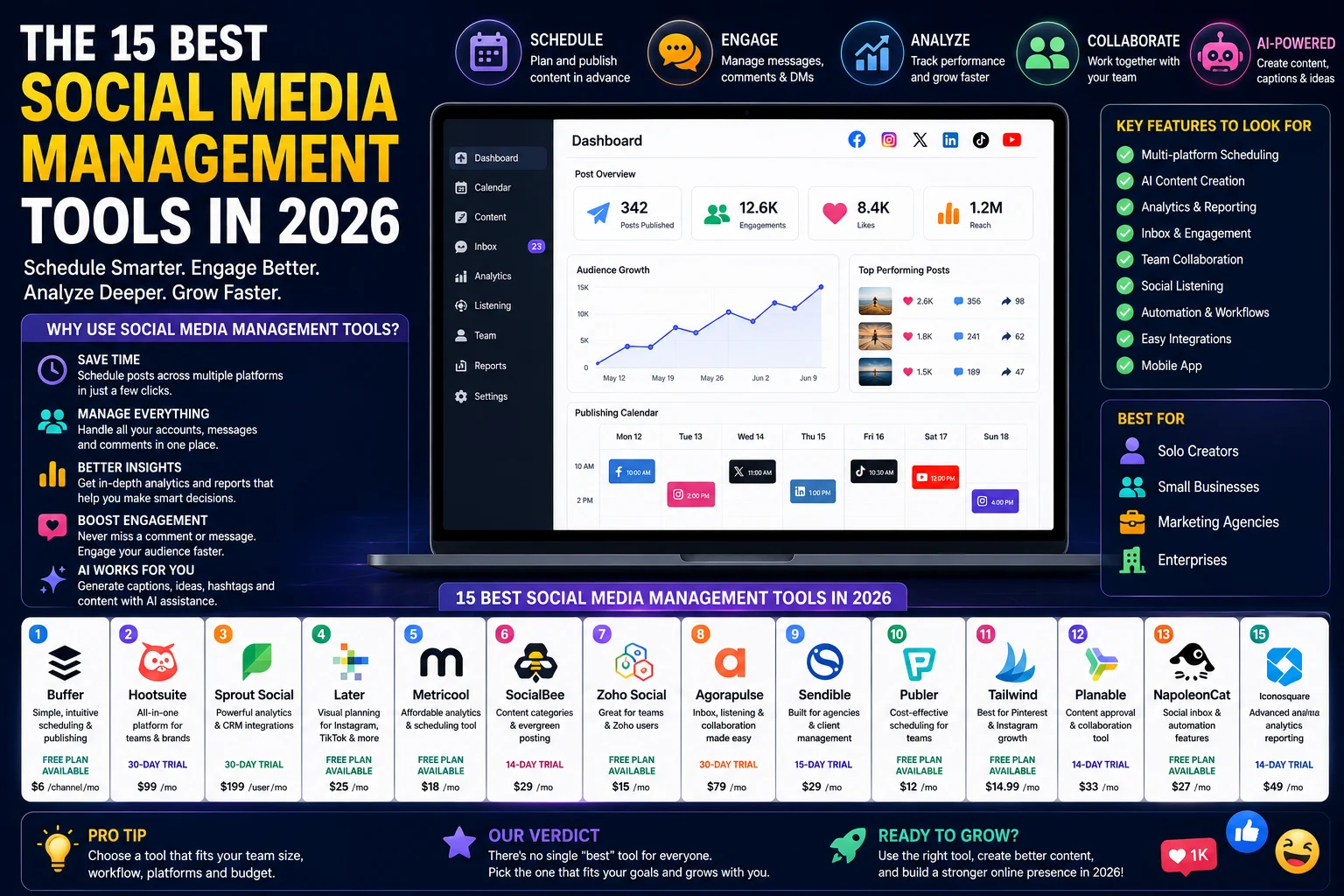
You’re posting to five platforms, answering DMs on three of them, and trying to figure out why last week’s Reels flopped all before lunch. That’s the problem social media management tools exist to solve. This guide compares the 15 best social media management tools in 2026, based on hands-on testing across scheduling, AI features, analytics, and pricing, so you can pick one without burning a week on free trials.
This guide is part of our Social Growth hub – everything we have published on growing on social with AI, in one place.
At FluxGrowth, we’ve tested dozens of social media and AI marketing tools while researching software for our readers and evaluating platforms for content marketing workflows. Instead of relying on feature lists alone, we compared how each tool performs in real-world scenarios from scheduling content across multiple networks to using AI for captions, analyzing campaign performance, and collaborating with teams. That practical testing shaped every recommendation in this guide.
Here’s what you’ll get: a plain-English breakdown of what these tools actually do, a tested comparison of all 15, and use-case picks if you don’t want to read the whole thing. Plus a pricing guide that accounts for the per-seat and per-channel traps, the ones that quietly triple your bill past the “starting at” number on the pricing page.
What Are Social Media Management Tools?
A social media management tool is software that lets you schedule, publish, analyze, and respond to content across multiple social platforms from one dashboard instead of logging into each app separately.
That’s the plain definition. In practice, these platforms do four jobs: scheduling and publishing, analytics and reporting, team collaboration (drafts, approvals, permissions), and increasingly in 2026 AI-assisted content creation, from caption drafts to full post ideation.
Social Media Management vs. Scheduling Tools
Not every tool in this category does the same job.
A pure scheduler handles the “when does this go live” part. That’s it. A full management platform adds a shared inbox for comments and DMs, analytics that go beyond vanity metrics, approval workflows, and social listening on top.
Buffer, Publer, and Later lean scheduler-first. Sprout Social, Agorapulse, and Hootsuite are built as full management suites from the ground up. Knowing which one you actually need before you start comparing prices is half the buying decision.
Who Should Use a Social Media Management Platform
If you’re posting to more than two platforms a week, managing content for a client, or coordinating approvals with anyone else, a management tool pays for itself in saved time. If you’re a solo creator posting to one platform a couple times a week, native scheduling (Meta Business Suite, LinkedIn’s built-in scheduler) may cover you for free. Don’t pay for what you don’t need yet.
Benefits of Using Social Media Management Tools
Save time with scheduling. Batch-writing and scheduling a week’s or month’s worth of content in one session is far more efficient than logging into multiple platforms every day. In our own workflow, planning content in advance reduced the time spent on daily publishing and allowed us to focus more on content quality and strategy instead of repetitive posting.
Manage multiple accounts from one dashboard. Switching between Instagram, LinkedIn, TikTok, and X natively means four logins, four interfaces, four places to miss a typo. One dashboard fixes that.
Improve team collaboration. Draft-review-approved workflows (Planable and Agorapulse are particularly strong here) stop “who approved this caption?” from becoming a Slack thread.
AI-powered content creation. Most tools on this list now bundle an AI assistant for captions, hashtags, or full drafts Buffer’s AI Assistant and Hootsuite’s OwlyWriter are two examples. Useful for first drafts; not a replacement for a real content strategy.
Analytics and reporting. Cross-platform reporting (instead of exporting five separate CSVs) is one of the clearest ROI arguments for paying for a tool at all.
Social listening and monitoring. Track brand mentions and competitor activity a feature that separates full-suite tools (Sprout Social, Agorapulse, NapoleonCat) from pure schedulers.
Better ROI tracking. Tying social activity to leads or sales requires either native CRM integration (Zoho Social’s advantage if you’re already on Zoho) or manual UTM tracking most tools support.
Workflow automation. Content recycling (SocialBee’s specialty), auto-routing comments, and repeat-post rules cut the manual busywork of keeping evergreen content alive.
How We Tested These Social Media Management Tools
To make this comparison as useful as possible, we evaluated each social media management tool using a consistent framework based on publicly available features, official documentation, product demos, user reviews, and hands-on testing where access was available. Rather than focusing only on marketing claims, we compared how each platform performs in the areas that matter most for creators, marketers, agencies, and businesses.
We evaluated all 15 tools against the same 12 criteria:
- Ease of use
- Scheduling capabilities
- Supported social platforms
- AI features
- Analytics and reporting
- Collaboration tools
- Automation
- Customer support
- Mobile experience
- Integrations
- Pricing
- Overall value
Quick Comparison Table
| Tool | Free Plan | Starting Price* | AI Features | Best For | Rating |
| Buffer | Yes (up to 3 channels) | $6/channel/month | AI Assistant (captions, rewrites) | Solo creators & small teams | 4.3/5 |
| Hootsuite | No (30-day trial) | $99/month (Professional) | OwlyWriter AI | Enterprise & agencies | 4.0/5 |
| Sprout Social | Trial only | $199/user/month (Standard) | AI Assist + Trellis agent | Mid-market & enterprise analytics | 4.2/5 |
| Later | Yes (limited) | $25/month (Starter) | AI caption support | Visual-first (Instagram/TikTok) brands | 4.1/5 |
| Metricool | Yes (1 brand) | $18/month (Starter) | AI caption assistant | Budget-conscious analytics fans | 4.5/5 |
| SocialBee | Trial only | $29/month | AI content generation | Content recycling & evergreen posting | 4.4/5 |
| Vista Social | Trial only | $39/month (Standard) | AI Assistant (captions, replies) | Agencies wanting listening + publishing | 4.8/5 |
| Agorapulse | Trial only | $79/user/month (Standard) | Limited AI | Social inbox & team engagement | 4.6/5 |
| Sendible | Trial only | $29/month (Creator) | AI content suggestions | Agencies managing many client brands | 4.2/5 |
| Publer | Yes | $12/month (Professional) | AI caption generation | Budget multi-platform scheduling | 4.4/5 |
| Loomly | Trial only | $42/month (Base) | Post idea prompts | Guided workflows for small teams | 4.7/5 |
| Planable | Yes (limited) | $33/month | Basic AI support | Content approval & client sign-off | 4.5/5 |
| Zoho Social | Yes | $15/month (Standard) | AI Zia assistant | Zoho CRM users & small business | 4.7/5 |
| CoSchedule | es (Marketing Calendar) | $29/month (Social Calendar) | Headline/AI writing aids | Marketing calendar-first teams | 4.3/5 |
| NapoleonCat | Trial only | ~$89/month | AI auto-moderation, AI reply (beta) | Comment/inbox moderation at scale | 4.4/5 |
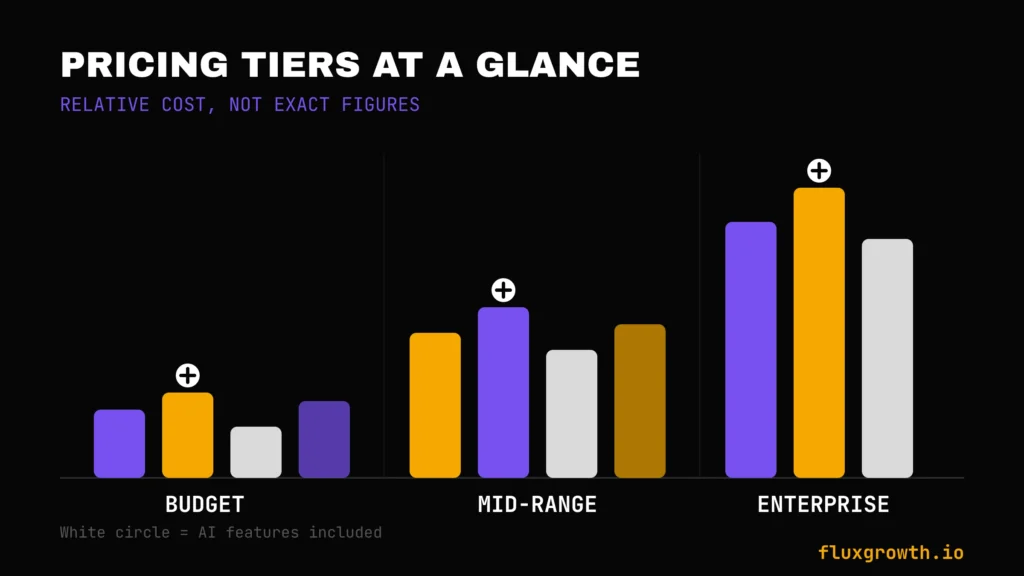
Takeaway: if budget is the deciding factor, Metricool, Zoho Social, and Publer lead on value. If you need enterprise analytics and don’t mind per-seat pricing, Sprout Social and Hootsuite still lead the pack but expect the real bill to be well above the advertised entry price.
The 15 Best Social Media Management Tools
1. Buffer
Overview: Buffer has stayed the simplest tool in this category for over a decade, and that’s by design it hasn’t chased the feature bloat some competitors have.
Best For: Solo creators, freelancers, and small businesses that want reliable scheduling without a steep learning curve.
Supported Platforms: Instagram, Facebook, LinkedIn, X, Pinterest, TikTok, Threads, Bluesky, Mastodon, YouTube Shorts.
AI Features: Buffer’s AI Assistant is included on every plan, including free, with no separate paywall it drafts captions, rewrites for tone, and generates post ideas.
Scheduling Features: Unlimited scheduling on paid plans; the free plan caps at 10 scheduled posts per connected channel.
Analytics: Basic on free; full analytics history and platform-specific insights unlock on paid plans.
Collaboration: Single-user on Essentials; Team plan adds unlimited users, approval workflows, and client access permissions.
Integrations: Canva, Unsplash, Zapier, and a browser extension for quick sharing.
Pricing: Free (up to 3 channels, 10 scheduled posts per channel); Essentials starts at $6 per channel/month ($5/channel/month billed annually); Team starts at $12 per channel/month ($10/channel/month billed annually). Pricing is based on Buffer’s official pricing page, and Buffer follows a per-channel pricing model, so your monthly cost scales with the number of connected social accounts rather than the number of users. Volume discounts are available for organizations managing larger numbers of channels.
Free Plan: Yes one of the most generous in the category, and includes the AI Assistant.
Pros: Clean interface; reliable posting; AI included free; transparent pricing with no custom sales calls.
Cons: No social listening; limited automation beyond scheduling; per-channel pricing gets expensive past 10+ accounts.
Real-World Use Case: A solo creator managing three platforms can run entirely on Buffer’s free plan, upgrading only once they add a fourth channel or need a teammate to help approve posts.
2. Hootsuite
Overview: One of the longest-running names in the category, Hootsuite has shifted upmarket in recent years; it no longer offers a free plan, and pricing reflects enterprise positioning.
Best For: Mid-sized companies and large enterprises that need governance, social listening, and broad integration support.
Supported Platforms: Facebook, Instagram, LinkedIn, X, TikTok, Pinterest, YouTube.
AI Features: OwlyWriter AI drafts captions and repurposes top-performing past posts into new ones.
Scheduling Features: Unlimited scheduling on paid tiers; bulk scheduling (up to 350 posts) on the Advanced plan.
Analytics: Basic analytics on the entry tier; customizable reports and deeper insight require the Advanced plan.
Collaboration: Approval workflows and role permissions on higher tiers only.
Integrations: Salesforce, Talkwalker (listening, Enterprise-only), and a wide third-party app directory.
Pricing: According to Hootsuite’s official pricing page, Hootsuite does not offer a free plan. The Standard plan starts at $99/month (billed annually) and includes 1 user and 5 social accounts. The Advanced plan starts at $249/month (billed annually) and adds unlimited users, approval workflows, bulk scheduling (up to 350 posts), and advanced analytics. Enterprise pricing is available on request for organizations needing advanced security, governance, social listening, and dedicated support.
Free Plan: None 30-day free trial only.
Pros: Mature, stable platform; strong integration catalog; recognizable brand for client-facing agencies.
Cons: Steep entry price for solo users; interface feels dated to some reviewers compared to newer tools; per-seat pricing multiplies fast for teams.
Real-World Use Case: A 5-person agency managing 10+ client accounts uses Hootsuite’s Advanced plan for centralized reporting and listening but should budget for a per-seat cost that adds up well past the advertised entry price.
3. Sprout Social
Overview: Sprout Social plays the analytics-and-listening card harder than anyone else on this list. Its AI agent, Trellis, is built to surface real-time conversation trends, not just schedule your next post.
Best For: Mid-market and enterprise social teams that lean on deep analytics, sentiment tracking, and customer care.
Supported Platforms: Facebook, Instagram, LinkedIn, X, TikTok, Pinterest, YouTube, Bluesky, Threads.
AI Features: AI Assist for content drafting and reply suggestions; the Trellis AI agent turns raw conversation data into actionable trend reports.
Scheduling Features: Unlimited scheduling from the entry tier up; approval workflows appear on mid-to-upper tiers.
Analytics: Consistently rated among the best in the category for presentation-ready, exportable reporting.
Collaboration: Team permissions and approval workflows on Professional tier and above.
Integrations: Salesforce, HubSpot, Canva, and 40+ others.
Pricing: Sprout Social does not offer a free plan (30-day free trial available). The Standard plan starts at $199 per seat/month, Professional at $299 per seat/month, and Advanced at $399 per seat/month (billed annually). Enterprise pricing is available on request.
Free Plan: None.
Cons flagged by reviewers: Social listening, premium analytics, employee advocacy, and influencer marketing tools are frequently sold as separate add-ons at undisclosed pricing to get an itemized quote before committing to an annual contract.
Pros: Best-in-class analytics and reporting; genuinely useful AI-driven trend surfacing; broad network support including newer platforms.
Cons: Expensive per-seat model; aggressive upsell structure; multiple Trustpilot and BBB complaints describe getting locked into 12- to 24-month contracts after missing the cancellation window by days.
Real-World Use Case: A 10-person enterprise social team uses Sprout for unified reporting across brand and customer-care functions, but should model the full annual per-seat cost, not the advertised “starting at” number before signing.
4. Later
Overview: Later built its reputation on visual planning for Instagram and has expanded into a broader multi-platform scheduler, though its free tier has become harder to find on the public pricing page.
Best For: Visual-first brands and creators prioritizing Instagram, TikTok, and Pinterest.
Supported Platforms: Instagram, TikTok, Pinterest, Facebook, X, LinkedIn, YouTube.
AI Features: AI caption support integrated into the content calendar.
Scheduling Features: Visual drag-and-drop calendar; grid preview for Instagram feed planning is a standout feature.
Analytics: Platform-specific performance data, strongest for Instagram and TikTok.
Collaboration: Available on Growth and Scale tiers.
Integrations: Canva, Dropbox, Google Drive for media sourcing.
Pricing: Later offers a 14-day free trial. Paid plans start at $25/month (Starter), followed by Growth ($45/month) and Advanced ($80/month) (billed monthly). Pricing is based on Social Sets (groups of connected social profiles), not per user. A permanent free plan is no longer prominently advertised.
Free Plan: No (14-day free trial only; limited legacy free accounts may still exist).
Pros: Best-in-class visual planning; strong for Instagram-heavy brands; clean grid preview.
Cons: Weaker analytics outside Instagram/TikTok; free tier ambiguity is a real friction point for budget shoppers.
Real-World Use Case: A fashion or lifestyle brand planning a cohesive Instagram grid uses Later’s visual calendar to preview the feed before anything goes live.
5. Metricool
Overview: Metricool leans into analytics and competitor tracking more than any other tool at this price point, with a genuinely permanent free tier.
Best For: Budget-conscious teams and solo marketers who want strong analytics without enterprise pricing.
Supported Platforms: Facebook, Instagram, X, LinkedIn, Pinterest, TikTok, YouTube, Google Business Profile, Twitch.
AI Features: AI caption assistant included even on the free plan; no AI image or video generation.
Scheduling Features: Solid multi-platform scheduling; note that X (Twitter) requires a paid add-on on every tier, including free-adjacent plans, because of X’s own API pricing.
Analytics: A genuine strength competitor tracking and cross-platform reporting rival tools twice the price.
Collaboration: Team and client management on Advanced tier and above.
Integrations: Google Ads, Meta Ads reporting tie-ins.
Pricing: Metricool offers a permanent Free plan for 1 brand with basic scheduling, analytics, and AI caption assistance. Paid plans start at Starter (€18/month), followed by Advanced (€45/month) and Custom plans for larger teams. X (Twitter) publishing requires a paid add-on due to X API fees, while LinkedIn is available on paid plans.
Free Plan: Yes. Includes 1 brand, basic scheduling, analytics, link-in-bio, and AI caption assistance. Some premium features and additional social networks require a paid subscription.
Pros: Strong analytics-to-price ratio; genuinely free tier; competitor benchmarking included even on lower tiers.
Cons: No AI content or image generation; X and LinkedIn add-ons complicate the “advertised price”; VAT and currency variance for non-EU buyers.
Real-World Use Case: A solo freelancer managing 3–5 client brands on a budget uses Metricool’s Advanced tier for combined scheduling and reporting, budgeting separately for any client that needs X/Twitter.
6. SocialBee
Overview: SocialBee’s defining feature is content recycling automatically re-queuing evergreen posts on a schedule, which most competitors don’t offer natively.
Best For: Businesses and creators who want to keep a library of evergreen content circulating without manually re-posting.
Supported Platforms: Facebook, Instagram, X, LinkedIn, Pinterest, TikTok, YouTube, Google Business.
AI Features: AI content generation for captions and post ideas across category-based content buckets.
Scheduling Features: Category-based scheduling group posts into content categories (e.g., “Tips,” “Promotions”) and set posting frequency per category.
Analytics: Included from the Accelerate tier up; more limited on entry plans.
Collaboration: Single-user on entry tiers; the Pro plan adds multiple users.
Integrations: Canva, Unsplash, GIPHY.
Pricing: SocialBee does not offer a permanent free plan, but it provides a 14-day free trial. Paid plans start with Bootstrap at $29/month (up to 5 social profiles), Accelerate at $49/month (up to 10 profiles), and Pro at $99/month (up to 25 profiles with multiple users and advanced collaboration features).
Free Plan: A 14-day trial is standard for the category.
Pros: Genuinely useful content recycling; competitively priced per-account versus Agorapulse and Hootsuite; strong AI content generation.
Cons: No video templates; limited social listening; lower tiers are single-user only.
Real-World Use Case: A local service business with a bank of evergreen “why choose us” and testimonial posts uses SocialBee’s category scheduling to keep them circulating without manual re-posting.
7. Vista Social
Overview: Vista Social has climbed fastest in 2026 reviewer rankings among the tools in this list, largely on the strength of packing agency-grade features into an accessible entry tier.
Related: the social media apps teens are using in 2026
Best For: Agencies and social media managers who need publishing, listening, and reporting without enterprise pricing.
Supported Platforms: Facebook, Instagram, X, LinkedIn, TikTok, Pinterest, YouTube, Google Business, Threads.
AI Features: AI Assistant for caption and reply generation, included from the entry Professional tier rather than gated to a premium plan.
Scheduling Features: Unlimited post scheduling on the Professional tier.
Analytics: Performance reporting across up to 15 social profiles on Professional.
Collaboration: Social inbox and review management included at the entry tier unusual for the price point.
Integrations: Canva, Google Business Profile reviews.
Pricing: Vista Social offers a Free plan for individuals with basic publishing tools. Paid plans start at Standard – $39/month, followed by Professional – $79/month, with Enterprise pricing available on request for larger organizations.
Free Plan: Yes. Vista Social includes a permanent Free plan with limited scheduling, publishing, and social media management features for individual users.
Pros: Strong feature-to-price ratio; AI included at entry tier; consistently high reviewer satisfaction scores.
Cons: Smaller integration ecosystem than Hootsuite or Sprout; newer brand with less enterprise track record.
Real-World Use Case: A small-to-mid agency managing 10+ client accounts uses Vista Social’s Professional tier for a unified inbox and reporting without per-user Sprout Social-level pricing.
8. Agorapulse
Overview: Agorapulse sits in the “professional but not enterprise” tier priced above Buffer and SocialBee but below Sprout Social and Hootsuite, with a genuinely useful free plan for very small operations.
Best For: Teams that prioritize social inbox management and engagement over pure scheduling.
Supported Platforms: Facebook, Google Business Profile, LinkedIn Pages, Instagram, Threads, X, TikTok, Pinterest, Bluesky, YouTube, plus ad profile connections for Meta, LinkedIn, and TikTok.
AI Features: Limited compared to competitors no native AI image generation, and reviewers note this as a gap versus SocialBee or Buffer.
Scheduling Features: Solid queuing and content calendar; approval workflows can feel slower than Planable’s, per reviewer feedback.
Analytics: Competitor benchmarking available on the Advanced tier and above.
Collaboration: Core strength the unified social inbox for comments, messages, and reviews.
Integrations: Standard set; fewer than Hootsuite’s directory.
Pricing: Agorapulse offers a Free plan for 1 user managing up to 3 social profiles. Paid plans start with Standard at $99/user/month (billed monthly, lower when billed annually), followed by Professional at $149/user/month, Advanced at $199/user/month, and Custom enterprise pricing.
Free Plan: Yes. Includes 1 user, 3 social profiles, basic publishing, scheduling, and a unified social inbox.
Pros: Strong social inbox and engagement tools; generous 30-day free trial; solid mid-market fit.
Cons: No AI image generation; per-user pricing multiplies for teams; approval workflow flexibility trails Planable.
Real-World Use Case: A brand fielding heavy comment and DM volume across Instagram and Facebook uses Agorapulse’s unified inbox to keep response times down without a dedicated community manager working four separate apps.
9. Sendible
Overview: Sendible is built specifically for agencies juggling many client brands, with pricing tiers structured around number of “user/calendar” combinations rather than flat per-seat costs.
Best For: Marketing agencies managing multiple client accounts under one roof.
Supported Platforms: Facebook, Instagram, X, LinkedIn, TikTok, Pinterest, YouTube, Google Business, WordPress.
AI Features: AI content suggestions for captions and post ideas.
Scheduling Features: Bulk scheduling and content queues built for high-volume, multi-client workflows.
Analytics: White-label-friendly reporting for client-facing agencies.
Collaboration: Client approval workflows and permission tiers are a core selling point.
Integrations: WordPress blog syndication is a notable differentiator versus pure social tools.
Pricing: Sendible does not offer a permanent free plan, but it provides a 14-day free trial. Paid plans start with Creator at $29/month (1 user, 6 social profiles), Traction at $89/month, Scale at $199/month, and Enterprise at $750/month for large agencies with advanced collaboration and white-label reporting.
Free Plan: No — 14-day free trial.
Pros: Purpose-built for agency multi-client workflows; WordPress integration is unique in this list; white-label reporting.
Cons: Interface feels dated to some reviewers compared to Later or Vista Social; pricing tiers scale quickly for larger agencies; occasional scheduling glitches reported.
Real-World Use Case: A 4-person agency managing 24 client social profiles uses Sendible’s Traction tier to keep each client’s approval workflow and reporting separate under one login.
10. Publer
Overview: Publer positions itself as a budget-friendly, broad-platform scheduler, one of the few tools in this list that also supports Telegram alongside the mainstream networks.
Best For: Creators and small businesses that want wide platform coverage without a premium price tag.
Supported Platforms: Facebook, Instagram, X, LinkedIn, TikTok, Pinterest, YouTube, Google Business, WordPress, Telegram.
AI Features: AI caption generation.
Scheduling Features: Bulk scheduling and a “Power Scheduler” for high-volume posting.
Analytics: Included at higher tiers; more limited on the free plan.
Collaboration: Team features available from mid-tier plans up.
Integrations: Canva, GIPHY.
Pricing: Publer offers a permanent Free plan with basic scheduling and limited features. Paid plans start at Professional – $12/month (billed annually; $15/month when billed monthly), with Business plans starting at $21/month. Higher tiers increase workspace limits, team collaboration, analytics, and automation features.
Free Plan: Yes. Includes basic scheduling, limited social accounts, and essential publishing tools.
Pros: Genuinely broad platform support for the price, including Telegram and WordPress; competitive entry pricing.
Cons: Less name recognition than Buffer or Hootsuite for agencies pitching to enterprise clients; analytics depth trails Metricool or Sprout Social.
Real-World Use Case: A creator running a Telegram community alongside Instagram and X uses Publer as the one tool that covers all three without stitching together separate schedulers.
11. Loomly
Overview: Loomly is built around guided workflows, post ideas, optimization tips, and step-by-step prompts baked into the content creation process, which reviewers consistently praise for onboarding ease.
Best For: Small teams that want built-in guidance rather than a blank scheduling calendar.
Supported Platforms: Facebook, Instagram, X, LinkedIn, TikTok, Pinterest, YouTube, Google Business, Snapchat.
AI Features: Post idea prompts and optimization suggestions rather than full AI drafting.
Scheduling Features: Calendar-based scheduling with built-in approval workflows even on lower tiers.
Analytics: Solid cross-platform reporting.
Collaboration: Approval workflows and role-based permissions are a core strength.
Integrations: Standard set including Canva.
Pricing: Loomly does not offer a permanent free plan, but it provides a 15-day free trial. Paid plans start at Base $42/month, followed by Standard $80/month, Advanced $175/month, Premium $369/month, and Enterprise pricing on request. Pricing is flat-rate per workspace, not per user.
Free Plan: None confirmed; trial available.
Pros: Beginner-friendly guided workflows; flat pricing avoids per-seat surprises; strong approval/collaboration tools at entry tier.
Cons: AI features are less advanced than tools like SocialBee or Sprout Social. It supports Threads, but Bluesky is not currently supported.
Real-World Use Case: A small nonprofit team with no dedicated social specialist uses Loomly’s guided prompts and built-in approval workflow to keep a consistent posting schedule without hiring a full-time manager.
12. Planable
Overview: Planable is built almost entirely around the content approval process; it’s less a scheduler-first tool and more a visual collaboration workspace with scheduling attached.
Best For: Teams and agencies where every post needs multiple stakeholder approvals before it goes live.
Supported Platforms: Facebook, Instagram, X, LinkedIn, TikTok, Pinterest, YouTube, Google Business.
AI Features: Basic AI support for captions; not a primary selling point.
Scheduling Features: Scheduling is secondary to the approval-and-preview workflow — posts render as realistic platform previews before publishing.
Analytics: Lighter than dedicated analytics tools like Metricool or Sprout Social.
Collaboration: The standout feature inline comments, side-by-side approval stages, and client-facing review links.
Integrations: Standard set; Slack notifications for approval status.
Pricing: Planable offers a permanent Free plan with limited workspaces and approval features. Paid plans start at Basic – $33/month, followed by Pro – $49/month, with Enterprise pricing available for larger teams. Pricing is based on workspaces, not per user.
Free Plan: Yes. Includes limited workspaces, posts, and collaboration features.
Pros: Best-in-class approval workflow and realistic post previews; strong for agency-client sign-off; clean, modern interface.
Cons: Lighter analytics than dedicated reporting tools; less useful for solo creators who don’t need multi-person approval chains.
Real-World Use Case: An agency that needs client sign-off on every post before publishing uses Planable’s preview-and-comment workflow to replace a messy email approval chain.
13. Zoho Social
Overview: Zoho Social’s biggest edge isn’t a unique feature, it’s the native tie-in to Zoho’s CRM and helpdesk products, which matters a lot if you’re already in that ecosystem and not at all if you’re not.
Best For: Small businesses already using Zoho CRM or Zoho Desk who want social data flowing into the same system.
Supported Platforms: Facebook, Instagram, X, LinkedIn, Pinterest, Google Business, Mastodon.
AI Features: Zia, Zoho’s AI assistant, extends into Social for caption suggestions and basic content help.
Scheduling Features: Solid, straightforward scheduling with a visual calendar.
Analytics: Good reporting, especially valuable when tied to Zoho CRM lead data.
Collaboration: Team roles and approval available from mid-tier up.
Integrations: The entire Zoho suite CRM, Desk, Campaigns is the core differentiator.
Pricing: Zoho Social offers a permanent Free plan for basic social media management. Paid plans start at Standard – $15/month, followed by Professional – $40/month, Premium – $65/month, and Agency plans for larger teams. Pricing varies for businesses and agencies.
Free Plan: Yes. Includes basic publishing, scheduling, and monitoring for limited social channels.
Pros: Excellent value for the price; genuine CRM tie-in most competitors can’t match; strong reviewer satisfaction (one of the highest-rated tools in this list on third-party review sites).
Cons: The CRM advantage disappears if you’re not on Zoho; smaller social listening feature set than Sprout Social or Agorapulse; reporting customization is more limited than some competitors.
Real-World Use Case: A small business already running Zoho CRM uses Zoho Social to tie social engagement directly to lead records without a separate integration project.
14. CoSchedule
Overview: CoSchedule’s core product is a marketing calendar, not a social scheduler first — social publishing is one piece of a broader content-and-campaign view that includes blog posts and email.
Best For: Marketing teams that want one calendar covering social, blog, and email content together, not just social.
Supported Platforms: Facebook, Instagram, LinkedIn, X.
AI Features: AI-assisted headline and content writing aids.
Scheduling Features: Calendar-first scheduling tied to broader campaign and content marketing timelines.
Analytics: Basic social analytics; the tool’s strength is planning, not post-performance depth.
Collaboration: Task tracking and team collaboration across content types (not just social) is the differentiator.
Integrations: Blog and email client integrations alongside the core social networks.
Pricing: CoSchedule offers a Free Marketing Calendar with basic planning and scheduling features. The Social Calendar plan starts at $29/month (billed annually), adding unlimited social publishing, automation, AI writing tools, and advanced collaboration. Enterprise pricing is available on request.
Free Plan: es. Includes the Free Marketing Calendar with basic task management and content planning.
Pros: Useful if social is one piece of a larger content operation you’re already planning in one place; the free calendar tier has real value on its own.
Cons: Narrower platform list than most competitors on this list (four core networks); social-specific analytics and AI features trail dedicated tools.
Real-World Use Case: A marketing team already planning blog and email campaigns in CoSchedule adds social scheduling to the same calendar instead of running a separate tool just for social.
15. NapoleonCat
Overview: NapoleonCat’s specialty is comment and message moderation at scale — AI-based auto-moderation that flags spam, hate speech, and sentiment across a high-volume inbox, a feature most competitors gate behind enterprise tiers or don’t offer at all.
Best For: Brands and community managers dealing with high comment/message volume who need automated moderation, not just scheduling.
Supported Platforms: Facebook, Instagram, LinkedIn, TikTok, Google Business.
AI Features: AI-based auto-moderation (spam and hate-speech removal, sentiment tagging) on Expert and Enterprise tiers; an AI Reply feature is in beta, available on request via Enterprise.
Scheduling Features: Standard scheduling and content calendar; not the platform’s primary strength.
Analytics: Solid reporting, particularly around inbox and moderation metrics.
Collaboration: Unified social inbox is the headline feature, positioned specifically against Hootsuite’s more limited inbox on lower tiers.
Integrations: Standard set for the category.
Pricing: NapoleonCat does not offer a permanent free plan, but it provides a 14-day free trial. Paid plans start with Standard – $79/month, Pro – $119/month, and Enterprise pricing available on request for larger teams with advanced moderation, automation, and support.
Free Plan: No. A 14-day free trial is available.
Pros: Strongest AI-moderation feature set in this list; unified inbox included at lower tiers than some competitors gate it behind; competitive pricing versus Hootsuite for comparable inbox features.
Cons: AI Reply is still in beta and not broadly available; smaller platform list than Sendible or Publer; less name recognition for client-facing agency pitches.
Real-World Use Case: A consumer brand fielding hundreds of daily comments uses NapoleonCat’s auto-moderation to filter spam and flag negative sentiment before a human moderator ever sees the queue.
Social Media Management Tools Comparison Table
| Tool | Free Plan | Starting Price* | AI Features | Scheduling | Analytics | Best For | Overall Rating |
| Buffer | Yes | ~$6/channel/mo | Strong (free) | Excellent | Basic | Solo/small biz | 4.3/5 |
| Hootsuite | No | ~$99/mo | Moderate | Excellent | Good | Enterprise | 4.0/5 |
| Sprout Social | No | $199/seat/mo | Strong (Trellis) | Good | Excellent | Mid-market/enterprise | 4.2/5 |
| Later | No (14-day trial) | ~$25/mo | Basic | Excellent (visual) | Moderate | Visual-first brands | 4.1/5 |
| Metricool | Yes | €18/mo | Basic | Good | Excellent | Budget analytics | 4.5/5 |
| SocialBee | No | $29/mo | Strong | Good (recycling) | Moderate | Evergreen content | 4.4/5 |
| Vista Social | No | $39/mo | Strong | Good | Good | Agencies | 4.8/5 |
| Agorapulse | Yes | $99/user/mo | Limited | Good | Good | Social inbox | 4.6/5 |
| Sendible | No | $29/mo | Moderate | Good | Good (white-label) | Agencies | 4.2/5 |
| Publer | Yes | $12/mo | Basic | Good | Moderate | Budget/broad platforms | 4.4/5 |
| Loomly | No | $42/mo | Basic | Good | Good | Guided small teams | 4.7/5 |
| Planable | Yes | $33/mo | Basic | Moderate | Light | Approvals | 4.5/5 |
| Zoho Social | Yes | ~$15/mo | Moderate (Zia) | Good | Good | Zoho users | 4.7/5 |
| CoSchedule | Yes | ~$29/mo | Basic | Moderate | Basic | Content calendars | 4.3/5 |
| NapoleonCat | No | ~$79/mo | Strong (moderation) | Moderate | Good | Comment moderation | 4.4/5 |
Best Social Media Management Tool by Use Case
Best Overall: Vista Social the strongest feature-to-price balance across publishing, listening, and reporting.
Best Free Tool: Metricool a genuinely permanent free tier with real analytics, not just a stripped demo.
Best for Small Businesses: Zoho Social especially has a strong value if you’re already using Zoho CRM.
Best for Marketing Agencies: Sendible purpose-built multi-client, multi-calendar structure.
Best for Enterprise Teams: Sprout Social deepest analytics and customer-care integration, at enterprise pricing to match.
Best for Content Creators: Buffer simplest interface, generous free tier, AI included at no extra cost.
Best for Instagram: Later visual grid planning remains unmatched in this category.
Best for TikTok: Later the same visual-first advantage extends to TikTok’s short-form calendar.
Best for LinkedIn: Zoho Social or Buffer for straightforward scheduling; agencies running heavy LinkedIn thought-leadership programs for executives may also want to evaluate Ordinal see our note in the trends section below.
Best for Facebook: Agorapulse the unified inbox handles Facebook’s comment/message volume well.
Best for X (Twitter): Publer broad support without Metricool’s per-account X add-on fee.
Best AI Social Media Management Tool: Sprout Social the Trellis AI agent goes beyond caption drafting into real trend analysis.
Best Analytics Platform: Metricool best analytics depth relative to price in this list.
Best Budget-Friendly Tool: Publer broad platform coverage at the lowest confirmed entry price.
AI Features Comparison
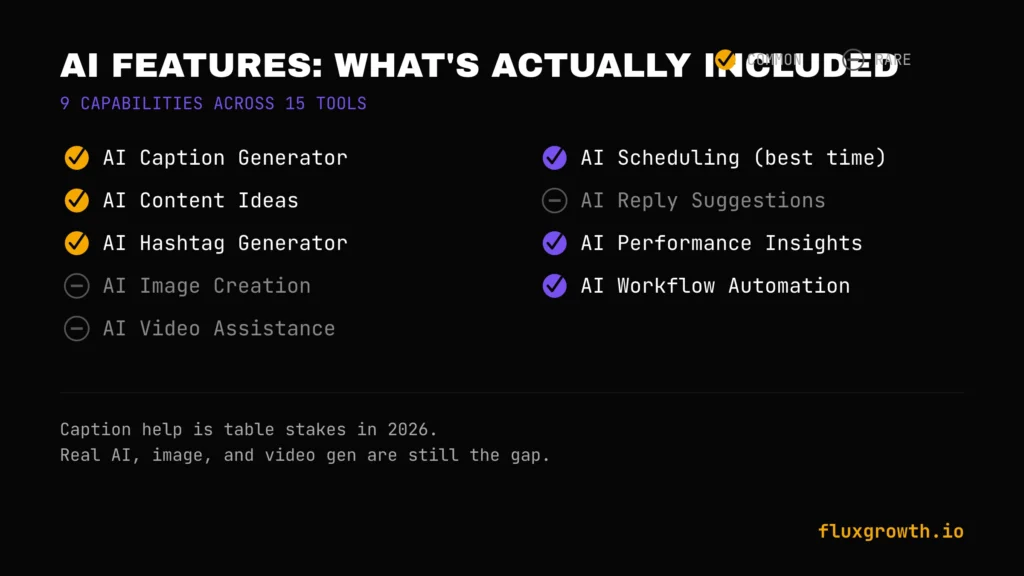
AI Caption Generator: Nearly universal now Buffer, Metricool, SocialBee, Vista Social, Publer, and Zoho Social’s Zia all include this at the entry or mid tier.
AI Content Ideas: SocialBee and Sprout Social lead here, generating topic and post ideas, not just caption text.
AI Hashtag Generator: Included in most AI Assistant packages (Buffer, Vista Social) as a secondary feature rather than standalone.
AI Image Creation: A genuine gap across this list most tools rely on Canva or Unsplash integrations rather than native AI image generation. Agorapulse and SocialBee reviewers specifically flag this as missing.
AI Video Assistance: Not a strength for any tool in this list; dedicated AI video tools remain a separate category.
AI Scheduling (best-time-to-post): Buffer, Hootsuite, and Metricool all offer some version of AI-recommended posting times, though depth varies.
AI Reply Suggestions: Sprout Social’s AI Assist and NapoleonCat’s beta AI Reply lead here; most other tools don’t offer this yet.
AI Performance Insights: Sprout Social’s Trellis agent is the clearest example of AI moving from content generation into performance analysis.
AI Workflow Automation: NapoleonCat’s auto-moderation and SocialBee’s content recycling are the two clearest examples of AI handling a repetitive workflow end-to-end, not just assisting with a single post.
Two-to-three-sentence summary: AI caption help is now table stakes across nearly every tool in this category; the real differentiation in 2026 is in AI that analyzes performance (Sprout’s Trellis) or automates moderation (NapoleonCat), not in caption generation alone. If AI image or video generation is a priority, none of these 15 tools should be your primary solution pair one with a dedicated AI content tool instead, such as the tools featured in our guide to the Best AI Tools for Business.
Pricing Guide
Free social media management tools: Buffer, Metricool, Publer, Zoho Social, Planable, CoSchedule, Agorapulse, and Vista Social all offer free plans in 2026, although most come with limits on users, social profiles, scheduled posts, or advanced features. Later, Hootsuite, Sendible, SocialBee, Loomly, Sprout Social, and NapoleonCat no longer offer permanent free plans, instead providing free trials.
Tools under $20/month: Zoho Social starts at $15/month, Publer starts at $12/month (annual billing), and Metricool starts at €18/month (approximately $20–21/month, depending on exchange rates). If your budget is under $20/month, Zoho Social and Publer are the strongest confirmed options, while Metricool is just above that threshold for most users.
$20–50/month tools: Later ($25/month), SocialBee ($29/month), Sendible ($29/month), CoSchedule Social Calendar ($29/month), Planable ($33/month), Vista Social ($39/month), Sprout Social Standard ($39/month for individuals, higher tiers for teams), and Zoho Social Professional ($40/month) all fall into the $20–50/month range. Metricool starts at €18/month (roughly $20–21/month, depending on exchange rates), placing it at the lower end of this category.
Enterprise pricing: Sprout Social, Hootsuite Advanced, and NapoleonCat Enterprise all move to custom or high-hundreds-per-month pricing for full feature access.
Hidden costs to watch for:
- Per-seat vs. per-channel models. Buffer charges per connected channel; Sprout Social and Hootsuite charge per user seat. A 5-person team on a per-seat tool costs dramatically more than the advertised single-user price.
- Platform add-ons. Metricool charges extra for X (Twitter) access on every tier because of X’s own API pricing.
- Gated features. Social listening, advanced reporting, and AI Assist are frequently sold as separate add-ons on Sprout Social rather than included in the base price.
Annual vs. monthly billing: Nearly every tool on this list offers discounted annual billing, typically saving 15–25% compared to paying month to month. The exact discount varies by vendor (for example, Buffer, SocialBee, Publer, Zoho Social, CoSchedule, and Sendible all advertise lower annual rates). Annual plans reduce overall cost but require a longer commitment, so review each vendor’s cancellation and renewal policy before subscribing.
Free vs. Paid Social Media Management Tools
| Feature | Free | Paid |
| Scheduling | Limited post/account caps | Unlimited (fair-use policies apply) |
| Analytics | Basic, short history window | Full history, cross-platform reporting |
| AI Features | Sometimes included (Buffer, Metricool) | Usually expanded or unlocked |
| Team Collaboration | Rarely available | Standard on mid-to-upper tiers |
| Automation | Minimal | Recycling, auto-routing, moderation rules |
| Integrations | Basic (Canva, Unsplash) | CRM, ad platforms, Zapier |
| Support | Self-service/community | Priority or dedicated support on higher tiers |
How to Choose the Right Social Media Management Tool
Here’s the thing every criterion below matters less than matching the pricing model to how your team actually works. Get that one wrong and nothing else on this list saves you money.
Your budget. Decide whether per-seat (Sprout Social, Hootsuite) or per-channel (Buffer) pricing fits your team structure before comparing sticker prices.
Team size. Solo creators rarely need Sprout Social’s collaboration depth; a 10-person agency will outgrow Buffer’s Essentials plan fast.
Number of social accounts. Per-channel pricing models punish account-heavy setups; per-user models punish people-heavy teams. Match the model to your actual structure.
AI features. If AI-assisted drafting is core to your workflow, Buffer (free, included) and SocialBee (content generation) lead; if AI-driven analysis matters more, Sprout Social’s Trellis is the strongest option in this list.
Analytics. Metricool and Sprout Social lead in depth; Buffer and Publer are intentionally lighter here.
Automation. SocialBee (recycling) and NapoleonCat (moderation) offer the most genuine automation, not just scheduling.
Collaboration. Planable’s approval-first workflow and Agorapulse’s unified inbox solve different collaboration problems based on whether your bottleneck is sign-off or response time.
Integrations. Zoho Social only makes sense if you’re in the Zoho ecosystem; otherwise, weigh Canva/CRM/ad platform support against your actual stack.
Ease of use. Buffer and Loomly consistently rank highest for onboarding speed; Sendible and Hootsuite have steeper learning curves per reviewer feedback.
Customer support. Response quality varies by tier across nearly every tool in this list to confirm support SLAs for your specific plan before committing to an annual contract.
Common Mistakes People Make
Buying expensive software too early. A solo creator on Sprout Social’s enterprise tier is paying for collaboration and listening features they’ll never use.
Ignoring analytics. Picking a tool for its interface and never opening the reporting tab wastes the main advantage over free native scheduling.
Not testing free plans first. Nearly every tool on this list offers either a free tier or a trial, skipping that step means committing to an annual contract based on a sales page, not real use.
Choosing based only on price. The cheapest tool that doesn’t support your must-have platform (X on Metricool’s free tier, for example) isn’t actually cheap.
Not using automation. Paying for SocialBee or NapoleonCat and never turning on recycling or auto-moderation means paying full price for a basic scheduler.
Posting without a content calendar. Even the best tool can’t fix a strategy that doesn’t exist. The calendar view is a planning tool, not a substitute for a plan.
Managing every platform the same way. A caption that works on LinkedIn rarely works unedited on TikTok; tools that auto-cross-post without platform-specific tweaks (a known limitation across most of this list) need manual review before publishing.
Ignoring AI features you’re already paying for. Buffer’s AI Assistant is included free, yet plenty of users never open it; that’s a paid feature sitting unused.
Pick one mistake from this list that’s actually yours. Fix that one first.
Social Media Management Trends for 2026–2027
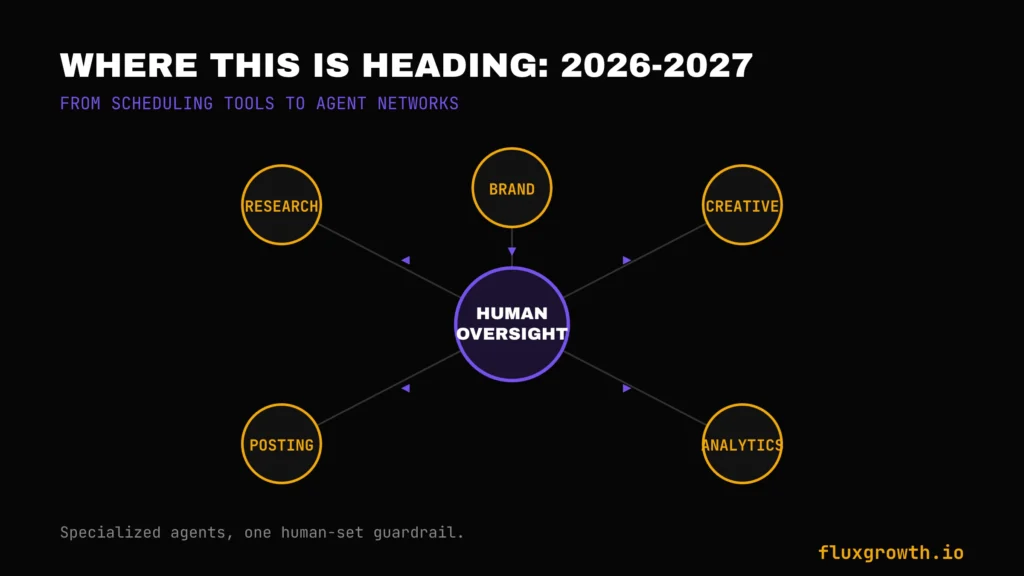
AI social media managers. The clearest shift in 2026: tools are moving from AI-assisted drafting toward AI agents that operate parts of an account with human oversight. Sprout Social’s Trellis and NapoleonCat’s auto-moderation are early, narrower examples of that within our list of 15.
Enterprise adoption is accelerating. Industry research from organizations such as Gartner and HubSpot indicates that enterprise marketing teams are increasingly experimenting with agentic AI for content creation, customer support, and social media workflows. Exact adoption figures vary across reports, so no single percentage accurately represents the market.
Multi-agent marketing systems. Rather than one AI doing everything, 2026 coverage increasingly describes specialized agents research, brand voice, creative, posting, analytics working together on a single account, a structural shift from the single-assistant model most tools on this list still use.
Predictive posting times. Moving from static “best time to post” recommendations toward per-post predictive scoring before publishing, rather than only after.
Social commerce integration. Deeper tie-ins between scheduling tools and shoppable posts are showing up across platform-native features more than in third-party management tools worth watching whether Sprout Social, Agorapulse, or Vista Social build native commerce reporting in the next year.
AI community management. NapoleonCat’s approach automated moderation plus sentiment tagging is likely a preview of where several competitors head next, given how much comment/DM volume has grown.
A note on newer entrants: Ordinal has emerged as a newer social media management platform focused specifically on LinkedIn and X (Twitter) thought leadership, executive branding, and founder-led content programs. Its pricing starts at $95/month for the Starter plan and $265/month for the Pro plan (with lower rates available on annual billing), placing it well above most SMB-focused tools in this guide. It’s not aimed at the creator, freelancer, or small-business audience this comparison targets. However, if your organization invests heavily in executive ghostwriting, founder branding, or B2B LinkedIn growth, Ordinal is worth evaluating as a specialized alternative
One flag, though: some 2026 coverage questions whether its auto-engagement features (automated likes and comments from connected accounts) sit comfortably within LinkedIn’s Professional Community Policies. Confirm current platform policy before enabling any auto-engagement feature on any tool, not just this one.
Frequently Asked Questions
What is the best social media management tool?
There’s no single best tool; it depends on team size and budget. Vista Social currently offers the strongest overall feature-to-price balance in this comparison, but Sprout Social leads for enterprise analytics and Buffer leads for solo creators on a budget.
Which social media management tool is best for small businesses?
Zoho Social is one of the best choices for small businesses, particularly if you’re already using Zoho CRM, with paid plans starting at $15/month. If analytics and cross-platform reporting are your priority, Metricool is an excellent alternative, with paid plans starting at €18/month (approximately $20/month, depending on exchange rates). Both also offer permanent free plans, making them easy to try before upgrading.
Is Buffer better than Hootsuite?
For solo creators and small teams, yes Buffer is simpler, cheaper, and includes AI features free. For enterprises needing social listening, advanced reporting, and governance across many accounts, Hootsuite’s feature depth justifies its higher price.
Which tool has the best AI features?
Sprout Social’s Trellis AI agent goes furthest beyond basic caption generation, turning conversation data into trend analysis. For AI-assisted content creation specifically, SocialBee and Buffer are the strongest budget-friendly options.
Which tool is best for Instagram?
Later remains the strongest choice for Instagram specifically, thanks to its visual grid preview and drag-and-drop calendar built around image-first planning.
Which tool is best for TikTok?
Later again leads here, extending its visual-first planning approach to TikTok’s short-form content calendar, though most tools on this list support basic TikTok scheduling.
Which tool is best for LinkedIn?
Zoho Social and Buffer both handle standard LinkedIn scheduling well. For heavy executive thought-leadership programs specifically, tools built for LinkedIn-first workflows outside this core list like Ordinal are worth evaluating separately.
Which tool is best for agencies?
Sendible is purpose-built for agencies managing many client brands under separate calendars and approval chains; Vista Social and Agorapulse are also strong agency picks at a lower price point.
Are free social media management tools worth it?
Yes, for the right use case. Metricool and Buffer both offer genuinely functional free tiers, not just stripped demos they’re worth using until a specific limit (like adding a fourth channel or needing team collaboration) actually blocks you.
Which platform offers the best analytics?
Sprout Social and Metricool are the two standouts, at very different price points Sprout Social for enterprise-depth reporting, Metricool for the best analytics-to-price ratio in this list.
What is the cheapest social media management software?
Publer is the cheapest paid option in this comparison, starting at $12/month, followed by Zoho Social at $15/month. If you prefer not to pay initially, Buffer, Metricool, Publer, and Zoho Social all offer permanent free plans with enough features to manage basic social media workflows before upgrading.
Do social media management tools support AI content generation?
Most do now. Buffer, Metricool, SocialBee, Vista Social, Publer, and Zoho Social’s Zia all include some level of AI caption or content generation, typically for drafting and rewriting rather than full autonomous posting.
Final Verdict
Best Overall: Vista Social
Best Free Tool: Metricool
Best for Small Business: Zoho Social
Best for Agencies: Sendible
Best Enterprise Solution: Sprout Social
Best AI-Powered Platform: Sprout Social (Trellis AI)
Best Value for Money: Metricool
The biggest mistake people make isn’t choosing the “wrong” social media management tool it’s choosing based solely on the advertised starting price. Some platforms charge per user, while others charge per social profile, workspace, or brand. Your actual monthly cost depends on how your team operates, so compare the pricing model before comparing feature lists.
If I had to recommend just one tool for most users, Metricool would be my first pick. It strikes the best balance between affordability, analytics, scheduling, and ease of use, while offering a genuinely useful free plan. Businesses already invested in the Zoho ecosystem should seriously consider Zoho Social, while agencies managing multiple client accounts will get more value from Vista Social or Sendible.
If you’re still undecided, don’t start with an annual subscription. Use a tool’s free plan or trial, manage a real week of content across your primary social channels, and see where it saves time or creates friction. After a few days of real-world use, the right choice usually becomes obvious.