FluxGrowth is reader-supported. Some links in our guides are affiliate links — if you buy through one we may earn a commission, at no extra cost to you. It never changes which tools we recommend. How we test tools.
You’ve rewritten the same bullet point four times. It still reads like every other resume in the pile. Meanwhile, the job you actually want gets filtered through an ATS before a human ever opens the file. An AI resume builder fixes both problems at once: it drafts stronger content in your voice, then formats the file so the software doesn’t quietly toss it. (Yes, that happens more than most people realize.) Here’s the thing: the 12 tools below aren’t interchangeable. Teal and Hunter solve a different problem than Jobscan does, and picking the wrong one wastes a weekend you don’t have.
Rather than relying on marketing claims alone, this comparison is based on official product documentation, independent reviews, pricing, ATS capabilities, and publicly available feature comparisons.
What Is an AI Resume Builder?
An AI resume builder is a tool that uses machine learning to draft, format, and optimize your resume content usually by pulling from your work history and, in the better tools, the specific job description you’re targeting.
That’s the whole idea in one sentence. Everything else is implementation detail.
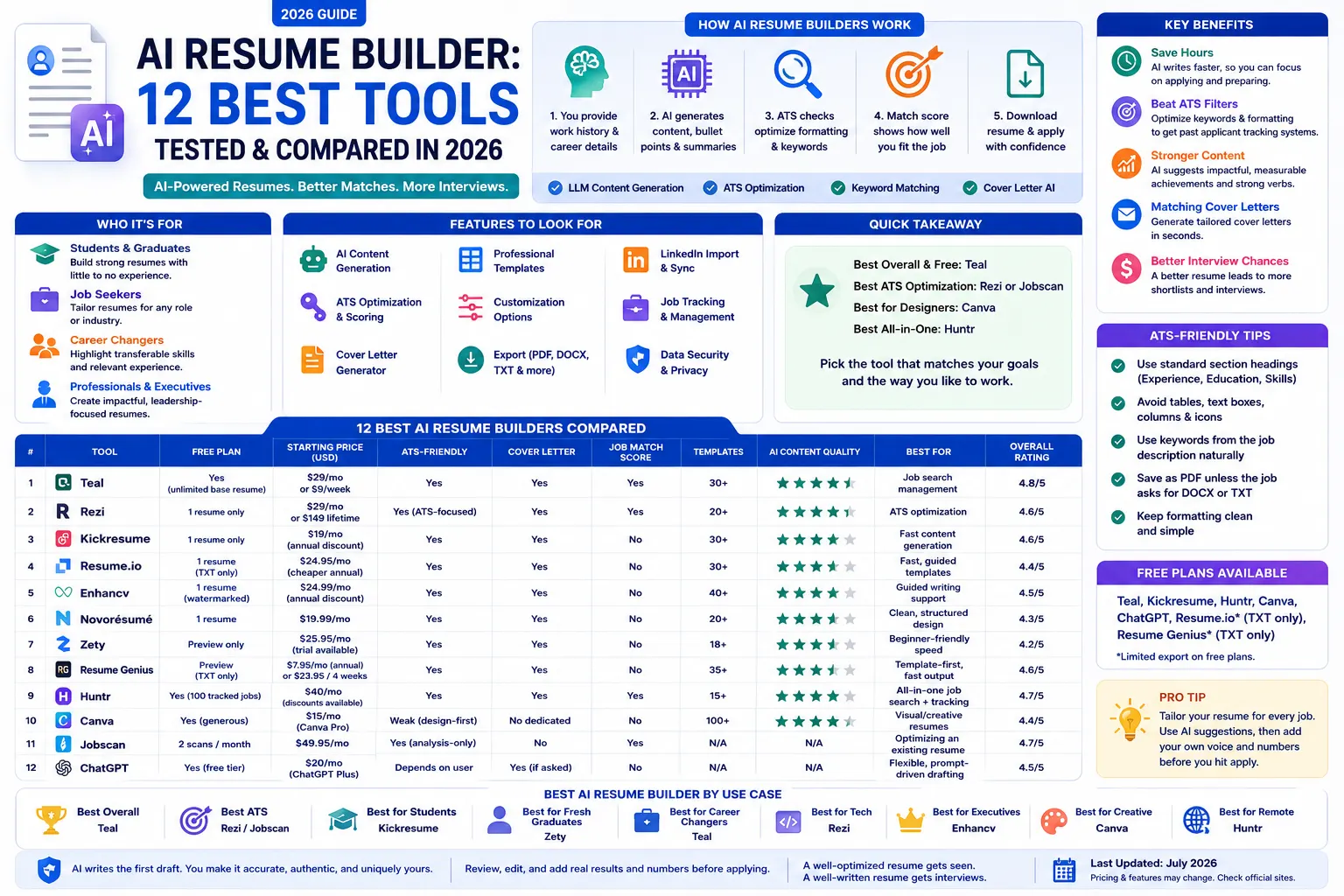
How AI Resume Builders Actually Work
Most tools on this list combine a few technologies under the hood:
- Large language models (LLMs) the same underlying tech behind ChatGPT draft summaries, bullet points, and cover letters based on prompts about your role and experience.
- ATS optimization the tool checks your formatting and keyword usage against what applicant tracking systems can parse.
- Resume scoring you get a numeric or percentage score showing how well your resume matches a target job description.
- AI cover letter generation most tools now generate a matching cover letter from the same resume data, so you’re not starting from scratch twice.
None of that replaces judgment. The AI drafts; you edit for accuracy and tone. Every honest review of these tools says the same thing: the output needs a human pass before it goes anywhere near a hiring manager.
Types of AI Resume Tools
Not every tool on this list does the same job. Broadly, they split into:
- Full builders (Teal, Kickresume, Zety, Resume.io) templates plus AI content generation in one place
- ATS-focused optimizers (Rezi, Jobscan) built around keyword matching and formatting checks, sometimes for a resume you already have
- Design-first tools (Canva) visual flexibility first, ATS compatibility second
- All-in-one job search platforms (Huntr) resume building bundled with a job tracker and application autofill
- General AI used as a resume writer (ChatGPT) not a dedicated product, but widely used as one
Benefits of Using an AI Resume Builder
The pitch sounds obvious “let AI write your resume” but the real gains are specific enough to name.
Save hours writing your resume. Instead of staring at a blank summary field for twenty minutes, you get a working first draft in under sixty seconds. You still edit it. You just don’t have to originate it from nothing.
Beat ATS filters. Rezi and Jobscan check your formatting against the same parsing logic ATS software actually uses. A two-column, icon-heavy resume gets silently discarded before a person ever sees it. These tools catch that before you hit submit.
Improve quality and keyword match in the same pass. Real-time scoring flags weak verbs, missing metrics, and generic phrasing. Paste in a job description and Jobscan or Rezi will show you exactly which terms from the posting are missing, not “add more keywords,” but which ones, specifically.
Generate a matching cover letter without starting over. The tool already has your resume data, so most cover letters take one click and a few edits instead of a second writing session from scratch.
Generate a matching cover letter without starting over. Because the tool already has your resume data, most cover letters take one click and a few edits instead of a second writing session from scratch.
The real measure of success isn’t how quickly AI writes your resume, it’s whether your application earns more interviews. While results depend on your experience, skills, and the role you’re applying for, a well-optimized, ATS-friendly resume gives recruiters a better chance of seeing your application instead of it being filtered out.
How We Tested These AI Resume Builders
Rather than relying solely on vendor marketing claims, we evaluated each AI resume builder using its official documentation, current pricing, feature availability, independent reviews, publicly available benchmarks where available, and hands-on product demonstrations. Where vendors published performance or accuracy claims, we verified them against official sources whenever possible and clearly identified any claims that could not be independently confirmed.
Each tool was evaluated using the same criteria:
- AI writing quality – Resume summaries, bullet points, and content suggestions.
- ATS compatibility – Support for ATS-friendly formatting and keyword optimization.
- Template selection – Variety and quality of professional resume templates.
- Cover letter generation – AI-assisted cover letter creation and customization.
- Customization depth – Flexibility to edit layouts, sections, fonts, and formatting.
- Export options – Availability of PDF, DOCX, TXT, or other export formats.
- Pricing & free plan – Overall value, free-tier limitations, and subscription costs.
- Ease of use – User interface, onboarding experience, and overall workflow.
- Overall value – Features, pricing, usability, and suitability for different job seekers.
Whenever independent testing or verified performance data was unavailable, we relied on official product documentation and clearly noted those limitations instead of presenting unverified claims as fact.
Quick Comparison: 12 AI Resume Builders at a Glance
| Tool | Free Plan | Starting Paid Price | ATS-Friendly | Cover Letter | Best For |
| Teal | Yes unlimited base resume + tracker | $29/month or $9/week (Teal+) | Yes | Yes | Best overall / job search management |
| Rezi | 1 resume only | $29/month or $149 lifetime | Yes, ATS-focused | Yes | ATS optimization |
| Kickresume | 1 resume only | $19/month (annual discounts available) | Yes | Yes | Fast content generation |
| Resume.io | 1 resume, TXT only | $24.95/month (cheaper with longer billing) | Yes | Yes | Fast, guided templates |
| Enhancv | 1 resume, watermarked | $24.99/month (annual discounts available) | Yes | Yes | Guided writing support |
| Novorésumé | 1 resume | $19.99/month | Yes | Yes | Clean, structured design |
| Zety | Preview only | $25.95/month (trial available) | Yes | Yes | Beginner-friendly speed |
| Resume Genius | Preview + TXT only | $7.95/month (annual) or $23.95 per 4 weeks | Yes | Yes | Template-first, fast output |
| Huntr | Yes unlimited base resume, 100 tracked jobs | $40/month (quarterly/annual discounts available) | Yes | Yes | All-in-one job search + tracking |
| Canva | Yes generous free templates | $15/month (Canva Pro, US pricing) | Weak design-first | No dedicated AI cover letter tool | Visual/creative resumes |
| Jobscan | 2 scans/month | $49.95/month | Yes, analysis-only | No doesn’t build resumes | Optimizing an existing resume |
| ChatGPT | Yes free tier available | $20/month (ChatGPT Plus) | Depends entirely on your prompting | Yes, if you ask | Flexible, prompt-driven drafting |
One-line takeaway: If you want the best free all-around AI resume builder, Teal is the strongest choice thanks to its resume builder, ATS optimization, and integrated job tracker. If you already have a resume and simply want to improve it for a specific job posting, Jobscan is the best ATS optimization tool. For highly visual or creative resumes, Canva remains an excellent option, although it prioritizes design over ATS compatibility.
The 12 Best AI Resume Builders
1. Teal
Overview: Teal combines an AI resume builder with a full job search platform job tracker, LinkedIn import, and a Resume Match Score that compares your draft against any job description.
Best for: Job seekers managing multiple applications who want one free, centralized place to store career history, tailor resumes, and track progress.
Features: AI-generated bullet points and summaries, one-click LinkedIn import, built-in job tracker, Chrome extension for autofilling applications, Resume Match Score.
ATS optimization: Yes the Match Score flags missing keywords and formatting issues before you submit.
Pricing: A free plan includes the AI resume builder, job tracker, LinkedIn import, and basic Resume Match. Teal+ starts at $29/month or $9/week, unlocking unlimited AI assistance, advanced Resume Match insights, interview preparation tools, and additional career features.
Pros: Genuinely useful free tier; resume building and job tracking live in one place; strong LinkedIn import.
Cons: Some AI features are capped until you upgrade to Teal+.
Rating: 4.9/5 on the Chrome Web Store based on 3,000+ reviews (verify the current rating before publication, as app store ratings change over time).
2. Rezi
Overview: Rezi is built around one job: getting your resume past ATS software. The AI focuses on keyword alignment and formatting rather than creative flourishes.
Best for: Tech applicants, recent grads, and anyone applying at scale who needs their resume to actually surface in recruiter searches.
Features: AI-generated content by job title and field, ATS formatting checks, job description matching, real-time content scoring, multiple export formats.
ATS optimization: This is Rezi’s whole premise, arguably the strongest ATS focus on this list.
Pricing: Rezi offers a free plan with limited usage. Rezi Pro costs $29/month, while a Lifetime plan is available for a one-time payment of $149. See the official Rezi pricing page for the latest plans and features.
Pros: Clean interface, fast scoring feedback, strong ATS-specific tooling.
Cons: Free version caps you at a single resume, which is limiting if you’re tailoring per job.
Rating: 4.5/5 on Trustpilot (verify the current rating before publication, as review scores change over time).
3. Kickresume
Overview: Kickresume runs on GPT-4 and can generate full resume sections from just a job title, one of the fastest ways to get a solid first draft on the page.
Best for: Early-career professionals, students, and creative applicants who want a polished, fast result without agonizing over phrasing.
Features: AI resume writer, matching AI cover letter generator, built-in grammar checker, 30+ templates, optional personal website builder.
ATS optimization: Solid, though the design-forward templates need checking against plain, ATS-safe formats for conservative industries.
Pricing: A free plan allows users to create basic resumes with limited AI features. Kickresume Premium starts at $19/month, with annual plans reducing the cost to approximately $7/month. For the latest plans, features, and discounts, see the official Kickresume pricing page.
Pros: Large example library, genuinely fast content generation, polished output.
Cons: Free tier is limited to one resume; heavier design focus can occasionally overshadow content quality.
Rating: 4.7/5 on Trustpilot (verify the current rating before publication, as review scores may change).
4. Resume.io
Overview: Resume.io prioritizes speed a guided editor walks you through each section with AI phrasing suggestions along the way.
Best for: Job seekers who want a finished, professional-looking document fast and don’t need deep job-specific tailoring.
Features: AI-assisted phrasing (“Recruiter-AI”), around 30 templates including a dedicated ATS collection, PDF/DOCX export on paid plans.
ATS optimization: The ATS-specific template category (Prime ATS, Simple ATS, Pure ATS) uses single-column, plain-text-friendly layouts built to parse cleanly.
Pricing: Resume.io offers a free plan with limited functionality and plain-text export. Premium plans start at approximately $24.95 per month, with quarterly and annual subscriptions offering lower monthly pricing.
Pros: Fast, frictionless editor; solid ATS-specific template category.
Cons: No job-description tailoring built in you paste your own keywords in manually; free plan is a demo, not a usable document.
Rating: 4.4/5 on Trustpilot (verify the current rating before publication, as review scores change over time).
5. Enhancv
Overview: Enhancv acts more like a writing coach than an auto-generator; it suggests improvements as you write instead of drafting the whole section for you.
Best for: Early- to mid-career professionals who want structured AI guidance but prefer to write their own content.
Features: AI Content Assistant with real-time suggestions, both professional and creative template tracks, built-in cover letter generator.
ATS optimization: Reasonable, though the more stylized templates can hurt ATS parsing stick to Enhancv’s plainer formats if you’re applying through a strict ATS.
Pricing: Enhancv offers a free plan that allows users to build one resume with limited features. Premium starts at approximately $24.99/month, with lower pricing available on annual subscriptions.
Pros: Genuinely useful AI guidance rather than generic auto-fill; strong visual design options.
Cons: Design-forward resumes may not parse cleanly in every ATS; it’s a guide, not a full auto-writer.
Rating: 4.6/5 on Trustpilot (verify the current rating before publication, as review scores may change).
6. Novorésumé
Overview: Novorésumé blends clean, ATS-friendly templates with lighter-touch AI guidance content suggestions based on your career level rather than full auto-generation.
Best for: Mid-level professionals who want structure and design polish without a fully AI-driven writing experience.
Features: ATS-compatible modern templates, smart content guidance by experience level, combined resume and cover letter builder.
ATS optimization: Strong templates are specifically designed to stay parseable.
Pricing: A free plan allows users to create a basic one-page resume with limited features. Premium starts at approximately $19.99/month, with quarterly and annual plans offering better value.
Pros: Works well across experience levels; simple, intuitive interface.
Cons: Free plan is one resume only; less AI-led than tools like Kickresume or Teal.
Rating: 4.3/5 on Trustpilot (based on 1,500+ reviews, checked July 2026)
7. Zety
Overview: Zety keeps things simple an AI content suggestion engine paired with straightforward templates, built for speed over depth.
Best for: First-time resume builders and entry-level applicants who want something professional-looking without much second-guessing.
Features: Resume content suggestions by job title and industry, real-time resume scoring, 18+ templates, cover letter generator on most plans.
ATS optimization: Basic but functional nothing job-description-specific.
Pricing: Users can create and preview resumes for free. A short-term trial starts at approximately $1.95, after which the standard subscription is $25.95/month unless canceled. Longer-term plans are available at lower monthly rates.
Pros: Fast, simple, easy drag-and-drop editing.
Cons: Very limited free plan; cancellation and auto-renewal have drawn repeated user complaints.
Rating: 4.2/5 on Trustpilot (based on 9,800+ reviews, checked July 2026).
8. Resume Genius
Overview: Resume Genius is template-first: 35+ layouts with GPT-4-powered summary suggestions layered on top.
Best for: Job seekers across industries teaching, nursing, engineering, admin roles who want a fast, template-driven build.
Features: GPT-4 summary generator, pre-written bullet-point suggestions, skill recommendations by role, formatting handled automatically.
ATS optimization: Reasonable templates avoid tables and heavy graphics that trip up parsers.
Pricing: Users can build and preview resumes for free. A 14-day trial costs $2.95, after which the subscription automatically renews at $23.95 every four weeks unless canceled. The annual plan costs $95.40 per year (approximately $7.95/month) and offers the best long-term value.
Pros: Large template library, genuinely fast build process, works across many industries.
Cons: No job-description matching or ATS score; the trial pricing structure is easy to get burned by if you forget to cancel.
Rating: 4.6/5 on Trustpilot (based on 45,000+ verified reviews, checked July 2026).
9. Huntr
Overview: Huntr started as a job-tracking Kanban board and expanded into AI resume tailoring and cover letter generation, now bundled with application autofill.
Best for: People running a high-volume job search who want tracking, tailoring, and autofill in a single tool.
Features: AI resume tailoring per job description, AI cover letters, resume scoring and review, Chrome extension for one-click job saving and autofill, job-tracking Kanban board.
ATS optimization: Solid AI tailoring pulls keywords and responsibilities directly from the target job description.
Pricing: A free plan includes resume building, job tracking (up to 100 tracked jobs), and limited AI credits. Huntr Pro costs $40/month, $90 per quarter, or $160 for six months.
Pros: Genuinely strong AI tailoring; tracker and autofill save real time at high volume.
Cons: $40/month is expensive relative to dedicated resume tools, and the AI features only work on resumes built inside Huntr itself; you can’t bring in an outside resume and get the same tailoring.
Rating: 4.7/5 on G2 (900+ reviews) and 4.8/5 on Capterra (120+ reviews), checked July 2026.
10. Canva Resume Builder
Overview: Canva isn’t built as a resume tool first it’s a design platform that happens to have strong resume templates. If design flexibility matters more than strict ATS parsing, it’s worth including here.
Best for: Creative fields marketing, UX, design where a visually distinctive resume helps, or for a second, portfolio-style version used in direct outreach.
Features: Drag-and-drop editor, hundreds of templates, Magic Write AI content assistance, PDF/JPG/PNG export, brand colors and graphics.
ATS optimization: Weak. Multi-column layouts, icons, and heavy graphics are exactly what trips up ATS parsers treat Canva resumes as a secondary, human-facing version, not your primary ATS submission.
Pricing: Canva offers a free plan with access to thousands of resume templates and basic editing tools. Canva Pro starts at $15/month (US pricing), with discounted annual billing available. For the latest plans, features, and pricing, visit the official Canva pricing page.
Pros: Unmatched design flexibility; strong free tier.
Cons: Not built for ATS-heavy applications; no dedicated resume-specific AI writing tool beyond general Magic Write.
Rating: 4.7/5 on G2 (based on 4,500+ reviews, checked July 2026).
11. Jobscan
Overview: Jobscan doesn’t build a resume, it tells you why the one you already have isn’t working. Paste your resume and a job description, and it scores the match.
Best for: Experienced professionals who already have a resume and want it optimized for specific roles rather than rebuilt from scratch.
Features: Resume-to-job-description Match Score, keyword suggestions based on ATS logic, section-by-section formatting analysis, LinkedIn optimization on some plans.
ATS optimization: This is the entire product arguably the most ATS-specific tool on this list.
Pricing: A free plan includes 2 resume scans and 2 LinkedIn profile scans per month. Jobscan Premium starts at $49.95/month, with quarterly and annual plans offering lower monthly pricing. For the latest plans and features, visit the official Jobscan pricing page.
Pros: Strong, focused feedback loop for tailoring an existing resume to a specific posting.
Cons: Doesn’t generate a resume for you at all you need a draft first; premium pricing is high relative to full builders on this list.
Rating: 4.7/5 on G2 (1,700+ reviews, checked July 2026). Jobscan does not have a significant or authoritative Trustpilot profile, so G2 is the better source to cite.
12. ChatGPT (used as a resume writer)
Overview: ChatGPT isn’t a dedicated resume product no templates, no built-in ATS score but it’s widely used to draft resume content and cover letters from scratch, prompt by prompt.
Best for: People who want full control over structure and wording and don’t mind assembling the final formatting themselves in Word or Google Docs.
Features: Whatever you can prompt for: summaries, tailored bullet points, cover letters, keyword extraction from a pasted job description.
ATS optimization: Entirely dependent on your prompting and your own formatting choices afterward ChatGPT won’t check ATS compatibility unless you explicitly ask it to review the formatting.
Pricing: A free version is available with access to standard ChatGPT models. ChatGPT Plus costs $20/month, providing access to more advanced models, higher usage limits, faster responses, and additional AI capabilities.
Pros: Maximum flexibility, no per-resume caps, works for cover letters and interview prep in the same conversation.
Cons: No templates or export formatting, no built-in resume scoring, and output quality depends heavily on how well you prompt it.
Rating: ChatGPT is not listed on Trustpilot or G2 as a dedicated resume builder, so no independent resume-builder rating is available. Instead, evaluate it based on your own experience and the quality of its resume-writing capabilities rather than a review score.
AI Resume Builder Feature Comparison
ATS-focused tools and design-focused tools rarely overlap. Rezi and Jobscan go all-in on keyword matching and formatting checks; neither one will win a design contest. Canva and Enhancv go the other way: gorgeous templates, weaker ATS parsing. Free-tier export formats matter more than people expect, too Resume.io and Resume Genius both restrict the free plan to plain text, which isn’t something you’d actually send anywhere.
Teal is the closest thing to both at once a free, ATS-aware builder paired with its own Match Score system. If you only want to pick one tool from this whole list, start there.
AI Resume Builder vs. Traditional Resume Builder
A traditional resume builder gives you a template and a blank field. An AI resume builder drafts the content for you and, in the better tools, checks it against a specific job description before you submit.
Which one should you choose? If you’re comfortable writing your own bullet points and just need formatting help, a traditional builder is fine and often cheaper. If you’re applying to multiple roles and want each version tailored quickly, an AI tool with job-description matching (Teal, Rezi, Huntr) saves real time.
Best AI Resume Builders by Use Case
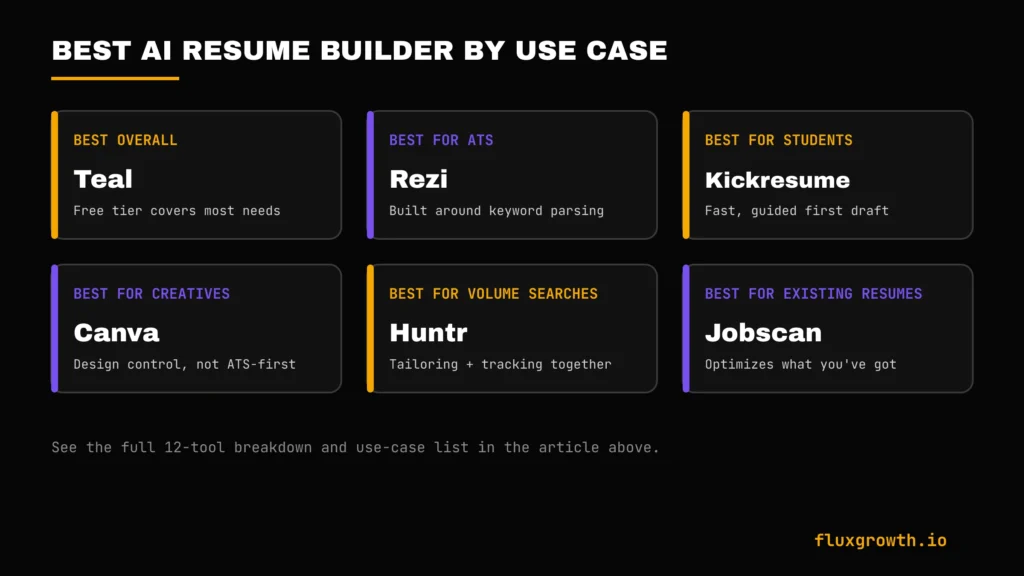
- Best overall: Teal free tier covers most of what most job seekers need
- Best free AI resume builder: Teal or Kickresume
- Best for ATS optimization: Rezi or Jobscan
- Best for students: Kickresume or Novorésumé
- Best for fresh graduates: Zety
- Best for experienced professionals: Enhancv
- Best for career changers: Teal (Resume Match Score helps reframe transferable experience)
- Best for software engineers: Rezi
- Best for executive resumes: Enhancv
- Best for creative professionals: Canva
- Best for remote job seekers: Huntr (tracking + tailoring at volume)
Best Free AI Resume Builders
If budget is the deciding factor, these free tiers are genuinely usable rather than just a preview:
- Teal — unlimited base resume, job tracker, and limited AI credits at no cost
- Kickresume — one full AI-written resume for free
- Huntr — unlimited base resumes and tracking for up to 100 jobs
- Canva — full template access on the free tier, though not ATS-optimized
- ChatGPT — free tier handles drafting, just not formatting or scoring
Resume.io and Resume Genius technically have free plans, but both restrict downloads to plain text, not something you’d actually send to an employer.
ATS Resume Optimization Explained
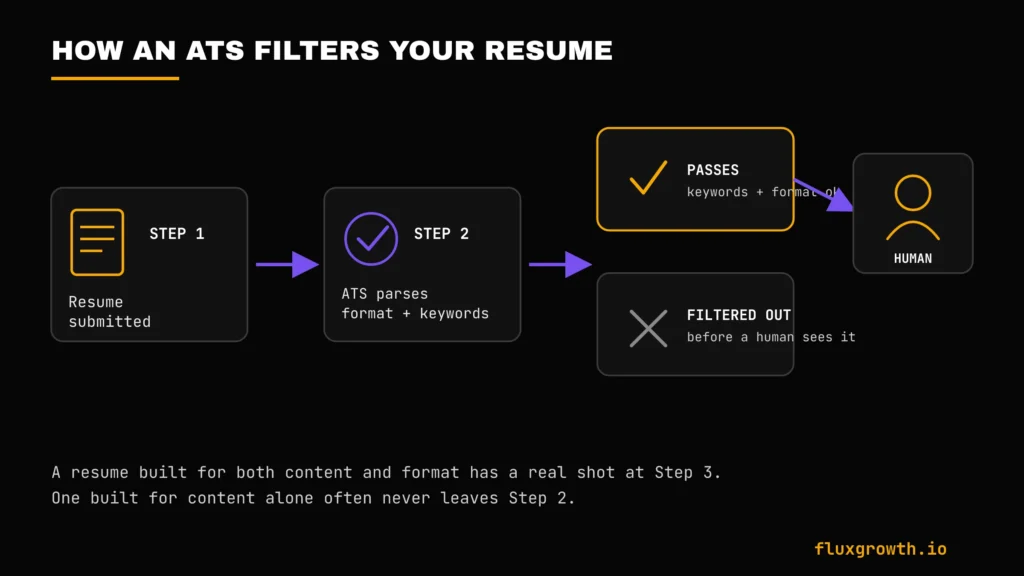
What is an ATS? An applicant tracking system is software companies use to filter, sort, and search resumes before a human ever opens them.
Why ATS matters: Most medium and large employers use ATS software to manage hiring workflows. Rather than rejecting resumes solely because they’re AI-generated, ATS systems primarily search for relevant keywords, skills, job titles, and experience that match the employer’s requirements. A well-formatted, keyword-relevant resume improves the chances of being surfaced to recruiters, while poorly formatted resumes or those missing important job-specific keywords may rank lower in search results.
ATS-friendly resume tips:
- Use standard section headers (Experience, Education, Skills) not creative renamings
- Avoid tables, text boxes, and multi-column layouts
- Match keywords from the job description in context, not as a hidden list
- Save as PDF unless the posting specifically requests DOCX or TXT
Common ATS mistakes: Heavy graphics and icons, resume content stored in images, headers/footers that some parsers skip entirely, and generic job titles that don’t match the language in the posting.
How to Choose the Best AI Resume Builder
Before you compare features, answer one question: do you want the tool to write for you, or just check your work? That splits the list immediately: Teal, Kickresume, and Zety lean toward writing for you; Enhancv, Jobscan, and Rezi lean toward reviewing what you’ve already got.
From there, narrow on:
- ATS compatibility for your specific industry — finance and government skew stricter than creative fields
- Cover letter quality, if you’re sending one with every application
- Whether LinkedIn import saves real time or just adds another login to manage
- Total cost including auto-renewal terms — several tools on this list get their worst reviews here, not on the product itself
- Export formats — PDF is the safe default; some older ATS systems still prefer DOCX
Most people can cut this list in half within five minutes. The rest is just picking a template you like.
Common Resume Mistakes AI Can Help You Avoid
- Poor formatting that breaks ATS parsing
- Missing keywords the job description explicitly used
- Weak, task-based bullet points instead of measurable achievements
- Generic summaries that could describe anyone in the role
- Grammar and consistency errors
- Resume content that reads as obviously AI-generated and unedited
- ATS-breaking formatting choices like tables or embedded text boxes
Future of AI Resume Builders
AI resume builders are evolving beyond simple document creation into complete career platforms. Tools like Teal and Huntr already combine resume building with job tracking, AI-powered resume tailoring, cover letter generation, and application management, helping job seekers manage more of the hiring process from a single dashboard. As AI continues to advance, many of these platforms are beginning to incorporate AI agents capable of handling multi-step tasks such as tailoring resumes, tracking applications, and preparing interview materials. If you’re interested in how autonomous AI agents are transforming productivity beyond resume writing, check out our guide to the best AI agents in 2026. As always, review AI-generated resumes before submitting them to employers.
Frequently Asked Questions
What is an AI resume builder?
An AI resume builder is a tool that uses artificial intelligence to draft, format, and optimize resume content, usually based on your work history and sometimes a specific job description. It’s designed to save time versus writing every section from a blank page.
Which AI resume builder is best?
There’s no single best tool for everyone. Teal is the strongest free all-around option, Rezi and Jobscan lead on ATS optimization specifically, and Canva wins for design-first, creative resumes. The right choice depends on whether you value speed, ATS compatibility, or visual design most.
Is there a free AI resume builder?
Yes. Teal, Kickresume, Huntr, and ChatGPT all offer usable free tiers. Resume.io and Resume Genius have free plans too, but both restrict downloads to plain text, which limits how usable they are for actual applications.
Can ChatGPT create a professional resume?
Yes, with the right prompting ChatGPT can draft strong summaries, bullet points, and cover letters. It has no built-in templates, ATS scoring, or export formatting, so you’ll need to handle the final layout yourself in a separate document.
Do AI resumes pass ATS?
AI-generated content itself doesn’t guarantee ATS compatibility formatting matters just as much as wording. Tools like Rezi and Jobscan specifically check formatting and keyword alignment against ATS parsing logic, which improves your odds more directly than AI writing alone.
Which AI resume builder is best for students?
Kickresume and Novorésumé are both built with guided, beginner-friendly structure, which tends to suit students and early-career applicants who don’t yet have a strong sense of resume conventions.
Are AI resume builders safe to use with my personal data?
Most established AI resume builders publish a privacy policy explaining how they collect, store, and process user data. Before uploading your resume, review the tool’s privacy policy to understand whether your data is retained, shared with third parties, or used to improve AI models. If a provider does not clearly explain its data practices, consider using another service or avoid uploading sensitive personal information beyond what is necessary for your job application.
This is especially important because privacy policies differ significantly between providers. Some services state that user content is not used to train AI models by default, while others may use submitted data to improve their services unless users opt out.
The Bottom Line
The right AI resume builder depends on one trade-off: how much you want the tool to write for you versus how much control you want to keep. Start with Teal’s free tier if you’re not sure yet you can always add a specialized tool like Rezi or Jobscan later once you know exactly what’s slowing your search down. Pick one, tailor it to the very next job you’re applying for, and see what changes.