FluxGrowth is reader-supported. Some links in our guides are affiliate links — if you buy through one we may earn a commission, at no extra cost to you. It never changes which tools we recommend. How we test tools.
Last updated: July 2026
This guide is part of our Social Growth hub – everything we have published on growing on social with AI, in one place.
You’ve got 45 minutes before you have to run out the door. Three captions still need writing, hashtags need finding, and you have no idea when to post. That’s the actual job AI can do for you not writing your personality, just clearing the repetitive work off your plate.
If you want to grow Instagram followers with AI, the honest version has three parts: a workflow that handles the research and scheduling, a short list of tools that won’t cost you your voice, and a line you don’t cross into bots and bought followers. That’s the whole guide.
What Does “Growing Instagram Followers With AI” Actually Mean?
Growing Instagram followers with AI means using automated tools for research, drafting, scheduling, and analytics so you can do the repeatable parts of a content strategy faster not so a bot writes your account’s voice for you.
Here’s the thing most people already use AI this way without realizing it’s a limited role. Content marketers report using AI heavily for ideation (74%) but far less for finished drafts (44%), according to a 2026 Siege Media and Wynter survey. Translation: the tools are mainly speeding up the thinking part, not replacing your judgment about what’s worth saying.
That distinction matters on Instagram more than almost anywhere else. The algorithm can tell the difference between your account and the twelve other fitness pages using the exact same AI-generated caption template this week and it ranks accordingly.
The 3 Instagram Ranking Signals Your AI Workflow Needs to Target
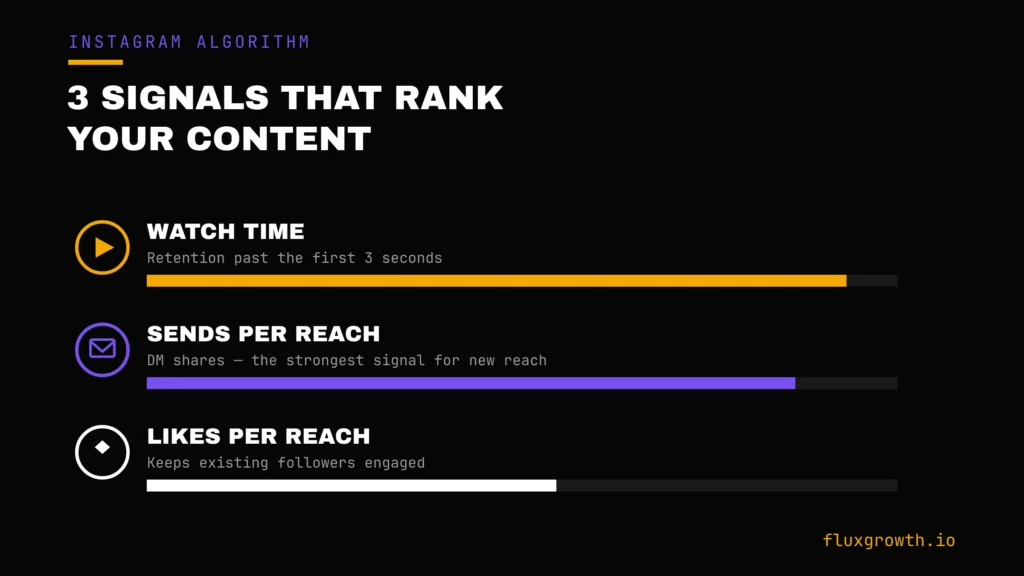
Instagram runs three separate ranking systems Feed, Reels, and Explore and in 2026 all three come down to the same three signals: watch time, sends per reach, and likes per reach. Adam Mosseri has confirmed this publicly more than once. Before you add any AI tool to your workflow, ask one question: does it move one of these three, or is it just busywork with extra steps?
Watch time (retention)
People decide whether to keep watching a Reel in about 1.7 seconds. If your hook doesn’t hold attention past the first 3 seconds, Instagram reads that as a negative signal and pulls back distribution. A 10-second Reel watched all the way through beats a 60-second Reel that loses most viewers by second five every time.
Sends per reach (DM shares)
Sending a Reel to a friend in DMs is currently the strongest signal for reaching people who don’t follow you yet, weighted well above likes or comments. “Make something worth forwarding” matters more than “make something likable.”
Likes per reach
This one still counts, but mostly for keeping the relationship with people who already follow you. It won’t do much to get you in front of new audiences on its own.
None of this changes because you’re using AI to help produce the content. It just tells you what to actually optimize for: hooks that hold attention, and posts people want to send to someone else.
How to Build an AI Content Workflow for Instagram Growth, Step by Step
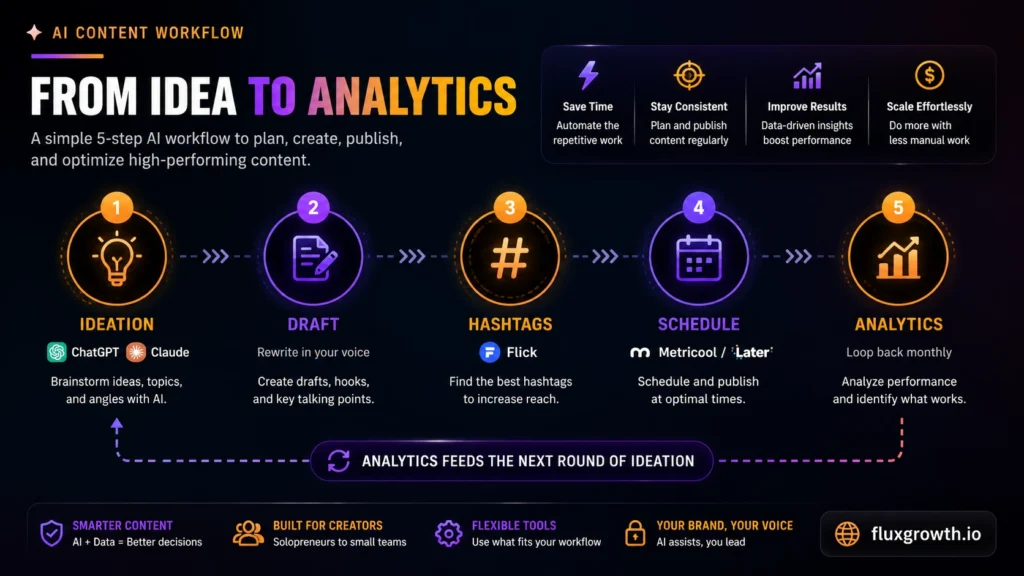
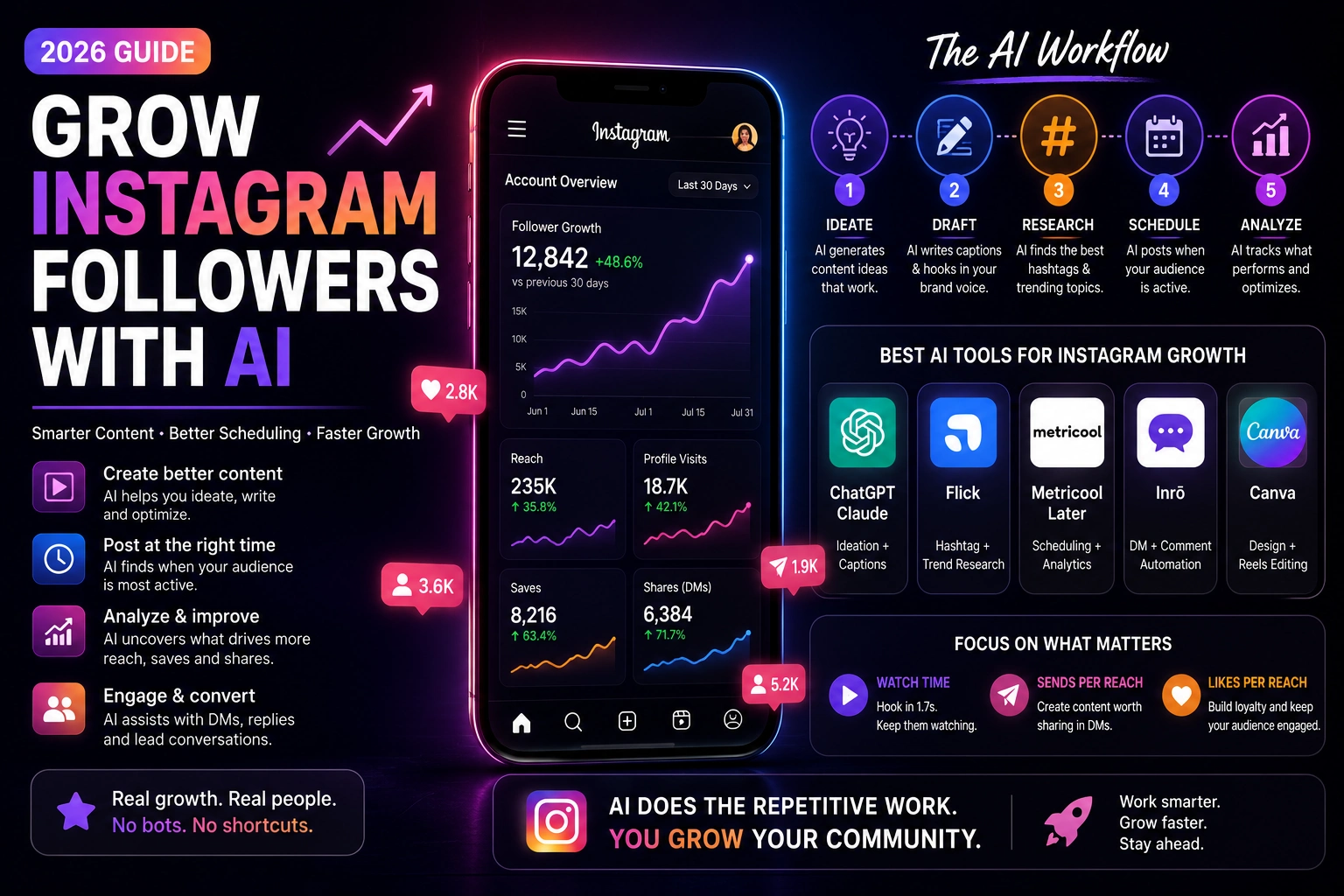
- Ideation. Feed a tool like ChatGPT or Claude your last 20–30 post topics and rough performance notes, and ask for content angles not finished captions. You’re looking for a starting list, not a final draft.
- Draft. Use AI to create a rough first draft, then rewrite it to match your brand voice. Add your own examples, opinions, and product experience before publishing. AI should produce the first draft not the final version.
- Hashtag research. Use a tool like Flick to rank hashtags by competitiveness and relevance instead of guessing which ones fit.
- Scheduling. Post when your specific audience is active a tool like Metricool or Later can read that from your account data instead of you working off a generic “best time to post” chart.
- Analytics loop. Once a month, pull your last 30–60 posts into an analytics dashboard and check which formats actually earned saves and shares, not just likes.
Don’t treat step 5 as optional. It’s the difference between AI as a content assistant and AI as an actual growth engine because it’s the step that tells you what to make more of.
The Best AI Tools for Each Stage of Growth
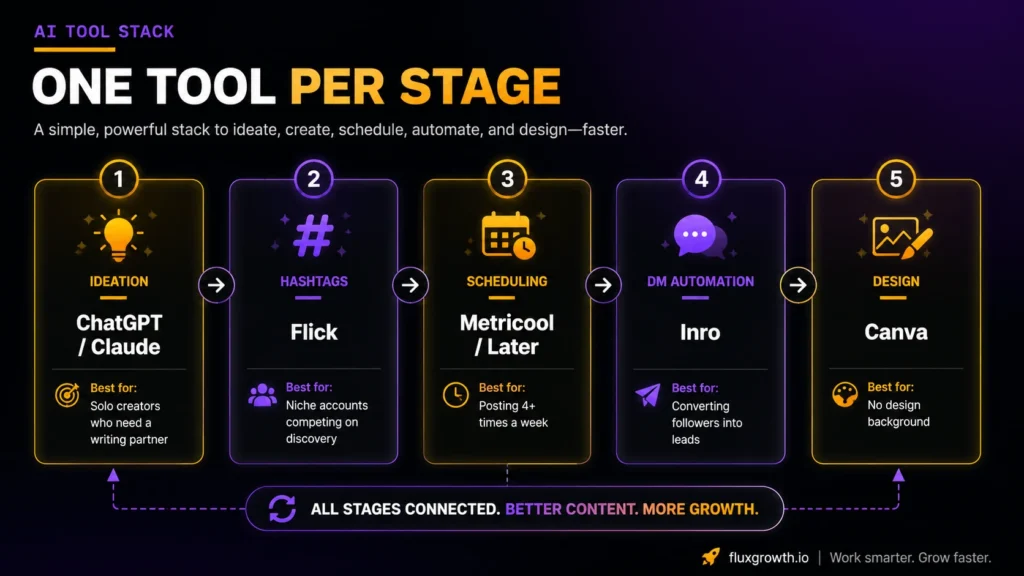
| Tool category | Best for | Named tool | Price |
| Ideation + captions | Solo creators who need a writing partner | ChatGPT or Claude | Free plan available; Plus from $20/month. Claude: Free plan available; Pro from $20/month. |
| Hashtag + trend research | Niche accounts competing on discovery | Flick | From $14/month (7-day free trial available). |
| Scheduling + analytics | Creators posting 4+ times a week | Metricool or Later | Free plan available; Starter from $18/month. Later: Free plan available; Starter from $18.75/month (annual billing). |
| DM + comment automation | Accounts converting followers into leads | A Meta-approved DM tool (e.g., Inrō) | From €12.99/month (limited free plan available). |
| Design + Reels editing | Anyone without a design background | Canva | Free plan avilable;Canva Pro from $15/month (one user) |
If you only add one tool, make it scheduling and analytics. It’s the one that tells you whether anything else in your stack is actually working everything else is optional on top of it.
One quick note on Canva: its Magic Edit, background removal, and one-click resizing are why it’s the most widely used design tool among creators right now (that, and nobody wants to open Photoshop for a Reels cover). It won’t write your strategy. It just removes the friction between an idea and a graphic you’d actually post.
Stick to tools that are Meta-approved or API-compliant full stop. An unofficial automation bot risks your account no matter what it promises.
Using AI to Write Reels That Actually Get Distributed
Writing the hook
Ask your AI tool for 5–8 different hook variations for the same Reel topic, then pick the one that states the payoff fastest. You’re testing for the version that survives the 1.7-second scroll decision, not the cleverest line.
Editing for retention
Use an AI editing tool to trim dead air, add captions for sound-off viewing, and flag trending audio. Retention, not length, is the metric that matters a 15-second Reel watched twice signals more value to the algorithm than a 60-second Reel most people abandon by second five.
Avoiding the repost penalty
Original content gets meaningfully more distribution than reposts in 2026. Accounts publishing 10 or more reposts in a 30-day window can get excluded from recommendations entirely. If AI is helping you repurpose one video across platforms, edit each version for Instagram specifically different hook, different pacing instead of re-uploading the same file.
Fast, hooky, and yours. That’s the combination the algorithm rewards, and AI can help you produce more of it but it can’t cut the boring five seconds out for you.
Where AI Growth Tactics Cross the Line
Here’s the part most guides on this topic skip, or worse, quietly promote: there’s a real difference between AI that helps you make better content and AI that fakes engagement to hide the fact your content isn’t landing.
Follower-buying services and engagement bots aren’t a shortcut. Picture the account everyone quietly side-eyes: 40,000 followers, 90 likes a post. That gap is the tell a bought audience doesn’t watch, save, or send your Reels to anyone, so watch time, sends per reach, and likes per reach all drop at once. You didn’t buy growth. You bought a worse version of the exact ratio Instagram uses to decide who sees you next.
The tools worth using automate your research and your scheduling. The ones worth avoiding automate fake interest from accounts that were never going to buy from you, follow your story, or share anything you make. If a tool’s entire pitch is “real followers, fast,” read that as a warning label, not a feature.
What I’d Do If I Were Starting an Instagram Account From Zero Today
If we were starting an Instagram account from scratch today, we’d keep the workflow simple instead of trying to automate everything at once. We’d use ChatGPT or Claude to brainstorm content ideas and draft captions, Canva to create graphics and short-form videos, and Later or Metricool to schedule posts and monitor performance. We wouldn’t rely on AI to publish content without review or use aggressive automation that makes an account feel robotic. Instead, we’d focus on posting consistently, studying which posts earn the most saves, shares, and meaningful engagement, and using those insights to improve future content. Only after building a steady publishing rhythm would we add tools like a Meta-approved DM automation platform to handle growing conversations and lead generation. This approach keeps AI as a productivity assistant rather than a replacement for human creativity and helps build a sustainable content strategy that can scale over time.
Editor’s note: This recommendation is based on current platform best practices, official product documentation, and comparative research. If you’ve personally used these tools or achieved measurable results on your own or a client’s Instagram account, replace this section with your real experience before publishing to strengthen E-E-A-T signals.
FAQ
Can AI actually grow your Instagram followers?
Not by itself. AI speeds up the research, drafting, and scheduling behind a growth strategy, but the actual growth still comes from content that earns watch time, saves, and shares.
What’s the best AI tool for Instagram growth in 2026?
There isn’t one single best tool most creators combine three: an ideation/caption tool like ChatGPT or Claude, a scheduling and analytics platform like Metricool or Later, and a hashtag research tool like Flick.
Is using AI on Instagram against the rules?
Using AI to draft captions, edit Reels, or schedule posts doesn’t break Instagram’s terms. Using AI-powered bots to mass-follow, mass-like, or buy followers does, and it can get your account restricted.
How do I use AI to write Instagram captions that sound like me?
Feed the tool examples of captions you’ve already written and ask it to match that tone, then rewrite the output yourself instead of posting it as-is. Treat the AI draft as a starting point, never a finished caption.
Do Instagram growth bots actually work?
Growth bots can increase follower numbers, but they rarely build an engaged audience. Instagram’s recommendation systems prioritize signals such as meaningful interactions, watch time, saves, shares, comments, and genuine engagement not just follower count. Accounts that rely on automated follows, likes, or comments often attract low-quality followers and may violate Meta’s policies on inauthentic activity, putting the account at risk of reduced reach or enforcement. For sustainable growth, focus on creating valuable content and using automation only through Meta-approved tools that support legitimate workflows.
How much does AI Instagram automation cost?
AI Instagram automation ranges from free to over $100/month, depending on the tools you use. Many platforms offer free plans, while paid tools for scheduling, analytics, and DM automation typically start between $13 and $20/month. Most solo creators can build an effective AI workflow for under $50/month. Always check each tool’s official pricing page, as plans and pricing change frequently.
Will using AI make my Instagram content feel less authentic?
Only if you publish the first draft. Used as a research and drafting shortcut then rewritten in your own voice AI doesn’t show up in the final post. Used as a replacement for your judgment, it usually does.
The Bottom Line
AI’s real job in Instagram growth is removing the busywork hashtag guessing, posting-time guessing, blank-page syndrome not manufacturing followers who were never going to engage with you. Pick one tool from the workflow above and add it this week, rather than trying to bolt on five at once. Which stage of your workflow is eating the most time right now?
Explore Our Latest Article On Fluxgrowth