FluxGrowth is reader-supported. Some links in our guides are affiliate links — if you buy through one we may earn a commission, at no extra cost to you. It never changes which tools we recommend. How we test tools.
Anthropic, OpenAI, and xAI all shipped major model updates within weeks of each other this summer. Treat every price and benchmark figure below as a snapshot, not a permanent fact. We’ve flagged anything worth double-checking before you put it in a budget line.
What Is an AI Coding Agent? (And How It’s Different From an AI Coding Assistant)
An AI coding agent is a tool that takes a goal to fix this bug, build this feature, refactor this module and executes it directly: running commands, editing files across your repository, and iterating on its own errors, largely without you copying and pasting anything.
That’s a different thing from a code-generation tool or AI coding assistant. Those suggest code as you type you’re still doing the acting.
An AI-powered IDE is a step further: an editor with an agent built in. Cursor is the clearest example. A terminal-based coding agent (Claude Code, Codex CLI, Aider) skips the editor entirely and runs from your command line. And “repository-aware” just means the agent actually reads your code base for context instead of guessing from a blank slate.
Here’s the short version: completion tools assist you while you code. Agents handle a task while you focus on something else.
How to Choose an AI Coding Agent — The 8 Questions That Actually Matter
Before you look at any ranked list, answer these. They’ll eliminate most of the options faster than reading ten reviews will.
- What’s your primary language or stack? Most agents handle mainstream languages well (JavaScript, Python, Java, PHP), but coverage depth still varies for niche frameworks and older code bases.
- Terminal or IDE? If you live in VS Code or JetBrains and don’t want to switch editors, an IDE-native tool like Cursor or Copilot fits better than a terminal-first agent like Claude Code or Codex CLI.
- How big is the code base? A large Moreno needs an agent with a genuinely deep context window and strong cross-file reasoning, not just fast autocomplete.
- What’s your experience level? Beginners benefit from chat-style tools with guardrails; experienced developers often want raw terminal control and fewer training wheels.
- Do you need tight GitHub integration? If your workflow already runs through GitHub issues and pull requests, that changes which tool saves you the most steps.
- How much does privacy matter? If you’re working with client code, proprietary IP, or anything under an NDA, you need to know exactly how a tool handles your code before you connect it.
- Solo or team? Team plans, shared context, and admin controls matter a lot more once you’re not the only person using the tool.
- What’s your budget? Free tiers exist, but the useful ceiling on most of them is lower than it looks to check usage limits, not just the sticker price.
The Best AI Coding Agents in 2026 (Ranked by Use Case)
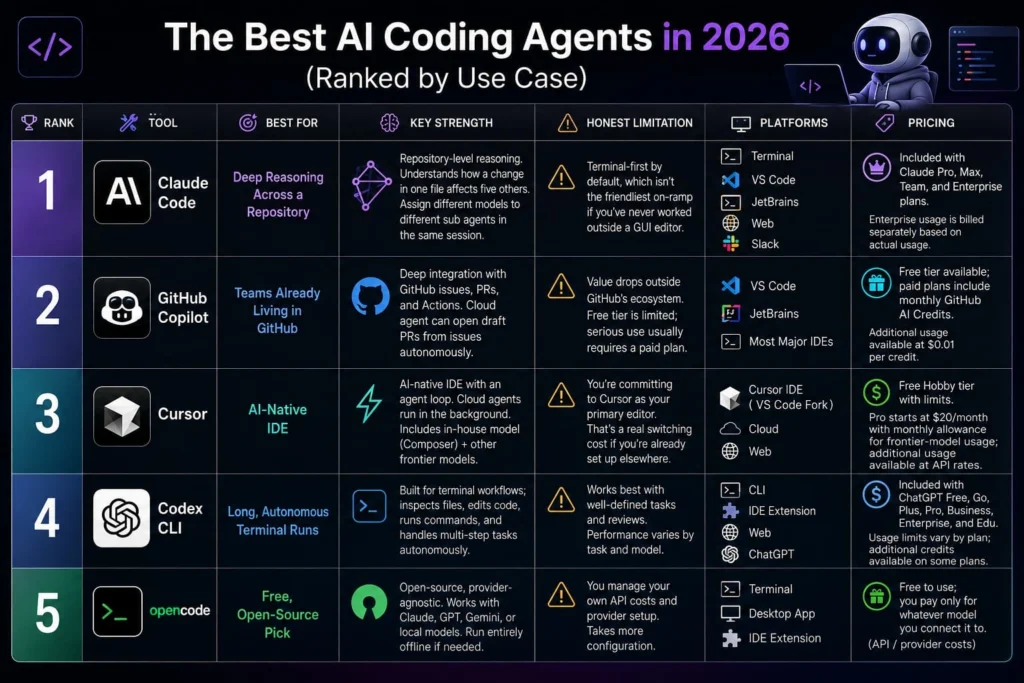
There isn’t one “best” agent in 2026. There’s a best one for your situation.
Claude Code — Best for Deep Reasoning Across a Repository
Claude Code is Anthropic’s agent coding tool. It runs in the terminal, plus VS Code, JetBrains, a desktop app, the web, and Slack, all sharing context from a single Claude subscription.
Its strength is repository-level reasoning, understanding how a change in one file affects five others, not just writing a clean function in isolation. It also lets you assign different models to different sub agents in the same session. Run a strong model for planning. Cheaper ones for the mechanical work.
Honest limitation: it’s terminal-first by default, which isn’t the friendliest on-ramp if you’ve never worked outside a GUI editor.
Pricing: Included with Claude Pro, Max, Team, and Enterprise plans. Enterprise usage is billed separately based on actual usage.
GitHub Copilot — Best for Teams Already Living in GitHub
GitHub Copilot is GitHub’s AI pair programmer, built into VS Code, JetBrains, and most major IDEs, with a cloud agent that can pick up a GitHub issue and open a draft pull request on its own.
Its real advantage is ecosystem depth. If your team’s whole workflow already runs through GitHub issues, PRs, and Actions, Copilot slots in without asking you to change anything else.
Honest limitation: its value drops noticeably for teams working outside GitHub’s ecosystem, and the free tier is limited enough that most serious use requires a paid plan.
Pricing: Free tier available; paid plans include monthly GitHub AI Credits, with additional usage available at $0.01 per credit.
Cursor — Best AI-Native IDE
Cursor is a full code editor built around an AI agent loop, not an extension bolted onto an existing one. It pairs fast, context-aware tab completion with cloud agents. Those agents can keep working in the background while you do something else.
Cursor also trains its own in-house model, Composer. You get other frontier models in the same drop-down too, so switching models doesn’t mean switching tools.
Honest limitation: you’re committing to Cursor as your primary editor to get full value. That’s a real switching cost if you’re already set up elsewhere.
Pricing: Free Hobby tier with limited Agent requests and Tab completions; Pro starts at $20/month and includes a monthly allowance for frontier-model usage, with additional usage available at API rates.
Codex CLI — Best for Long, Autonomous Terminal Runs
Codex is OpenAI’s coding agent, available through the CLI, an IDE extension, the web, and ChatGPT itself. All four interfaces connect to your ChatGPT account. Codex CLI in particular is built for terminal workflows — inspecting files, editing code, running commands, and working through multi-step tasks on its own.
Honest limitation: Codex works best when you can hand it a well-defined task and review the result. For complex or unfamiliar repositories, performance varies by task and model — it’s not universally better or worse than the other agents here, just different in what it’s tuned for.
Pricing: Codex is included with ChatGPT Free, Go, Plus, Pro, Business, Enterprise, and Edu, with usage limits varying by plan. Some plans can purchase additional credits when they reach their included limits.
open code — Best Free, Open-Source Pick
open code is an open-source, provider-agnostic coding agent you can point at Claude, GPT, Gemini, or a fully local model. You bring your own API key. No subscription markup.
It’s become the most-starred open-source agent in the category, largely because it doesn’t lock you into one vendor. If your team’s security policy blocks proprietary tools outright, open code’s ability to run entirely offline with local models is a real advantage not just a checkbox on a compliance form.
Honest limitation: you’re managing your own API costs and provider setup, which takes more configuration than a plug-and-play subscription tool.
Pricing: free to use; you pay only for whatever model you connect it to.
Beginner-Friendly vs. Team/Enterprise Picks
Coding students and beginners: start with a tool that has a chat-style interface and forgiving guardrails rather than a bare terminal. GitHub Copilot’s free tier and Cursor’s Hobby tier are both reasonable starting points to get to see the agent work without a subscription commitment.
Solo freelancers: weigh cost against how much of your work is repetitive versus genuinely novel. If you’re mostly doing greenfield feature work across different client stacks, a model-agnostic option like open code keeps you flexible without locking you into one vendor’s road map.
Small teams and startups: GitHub Copilot or Cursor tend to make the most sense once you’re coordinating across more than one developer. Both have team plans with shared billing and admin controls.
Engineering managers overseeing a team: the decision shifts from “which tool writes the best code” to “which tool gives me visibility.” Look for audit trails, transparent change logs, and clear permission models before you standardize a whole team on one agent.
Privacy and Data-Handling — What to Check Before You Connect Your code base
Connecting a coding agent to your repository means your code, at minimum, passes through the model provider’s infrastructure. What happens after that varies a lot by tool and by plan tier. Don’t assume.
Before you connect anything to client work, proprietary code, or code under an NDA, check three things on the vendor’s site directly. Is your code used to train future models by default, and can you opt out? How long does the provider actually retain your code and prompts? And does a business or enterprise tier exist with stronger guarantees than the free plan you’re probably testing on right now?
Privacy policies change, so verify these claims directly with each vendor’s official privacy or trust documentation before using an AI coding tool with sensitive code.
AI Coding Agents Compared
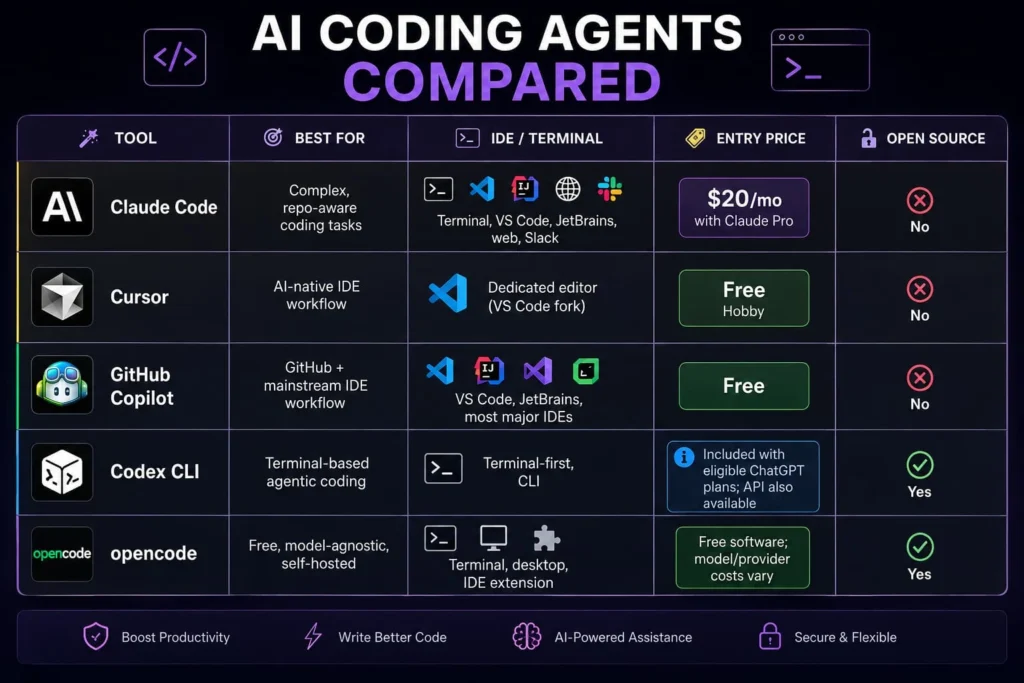
| Tool | Best For | IDE / Terminal | Entry Price | Open Source |
| Claude Code | Complex, repo-aware coding tasks | Terminal, VS Code, JetBrains, web, Slack | $20/mo with Claude Pro | No |
| Cursor | AI-native IDE workflow | Dedicated editor (VS Code fork) | Free Hobby | No |
| GitHub Copilot | GitHub + mainstream IDE workflow | VS Code, JetBrains, most major IDEs | Free | No |
| Codex CLI | Terminal-based agentic coding | Terminal-first, CLI | Included with eligible ChatGPT plans; API also available | Yes |
| opencode | Free, model-agnostic, self-hosted | Terminal, desktop, IDE extension | Free software; model/provider costs vary | Yes |
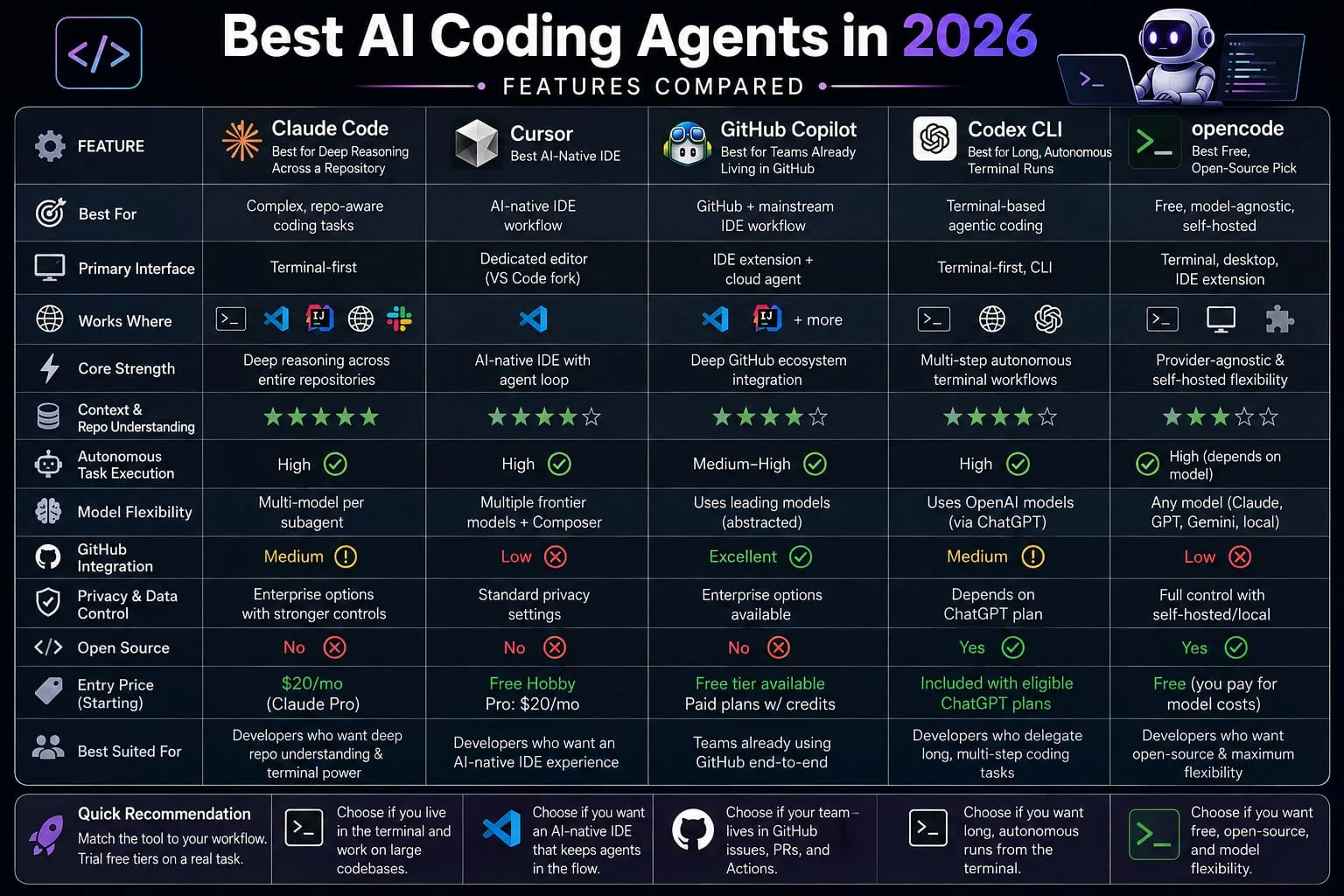
If you only take one thing from this table: choose based on where you already work Claude Code and Codex for terminal-first workflows, Cursor for an AI-native IDE, GitHub Copilot for GitHub-centered development, and OpenCode for open-source, provider-flexible workflows.
What I’d Tell a Developer Starting Today
Start with your workflow, not the leader-board.
Live in an IDE and don’t want to change that? Try Cursor or Copilot first. Comfortable in a terminal and want the deepest reasoning across a large code base? Claude Code is worth the setup time. Budget the constraint? open code gets you a genuinely capable agent for the cost of API tokens.
Here’s the thing: pick two, trial both free tiers on a real task this week (not a toy example), and let the actual friction decide. Not a benchmark number that’ll be stale in a month anyway. For a deeper comparison, see Claude Code vs GitHub Copilot: Which AI Coding Tool Is Right for You in 2026?
FAQ
What is the best AI coding agent in 2026?
There isn’t one best AI coding agent for every developer. The right choice depends on your workflow: Claude Code for terminal-first and repository-heavy work, Cursor for an AI-native IDE, GitHub Copilot for GitHub-centered development, and Codex for delegated, multi-step coding tasks. Current research also shows that results vary by task and benchmark, so benchmark rankings should not be treated as a universal leader-board.
What’s the difference between an AI coding assistant and an AI coding agent?
An AI coding assistant suggests code as you type, like inline autocomplete, and leaves the acting to you. An AI coding agent takes a goal and executes it directly, running commands, editing files across your code base, and iterating on errors with much less hand-holding.
Are AI coding agents safe to use with proprietary or client code?
It depends entirely on the tool and the plan tier. Check each vendor’s privacy documentation directly for their data-retention policy and whether your code is used for model training by default. Don’t assume any tool is safe for sensitive code without confirming this yourself.
What’s the best free AI coding agent?
There isn’t one universal winner. OpenCode is a strong choice for developers who want an open-source, model-agnostic setup, while GitHub Copilot Free, Cursor Hobby, and Codex provide easier entry points with usage limits. Check each vendor’s current limits before publishing because free-tier terms change frequently.
Should I use Claude Code or GitHub Copilot?
Choose Claude Code if you want deep reasoning across a large or unfamiliar repository and don’t mind working from the terminal. Choose GitHub Copilot if your team’s workflow already runs through GitHub issues and pull requests and you want the agent to slot into that without changing your process.
Can AI coding agents actually write production-ready code?
They can produce working code, but production-readiness still depends on the task and the review you apply. Even strong agents produce output that’s close but not quite right often enough that human review remains a real step, not a formality. Treat agent output as a solid first draft, not a finished pull request.
What’s the best AI coding agent for beginners?
A tool with a chat-style interface and forgiving guardrails beats a bare terminal for anyone just starting out. GitHub Copilot’s free tier and Cursor’s Hobby tier are both reasonable starting points because they let you see the agent work without committing to a paid plan or a command-line-only workflow.
The Bottom Line
The frontier models behind these tools have converged enough that the harness and your actual workflow now matter more than which one scores highest on a given week’s benchmark. Pick your top two candidates from the framework above, trial both free tiers on a real task, and let the friction or lack of it make the call.
Still weighing options after that? Start with whichever tool fits the surface you already work in most: terminal, IDE, or GitHub.