FluxGrowth is reader-supported. Some links in our guides are affiliate links — if you buy through one we may earn a commission, at no extra cost to you. It never changes which tools we recommend. How we test tools.
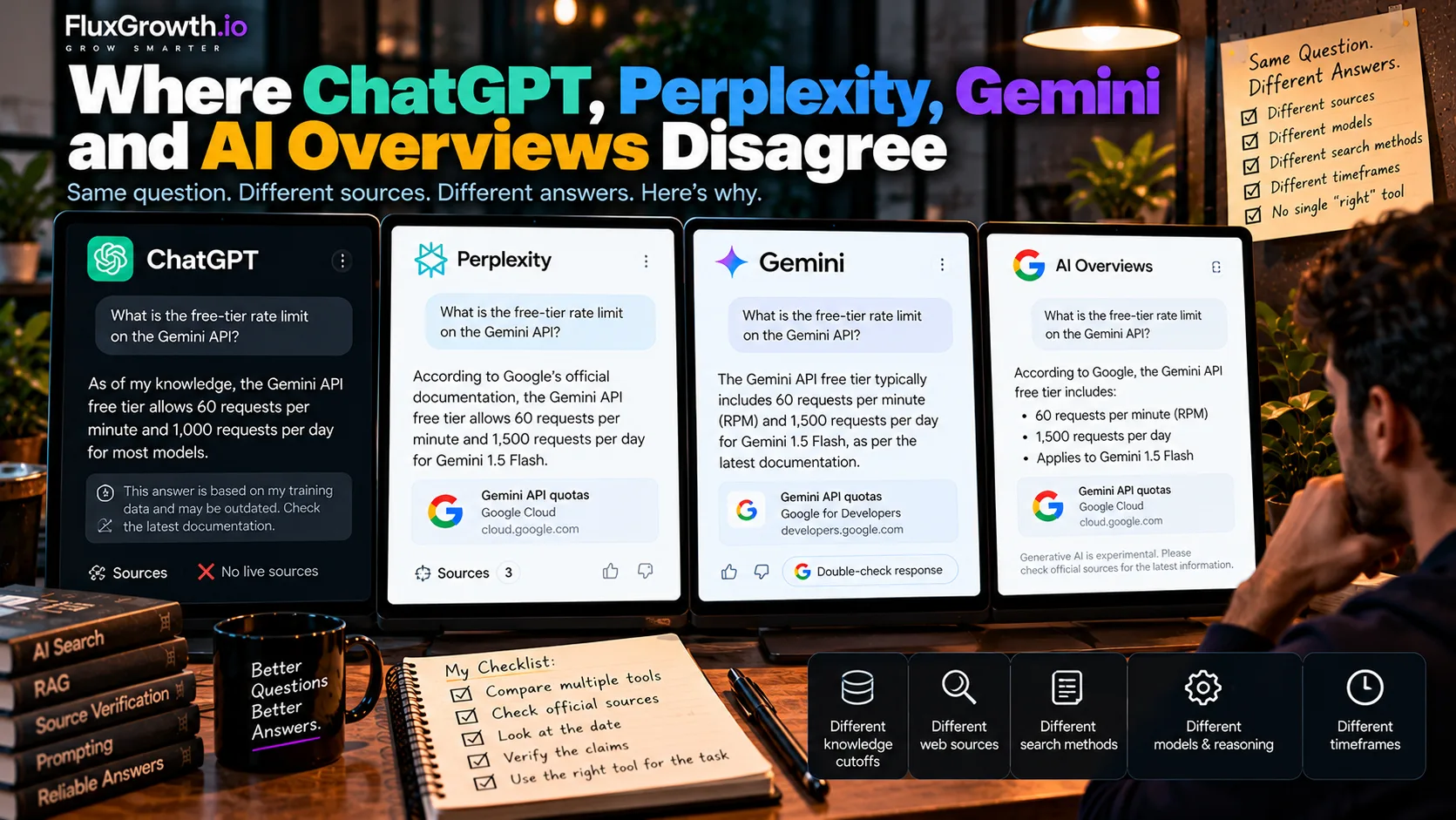
You ask ChatGPT, Perplexity, Gemini and Google the same question: what’s the free-tier rate limit on the Gemini API? You get four answers. Two match, one describes last year’s limits, and one cites a forum thread.
That’s normal for ChatGPT vs Perplexity vs Gemini vs Google AI Overviews. Each system decides differently when to search, searches differently and reads different pages.
Below are the seven reasons answers split, what each system’s own documentation says about how it finds information, and a seven-step check for any AI answer headed into your codebase. You won’t find a winner here, because the most reliable tool changes with the question.
This guide is part of our GEO & AI Search hub — everything we have published on getting cited by ChatGPT, Perplexity, Gemini and AI Overviews, in one place.
Why do ChatGPT, Perplexity, Gemini and Google AI Overviews give different answers?
ChatGPT, Perplexity, Gemini and Google AI Overviews give different answers because each one starts from a different model, searches a different index, rewrites your question in its own way and picks different pages to cite. A disagreement usually means the evidence behind each answer differs. It doesn’t automatically mean one tool is wrong.
An AI chatbot answers from what its model learned during training. That knowledge stops at a knowledge cutoff, the date after which the model has no training data. OpenAI — ChatGPT knowledge and search
An AI search engine runs a live web search first, then writes an answer from the pages it retrieved. That pattern is called retrieval-augmented generation (RAG): retrieve documents, hand them to the model, generate an answer. An answer tied to pages fetched at the moment you ask is called web-grounded.
A hallucination is a confident statement that no source supports. All four products mix chatbot mode and search mode, so the first thing to find out about any answer is which mode produced it.
How does each AI search system get its information?
Each of the four systems uses a different pipeline to collect evidence, and none of them runs the identical process on every question.
ChatGPT
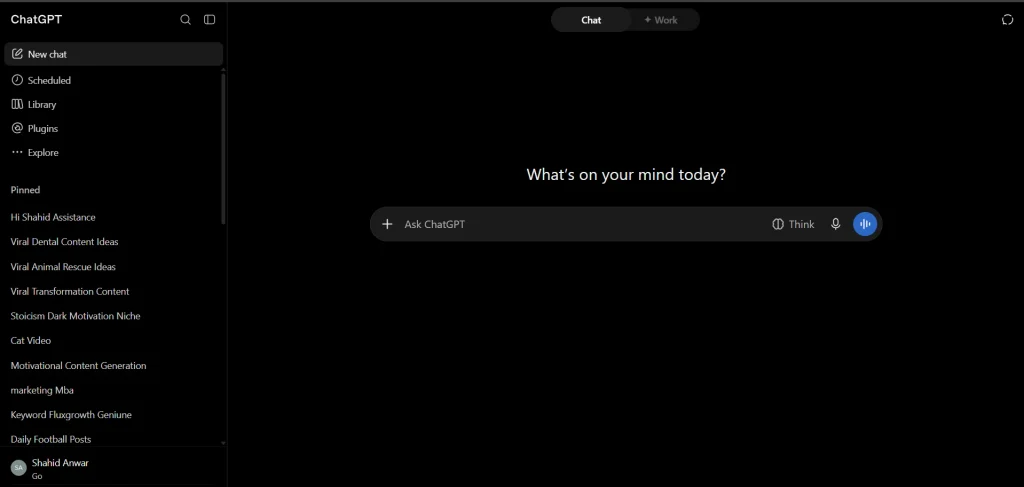
ChatGPT answers from its model knowledge unless web search runs. According to OpenAI’s help page on ChatGPT search, ChatGPT may search automatically when a question would benefit from current information, and it sometimes works with third-party search providers.
OpenAI is candid about the limits: its documentation says search results and citations can be incomplete, outdated, or incorrect. No Sources button under a response? Treat the answer as unsourced.
Perplexity
Perplexity is search-first. Its Help Center says it searches the web and synthesizes information from multiple sources, with direct links to the original sources included in answers. perplexity.ai
A language model still generates the response. Perplexity lets eligible users choose among models from Perplexity, OpenAI, Anthropic, Google, and other providers, so the selected model can affect how an answer is reasoned about and written. Perplexity also changes its available model lineup as new models are released and older ones are retired. Perplexity review for 2026
Gemini
Gemini is really two products for developers. In the Gemini app, Google says not every response includes sources, and that Gemini can still get things wrong even when it shows them.
The app does offer a “Double-check response” button, which runs a Google Search and flags statements that results support or contradict. Google notes it skips code, which is the part developers most want checked.
The Gemini API is more transparent. With Grounding with Google Search enabled, the response includes a groundingMetadata object listing the search queries Gemini ran, the pages it used and which parts of the answer each page supports. For developers, that’s the most inspectable setup of the four.
Google AI Overviews
Google AI Overviews is a feature inside Google Search, not a standalone chatbot. Google’s Search Central documentation says AI Overviews and AI Mode may use a “query fan-out” technique, issuing several related searches across subtopics to build one response.
The same page says the two features may use different models and techniques, so their responses and links will vary.
Takeaway: ChatGPT and the Gemini app decide when to search, Perplexity searches by default, and AI Overviews sit on top of Google Search’s own ranking. Before comparing two AI answers, check whether both of them actually searched.
The 7 main reasons AI systems disagree
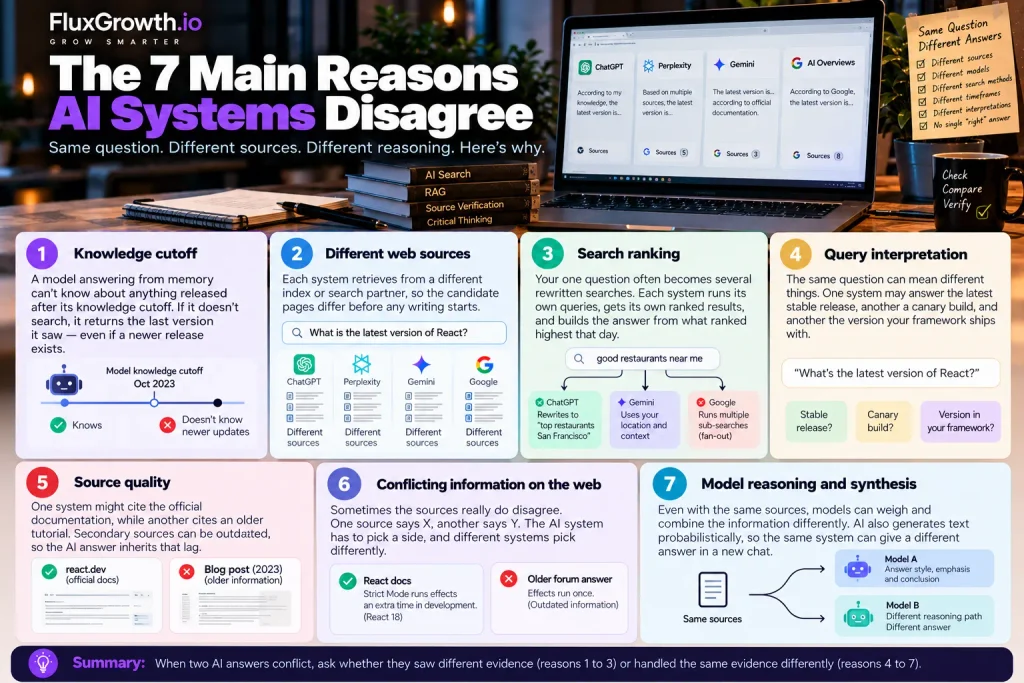
Most AI disagreements trace back to seven causes. The first three change what evidence a system sees; the last four change what it does with that evidence.
1. Knowledge cutoff
A model answering from memory can’t know about anything released after its knowledge cutoff. If ChatGPT or Gemini answers a version or pricing question without searching, the newest release doesn’t exist for it. The model returns the last version it saw. Confidently.
2. Different web sources
Each system retrieves from a different index or search partner, so the candidate pages differ before any writing starts. That holds even inside one company (Google’s own two AI features are the clearest example).
Ahrefs compared 730,000 AI Mode and AI Overviews response pairs from September 2025 US data. Across 540,000 query pairs, the two cited the same URLs only 13.7% of the time. Yet they reached semantically similar conclusions 86% of the time (Ahrefs, December 2025). Ahrefs research
3. Search ranking
Your one question rarely stays one search. In OpenAI’s own example, ChatGPT may rewrite “good restaurants near me” into “top restaurants San Francisco” based on your IP location, and Google’s fan-out fires several sub-searches at once. Each search returns its own ranked list, and the answer is built from whatever ranked highest for those rewritten queries, that day.
4. Query interpretation
“What’s the latest version of React?” can mean the latest stable release, a canary build or the version your framework ships with. One system picks one reading, another picks a different one. Both answers can be accurate for the question each system thought you asked.
5. Source quality
One tool cites react.dev. Another cites a 2023 tutorial that summarized react.dev before a breaking change. Secondary sources lag behind primary ones, and the AI answer inherits that lag.
6. Conflicting information on the web
Sometimes the sources really do disagree. React’s docs explain that Strict Mode runs effects an extra time in development, a React 18 change, while older Stack Overflow answers still describe effects running once. An AI system has to pick a side, and different systems pick differently.
7. Model reasoning and synthesis
Two models reading identical pages can still weigh and merge them differently. Language models also generate text probabilistically, so the same system can give a different answer in a fresh chat. That’s how large language models (LLMs) work in general, so one odd answer isn’t proof that a product is worse.
Summary: when two AI answers conflict, ask whether they saw different evidence (reasons 1 to 3) or handled the same evidence differently (reasons 4 to 7).
What do real developer disagreements look like?
AI disagreements hit developers hardest on fast-changing facts such as prices, versions, deprecation dates, dependencies, and API availability. The four scenarios below are hypothetical examples based on documented differences in how AI search and answer systems retrieve, interpret, and cite information. They are not recorded test results.
Example 1: API pricing
Ask “What does a given OpenAI model cost per million input tokens?” and answers drift. Prices change, old blog posts stay ranked, and a model answering from memory quotes its training data. Check the vendor’s official pricing page, and match the exact model name and tier, since batch and standard pricing can differ.
Example 2: Latest library version
Ask “What’s the latest stable Next.js?” and one system may answer from memory while another cites a canary tag. Skip the debate. npm view next version returns the current published version straight from the registry, and the project’s GitHub Releases page confirms it.
Example 3: Deprecation dates
Ask when a specific Gemini API model stops working, and third-party articles often lag the official schedule. Check the Gemini API changelog and deprecation docs, and match the exact model ID string, not just the model family.
Example 4: Package recommendations
Ask “Which npm package handles this task?” and accuracy is only half the problem. Security is the other half.
In a USENIX Security 2025 study by Spracklen and colleagues, 19.7% of the 2.23 million packages referenced in 576,000 code samples from 16 code-generation models didn’t exist. Commercial models hallucinated packages 5.2% of the time; open-source models, 21.7%.
Worse, 43% of hallucinated names reappeared in every one of ten reruns of the same prompt, so a fake package can look consistent. Attackers register those names, a tactic called slopsquatting. Before installing, check the registry page for the publisher, creation date, download history and linked repository.
How do you verify conflicting AI answers?
Verify a conflicting AI answer by tracing it back to the primary source, checking that source’s date and testing the exact claim yourself. Here’s the seven-step version.
- Ask the same question precisely. Use identical wording in every tool, and include your context: framework, version, runtime, region.
- Ask each system for sources. Request URLs to official documentation. No URL means no trust yet.
- Identify the primary source. Prefer official docs, product pages, government sites, standards bodies and original research over blog summaries.
- Check publication and update dates. An answer that was correct in 2024 can be wrong for a 2026 SDK.
- Compare the exact claim. Find the specific sentence in the documentation. Don’t compare one AI summary against another.
- Test the claim when possible. Run it in a scratch repo, send a curl request or try it in staging, never in production first.
- Record uncertainty. If official sources disagree with each other, write “unresolved” in the ticket or PR and link both sources.
Should you trust the primary source or the AI answer?
When accuracy matters, trust the primary source. An AI answer is an interpretation of information; the primary source is the authority you verify against.
Stack Overflow’s 2025 Developer Survey showed substantial skepticism toward AI tools: 46% of respondents said they distrust the accuracy of AI tools, compared with 33% who said they trust them, while 66% identified AI solutions that are “almost right, but not quite” as their biggest frustration. These are 2025 survey results.
The sources worth bookmarking: API documentation, GitHub repositories and release notes, official changelogs, vendor pricing pages, security advisories, standards such as IETF RFCs and W3C specs, and government sites.
AI is still useful here. It’s fast at finding, summarizing and comparing those pages. It just shouldn’t be the last stop before a production change.
How do ChatGPT, Perplexity, Gemini and Google AI Overviews compare on sources and citations?
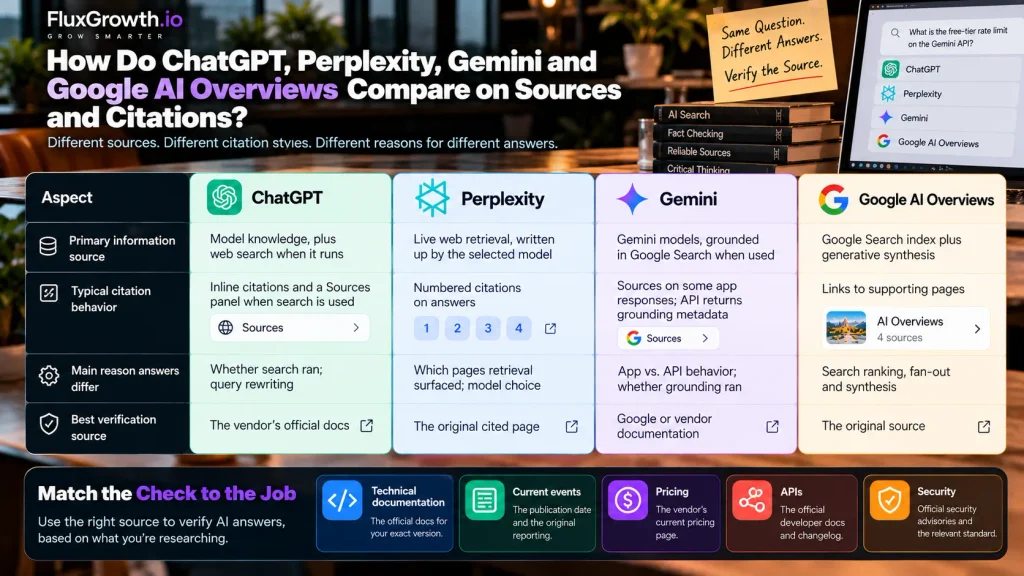
ChatGPT, Perplexity, Gemini and Google AI Overviews differ mainly in when they search and how visibly they cite, not in being universally right or wrong. The table reflects each vendor’s documentation as of October 2026.
| System | Primary information source | Typical citation behavior | Main reason answers differ | Best verification source |
| ChatGPT | Model knowledge, plus web search when it runs | Inline citations and a Sources panel when search is used | Whether search ran; query rewriting | The vendor’s official docs |
| Perplexity | Live web retrieval, written up by the selected model | Numbered citations on answers | Which pages retrieval surfaced; model choice | The original cited page |
| Gemini | Gemini models, grounded in Google Search when used | Sources on some app responses; API returns grounding metadata | App vs. API behavior; whether grounding ran | Google or vendor documentation |
| Google AI Overviews | Google Search index plus generative synthesis | Links to supporting pages | Search ranking, fan-out and synthesis | The original source |
Match the check to the job:
- Technical documentation: the official docs for your exact version.
- Current events: the publication date and the original reporting.
- Pricing: the vendor’s current pricing page.
- APIs: the official developer docs and changelog.
- Security: official security advisories and the relevant standard.
How should developers use multiple AI systems together?
Use multiple AI systems to surface disagreements, then let the primary source settle them. A practical loop:
- Ask one system for an initial explanation.
- Ask a second system, “What’s wrong, missing or outdated in this answer?”
- Ask both for primary sources, then open them yourself.
- Verify the specific claim and test technical claims locally.
- Treat the verified source, not any AI response, as the final authority.
Here’s the thing: agreement between AI systems isn’t proof. Three tools can repeat the same outdated blog post and agree word for word. The Ahrefs numbers show the flip side: two Google features reaching similar conclusions from mostly different pages. Matching answers tell you very little about the evidence underneath.
What do AI answer disagreements mean for AI search and SEO?
For publishers, AI disagreement means there’s no single AI ranking to win. Each engine retrieves and cites differently, so visibility in one doesn’t guarantee visibility in another.
Google’s guidance is direct: there are no additional requirements or special optimizations for appearing in AI Overviews or AI Mode, and normal SEO best practices still apply. Google also warns that spinning up separate pages for every query variation, including fan-out queries, mainly to manipulate rankings or AI responses violates its scaled content abuse policy.
What helps is the unglamorous work: first-party documentation, visible update dates, plain definitions, one consistent name per product, and passages that answer a question on their own.
None of that guarantees a citation. It does make your page easier for an engine to quote accurately and for a developer to verify. More on this in our GEO and AI search hub.
FAQ
Why do ChatGPT and Perplexity give different answers?
ChatGPT and Perplexity gather evidence differently. Perplexity searches the web by default, while ChatGPT may answer from model knowledge unless search runs, and the two retrieve different pages even when both search.
Which is more accurate, ChatGPT or Perplexity?
Neither is more accurate across the board. Accuracy depends on the question, whether search ran, which sources were retrieved, which model wrote the answer and how fresh the information is.
Why does Gemini disagree with ChatGPT?
Gemini and ChatGPT run different models with different training data and cutoffs, and they search different infrastructure. Gemini draws on Google Search, while ChatGPT uses its own search setup, sometimes with third-party providers.
Are Google AI Overviews always accurate?
No. AI Overviews summarize pages from Google Search, and a summary can misread or oversimplify its sources. Ahrefs found 11% of AI Overviews in its dataset cited no sources at all, so open the linked pages before relying on one.
Which AI search engine has the best citations?
Each cites differently rather than better overall. Perplexity numbers its citations, the Gemini API exposes grounding metadata, ChatGPT shows sources when search runs and AI Overviews link to supporting pages. The best citation is one that leads to a primary source you can check.
How do I verify an AI-generated answer?
Ask for sources, open the primary source, check its date and compare the exact claim. For technical answers, test the claim in a safe environment, and record it as unresolved if official sources conflict.
Should developers trust AI answers for coding?
Use AI for coding help, but verify before shipping. Check APIs against official docs, confirm every suggested dependency exists on its registry, review security-sensitive code by hand and test behavior before production.
The takeaway
When ChatGPT, Perplexity, Gemini and Google AI Overviews disagree, treat it as a signal to inspect the sources, not a cue to trust whichever tool sounds most confident. Different models, indexes, rankings and cutoffs explain most splits. The primary source settles them.
On your next AI answer that matters, ask for sources, open the primary one, check its date and verify the exact claim. Use AI to find the docs faster. Then let the docs have the final word.