FluxGrowth is reader-supported. Some links in our guides are affiliate links — if you buy through one we may earn a commission, at no extra cost to you. It never changes which tools we recommend. How we test tools.
Introduction
You don’t need another list of 20 AI tools with the same three sentences copied under each one. You need to know which tool actually fits your workflow and where the marketing copy is quietly hiding a $200-a-month catch.
This guide is part of our AI Marketing hub – everything we have published on AI marketing tools and content workflows, in one place.
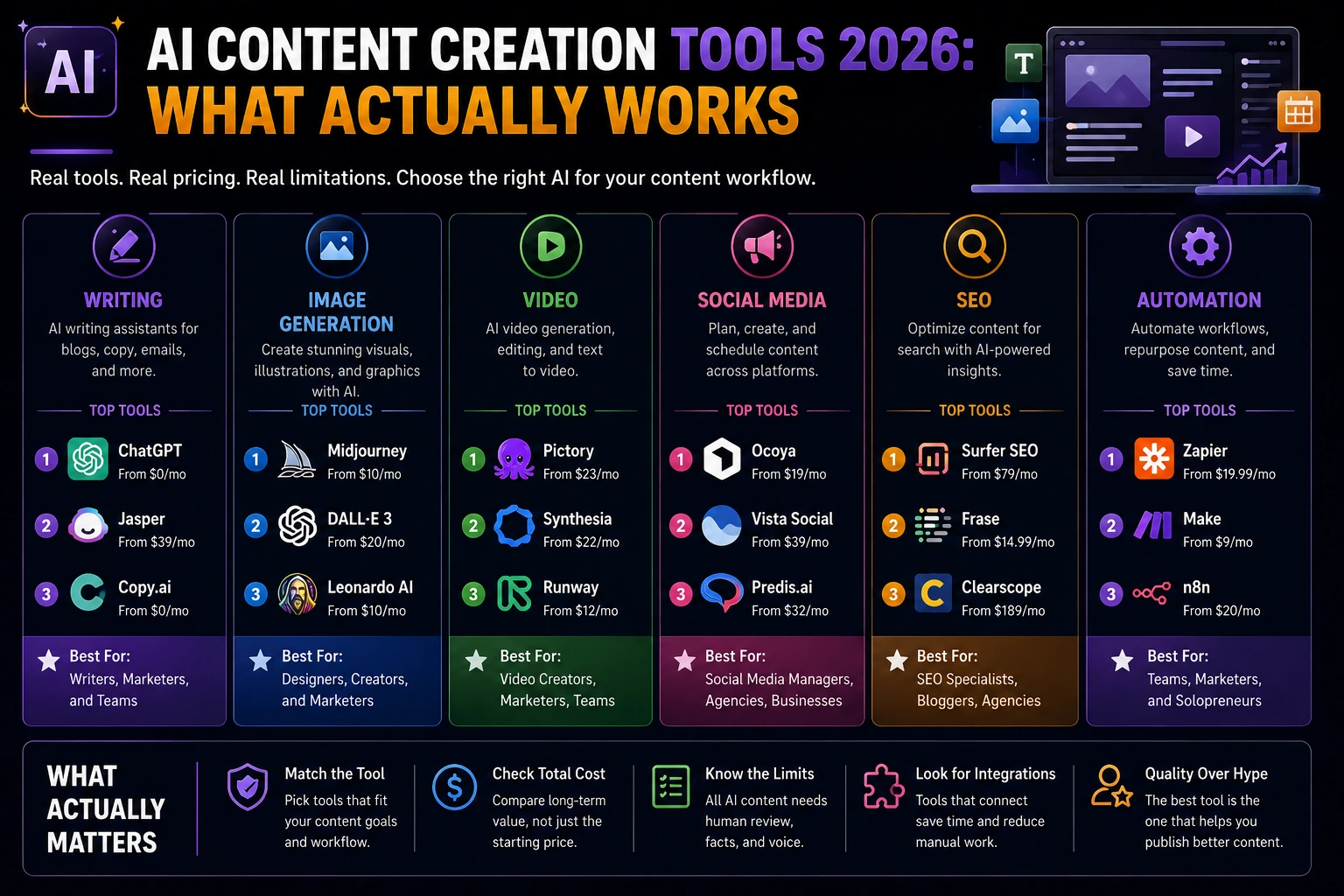
AI content creation tools now support nearly every stage of the content workflow, including writing, image generation, video editing, SEO optimization, social media scheduling, and workflow automation. As these tools continue to improve, choosing the right platform matters more than simply deciding whether to use AI.
This guide compares the best AI content creation tools by category writing, image generation, video, social media, SEO, and automation with verified pricing, honest limitations, and practical recommendations. Instead of ranking tools by popularity alone, it helps you choose the right AI tool based on your budget, content goals, and workflow.
What Are AI Content Creation Tools?
AI content creation tools are software platforms that use generative AI to help produce content, drafting copy, generating images, editing video, and optimizing text for search. That’s the textbook version.
Here’s the real version: none of these are “set it and forget it.” Every tool below still needs a person checking facts, adjusting tone, and deciding what’s actually worth publishing. Skip that step and it shows.
How We Evaluated These Tools
We evaluated each AI content creation tool across ten practical criteria: writing quality, image generation, video creation, social media support, SEO capabilities, automation features, collaboration tools, ease of use, integrations, and overall value for money. Rather than forcing every platform into a single ranking, we grouped tools by the job they perform best, since an AI writing assistant solves a different problem than a video generator or social media scheduler.
Pricing received extra scrutiny. Every price, plan, and feature referenced in this guide was verified against the vendor’s official pricing page whenever possible instead of relying on third-party review sites. AI software pricing changes frequently, and usage-based credits, add-ons, and feature limits can significantly affect the real cost beyond the advertised starting price
Best AI Writing Tools
ChatGPT
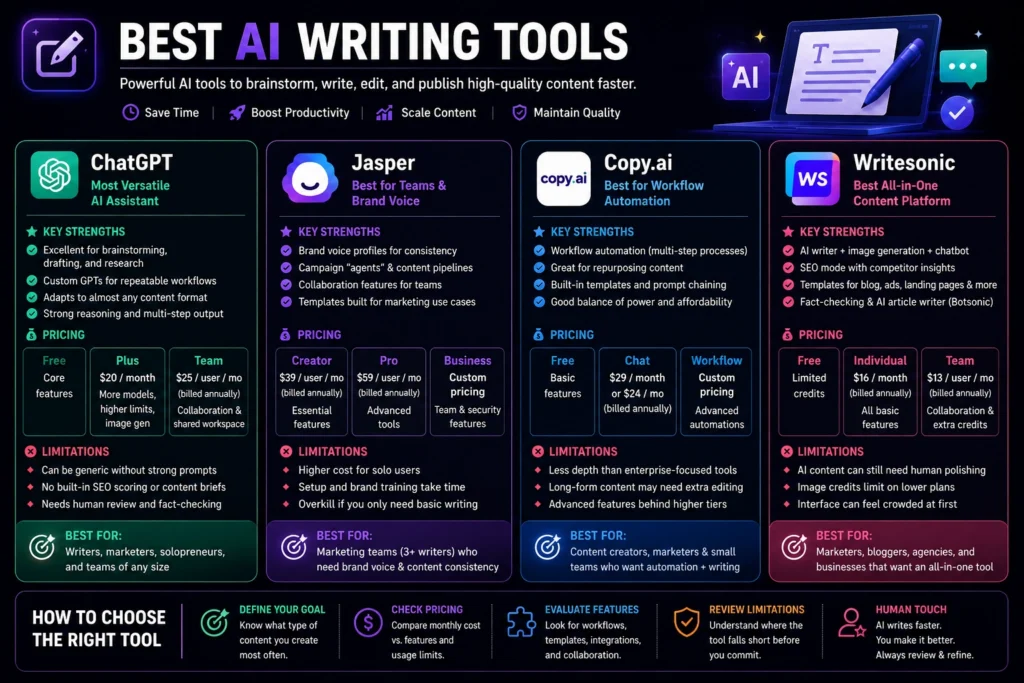
ChatGPT remains the most flexible starting point for drafting, outlining, and research not because it’s the best writer out of the box, but because it adapts to almost any format without a learning curve. Custom GPTs let you build repeatable prompt setups for recurring formats (a blog outline GPT, a caption GPT), which cuts a lot of the “re-explain what I want” friction that eats time with generic prompting.
Pricing: ChatGPT offers a Free plan with access to core AI features. Plus costs $20/month and includes access to more advanced models, higher usage limits, image generation, and additional productivity features. Team starts at $25 per user/month (billed annually) or $30 per user/month (billed monthly), adding shared workspaces and team collaboration. Enterprise plans provide additional security, compliance, and administrative controls. Always verify current plans on OpenAI’s official pricing page.
The honest limitation: default ChatGPT output reads generic unless you build strong custom instructions or a GPT around your brand voice. Skip the default prompts; they’re the fastest way to end up with content that sounds like everyone else’s. It also has no native SEO scoring or content-brief structure built in, so if search optimization is the job, you’re pairing it with something else (Surfer or Frase) rather than using it alone.
Jasper
Jasper is built for marketing teams that need brand-voice consistency across multiple writers, not solo drafting. Brand voice profiles, campaign “agents,” and content pipelines are the differentiator. It’s less about raw writing quality and more about keeping five people on brand without a 40-page style guide getting ignored.
Pricing: Jasper’s Creator plan starts at $39/user/month (annual billing) or $49/month billed monthly. The Pro plan starts at $59/user/month (annual billing), with custom pricing available for Business plans. Always verify the latest pricing on Jasper’s official pricing page.
The honest limitation: Jasper’s setup takes real time. Training the brand voice profile properly, building out campaign templates none of it is instant, and a solo user paying $59/month for infrastructure built for teams is usually overpaying for what they need.
Best for: marketing teams of 3+ writers who need brand consistency more than they need the cheapest per-word cost.
Copy.ai
Copy.ai leans into workflow automation on top of writing chaining prompts into repeatable multi-step processes (research → draft → repurpose) instead of one-shot generation. Not flashy. But it sits in a genuinely useful middle spot: more structure than a plain chatbot, a lower price than Jasper, less setup work than building your own automation from scratch.
Pricing: Copy.ai offers a Free plan. The Chat plan starts at $29/month (or $24/month billed annually). Workflow automation plans are designed for larger teams, with Growth starting at $1,000/month, while Enterprise pricing is available on request. Always verify the latest pricing on Copy.ai’s official pricing page.
Writesonic
Writesonic used to be a straightforward AI writer. In 2026 it repositioned itself into an AI search visibility (GEO) and SEO platform it now tracks how your brand shows up across ChatGPT, Gemini, and Google AI Overviews, alongside drafting articles and running SEO audits.
That pivot is worth knowing before you buy it. If you want a general writing tool, Writesonic isn’t the sharpest option in this list Jasper and Copy.ai handle drafting better. But if you specifically want to know whether your brand gets cited when someone asks an AI chatbot about your category, Writesonic is one of the few tools that measures that directly, not just draft quality.
Related: If writing is the main job, our guide to the best AI tool for content writing ranks nine tools by task, with 2026 prices.

Writesonic offers a Free plan with limited usage. Paid plans start at $16/month (annual billing) for individuals, while higher-tier plans add more AI credits, advanced SEO features, team collaboration, and AI marketing tools. Enterprise plans are available with custom pricing. Always verify the latest plans on Writesonic’s official pricing page.
Best AI Image Generation Tools
Midjourney
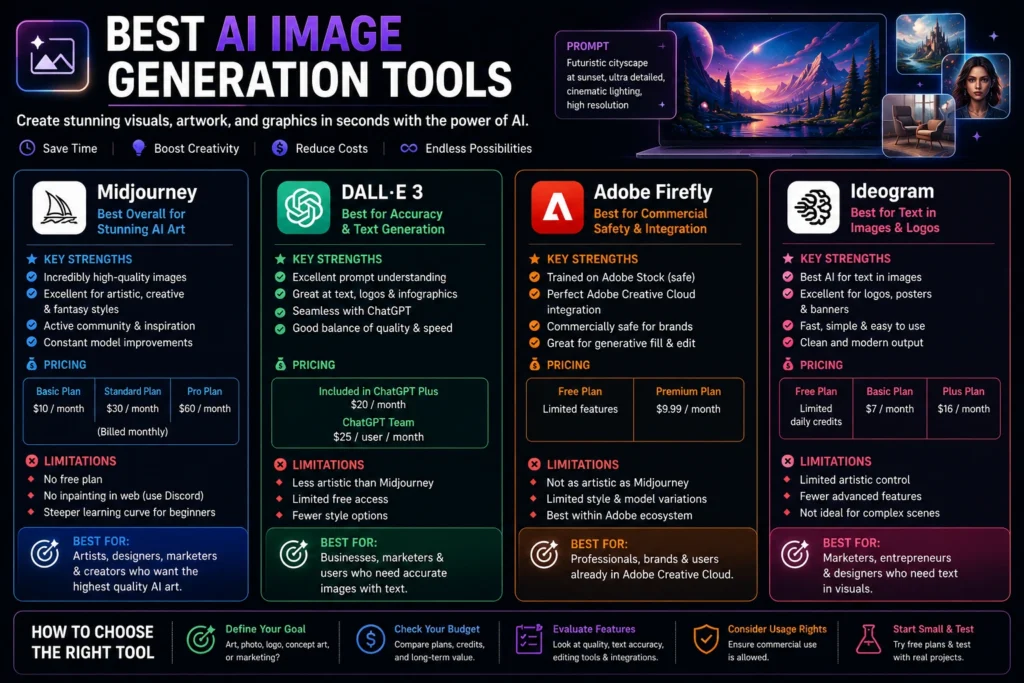
Midjourney is still the pick for a distinctive visual style brand imagery that doesn’t look like it came from the same stock-photo library as everyone else’s LinkedIn header. The trade-off is a steeper prompting learning curve and a Discord-first interface that some teams find clunky to work into a standard content pipeline. It’s also not the tool for precise, text-heavy graphics such as posters or infographics with lots of copy, so many creators finish those assets in another editor. If you want to turn AI-generated images into animations or videos, check out our guide to the best AI image-to-video generators in 2026.
DALL·E 3 (via ChatGPT)
Built directly into ChatGPT, DALL·E 3 is the most accessible option for quick, on-brief images. It follows detailed instructions more reliably than most competitors ask for “a navy blue sneaker on a white background, studio lighting” and you’ll actually get that, not an artistic interpretation of it. That reliability matters more than style points when the job is a product mockup, not a mood board.
Adobe Firefly
Firefly is the safer commercial choice: trained on licensed Adobe Stock content, which matters if you’re a brand worried about copyright exposure in generated imagery. Native Photoshop integration also means less exporting-and-reimporting friction for teams already in the Adobe ecosystem.
Ideogram
Ideogram solves a specific problem the other three still struggle with: text inside images. Ask Midjourney or DALL·E 3 to put a headline on a poster or a price tag on a product shot, and the letters usually come out warped or misspelled. Ideogram’s text rendering is the reason it’s become the default for social graphics, infographics, and anything with actual words baked into the visual, not just a subject.
Pricing: Ideogram offers a Free plan with limited daily generations. Paid plans start at $8/month (Basic, annual billing) or $10/month billed monthly. Plus starts at $20/month annually ($24 monthly), and Pro starts at $60/month annually ($80 monthly), adding faster generation, private images, higher limits, and advanced features. Always verify the latest plans on Ideogram’s official pricing page.
We found Ideogram particularly effective for creating social media graphics with embedded text, such as quote cards, promotional banners, and thumbnail concepts. While the text quality was noticeably better than most competitors, we still recommend reviewing spacing and typography before using the images in production.
Best AI Video Creation Tools
Synthesia
Synthesia replaces a studio setup for a specific job: script-to-video with an AI avatar. Paste a training manual or a script, pick an avatar, and it outputs a paced video with narration genuinely useful for training content, internal comms, or explainer videos where a talking head is the format, not cinematic storytelling.
Pricing: Synthesia offers a Free plan for limited video creation. The Starter plan starts at $18/month (annual billing), while the Creator plan starts at $64/month (annual billing) and unlocks additional avatars, higher video limits, collaboration features, and advanced editing tools. Enterprise plans are available with custom pricing. Always verify the latest plans on Synthesia’s official pricing page.
HeyGen
HeyGen is Synthesia’s closest competitor, and the honest comparison is: HeyGen generally wins on avatar quality and language coverage, Synthesia wins on enterprise workflows and team governance. If you’re a solo creator or small team, HeyGen’s faster iteration and broader language support usually make it the better starting point.
Pricing: HeyGen offers a Free plan for limited video generation. The Creator plan starts at $24/month (annual billing) or $29/month billed monthly. The Team plan starts at $69 per seat/month (annual billing), while Enterprise plans include custom pricing, advanced security, and API access. Additional services such as custom avatars, extra video credits, and premium features may incur additional charges. Always verify the latest plans and add-on pricing on HeyGen’s official pricing page.
Runway
Runway pushes further into actual video generation and editing background removal, motion tracking, visual effects for teams that want something closer to produced video rather than an avatar reading a script. The trade-off is credit-based pricing tied to render quality, so cost scales with how ambitious the output gets, not with a flat monthly fee.
Opus Clip
Opus Clip solves a narrower, more common problem: turning one long-form video (a podcast, webinar, or YouTube episode) into multiple short clips with captions, automatically finding the moments worth clipping. If your team already records long-form and struggles to repurpose it into social cuts, this is the tool, not a general video generator. Its limitation is the mirror image of its strength; it’s not built for generating video from nothing, only for cutting down what you’ve already recorded.
Pricing: Opus Clip offers a Free plan with limited exports. Paid plans start at $15/month (annual billing) or $19/month billed monthly, with higher tiers providing additional processing hours, AI credits, higher-quality exports, and team collaboration features. Always verify the latest pricing on Opus Clip’s official pricing page.
Best AI Social Media Content Tools
Canva (Magic Studio)
Canva remains the fastest path from idea to polished social graphic without a designer in the loop. Magic Write for captions, Magic Resize for cross-platform formatting, and Magic Eraser for quick cleanup cover the bulk of what a solo marketer or small team needs day to day. Brand Kits keep colors, fonts, and logos consistent across everyone touching the account, which matters more than it sounds once you have more than one person posting.
Pricing: Canva offers a Free plan. Canva Pro starts at $15/month (one user) or $120/year, while Canva Teams starts at $10 per user/month (minimum three users, billed annually). Always verify the latest plans on Canva’s official pricing page.
The trade-off versus dedicated design software is depth. Canva won’t replace a designer building a full brand system, but for the everyday social graphic most teams actually ship, it covers it.
One important point: there is no official evidence that Meta, TikTok, or Google automatically down-rank content simply because it was created with AI. Their guidance focuses on content quality, originality, and value to users, regardless of whether AI assisted in creating it. AI-generated graphics still benefit from human editing to ensure they match your brand voice and stand out from generic templates.
Buffer (AI Assistant)
Buffer’s AI Assistant generates post ideas, repurposes one piece of content across platforms, and rewrites captions for different tones and unlike most competitors, it’s free on every plan, including Buffer’s free tier. If you’re a solopreneur managing three or four channels, that’s the cheapest real AI social tool on this entire list.
The catch is Buffer’s per-channel pricing model on paid plans: cheap for three accounts, expensive once you’re past ten. Fine for a solo operator or small business; agencies managing many client accounts tend to outgrow it.
Ocoya
Ocoya bundles AI copywriting, design, and scheduling into one interface closer to an all-in-one content engine than a scheduler with a caption generator bolted on. Its “Travis AI” writes captions and post variations while the design side handles the visual, so you’re not switching between Canva and a separate scheduler. For a solo operator juggling five platforms, cutting that tool-switching out of the day is worth more than any single feature on the list.
Pricing: Ocoya plans start at $19/month (Bronze, annual billing), with higher-tier plans adding more workspaces, team members, AI credits, and automation features. Enterprise plans are available on request. Always verify the latest pricing on Ocoya’s official pricing page.
Best AI SEO Content Tools
Surfer SEO
Surfer scores your draft against what’s actually ranking keyword density, structure, word count, and entity coverage in real time as you write. Paired with a writing tool, it turns “does this look SEO-friendly” from a guess into something measurable.
Pricing: Surfer plans currently start at $79/month (Essential), with Scale at $175/month and Enterprise pricing available on request. Annual billing offers discounted pricing. Because Surfer occasionally updates its plans and feature limits, always verify the latest pricing on its official pricing page.
Frase
Frase flips the order Surfer uses: it pulls SERP data into your outline before you write, instead of scoring your draft after the fact. If you’d rather front-load the research than fix a document afterward, this is the tool one place for the brief and the draft, not two.
Semrush Content Toolkit
If you’re already using Semrush for keyword research, the Content Toolkit lets you research, draft, optimize, and track content in one platform instead of paying for a separate SEO optimization tool.The Content Toolkit is available as a paid add-on to eligible Semrush subscriptions.
Clearscope
Clearscope is a premium content optimization platform built for teams that need high-quality SEO recommendations, AI search visibility tracking, and streamlined editorial workflows. It integrates with tools like Google Docs, WordPress, and Google Search Console, making it popular with agencies and enterprise content teams.
Pricing: Clearscope Essentials starts at $129/month, Business costs $399/month, and Enterprise pricing is available on request. All plans include AI-powered content optimization and AI search visibility features. Always verify the latest pricing on Clearscope’s official pricing page.
Here’s the honest trade-off: NeuronWriter and Frase do a similar core job content scoring against SERP data for a fraction of the price. Clearscope makes sense once you need the reporting layer for client work, not before.
AI Automation & Agent Tools for Content Workflows
This is the part most “best AI tools” roundups skip entirely, and it’s where the real time savings are starting to show up in 2026.
Individual tools are fast. The bottleneck now is the handoff between them.
Pulling a data point, drafting three post variations, formatting for each platform, and scheduling—all without manually copy-pasting between five open tabs—is where agent-style workflows shine. If you’re new to AI agents, see our guide to the best AI agents in 2026 to understand how they automate multi-step tasks. Built-in tools like Copy.ai’s automation layer, or workflows stitched together with ChatGPT’s Custom GPTs using browsing and data analysis, can enrich a raw data point with context, draft multiple content variations, format them for each platform, and queue everything for review.
A concrete version of that chain looks something like this:
- Research step — an agent pulls a trending topic or a data point relevant to your niche
- Draft step — it generates 2–3 post variations (a question, a stat-led hook, a short story) instead of one generic draft
- Format step — each variation gets reshaped for the specific platform’s character limits and conventions
- Review step — a human reads, edits, and approves before anything schedules
How we use AI at FluxGrowth
At FluxGrowth, AI is used to speed up research, content outlining, headline generation, and first drafts. Every article is then manually reviewed to verify pricing, product features, licensing, official documentation, and external references before publication. AI helps reduce repetitive work, but editorial decisions, fact-checking, and final recommendations remain human-reviewed.
That’s the important distinction. AI automates repetitive tasks, not editorial judgment. The highest-performing workflows still include a human review before anything goes live, especially for articles comparing software, pricing, or business tools. This balanced approach improves efficiency while maintaining accuracy and trustworthiness.
Comparison Table: AI Content Creation Tools at a Glance
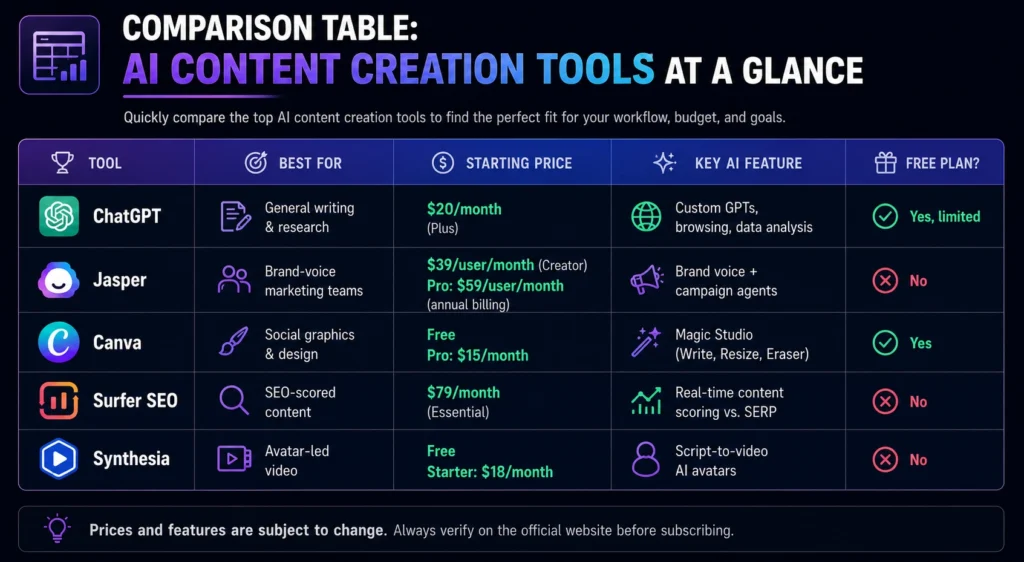
| Tool | Best For | Starting Price | Key AI Feature | Free Plan? |
| ChatGPT | General writing & research | $20/month (Plus) | Custom GPTs, browsing, data analysis | Yes, limited |
| Jasper | Brand-voice marketing teams | $39/user/month (Creator)Pro: $59/user/month (annual billing) | Brand voice + campaign agents | No |
| Canva | Social graphics & design | FreePro: $15/month | Magic Studio (Write, Resize, Eraser) | Yes |
| Surfer SEO | SEO-scored content | $79/month (Essential) | Real-time content scoring vs. SERP | No |
| Synthesia | Avatar-led video | FreeStarter: $18/month | Script-to-video AI avatars | No |
Bottom line: most teams end up running two or three of these at once rather than one tool for everything: a writing tool for drafts, a design tool for visuals, and either an SEO tool or a video tool depending on the content format you publish most.
Common AI Content Tool Mistakes to Avoid
Most of the roundups covering this topic list tools. Almost none of them list the ways teams waste money and time on those tools. A few show up constantly:
Buying the platform before the workflow. Jasper’s brand-voice controls are wasted on a solo creator with no second writer to keep on-brand. Match the tool’s structure to how many people are actually touching the content, not to the most feature-rich option you can afford.
Ignoring credit-based pricing traps. HeyGen and Surfer both bill on credits, not a flat monthly seat. The headline price looks reasonable until top-up credits, extra seats, and add-on features push the real bill 2–3x higher than the plan page suggests. Read the credit system before you commit, not after the first invoice.
Publishing the first draft. AI-generated content should almost always be reviewed before publication. Unedited AI drafts often sound generic, while Google’s guidance emphasizes creating original, people-first content that demonstrates expertise and provides real value rather than relying on AI-generated text alone.
Running one tool for every format. A writing tool that also claims to do video and image generation usually does all three worse than a dedicated tool for each. Pick a specialist per format rather than a generalist that spreads itself thin.
Skipping the free tier test. ChatGPT, Canva, and Buffer all have usable free plans. Test the free version against your actual workflow before paying for the upgrade. Plenty of teams pay for features they’d have discovered they don’t need.
Assuming AI output is legally safe by default. Not every tool’s training data is documented the same way, and “the tool let me generate it” isn’t the same as “I have clean commercial rights to it.” This is worth thirty minutes of reading before you build a campaign or a brand asset on top of a single generated image. More on this in the next section.
None of these mistakes are reasons to avoid the tools. They’re reasons to buy deliberately instead of reactively which, honestly, is the same advice that applied to software before AI, just with a faster-moving price list now.
Copyright & Commercial Use: What to Check Before You Publish
This is the part most “best AI tools” roundups skip and the part most likely to create problems if you overlook it.
Most major AI content creation platforms allow commercial use of AI-generated content under their terms of service, but the exact rights, ownership, and licensing vary by provider. Some tools place restrictions on free plans, generated assets, or third-party content, and those terms can change over time. Before publishing content commercially, review the tool’s current licensing and commercial-use policy rather than relying on third-party summaries or older articles.
Image generation carries more nuance. Adobe Firefly’s training data is licensed stock specifically to reduce copyright exposure that’s the whole reason brands choose it over other generators. Tools trained on broader, less-documented datasets carry more uncertainty about downstream commercial use, especially for anything resembling a recognizable style or a real person’s likeness.
One distinction worth knowing if you’re using AI for logos, brand marks, or other branding assets: the U.S. Copyright Office generally does not grant copyright protection to purely AI-generated works without sufficient human authorship. However, an AI-generated logo may still qualify for trademark protection if it meets trademark requirements such as distinctiveness and use in commerce. Copyright and trademark protect different legal rights, so businesses should understand both before relying on AI-generated branding.
None of this means don’t use AI-generated content commercially. It means checking the specific terms before you build a campaign, a product, or a brand identity on top of a single generated asset.
Practically, this shows up most often in three places: logos and brand marks (the copyright/trademark distinction above), stock-style photography used in paid ads (some platforms have started asking advertisers to disclose AI-generated creative), and anything featuring a recognizable style closely associated with a specific living artist. None of these situations are reasons to avoid AI tools, they’re reasons to spend the extra ten minutes reading the terms of service for the specific tool and use case before you scale it.
How to Choose Your AI Content Stack by Budget
Solo creator / freelancer. ChatGPT Plus ($20/mo) plus Canva’s free plan. That’s it, honestly it covers drafting and basic visuals without a second subscription, and it’s enough for most solo output. Add Surfer or Phrase later, only once you’re publishing SEO content often enough that scoring saves time instead of adding a step.
Small business (1–3 person marketing effort). A practical stack is ChatGPT or Jasper for content creation, Canva Pro for brand consistency, and an SEO platform such as Surfer SEO or Semrush Content Toolkit if organic search is part of your marketing strategy. Depending on the tools and plans you choose, expect to spend roughly $100–250 per month.
Agency / team. Jasper or something like it earns its keep once you’re managing content for multiple clients or writers who all need to sound consistent without a 40-page style guide nobody actually reads. Layer in Surfer or Semrush Content Toolkit for SEO-driven client work. Add a video tool, Synthesia or Opus Clip, only if video is actually part of what you’re delivering.
Enterprise. For larger organizations, priorities shift from content generation to governance, security, and collaboration. Enterprise plans typically include features such as single sign-on (SSO), advanced permissions, audit logs, admin controls, API access, and dedicated customer support. Pricing is generally custom and depends on the number of users, usage requirements, and support needs, so you’ll need to contact each vendor for a quote.
What I’d Use If Starting Today
If I were building a content workflow from scratch today, I’d keep it simple instead of chasing an all-in-one platform.
For writing and research, ChatGPT Plus would be my first subscription. It’s flexible enough for brainstorming, outlining, first drafts, editing, and repurposing content across blogs, newsletters, and social media.
For graphics, I’d pair it with Canva Pro. The combination of Magic Studio and Brand Kit makes it easy to turn ideas into polished social posts without switching between multiple design tools.
If organic search were an important growth channel, the next addition would be Surfer SEO. Once you’re publishing consistently, real-time optimization saves more time than manually comparing your article against competing pages.
That three-tool stack ChatGPT + Canva + Surfer SEO covers the majority of content workflows for small businesses, creators, and marketing teams. As your needs grow, add specialized tools like Synthesia for AI video, Opus Clip for repurposing long-form content, or Semrush for more advanced SEO and keyword research.
The biggest lesson isn’t choosing the “best” AI tool. It’s building a workflow where each tool has a clear job. A small, well-integrated stack usually delivers better results than paying for half a dozen overlapping AI subscriptions you rarely use.
FAQ
What is the best AI content creation tool overall?
There isn’t one “best” tool, it depends on the job. ChatGPT is the most flexible starting point for general writing, Jasper fits marketing teams that need brand-voice consistency, and Surfer SEO leads specifically for SEO-scored content. Most teams end up combining two or three tools rather than relying on a single platform.
Can AI content creation tools replace human writers?
No. AI content creation tools can significantly speed up research, drafting, editing, and formatting, but they don’t replace human judgment, subject-matter expertise, fact-checking, or brand strategy. For the best results, treat AI as a productivity tool rather than a replacement for human review, especially for content published under your brand or intended to rank in search engines.
Are AI content creation tools free to use?
Some offer usable free tiers ChatGPT’s free plan and Canva’s free plan both support real content creation, not just a demo, and Buffer’s AI Assistant is free on every plan including its no-cost tier. Free tiers typically cap volume or lock advanced features, so check the limits against your actual publishing pace before relying on one long-term.
Which AI tool is best for social media content?
Canva’s Magic Studio is the strongest fit for most teams’ Magic Write, Magic Resize, and Brand Kits cover captioning, cross-platform formatting, and visual consistency in one tool without a designer.
Do AI-generated content tools hurt SEO rankings?
Not inherently Google’s guidance focuses on whether content is genuinely helpful, not how it was produced. The risk is thin, unedited AI output at scale, which Google’s helpful-content systems are built to catch. AI-assisted content that’s fact-checked, edited, and adds real value performs the same as any other well-made content.
Can I use AI-generated content commercially?
Usually, yes—but it depends on the tool’s license. Most major AI content creation platforms allow commercial use of AI-generated text and images under their terms of service, although the rights and restrictions vary by provider. For example, Adobe Firefly is trained on licensed content, Adobe Stock, and public-domain material to support commercial use. Before publishing or selling AI-generated content, always review the specific platform’s current licensing and commercial-use policy.
What’s the difference between an AI writing tool and a full AI content platform?
A writing tool (like base ChatGPT) generates text from a prompt. A content platform (like Jasper or Surfer) adds structure around that brand voice controls, SEO scoring, team collaboration, or campaign workflows built for repeatable production rather than one-off drafts.
Conclusion
The right AI content stack isn’t the one with the most features, it’s the smallest set of tools that actually covers what you publish, at a price that matches your output. Start with one writing tool and one design tool, add a specialized tool (SEO, video, automation) only once that specific format is a real, recurring part of your workflow. Pricing pages change, tool names get rebranded, and “best of 2026” lists go stale within months the categories and the decision logic in this guide won’t. Which category is eating the most of your time right now — writing, visuals, or video? Start there.