FluxGrowth is reader-supported. Some links in our guides are affiliate links — if you buy through one we may earn a commission, at no extra cost to you. It never changes which tools we recommend. How we test tools.
You’re already paying twenty dollars a month for one AI assistant. Now you’re wondering whether Claude vs Gemini would have been the smarter call.
This guide is part of our AI Marketing hub – everything we have published on AI marketing tools and content workflows, in one place.
Here’s the direct answer to Claude vs Gemini: these two tools are not solving the same problem.
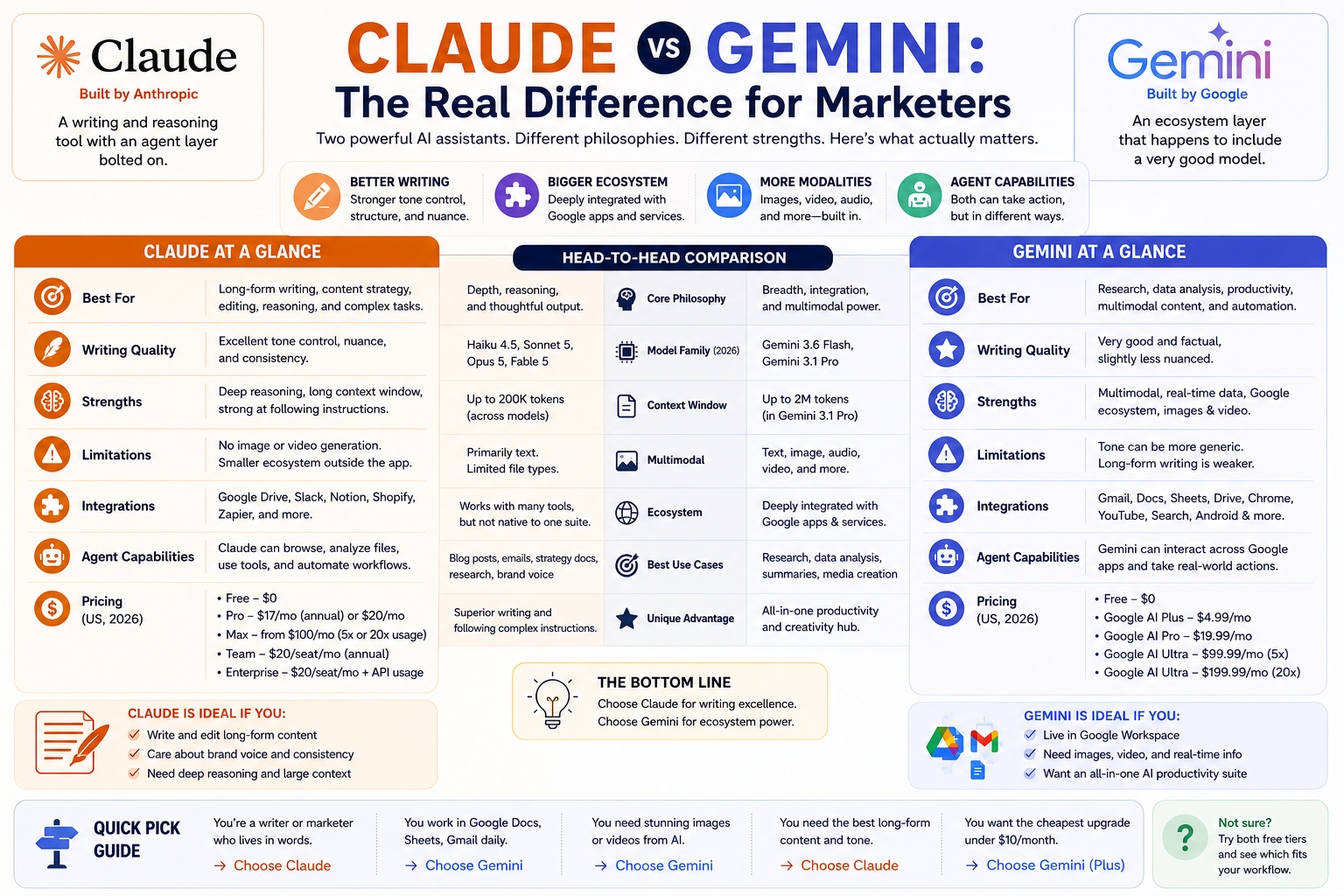
Claude is a writing and reasoning tool with an agent layer bolted on.
However, Gemini is an ecosystem layer that includes a very good model.
So if you write long-form content and care about voice, Claude usually wins. If you live in Google Docs and need images and video in the same subscription, Gemini usually wins.
What follows is pricing, gaps, and fit—the three things that decide this in the Claude vs Gemini comparison.
Additionally, I left the benchmark scores out on purpose.
Nobody has ever picked a writing tool because it scored 82.1% on SWE-bench.
What’s the difference between Claude and Gemini, in plain English?
Claude is an AI assistant built by Anthropic. Gemini is an AI assistant built by Google. Both let you type a question and get a written answer, and both can read files you upload. The differences show up in what surrounds the chat box.
Four terms come up constantly in these comparisons, so here they are in one sentence each.
A large language model is software trained on huge amounts of text that predicts what words should come next, which is how it writes.
A context window is how much text the model can hold in its working memory at once, measured in tokens roughly three-quarters of a word each.
multi-modal means the model can handle more than text, such as images, audio, or video.
An AI agent is a model that can take actions on your behalf, like browsing a page or editing a file, instead of only writing back to you.
The feature lists look similar. The bets behind them aren’t.
Anthropic never built an image generator; it put those years into reasoning and agents instead. Google went the other way and wired Gemini into grail, Docs, Chrome, Search, and Android, so you’d bump into it whether you wanted to or not.
Which models does each one actually run right now?
Claude runs four: Haiku 4.5 for speed, Sonnet 5 as the everyday workhorse, Opus 5 for complex work, and Fable 5 above that for long-running agent tasks. Access varies by plan.
Gemini’s app runs Gemini 3.6 Flash for everyday questions and Gemini 3.1 Pro as the flagship, with access to Pro varying by tier. Google also bundles separate models for separate jobs inside the same subscription Veo 3.1 for video, Nano Banana Pro for images.
That last point matters more than the model names. Gemini’s paid plans are a bundle of several AI products. Claude’s paid plans are one product with more capacity.
What do Claude and Gemini cost in the US in 2026?
Both platforms start free and both have a roughly twenty-dollar tier. Above and below that, the ladders diverge sharply.
- Free $0
- Pro $17/month billed annually ($200 up front), or $20 billed monthly
- Max from $100/month, with a choice of 5x or 20x Pro’s usage
- Team $20 per seat per month annually ($25 monthly) for standard seats, $100 per seat annually ($125 monthly) for premium seats, for teams of 2 to 150
- Enterprise $20 per seat per month plus usage billed at API rates, annual only
- Free $0
- Google AI Plus $4.99/month, roughly 2x the free usage, 400 GB storage
- Google AI Pro $19.99/month, roughly 4x the free usage, 5 TB storage, YouTube Premium Lite
- Google AI Ultra $99.99/month for 5x Pro’s limits, or $199.99/month for 20x, starting at 20 TB storage and full YouTube Premium
The $4.99 tier Claude doesn’t have
Google AI Plus has no Claude equivalent, and for a lot of solo creators that’s the entire decision. Five dollars a month gets you past the free tier’s limits plus 400 GB of storage. Claude’s cheapest paid step is $17.
If your AI use is a few hours a week captions, subject lines, the occasional outline Google AI Plus is the cheapest real upgrade either company sells. Claude has no answer at that price. Pretending otherwise would be dishonest.
When the $100 tiers are worth it
Both companies sell a roughly hundred-dollar tier, and for most marketers neither is necessary. Max and Ultra exist for people who hit limits daily, not weekly.
One exception. Google AI Ultra bundles Flow credits for video generation at volume, so if you’re shipping short-form video every week, the credits alone can justify the jump in a way that raw chat capacity never would.
A warning on API pricing, if you’re building automation rather than chatting. Anthropic currently lists Sonnet 5 at $2 per million input tokens and $10 per million output tokens but that’s introductory pricing through August 31, 2026, moving to $3 and $15 after. Budget against the higher number.
Which is better for writing blog posts and marketing copy?
Claude is generally the stronger writer, especially when you need consistent tone and detailed style control. For marketers looking to use Claude AI for marketing, that consistency can make a noticeable difference when producing long-form content or branded copy.
Related: See the same-prompt writing test (Claude vs ChatGPT vs Gemini) in our guide to the best AI tool for content writing.
Both produce clean, grammatical drafts. The split appears when you hand over a style guide with real constraints: no em dashes, second person only, sentences under twenty words, no three-item lists.
Claude tends to hold those as hard rules across a full draft. Gemini follows them for a few paragraphs, then drifts back toward its house style. For a blog post, that drift costs you an editing pass. For a client’s brand voice, it costs you more than that.
Gemini’s advantage in writing work is proximity. Because it sits inside grail and Docs on paid plans, it works from the document you’re already in instead of making you paste content into a second tab. For quick edits and email drafting, that convenience beats a marginally better sentence most days.
Where both still need you
Neither one produces publishable long-form on the first pass.
Both will hand you a confident statistic that doesn’t exist, so check every number either one gives you before it goes near a client. And both settle into that flat, evenly-paced rhythm that readers now clock instantly as AI.
Fast first draft, good editor. Not a writer.
Which is better for SEO research, data analysis, and repurposing?
Gemini wins on volume of source material. Claude wins on precision with the material you give it.
Google AI Pro advertises a 1 million token context window and file uploads up to 1,500 pages. Claude’s Free, Pro, Max, and Team plans all list a 200k context window, with 500k appearing only on Enterprise. That gap is verifiable on both companies’ own pages, and it decides certain jobs outright.
Feeding in a year of Search Console exports, forty competitor pages, or a full content archive? Gemini takes it in one shot. Claude makes you chunk it.
Both ship a deep research mode that browses and compiles a sourced report. Gemini is called Deep Research and appears on the free tier. Claude’s is called Research and starts on Pro. Both produce usable competitor tear downs and both will occasionally cite a page that doesn’t say what they claim it says, so open the sources.
For structured data work, Claude creates and edits real files with code execution. Ask for a keyword gap analysis across 200 URLs and you get a spreadsheet you can open, not a description of one. Google’s equivalent is Gemini Notebook, with audio overviews and higher limits on paid tiers, plus the Workspace apps themselves.
Content re purposing: one draft into twenty posts
This is where the tone-control difference compounds. Turning one blog post into a LinkedIn post, five tweets, three Instagram captions, and a newsletter section means holding one voice across a dozen short outputs.
Claude holds voice better across that kind of batch. Gemini gets you closer to a finished asset, because it can generate the accompanying graphic in the same conversation.
Pick based on which half of that job costs you more time.
Which one fits the tools you already pay for?
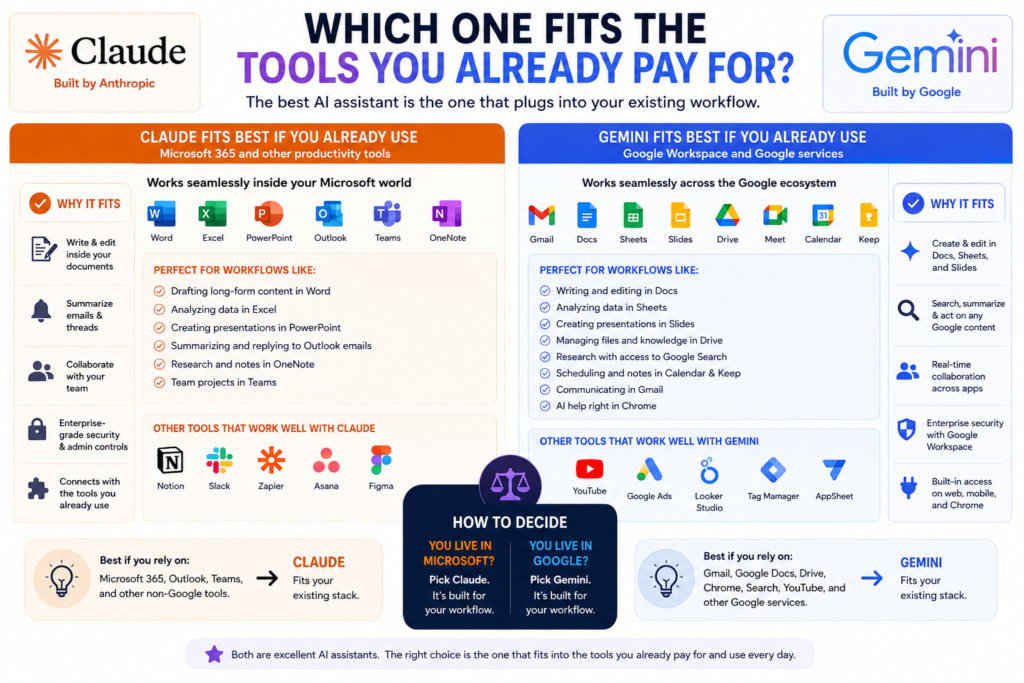
Your office suite has probably already decided this for you, and most comparison articles skip straight past it.
If your team runs on Google Workspace, Gemini is already there. Google discontinued the standalone Gemini Workspace add-on in 2025 and folded Gemini into Business Standard, Business Plus, and Enterprise plans, raising the base seat prices to cover it. So you may be paying for Gemini right now without using it. Google did not exactly put that on a billboard.
Check your admin console before you buy anything.
If your team runs on Microsoft 365, the picture flips. Anthropic lists Claude for Microsoft 365 and Claude for Microsoft Outlook on its paid plans, which puts Claude inside the documents and inbox your team actually works in.
Outside the office suite, both reach out. Claude ships connectors and a browser extension, Claude for Chrome. Google ships Gemini in Chrome plus its own agent features.
The practical test takes thirty seconds. Open the app you spend the most hours in each week and ask whether either assistant is already sitting inside it.
What can Gemini do that Claude can’t?
The biggest difference is native media creation. Claude doesn’t generate photos or illustrations like a dedicated image generator, while Gemini can generate and edit images and Google Flow can create and edit AI video.
Claude can still create diagrams, charts, and interactive visuals using HTML and SVG. Anthropic’s Claude Help Center also explains that Claude can build these visuals directly in conversations. Anthropic launched Claude Design in April 2026, allowing users to create designs, prototypes, slides, one-pagers, and other visual work.
Gemini’s advantage is that Google’s ecosystem goes further into media generation. Gemini supports image creation through its Nano Banana models, while Google Flow uses Veo models for text-to-video, image-to-video, and video editing workflows.
For a social media manager, that difference can matter. If your workflow includes creating both copy and visual assets, Gemini can cover more of the media-creation process, while Claude is better suited to writing, reasoning, coding, analysis, and visual work that doesn’t require conventional image or video generation.
What Claude does that Gemini doesn’t
Here’s the thing: the gap running the other way is smaller, but it’s the one that saves you hours rather than assets.
Claude Code and Claude Cowork ship on every paid plan, and both hand off work that spans files and tools instead of answering in a chat window. Skills let you save a repeatable process, like a house style guide or a per-publish checklist, and reuse it without re-explaining yourself every time.
Google has answers here too, including Jules and antigravity. Both are aimed at software developers rather than marketers.
If your bottleneck is producing assets, Gemini. If your bottleneck is running the same complicated process forty times, Claude.
Is it safe to put client work into either one?
For sensitive client work, don’t rely on a standard consumer account without checking its data controls first. Both Claude and Gemini offer business-focused options with stronger data protections, while consumer plans have different settings and policies around data use.
With Claude’s consumer plans, users can control whether their conversations are used to improve Claude, and Incognito chats are not used for training. Anthropic says Team and Enterprise plans have different data-use protections designed for organizations.
Google takes a similar approach. Consumer Gemini products have different data-use settings, while Gemini within Google Workspace is covered by business data protections, and Google says Workspace customer data is not used to train its AI models.
So if you’re handling an unpublished campaign, customer list, financial data, or other confidential client information, use the appropriate business plan or privacy controls rather than assuming a personal account is automatically suitable.
There’s a separate question around copyright ownership. The U.S. Copyright Office says purely AI-generated material is not protected by copyright, but human-authored expression, creative arrangement, selection, or modification can qualify for protection. Prompts alone generally aren’t enough.
Bottom line: treat client data and copyright as two separate issues. Check the platform’s current privacy terms before uploading confidential information, and don’t assume that having commercial rights to an AI output automatically means you own copyright in every part of it.
Claude vs Gemini: the decision table
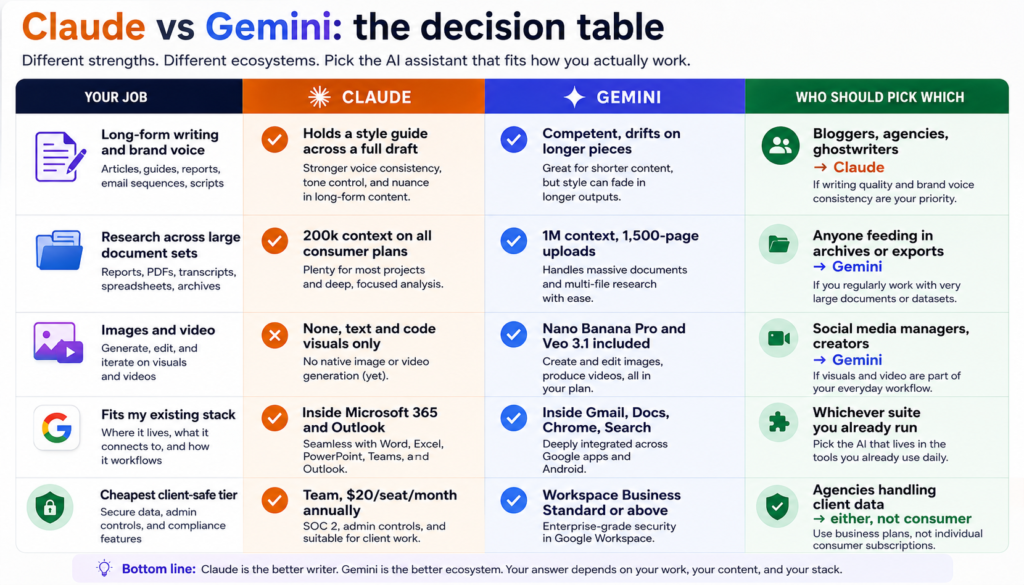
| Your job | Claude | Gemini | Who should pick which |
| Long-form writing and brand voice | Holds a style guide across a full draft | Competent, drifts on longer pieces | Bloggers, agencies, ghostwriters → Claude |
| Research across large document sets | 200k context on all consumer plans | 1M context, 1,500-page uploads | Anyone feeding in archives or exports → Gemini |
| Images and video | None, text and code visuals only | Nano Banana Pro and Veo 3.1 included | Social media managers, creators → Gemini |
| Fits my existing stack | Inside Microsoft 365 and Outlook | Inside Gmail, Docs, Chrome, Search | Whichever suite you already run |
| Cheapest client-safe tier | Team, $20/seat/month annually | Workspace Business Standard or above | Agencies handling client data → either, not consumer |
The one-line version: Claude for words, Gemini for everything around the words. If your deliverable is written, Claude. If it includes a picture, a video, or a Google Doc somebody else will edit, Gemini.
So which one should you actually pick?
Solo creator publishing to Instagram, TikTok, or YouTube: Gemini. Image and video generation are bundled, and Google AI Plus at $4.99 starts you for less than a coffee.
Freelance writer or content agency: Claude. Voice control across long drafts is the whole job, and Team seats keep client work out of training data.
commerce brand: Gemini, usually. Product photo variants, listing copy at volume, and Workspace integration cover most of what you need.
SaaS company or startup founder: Claude, if the work is documentation, positioning, and technical content. Gemini, if you need marketing assets and already run Workspace.
In-house marketing team of five or more: Start with whichever one your office suite already includes. Then wait until somebody on the team hits a wall they keep working around no images, or a 400-page report that won’t fit and buy the second subscription for that specific wall.
What I’d do if I were starting today
If I were building my AI workflow from scratch today, I wouldn’t pay for both Claude and Gemini immediately. I’d start with the one that fits my main workflow and add the second only when it solves a problem the first one doesn’t.
For my workflow, that means starting with Claude/Gemini because of your specific reason for example, long-form writing, research, Google Workspace, content editing, or multi modal work.
I’d use it for specific tasks you actually do and measure one thing: how much time it saves compared with doing the same work manually.
I’d add Gemini/Claude only if I consistently needed [specific capability the first tool doesn’t cover]. For example, Gemini makes more sense if your workflow depends heavily on Google’s ecosystem and its media-generation tools, while Claude is a strong option for writing, reasoning, coding, and long-form work. Claude Pro currently costs $20/month in the U.S., while Google’s Gemini subscription options vary by plan and include different levels of AI and Google ecosystem access.
The biggest mistake I’d avoid is paying for two subscriptions just because comparison articles say both are “the best.” One AI tool that you use every day is more valuable than two subscriptions that overlap.
My rule would be simple: start with one tool, use it on real work for 30 days, then add the second only when you can point to a specific workflow it improves.
The case for paying for both
Forty dollars a month for Claude Pro and Google AI Pro is a real option, and plenty of working marketers run exactly that stack.
The math is simple enough. If you bill $75 an hour for content, one recovered hour covers both subscriptions with change left over. Route drafting and editing to Claude, route research, images, and anything living in a Google Doc to Gemini, and stop trying to force one tool through both jobs.
If you’re not billing for content yet, pick one and revisit in ninety days.
Frequently asked questions
Is Claude better than Gemini for writing?
For most writing tasks, yes. Claude follows detailed style instructions more consistently across long drafts and produces prose that needs less editing to sound human. Gemini writes competently and is more convenient if you’re already working inside Google Docs, but it tends to drift back toward a generic house style on longer pieces.
Is Gemini’s free plan better than Claude’s free plan?
Gemini’s free plan is broader in scope. It includes Deep Research, image generation, Gemini Live, and Canvas at no cost, plus access to Gemini 3.6 Flash and varying access to 3.1 Pro. Claude’s free plan covers chat, web search, file creation, and connectors, but has no image generation and stricter usage limits.
Can I use Claude or Gemini content commercially?
Yes. Both Anthropic and Google grant users rights to the output they generate, including commercial use. What’s less settled is whether AI-generated work can be copyright-registered in the US, since the Copyright Office has held that purely machine-generated material isn’t eligible. Add meaningful human authorship to anything you need to own outright.
Does Gemini have a bigger context window than Claude?
Yes, by a wide margin on consumer plans. Google AI Pro advertises a 1 million token context window with file uploads up to 1,500 pages. Claude’s Free, Pro, Max, and Team plans all list a 200k context window, with 500k available only on Enterprise.
Can Claude generate images?
No. Claude has no image generation model and cannot produce photos or illustrations. It can write SVG and HTML code that renders as charts, diagrams, and simple graphics, and it can analyze images you upload. For actual image generation you need Gemini, a separate tool, or a connector.
Should I pay for Claude Pro or Google AI Pro?
Pay for Claude Pro if your main output is written and voice consistency matters. Pay for Google AI Pro if you need images and video, already run Google Workspace, or want the extra 5 TB of storage and YouTube Premium Lite. Both sit around twenty dollars a month, so the deciding factor is your deliverable, not your budget.
The bottom line
The Claude vs Gemini question gets easy once you stop comparing models and start comparing workflows. Claude is the better writer. Gemini is the better everything-else. And the tool sitting inside the software you already open every morning usually beats the one that scores higher on a benchmark.
Do this today, before you pay anyone. Take one real brief from your actual work: a blog outline, a batch of captions, a competitor summary and run it through both free tiers side by side. Judge them on how much editing each output needs, not on which one sounds more impressive.You’ll know by the end of the afternoon.