FluxGrowth is reader-supported. Some links in our guides are affiliate links — if you buy through one we may earn a commission, at no extra cost to you. It never changes which tools we recommend. How we test tools.
Last updated: August 2026
If you’ve tried to figure out which AI website actually deserves your $20 a month, you already know the problem: there are hundreds of them, and most “best AI tools” lists just repeat each other.
AI websites are online platforms that use models like large language models, image diffusion models, or specialized machine learning systems to generate, analyze, or transform content directly in your browser. No install required. This guide breaks down the real categories, the tools worth using in each one, and how to pick based on what you actually need to get done, not what a roundup blog is getting paid to recommend.
For decks specifically, we tested the AI presentation makers head to head.
What Are AI Websites?
An AI website does the work, not just the hosting. Type a prompt into ChatGPT or Claude, and a language model not a database query generates the response. That’s the difference. A normal website serves you content someone already wrote. An AI website writes it in front of you.
That definition matters because “AI website,” “AI app,” “AI assistant,” and “AI agent” get used interchangeably, and they’re not the same thing:
● AI website — accessed through a browser, no download needed. ChatGPT, Claude, and Perplexity all work this way. (kept as-is — this one’s fine as the anchor/first item)
● AI app a native mobile or desktop application, sometimes wrapping the same underlying model as a website version.
● Download it instead of opening a tab, and you’re using an AI app — often the same model, just wrapped in a native mobile or desktop shell.
●AI chatbot is technically a subset of assistants, usually simpler and narrower in scope.
● AI agent software that can take multi-step actions on your behalf (booking, browsing, editing files) rather than just responding to a prompt.
Most people access AI websites one of three ways: directly through a browser tab, through a free-standing app built on the same model, or through an API that developers wire into their own product.
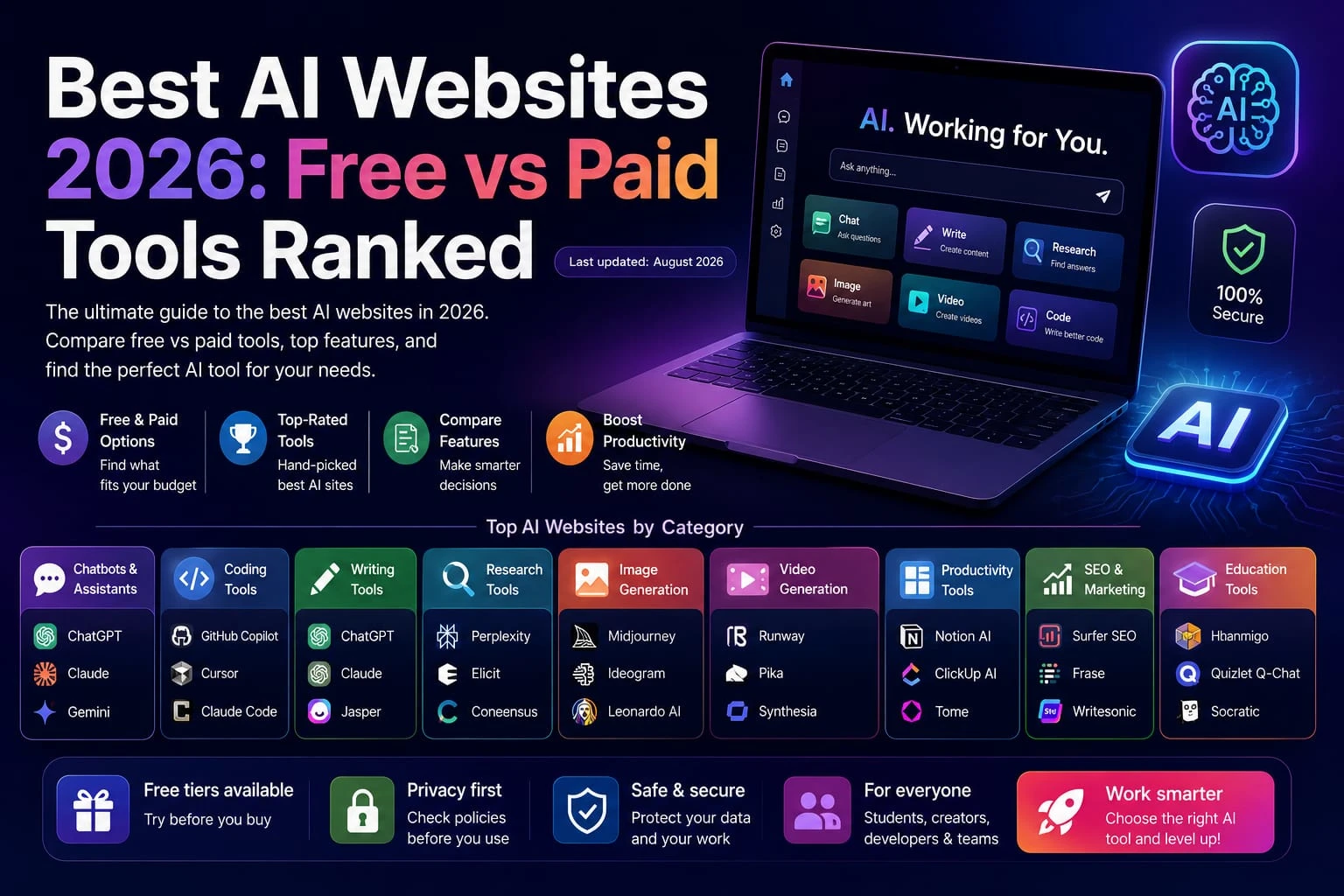
Types of AI Websites
AI chat bots and Assistants
General-purpose tools for writing, brainstorming, answering questions, and analyzing files or images through conversation. ChatGPT, Claude, and Gemini are the three most widely used.
Good for almost anyone who needs a flexible thinking partner. The limitation? None of them are specialists for narrow, high-stakes tasks like legal drafting or medical research, a purpose-built tool usually beats a generalist every time.
AI Coding Websites
AI coding websites and coding assistants can write, complete, debug, and refactor code, ranging from browser-based tools to AI-native development environments. Popular options include GitHub Copilot, Cursor, and Claude Code, although their interfaces and workflows differ.
They can be useful for developers at different experience levels, but AI-generated code still requires human review and testing. GitHub’s own documentation recommends reviewing and testing AI-generated code, particularly for security-sensitive applications. Independent research has also found security vulnerabilities in AI-generated code, so developers should treat AI output as a draft rather than automatically merge-ready code
AI Writing Websites
Tools focused on drafting, editing, and refining prose blog posts, emails, marketing copy, long-form content. ChatGPT and Claude both function here alongside more specialized tools like Jasper.
Useful for speeding up first drafts. The catch: unedited AI prose reads generic, and that’s exactly what Google’s helpful-content systems (and human readers) both penalize.
AI Research Websites
Tools built to search, summarize, and cite sources rather than just generate text from training data. Perplexity is the clearest example; it’s built around citations and real-time web results instead of a static knowledge cutoff.
Best for anyone who needs sourced, current answers instead of a single confident-sounding paragraph with no receipts.
AI Image Generation Websites
Tools that create original images from text prompts. mid journey and Ideogram are the two names most 2026 coverage points to, Ideogram specifically stands out when your images need to include readable text or logos.
One limitation worth flagging: image rights and commercial-use terms vary by platform and plan. Check the license before you use output commercially, not after.
AI Video Generation Websites
Tools that generate or edit video from text prompts or existing footage. Runway is the name that comes up most.
Useful for short-form social content and rapid prototyping. Still limited to longer, narrative-consistent output compared to traditional production, nobody’s shooting a feature film on this yet.
AI Productivity Websites
AI productivity websites integrate AI directly into workspace for documents, notes, projects, search, and other everyday tasks. Notion AI is a clear example: it can search, generate, analyze, and summarize information within the Notion workspace rather than requiring a separate AI tool.
Best for: Individuals and teams that want AI built into an existing workspace and want to reduce context switching between separate tools. Notion also supports multiple AI capabilities and integration, so the trade-off is less about being “locked” to one model and more about whether the work space’s available AI features and model options meet your needs.
AI SEO and Marketing Websites
AI SEO and marketing websites combine AI with marketing-focused workflows such as keyword research, content briefs, SEO optimization, campaign copy, and content planning. They can be more useful than general-purpose chatbots when a task depends on SEO data, keyword metrics, or marketing-specific workflows.
Best for: Marketers, SEO professionals, agencies, and content teams that need to speed up repeatable tasks such as keyword research, outlines, meta descriptions, and campaign drafts.
The main limitation is that AI-generated marketing content still needs human review. Verify factual claims, search intent, keyword targeting, and originality, then add firsthand expertise and examples. Generic AI copy can also sound repetitive when teams rely on the same prompts and tools.
AI Education Websites
AI education websites are built for tutoring, studying, teaching, and academic support rather than general-purpose chat. Khanmigo is a clear example: Khan Academy describes it as an AI-powered personal tutor and teaching assistant that guides learners through questions and helps them develop understanding instead of simply giving answers. It is also integrated with Khan Academy’s learning content.
Best for: Students and learners who want on-demand study support, explanations, practice, and help across subjects such as math, science, coding, history, and humanities. Khan Academy also states that Khanmigo can support learners from elementary school through college.
The limitation is accuracy: AI tutors can still make mistakes. Khan Academy itself has documented cases where Khanmigo made math and student-evaluation errors, so important answers should still be checked against trusted course materials, textbooks, or an instructor.
AI Business Websites
Think AI wired into a CRM or support inbox lead scoring, forecasting, auto-drafted replies instead of a chat window someone has to remember to open.
Best for teams past the individual-tool stage. Here’s the thing: a chatbot only helps if someone opens it. A business tool works whether or not anyone remembers it’s there.
Best AI Websites for Different Use Cases
Developers: GitHub Copilot suits teams already standardized on the GitHub ecosystem, Cursor suits developers who want a full AI-native editor with project-wide context, and Claude Code suits terminal-native, deep-reasoning work on complex, multi-file changes. Cursor tends to win on visual diffing and inline review, while Copilot remains the pragmatic default for organizations already standardized on GitHub.
For writing, ChatGPT or Claude handle drafting and editing well — Claude in particular gets called out by reviewers for document-heavy, reasoning-heavy work that rewards careful synthesis.
Doing research? Perplexity’s the pick. It’s built around citations, not a single generated answer with no sourcing.
Students get the most mileage from ChatGPT or Claude as a study partner, with Perplexity stepping in when a task needs sourced, current information instead of a static answer.
Productivity comes down to pairing: a general assistant (ChatGPT, Claude, or Gemini) plus whatever workspace tool your team already uses. Most people land here after trial and error — one general tool plus one or two specialists beats a drawer full of subscriptions nobody remembers to cancel.
Marketers do best combining ChatGPT or Claude for drafting with a dedicated AI SEO/marketing tool for keyword and brief work.
SEO work needs a specialized AI SEO tool layered on top of a general assistant for drafting — general chatbots simply aren’t built with keyword-volume or SERP data baked in.
For image generation, Midjourney wins on overall quality; reach for Ideogram instead when the image needs legible text or logo work.
Video generation points to Runway for short-form and prototype work.
Running a business? Pair a general assistant for day-to-day tasks with a dedicated AI business/CRM platform once you’re past individual use and need AI wired into an actual workflow.
Free vs. Paid AI Websites
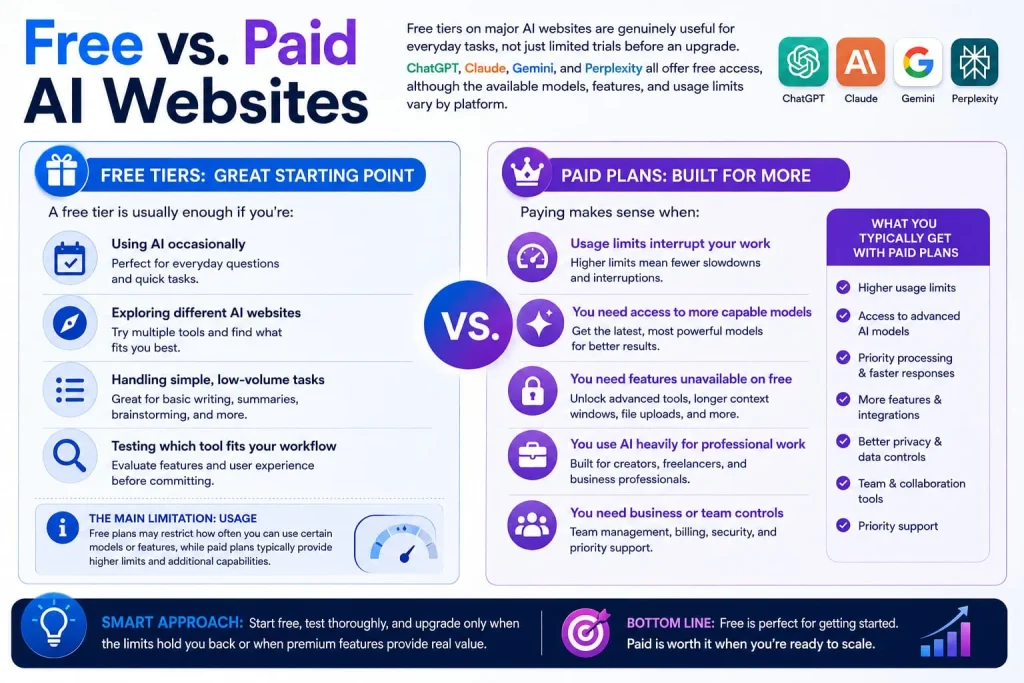
Free tiers on major AI websites are genuinely useful for everyday tasks, not just limited trials before an upgrade. ChatGPT, Claude, Gemini, and Perplexity all offer free access, although the available models, features, and usage limits vary by platform.
A free tier is usually enough if you’re:
- Using AI occasionally
- Exploring different AI websites
- Handling simple, low-volume tasks
- Testing which tool fits your workflow
The main limitation is usage. Free plans may restrict how often you can use certain models or features, while paid plans typically provide higher limits and additional capabilities.
Paying makes sense when:
- Usage limits regularly interrupt your work
- You need access to more capable models
- You need features unavailable on the free plan
- You use AI heavily for professional work
- You need business or team controls
Before subscribing, check the current usage limits, available models, features, and privacy/data policies. These can differ between consumer and business plans and may change over time.
How to Choose an AI Website
1. Identify your task. Coding, writing, research, images, video the category narrows the field fast.
2. Check the AI website’s core features. Does it do the specific thing you need, or just something adjacent to it?
3. Compare free and paid plans. Look at what actually changes between tiers, not just the price.
4. Check usage limits. Message caps, generation limits, and context window size all affect real-world usability.
5. Review privacy and data policies. Read the actual policy page, not a summary especially before uploading anything sensitive.
6. Check commercial-use rights. Especially important for image and video generation if you plan to publish or sell the output.
7. Test the free version when available. A free tier tells you more about fit than any review will.
8. Compare alternatives before subscribing. Most people end up running one general tool plus one or two specialists pick deliberately rather than stacking subscriptions you’ll forget to cancel.
Privacy and Safety
You’re not just typing questions into AI websites. You may be uploading contracts, client emails, source code, or other sensitive information, so you should understand how each platform handles submitted data before using it.
In general, data-use policies vary by provider, product, plan, and settings. For example, OpenAI says personal ChatGPT and Codex content may be used to improve models unless the user opts out, while ChatGPT Business, Enterprise, Edu, and API data is not used for training by default. Google also provides different controls for Gemini activity and connected-app data, including settings that can affect whether interactions are used to improve Google’s services.
Consumer and business plans can therefore have different data-handling terms. Don’t assume that a paid consumer plan automatically provides the same privacy protections as a business or enterprise plan. Check the provider’s current privacy and data-use documentation before uploading proprietary or confidential information.
Basic account security still matters:
- Use a strong, unique password.
- Enable two-factor authentication where available.
- Avoid uploading confidential information unless the provider’s policy allows it.
- Check data-retention and deletion options.
- Review whether conversations or uploads can be used for model improvement.
- Use business or enterprise controls when your organization requires stronger data protections.
Practical takeaway: Don’t assume an AI website is private because its interface feels personal. Check the provider’s current privacy, data-use, and security policies before putting sensitive information into it.
Comparison Table
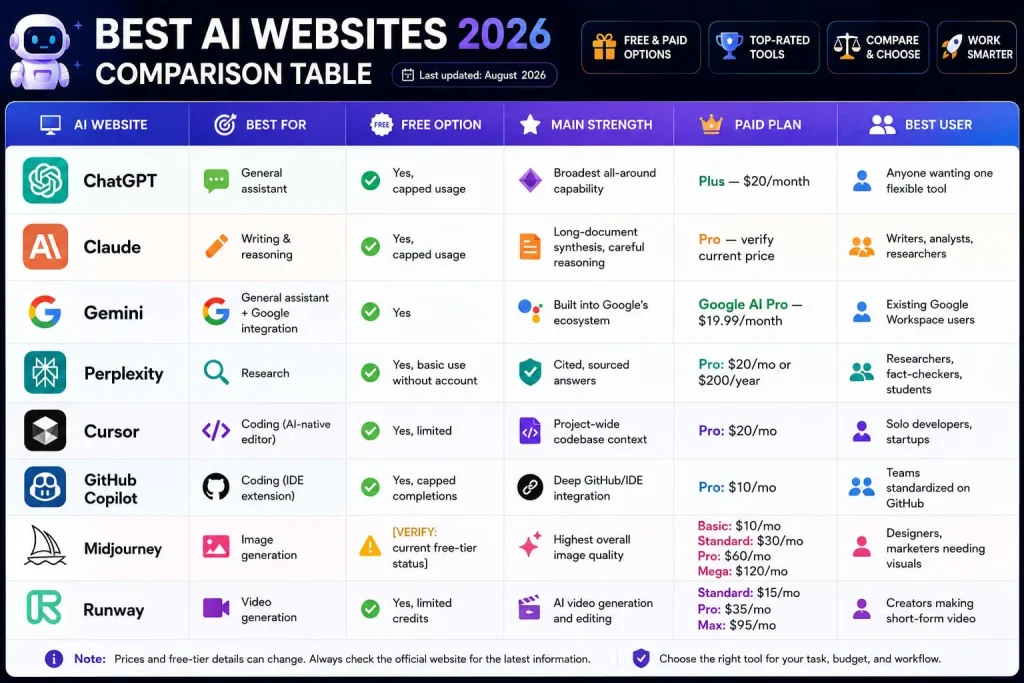
| AI Website | Best For | Free Option | Main Strength | Paid Plan | Best User |
| ChatGPT | General assistant | Yes, capped usage | Broadest all-around capability | Plus — $20/month | Anyone wanting one flexible tool |
| Claude | Writing & reasoning | Yes, capped usage | Long-document synthesis, careful reasoning | Pro — verify current price | Writers, analysts, researchers |
| Gemini | General assistant + Google integration | Yes | Built into Google’s ecosystem | Google AI Pro — $19.99/month | Existing Google Workspace users |
| Perplexity | Research | Yes, basic use without account | Cited, sourced answers | Pro: $20/mo or $200/year | Researchers, fact-checkers, students |
| Cursor | Coding (AI-native editor) | Yes, limited | Project-wide codebase context | Pro: $20/mo | Solo developers, startups |
| GitHub Copilot | Coding (IDE extension) | Yes, capped completions | Deep GitHub/IDE integration | Pro: $10/mo | Teams standardized on GitHub |
| Midjourney | Image generation | [VERIFY: current free-tier status] | Highest overall image quality | Basic: $10/mo; Standard: $30/mo; Pro: $60/mo; Mega: $120/mo | Designers, marketers needing visuals |
| Runway | Video generation | Yes, limited credits | AI video generation and editing | Standard: $15/mo; Pro: $35/mo; Max: $95/mo | Creators making short-form video |
Which one should you choose?
Want one tool that covers the widest range of everyday tasks? Start with ChatGPT or Claude. Research-heavy work points to Perplexity as the add-on. Writing code daily is a Cursor-or-Copilot decision — new editor versus extension inside the one you’ve already got. And if you’re producing visual content, Midjourney handles images while Runway covers video. Most people land on one general tool plus one specialist, not a long subscription list.
One more thing I caught in the screenshot: “mid journey” is showing as two words in your live copy — should be one word, Midjourney. Worth a find-and-replace check across the doc in case that split happened during a paste somewhere else too.
FAQ
What are AI websites?
AI websites are browser-based platforms that use artificial intelligence, typically a language model or image/video model, to generate, analyze, or transform content. They require no download and are usually accessed directly through a URL.
What is the best AI website?
There isn’t a single best one; it depends on the task. ChatGPT and Claude are strong general-purpose choices, Perplexity leads for sourced research, and Cursor or GitHub Copilot lead for daily coding work.
What are the best free AI websites?
ChatGPT, Claude, Gemini, and Perplexity all offer usable free tiers without requiring a credit card, though each caps daily or monthly usage and may route free users to a lighter model.
Which AI website is best for students?
ChatGPT or Claude work well as a study and explanation partner, while Perplexity is a better fit for research tasks that need current, sourced information rather than a single generated answer.
Which AI websites are best for coding?
GitHub Copilot suits teams already standardized on GitHub, Cursor suits developers who want a full AI-native editor, and Claude Code suits complex, multi-file reasoning tasks run from the terminal.
Are AI websites free?
Many offer free tiers, but usage is capped by daily or monthly limits, and free tiers often use a lighter model than paid plans. Whether free is “enough” depends on how heavily you use the tool.
Are AI websites safe to use?
Safety depends on the platform’s specific data handling and security practices, which vary by company and plan. Always review the current privacy policy before uploading sensitive personal, financial, or client information, and enable two-factor authentication where available.
Can I use AI websites for business?
Yes, though commercial-use rights and data-training defaults vary by tool and plan, business and enterprise tiers commonly exclude your data from model training by default, while some free consumer tiers may not. Check the specific terms before using output commercially.
Can AI websites generate images and videos?
Yes. mid journey and Ideogram are common choices for image generation, while Runway is a common choice for AI video generation and editing.
How do I choose the right AI website?
Start by identifying the specific task, then compare features, free-vs-paid limits, privacy policies, and commercial-use rights before testing the free tier of your top choice.
The Bottom Line
There’s no universal “best” AI website; the right one depends entirely on whether you’re coding, writing, researching, or generating images or video. The categories are clearer than the marketing makes them sound: general assistants (ChatGPT, Claude, Gemini) for flexible everyday work, specialists (Perplexity for research, Cursor or Copilot for code, mid journey or Runway for visuals) for anything task-specific. Start with one general tool, add a specialist only once a real limitation shows up, and check the free tier before you pay for anything. If you’re not sure where to start, pick the category that matches what’s slowing you down most this week and try the free version of the tool that fits it.