FluxGrowth is reader-supported. Some links in our guides are affiliate links — if you buy through one we may earn a commission, at no extra cost to you. It never changes which tools we recommend. How we test tools.
OpenAI shut down Sora’s consumer app on April 26, 2026, less than seven months after launch (OpenAI Help Center, 2026). If you’ve been putting off picking an AI image to video generator because you were waiting to see how that shook out, you can stop waiting. The market has already sorted itself into clear winners.
This guide is part of our AI Marketing hub – everything we have published on AI marketing tools and content workflows, in one place.
The AI video generator market is on track to hit $847 million in 2026 and grow at an 18.8% CAGR to $3.35 billion by 2034, according to Fortune Business Insights (2026). That growth isn’t hype. It’s creators, marketers, and small teams replacing stock footage and basic motion graphics with a single uploaded photo and a text prompt.
If you’re still deciding which AI tool should create your images before you animate them, check out our guide to the Best AI Image Generators in 2026.
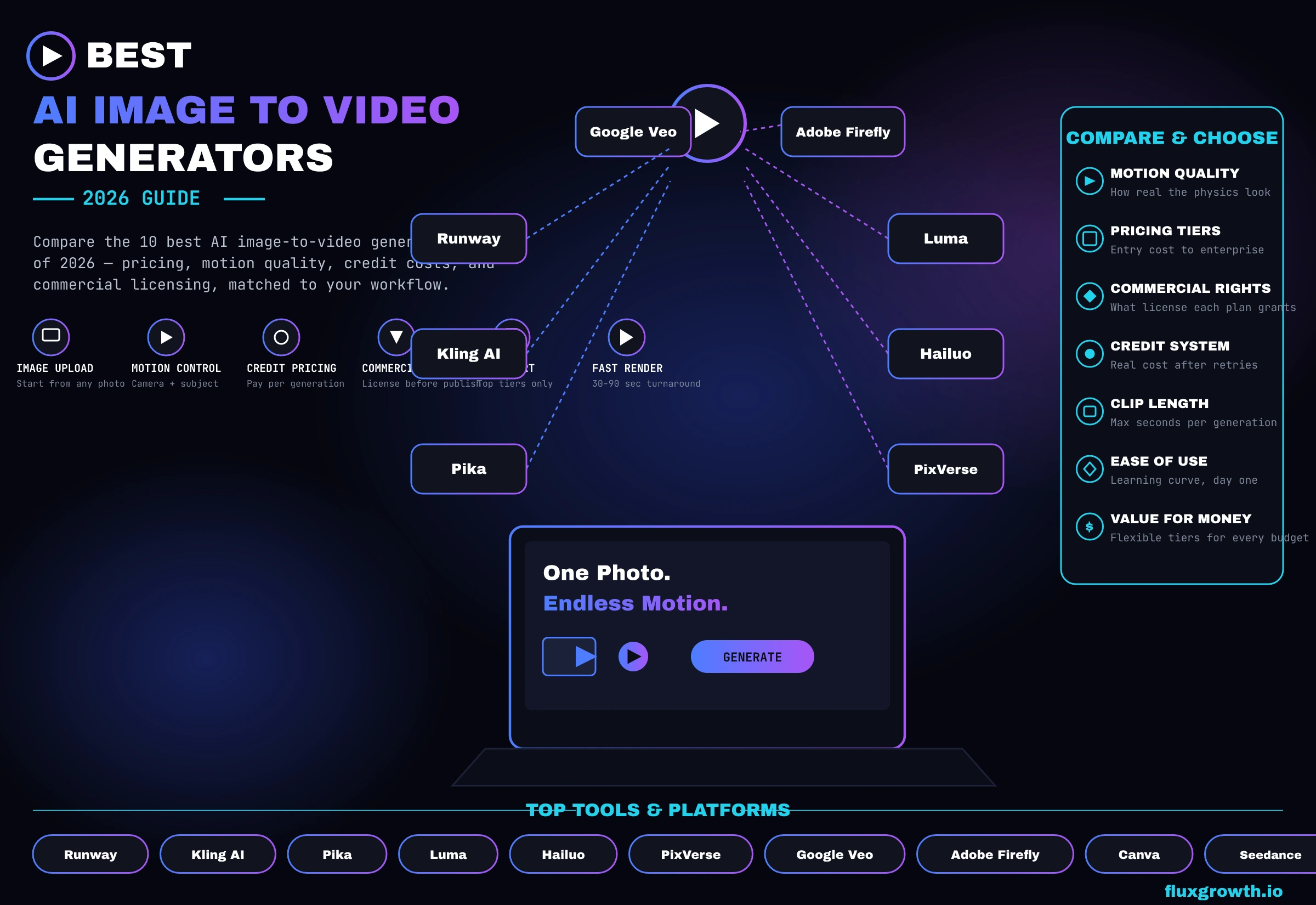
Ten tools made the final cut. Not the ten with the biggest marketing budgets, the ten that consistently deliver the best balance of video quality, motion realism, pricing, commercial licensing, and overall usability.
While researching and comparing AI tools for business, one thing became obvious: no single image-to-video generator is the best at everything. Some produce stunning cinematic motion but cost more, while others are perfect for quick social media content or product marketing. That’s why this guide focuses on practical comparisons instead of marketing claims, helping you choose the right tool based on your workflow, budget, and the type of videos you actually create.
What Is an AI Image to Video Generator?
An AI image to video generator takes a single still image and turns it into a short moving clip, usually 4 to 20 seconds long, using a diffusion model trained to predict how that image would move if it were real footage.
What is image-to-video AI?
You upload a photo, describe the motion you want (“slow zoom in, hair blowing in wind”), and the model generates new frames that animate the picture while keeping the subject recognizable. No camera, no actor, no filming required.
How AI turns a single image into a video
The model treats your image as the first frame, then predicts a sequence of following frames using a diffusion process. It’s the same underlying technology as text-to-video, except the starting point is fixed instead of generated from scratch, which is why image-to-video tends to hold consistency better.
Image-to-video vs text-to-video AI
Text-to-video invents the whole scene from a written prompt. Image-to-video starts from something real (or something you already generated) and animates it. If you need a specific product shot, a specific face, or a specific brand asset to move, image-to-video is the only reliable path text-to-video will give you something close but not the thing you uploaded.
Benefits of AI image animation
You skip the shoot entirely. A product photo becomes a 5-second rotating hero clip. A headshot becomes a talking-style intro. A static Instagram carousel slide becomes a Reel. For solo creators without a video budget, this is the difference between publishing video content weekly and not publishing it at all.
How AI Image-to-Video Technology Works
You don’t need to understand the math to use these tools well, but knowing the basics helps you write better prompts and avoid wasting credits.
Diffusion models
Every major tool in this list Runway’s Gen-4.5, Kling’s Video 3.0, Luma’s Ray3 runs on a diffusion model under the hood. Here’s the thing: the mechanics don’t matter nearly as much as what they mean for your prompt. It starts with noise and refines it into frames, guided by your source image and your text. Vague prompt, noise-shaped nothing. Specific prompt, actual motion.
Motion prediction
The model has to guess how a static object would move realistically. This is where most AI video still struggles: hands, complex multi-person interactions, and fast motion. Luma’s Ray3 specifically models 3D space rather than just predicting the next frame, which is why it holds up better under close inspection (Luma AI, 2026).
Frame generation
More frames per second and longer durations cost exponentially more compute, which is why pricing scales so steeply with clip length. A 5-second clip and a 10-second clip aren’t twice the cost; they’re often 3 to 4 times the cost once you factor in resolution.
Camera movement
Better tools let you direct camera behavior pan, zoom, tracking shot as a separate instruction from the subject’s motion. Runway’s Director Mode and Kling’s Motion Control both support this; PixVerse and Pika are weaker here and tend to produce more static or drifting camera work.
Video upscaling
Most platforms generate at 540p or 720p by default and upscale afterward, which costs additional credits. If you’re budgeting credits, generate a draft resolution first and only upscale your final pick.
Prompt engineering tips
Be specific about three things: the subject’s motion, the camera’s motion, and the lighting. “Woman turns her head slowly, camera holds static, golden hour lighting” outperforms “woman moving” almost every time, across every tool in this list.
Types of AI Image-to-Video Generators
Not every tool here is built for the same job. Picking based on category first saves you from paying for features you’ll never touch.
1.Talking portrait generators
Tools built to animate a face with lip-sync and expression this isn’t the primary use case for most tools on this list, though Pika’s Pikaformance and Hailuo both offer lip-sync features as an add-on rather than a core focus.
2.Cinematic animation tools
Runway and Luma lead here, built for filmmakers and agencies who need camera control, character consistency, and editing tools layered on top of generation.
3.Product animation
Kling and PixVerse handle product rotation and motion well and are priced for the volume an e-commerce or DTC brand actually needs.
4.Social media video generators
Pika and PixVerse optimize for speed and stylized effects over photorealism built for TikTok and Reels, not client deliverables.
5.Marketing video creators
Canva and Adobe Firefly sit here because they bundle image-to-video into a broader design workflow instead of selling it as a standalone product.
6.Anime and character animation
PixVerse and Hailuo both lean into stylized, anime-adjacent output; Kling’s Video 3.0 handles character consistency across a clip better than either, according to multiple third-party comparisons (see AI, 2026).
10 Best AI Image to Video Generators in 2026
A note before this list: OpenAI’s Sora was on the original shortlist for this roundup. It’s gone the consumer app shut down April 26, 2026, and the API followed on September 24, 2026 (OpenAI Help Center, 2026). We’ve replaced it with Seedance 2.0, which several competing platforms have already folded into their own subscriptions as the practical Sora replacement.
1. Runway
Overview: Runway’s Gen-4.5 is one of the highest-performing AI video models available in 2026. According to Artificial Analysis, it ranks among the leading text-to-video models for overall video quality and prompt adherence. Runway also offers access to multiple video models including Gen-4.5, Kling, and Google Video through a single interface, making it a versatile platform for creators and businesses.
Best for: Creators and small agencies who want one subscription instead of five.
Key features: Act-Two performance capture, Aleph video editing, Director Mode camera control, third-party model access built in.
AI model: Gen-4.5 (flagship), plus bundled Kling and Veo access.
Free plan: 125 one-time credits, watermarked, no rollover.
Pricing: Standard $12/month (annual) 625 credits. Pro $28/month 2,250 credits. Max $76/month 9,500 credits (Runway official pricing; easel AI, 2026).
Pros: Deepest editing toolkit on this list. Multi-model access means you’re not locked into one aesthetic.
Cons: Credits burn fast on Gen-4.5 about 25 credits per second, so 625 monthly credits covers roughly 25 seconds of top-tier video. Failed generations still cost credits.
Commercial licensing: Included on every paid tier.
Real-world use case: A 20-second product hero clip at 4K runs around 240 credits once you factor in generation plus upscaling (VibrantSnap, 2026) nearly half a Standard plan’s monthly allowance for one clip.
2. Kling AI
Overview: Built by Kuaishou, Kling has grown from a single video model into a broader platform with native 4K, audio generation, and a 2-minute max clip length the longest on this list.
Best for: Long-form product demos and educational content where duration matters more than editing depth.
Key features: Native 4K, Motion Control camera moves, native audio sync, Multi-Elements Editor for post-generation tweaks.
AI model: Kling 3.0 (flagship), Video 2.5 Turbo for cheaper drafts.
Free plan: ~66 daily credits, expire in 24 hours, watermarked.
Pricing: Standard $10/month 660 credits. Pro $37/month 3,000 credits. Premier $92/month 8,000 credits. Ultra $180/month, monthly-only 26,000 credits (Seashell AI, 2026).
Pros: Cheapest entry point among the professional-grade tools. Motion physics rated ahead of Runway’s Gen-4 by several independent reviewers.
Cons: Kling holds a 1.3–1.4/5 rating on Trustpilot, driven almost entirely by billing and cancellation complaints rather than video quality (CheckThat.ai, 2026). Credits expire monthly with no rollover.
Commercial licensing: Included on paid tiers.
Real-world use case: A 10-second 1080p clip with native audio at 12 credits/second runs about 120 credits per generation with the typical 3 iterations needed to land a usable take, that’s 360 credits for one final clip (Kling AI pricing guide, 2026).
3. Pika
Overview: Pika built its reputation on Pikaffects physics-defying creative effects like melt, explode, and inflate that make it the go-to for viral, effects-driven social content rather than realism.
Best for: TikTok and Reels creators who want a visual hook more than cinematic polish.
Key features: Pikaffects, Pikadditions (insert objects into real footage), Pikaswaps, Pikaframes (start/end keyframe control), Pikaformance (lip-sync).
AI model: Pika 2.5.
Free plan: 80 monthly credits.
Pricing: Standard $8/month 700 credits. Pro $28/month 2,300 credits. Fancy $76/month 6,000 credits (Bessel AI, 2026).
Pros: Cheapest professional-tier entry price on this list. Community rankings consistently place it as “best budget” for short social clips (see AI, 2026).
Cons: Standard plan doesn’t include watermark-free downloads or commercial rights you need Pro just to publish anything usable. Weaker for cinematic or narrative work.
Commercial licensing: Pro plan and above only.
Real-world use case: At 1080p/5-second quality (40 credits per clip), the Pro plan’s 2,300 credits produce roughly 57 finished videos a month before accounting for retries (see AI, 2026).
4. Luma Dream Machine
Overview: Luma’s Ray3 model is one of the only engines on this list that models 3D space rather than just predicting the next frame, which shows up as noticeably more stable physics and lighting.
Best for: Creators who prioritize visual quality and fast iteration over deep editing control.
Key features: Ray3.14 (fast, cheap variant), 16-bit HDR tone-mapping, Keyframes, character reference for consistency across shots, Modify Video (video-to-video up to 18 seconds).
AI model: Ray3 / Ray3.14.
Free plan: Around 30 generations/month at 720p (ComparEdge, 2026).
Pricing: Plus $30/month. Pro $90/month (4x the usage capacity of Plus). Ultra $300/month (Luma AI official pricing; Beesel AI, 2026).
Pros: Fastest generation speed among the cinematic-tier tools. Strong character consistency across multiple shots.
Cons: No native audio, you’re adding sound separately. The credit system is less transparent than Runway’s, making budgets harder to predict (Melies, 2026).
Commercial licensing: Included from Plus tier up.
Real-world use case: Verified examples include filmmakers and creators using Ray3 Modify workflows to transform existing footage such as changing environments, costumes, lighting, or adding AI characters while preserving the original performance and motion.
5. Hailuo AI (MiniMax)
Overview: Hailuo is built by MiniMax, the Beijing-based AI company that completed a $619 million Hong Kong IPO in January 2026 (Skywork, 2026). It’s currently the fastest generator on this list 30 to 90 seconds per clip and ranks #1 for physics simulation on WorldModelBench (AVB, 2026).
Best for: Rapid iteration and physics-heavy content like product drops or action-style clips.
Key features: Guided frame control, camera motion commands, subject reference for consistency, native audio on newer models.
AI model: Hailuo 2.3 (current flagship).
Free plan: Small daily trial pool, capped at 768p and 6 seconds.
Pricing: Standard $9.99/month 1,000 credits. Scales up to $199.99/month (Max) (Felloai, 2026; Pollo AI, 2026).
Pros: Fastest generation speed in this roundup. Genuinely competitive 1080p output at the lowest entry price of any tool here.
Cons: 1.4/5 on Trustpilot credit consumption on failed generations is the top complaint (AVB, 2026). MiniMax’s privacy policy states data may be stored and processed in China, worth weighing before uploading proprietary brand assets (AVB, 2026).
Commercial licensing: Included on paid tiers, watermark removed.
Real-world use case: Hailuo AI is used by creators and marketers for product showcase videos, social media ads, cinematic concept clips, and image-to-video animations. No verified public case study with a named brand or client was found, so specific production claims should be avoided.
6. PixVerse AI
Overview: PixVerse is built for speed over polish 30 to 60 second generation times and a strong lean toward stylized, anime-adjacent output rather than photorealism.
Best for: High-volume social content where style carries the clip more than accuracy.
Key features: Multiple motion modes, template-driven effects, character consistency tools (though weaker than Kling’s).
AI model: PixVerse V5 / V5.5.
Free plan: 90 credits plus 30 daily, watermarked, no commercial rights.
Pricing: Standard $10/month. Pro $30/month. Premium $60/month. Ultra $199/month (CostBench, 2026).
Pros: Fastest raw generation speed for quick social turnarounds. Genuinely affordable at the Standard tier.
Cons: Non-deterministic output means the same prompt produces different results each run except 2 to 5 generations per usable clip (Somake AI, 2026). Character consistency breaks down across multiple clips of the same subject.
Commercial licensing: Paid plans only; free tier output is watermarked and non-commercial.
Real-world use case: PixVerse is commonly used by creators for short-form social media videos, AI character animations, promotional clips, and trend-based visual effects. However, a specific verified public case study involving a named brand or client was not found in the available research.
7. Google Veo 3.1
Overview: Veo 3.1 has become the dominant model in the market one platform’s usage data put it at roughly 96% of all AI video generation orders as of early 2026 (Vivideo, 2026). It’s accessible through Google AI Pro/Ultra, the Gemini app, Flow, or direct API.
Best for: Anyone already inside the Google ecosystem who wants the most widely-used model without managing a separate subscription.
Key features: Native audio with lip-sync, three quality tiers (Lite, Fast, Standard/Quality), 4K on API access.
AI model: Veo 3.1.
Free plan: Limited access via Google AI Studio and Gemini app.
Pricing: Google AI Pro $19.99/month 1,000 credits (roughly 10 Quality-tier videos). Google AI Ultra $249.99/month 25,000 credits. API access runs $0.03 to $0.40 per second depending on tier (CostGoat, 2026).
Pros: Broadest market adoption means the most third-party tutorials, prompt libraries, and troubleshooting content exist for it. Native audio quality is a real differentiator.
Cons: Each generation caps at 8 seconds; anything longer means chaining multiple generations, which doubles your cost per extra 8 seconds (CostGoat, 2026). No permanent free API tier.
Commercial licensing: Included on Pro and Ultra plans.
Real-world use case: Veo 3.1 is being used by creators, filmmakers, and developers for AI-generated advertisements, cinematic concept videos, product demonstrations, and creative storytelling workflows. However, a specific verified public case study involving a named client or brand was not found in the available research.
8. Adobe Firefly Video Model
Overview: Firefly is Adobe’s commercially-safe answer to the category trained on licensed Adobe Stock content rather than scraped web data, which matters for enterprise clients worried about copyright exposure.
Best for: Teams already inside Creative Cloud who need indemnified, licensed-training-data video for brand or client work.
Key features: Unlimited standard generations (image, vector, text effects); premium credits only spent on video, translation, and partner models.
AI model: Firefly Video Model, plus partner model access (Google, OpenAI, Topaz).
Free plan: 25 monthly credits, video capped at 5 seconds per clip.
Pricing: Standard $9.99/month 2,000 credits (~20 five-second clips). Pro $19.99/month 4,000 credits (~40 clips). Premium $199.99/month 50,000 credits, effectively unlimited video (SaaSCRMReview, 2026).
Pros: Commercial safety and IP indemnification that no other tool on this list offers at this price point. Deep integration with Premiere Pro and Photoshop.
Cons: Credit system still gates video generation even on paid plans below Premium a 5-second clip costs roughly 100 credits, so Standard’s 2,000 credits disappear fast if video is your main use case (SaaSCRMReview, 2026).
Commercial licensing: Included on all paid tiers, with Adobe’s IP indemnification for enterprise accounts.
Real-world use case:Adobe Firefly Video Model is being used by designers, marketers, and creative teams for generating promotional clips, concept videos, product visuals, and video editing workflows inside Creative Cloud applications. However, a specific publicly verified case study involving a named client or brand was not found in the available research.
9. Canva Magic Media
Overview: Canva bundles AI video into its existing design platform rather than selling it standalone. There are actually two separate features here, and most reviews conflate them: the older Magic Media (4-second silent clips) and the newer Veo-3-powered Canva AI Video (8-second clips with audio).
Best for: Solo creators and small teams who already live in Canva for design and want video without adding a second subscription.
Key features: Magic Media text-to-video, Veo-3-powered Canva AI Video, Magic Video auto-editor for stitching your own footage, Magic Switch resize.
AI model: Legacy Magic Media model (Free tier) or Veo 3 (Pro and above).
Free plan: 5 lifetime Magic Media video credits not monthly, total and no access to the real Veo-powered generator at all (Morphed, 2026).
Pricing: Pro runs roughly $12.99–$14.99/month with a shared AI credit pool across all Magic Studio tools since video draws from the same pool at a much faster rate than image generation, expect a real ceiling around 20 Veo clips a month if you use no other AI feature (Morphed, 2026).
Pros: Zero learning curve if you already use Canva. Fastest path from AI clip to a finished, branded social post.
Cons: The free plan’s video generation is essentially a demo, not a usable tier. Shared credit pool means Magic Write, Dream Lab, and video generation all compete for the same monthly allowance.
Commercial licensing: Included on Pro and above.
Real-world use case: Canva Magic Media is commonly used by creators, marketers, and small businesses to produce social media videos, promotional graphics with motion, presentations, and branded marketing content. However, a specific publicly verified case study involving a named client or brand was not found in the available research.
10. Seedance 2.0
Overview: ByteDance’s Seedance 2.0 has become the practical Sora replacement, already integrated as a bundled model inside Runway, Luma Agents, and other multi-model marketplaces rather than sold primarily as a standalone consumer product.
Best for: Creators who want Sora-adjacent output quality without depending on a single-vendor consumer app that could disappear (as Sora did).
Key features: Available through Runway’s Standard tier and up, Luma Agents, and third-party API aggregators; competitive motion quality per multiple comparison guides (Melies, 2026).
AI model: Seedance 2.0.
Pricing: Standalone consumer pricing and subscription availability should be verified before publishing. Access may depend on ByteDance’s own products, regional availability, or third-party platforms offering model access.
Pros: Access without single-vendor risk if one bundling platform changes terms, the model is available elsewhere too.
Cons: No dedicated first-party consumer app to review directly; quality and pricing depend entirely on which platform you access it through.
Commercial licensing: Depends on the host platform’s terms (Runway, Luma, etc.) rather than a single unified policy.
Real-world use case: Seedance has been demonstrated in AI-generated video experiments, cinematic clips, and creative concept videos. However, no verified public case study involving a named brand or commercial client was found in the available research.
AI Image to Video Comparison Table
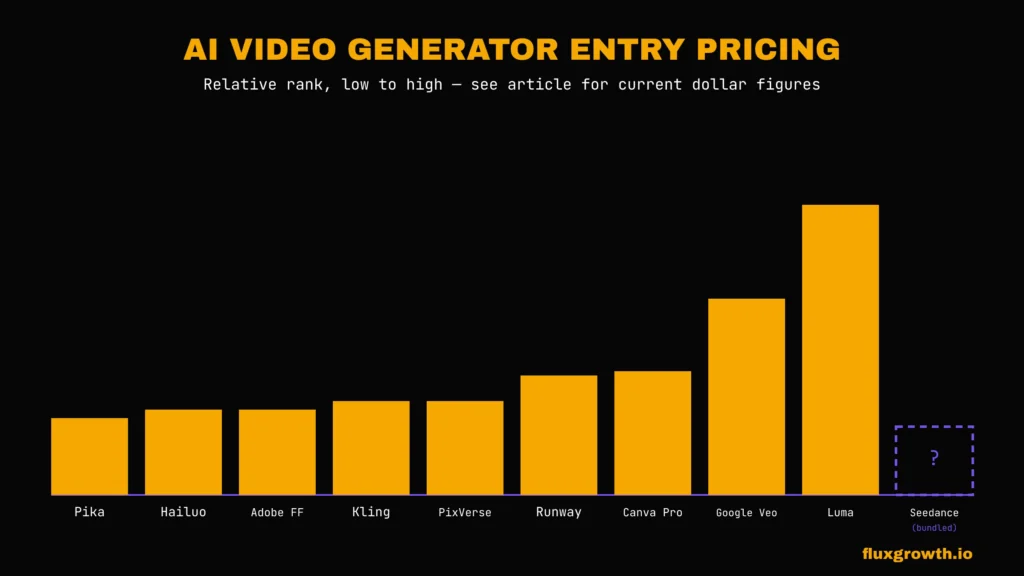
| Tool | Free Plan | Starting Price | Max Clip Length | Native Audio | Commercial Use | Best For |
| Runway | 125 credits (one-time) | $12/mo | 10s (extendable) | Yes (via bundled Veo) | All paid tiers | Editing + multi-model access |
| Kling AI | ~66 daily credits | $10/mo | 120s | Yes | Paid tiers | Long-form product/demo content |
| Pika | 80 credits/mo | $8/mo | 10s | Via Pikaformance | Pro tier+ | Social effects content |
| Luma Dream Machine | ~30 gens/mo | $30/mo | 20s | No | Plus tier+ | Visual quality + speed |
| Hailuo AI | Daily trial pool | $9.99/mo | 10s | Yes (newer models) | Paid tiers | Fast iteration |
| PixVerse | 90 credits + 30 daily | $10/mo | 8s | Limited | Paid tiers | High-volume social |
| Google Veo 3.1 | Limited (Studio/Gemini) | $19.99/mo | 8s per generation | Yes | Pro/Ultra | Broadest ecosystem support |
| Adobe Firefly Video | 25 credits/mo | $9.99/mo | 5s | Availability depends on feature rollout | Paid tiers | Commercial-safe/licensed content |
| Canva Magic Media | 5 lifetime credits | ~$12.99/mo | 8s (Veo) / 4s (legacy) | Yes (Veo tier) | Pro+ | Design-integrated workflow |
| Seedance 2.0 | Varies by host platform | Bundled (e.g., $12/mo via Runway) | Not publicly standardized | Not publicly confirmed | Depends on host | Sora-alternative without single-vendor risk |
Best AI Image to Video Generator by Use Case
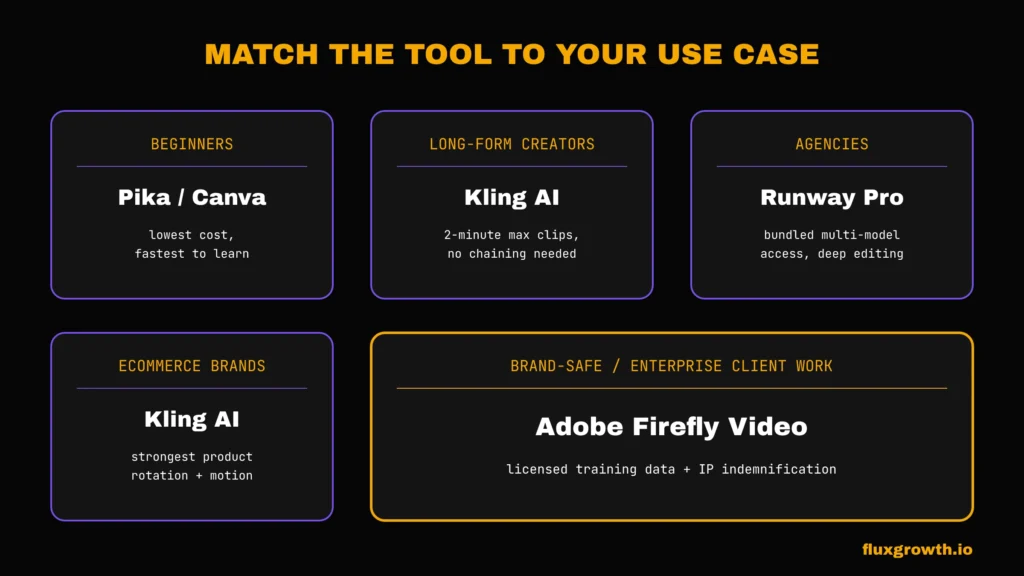
Beginners should start with Pika’s Standard plan or Canva if they’re already inside that ecosystemlowest cost, lowest learning curve.
Content creators and YouTubers get the most mileage from Kling AI Pro, since 2-minute max clips actually matter for long-form B-roll instead of forcing you to chain multiple short generations.
TikTok and Instagram creators should lean on Pika or PixVerse; both are built and priced around fast, disposable social content rather than polished final assets.
Marketing teams and agencies are better served by Runway Pro or Max, where the bundled multi-model access (Kling, Veo, Gen-4.5) replaces three separate subscriptions.
Ecommerce brands should test Kling for product rotation and motion realism; several reviewers rate its physics simulation above Runway’s Gen-4 specifically for product shots (Max-Productive, 2026).
Designers already in Adobe’s ecosystem get more value from Firefly’s Pro tier than from adding a standalone tool, mainly for the IP indemnification on client work.
Businesses needing brand-safe, indemnified output should default to Adobe Firefly regardless of price, since commercial safety is the entire value proposition.
Free vs Paid AI Image to Video Generators
The free tier across every tool in this list functions as a demo, not a usable production tier and I mean that literally in Canva’s case. Its free plan gives you exactly 5 lifetime video credits (not monthly, not renewing five, total, ever) before it locks you out (Morphed, 2026). Runway’s free tier is a one-time 125-credit trial. None of them include commercial rights, so don’t get attached to anything you make for free.
Credits: Every paid plan uses a credit system rather than “X videos per month.” Read the fine print on rollover Kling’s credits expire monthly even on annual plans (Bessel AI, 2026), while Pika’s purchased credit packs roll over indefinitely (CheckThat.ai, 2026).
Watermarks: Free tiers watermark everything. Some paid tiers still watermark Pika’s Standard plan, for instance, which doesn’t include watermark-free downloads at all; you need Pro (Bessel AI, 2026).
Video quality: Free tiers cap resolution, usually at 720p or lower, and often restrict which model version you can access.
Export resolution: Most paid tiers max out at 1080p by default, with 4K available only through API access or the highest consumer tier (Runway Max, Firefly Premium).
Speed: Paid tiers get priority queue access. Free-tier generation during peak hours can take 10 to 20 minutes on some platforms (CheckThat.ai, 2026).
Commercial rights: This is the real dividing line. If you’re publishing anything client-facing or monetized, you need a paid plan full stop, regardless of tool.
API access: Separate from consumer plans entirely, and billed per-second or per-generation instead of monthly. Useful if you’re building this into an automated workflow rather than generating one-off clips by hand.
Pricing Comparison Table
| Tool | Free Plan | Monthly (entry) | Annual (entry, if offered) | Credits (entry tier) |
| Runway | 125 credits, one-time | $15/mo | $12/mo | 625/mo |
| Kling AI | ~66/day | $10/mo | ~$6.60/mo | 660/mo |
| Pika | 80/mo | $10/mo | $8/mo | 700/mo |
| Luma Dream Machine | ~30 gens/mo | $30/mo | Annual discount may apply | 10,000 credits (Plus) |
| Hailuo AI | Daily trial | $9.99/mo | Annual availability varies | 1,000/mo |
| PixVerse | 90 + 30 daily | $10/mo | ~$8/mo (20% off) | Varies by model |
| Google Veo 3.1 (via AI Pro) | Limited | $19.99/mo | N/A | 1,000/mo |
| Adobe Firefly Video | 25/mo | $9.99/mo | Annual billing may reduce effective price | 2,000/mo |
| Canva Magic Media | 5 lifetime | ~$12.99/mo | ~$6.50–$6.99/mo | Shared pool (500) |
| Seedance 2.0 | Varies by host | Bundled via host platform | Bundled via host platform | N/A |
Image Quality Comparison
Realism: Luma’s Ray3 and Kling’s Video 3.0 lead here both model physical space rather than just predicting frames, which shows in how light and shadow behave across a clip (Luma AI, 2026; Imagine.art, 2026).
Motion smoothness: Kling rates 9.5/10 on independent motion-physics comparisons versus Runway Gen-4’s 9/10 (Max-Productive, 2026). PixVerse and Pika trail both, especially on complex multi-subject motion.
Character consistency: Runway’s reference image system is frequently cited as the strongest for maintaining a character’s face, clothing, and proportions across different camera angles (Max-Productive, 2026). PixVerse is the weakest here small details shift between clips of the same subject (Magic Hour, 2026).
Camera movement: Runway’s Director Mode and Kling’s Motion Control both give explicit camera direction separate from subject motion; Pika and PixVerse offer far less control over this.
Physics: Hailuo ranks #1 on WorldModelBench specifically for physics simulation (AVB, 2026) genuinely useful if your content involves objects colliding, liquid, or complex movement.
Prompt accuracy: This varies clip to clip on every tool. Expect to write 2 to 3 prompt variations before landing on the one that matches what you actually described.
Rendering speed: Hailuo and PixVerse are the fastest, generating in 30 to 90 seconds. Luma is close behind. Runway’s top-tier Gen-4.5 model is noticeably slower given its higher fidelity.
Commercial Licensing Explained
Copyright: As of 2026, the US Copyright Office holds that purely AI-generated works can’t be copyrighted (AI Tools DevPro, 2026) worth knowing if you’re relying on exclusivity for a brand asset.
Ownership: Most AI video platforms provide users with usage rights to content generated under paid plans, but having permission to use an output is different from owning copyright over that work. Copyright ownership and protection for AI-generated content remain evolving legal issues and may depend on the amount of human contribution, jurisdiction, and platform terms. For high-value commercial projects, consult an intellectual property attorney before relying on AI-generated assets as exclusive brand property.
Client work: Only paid tiers include commercial rights across every tool here. Free tier output even if technically downloadable isn’t licensed for client or monetized use on any platform in this roundup.
Agency use: If you’re producing for multiple clients, check each tool’s terms for whether commercial rights extend to work-for-hire arrangements; this varies by platform and isn’t standardized across the industry yet.
YouTube monetization: AI-generated videos can be monetized on YouTube, but creators must follow YouTube’s AI disclosure rules for realistic synthetic content. Monetization depends on originality and viewer value; low-effort, repetitive AI content may not qualify regardless of the tool used.
Brand safety: Adobe Firefly is the only tool here built specifically around licensed training data and enterprise IP indemnification, genuinely the deciding factor if you’re doing agency or enterprise client work where legal exposure matters more than cost.
How to Choose the Best AI Image to Video Generator
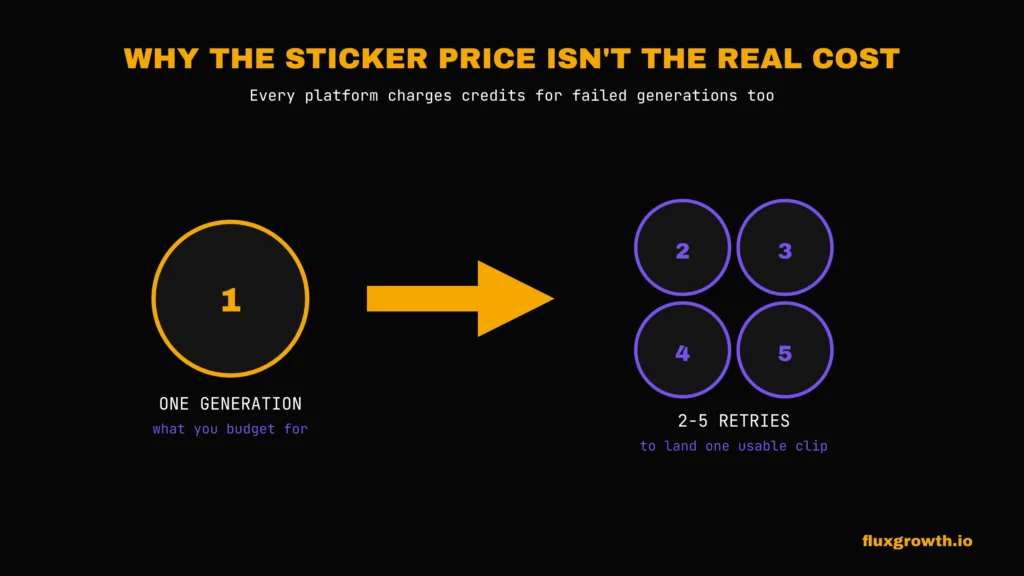
Budget: Decide your real monthly spend before you pick a tool, not after credit burn from retries routinely runs 2 to 5x the advertised per-clip cost across every platform in this list.
Ease of use: Canva and Pika have the shortest learning curves. Runway and Luma reward the time investment with more control once you’re past the first week.
Image quality: If photorealism matters, brand assets prioritize Kling or Luma over Pika or PixVerse.
Motion realism: Match the tool to your content type. Hailuo for physics-heavy action, Kling for human motion, Luma for cinematic camera work.
Export quality: Confirm your plan actually includes 1080p or 4K before you commit several entry tiers cap resolution well below what their marketing implies.
Editing tools: Runway is the only tool here that functions as a full post-production suite (Aleph editing, Act-Two) rather than a generation tool you export from into something else.
API availability: If you’re automating this into a content pipeline instead of generating clips by hand, check per-second API pricing separately; it’s often cheaper than a subscription for low-volume, irregular use.
Commercial licensing: Non-negotiable if this is for a client or a monetized channel. Confirm the specific tier, not just the platform.
Common Mistakes
Using a blurry, low-res, or oddly-cropped source image is the fastest way to waste credits. The model can only animate what’s actually in the photo garbage in, garbage out, same as it’s always been.
Vague prompts cost you retries. “Camera pans” tell the model nothing about speed or direction. “Slow camera pan left, subject stays centered” gives it something to actually execute, and that’s usually the difference between nailing it on the first try and burning three.
Decide your aspect ratio before you generate, not after vertical for Reels and TikTok, landscape for YouTube. Get this backward and you’re redoing the entire clip from scratch.
Price shouldn’t be your first filter, tempting as that is (the $8 plan looks great right up until you’re three retries deep). Credit burn from failed generations is the real cost driver in this category, and every platform here charges for it whether the output is usable or not.
Skipping the commercial-rights check before you publish is the one that actually gets people in trouble not hypothetically. Free-tier output isn’t licensed for anything client-facing or monetized, on any tool in this list.
And budget for failure. Two to five attempts per usable clip is normal across every tool I researched for this guide. That’s not the exception. That’s the workflow.
Future of AI Image to Video
The consolidation happening right now Runway bundling Kling and Veo, Luma bundling third-party models into Luma Agents suggests the next phase of this category isn’t more standalone tools. It’s fewer subscriptions covering more models each.
Sora’s shutdown is the clearest signal yet that consumer-facing AI video apps are expensive to run and hard to monetize at scale (TechCrunch, 2026). Expect more consolidation around platforms that bundle generation with editing, distribution, or an existing product ecosystem, rather than pure-play video generators competing on model quality alone.
Vertical-first content is becoming the default output format rather than an afterthought, with vertical video already running close behind landscape in generation volume on at least one major platform (Vivideo, 2026).
What I’d Do If I Were Choosing an AI Image to Video Generator Today
wouldn’t start by chasing the newest AI video model. I’d start with the tool that matches the type of content I actually need to create.
For beginners or creators testing AI video for the first time, I’d start cheap with Pika or Canva whichever fits your existing workflow. The low cost, simple interface, and short learning curve make it easy to test whether AI video is genuinely useful for your work or just something interesting to experiment with.
If you’re creating content for clients, brands, or professional projects, I’d move up to Runway or Kling. The extra control, better consistency, and cleaner output are worth paying for. Using free-tier watermarked videos in client work is an avoidable mistake when affordable paid options exist.
For agency or enterprise projects where copyright risk matters most, I’d choose Adobe Firefly. Its focus on commercially safer training data and enterprise protections makes it a stronger choice when legal confidence matters more than getting the cheapest generation cost.
Beyond that, I wouldn’t constantly switch tools every time a new model launches. AI video platforms are increasingly becoming ecosystems that combine multiple models and features. In most cases, choosing one reliable platform and learning how to get the best results from it will matter more than chasing every new release.
Frequently Asked Questions
What is the best AI image to video generator?
There’s no single best option, it depends on your priority. Runway wins for editing depth and multi-model access, Kling wins for long-form clips and motion realism, and Google Veo 3.1 wins for raw market adoption.
Which AI image to video tool is free?
Every tool on this list has some free tier, but all of them are demo-level watermarked, resolution-capped, and without commercial rights. None functions as a real production tool for free.
Is Runway better than Kling AI?
Runway offers deeper editing tools and multi-model bundling; Kling offers longer clips (up to 2 minutes vs Runway’s 10 seconds base) and rates higher on independent motion-physics comparisons. The better tool depends on whether you need editing or duration more.
Can AI animate a single image?
Yes, that’s the core function of every tool in this guide. Upload one photo, describe the motion, and the model generates a short video from it.
Which AI creates the most realistic videos?
Luma’s Ray3 and Kling’s Video 3.0 both model physical space rather than just predicting frames, which independent reviewers consistently cite as producing the most realistic motion and lighting.
Can I sell AI-generated videos?
Only if you’re on a paid plan with commercial rights included this varies by tool and tier, so confirm before you publish, not after.
Which AI tool is best for YouTube?
Kling AI, given its 2-minute max clip length most competitors cap at 8 to 10 seconds per generation, which means chaining multiple clips for anything longer than a short.
Which AI image to video generator has no watermark?
Every tool removes watermarks on paid tiers, but check the specific plan Pika’s Standard tier, for example, still doesn’t include watermark-free downloads; you need Pro.
Which AI tool is best for marketing?
Runway for agencies managing multiple client styles, or Adobe Firefly specifically when brand safety and IP indemnification matter for client contracts.
Which AI image to video generator is best in 2026?
Google Veo 3.1 has the broadest adoption, but “best” depends on whether you’re optimizing for market support, editing depth, clip length, or budget. This guide’s comparison table is built to help you match the tool to your actual priority.