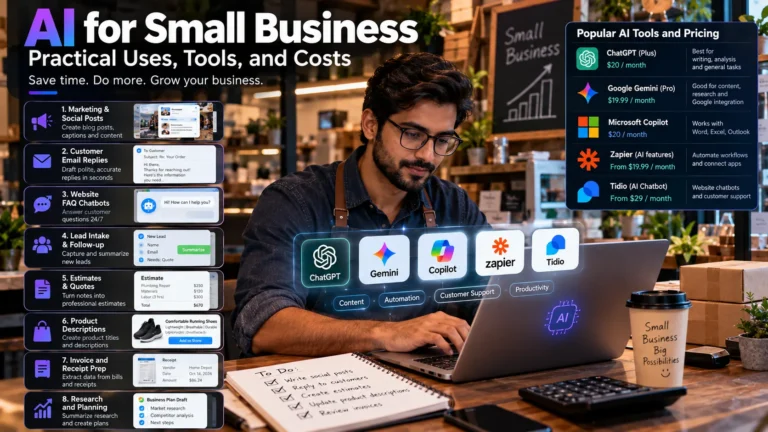
You’ve used ChatGPT to rewrite an email. Maybe you’ve had Canva throw together a decent poster in four minutes. Now the obvious question: how does any of that turn into actual income?
Here’s the short answer on how to make money with AI. You sell an outcome someone already pays for (blog posts, booked leads, captioned video, fewer hours of data entry) and you use AI to deliver it faster or cheaper than they could alone.
Demand for this work is growing fast. Upwork’s In-Demand Skills 2026 report found that freelancer earnings on skills that explicitly reference AI grew 109% in 2025, based on U.S.-originated work on its marketplace.
But demand on a platform isn’t money in your account. This guide covers 10 business models, what each costs, how to land a first customer, and the scams to stay away from.
How to Make Money with AI: What Actually Works?
Making money with AI works when AI cuts the time or cost of delivering something a customer already values. It fails when the plan depends on AI producing income by itself, with no buyer, no way of reaching that buyer, and no human checking the output. Every legitimate model in this guide follows the first pattern.
That distinction sounds obvious. It isn’t, judging by how many “AI income” courses sell the second one.
Three ways AI shows up in a real business
AI-assisted work, AI-powered services, and AI-based products are three different business shapes, and mixing them up leads to bad pricing decisions.
- AI-assisted work means you still do the job, and AI speeds up parts of it. A copywriter who drafts outlines in Claude and then rewrites them in her own voice is doing AI-assisted work. The client pays for the writing, not the AI.
- AI-powered services means AI is part of what the client receives. An automated workflow that reads incoming leads, scores them, and drafts a follow-up email for a dentist’s office is an AI-powered service. The client pays for the system working every day.
- AI-based products means you build something once and sell it many times. A Notion template pack built with AI help, or a small web app that calls an AI model, is an AI-based product. The customer pays for the asset.
What the 2026 demand data says
Upwork’s 2026 In-Demand Skills report, published February 4, 2026, shows the fastest growth in AI skills applied inside existing jobs. AI video generation and editing grew 329%, AI integration grew 178%, AI data annotation grew 154%, and AI chatbot development grew 71% year over year.
The same report found that the most in-demand skills overall (full stack development, general virtual assistance, data analytics, graphic design) stayed strong.
My read: buyers aren’t paying for “AI.” They’re paying for a skill done better with AI. One caveat: Upwork is a marketplace with an interest in reporting growth, and its data covers its own platform only.
What Are the 10 Most Practical Ways to Earn Money with AI?
The 10 most practical ways to earn money with AI fall into three tiers: services you can sell with skills you may already have, skill-heavy services that take longer to learn, and assets you build once and sell repeatedly.
Tier 1 is usually the fastest route to a first payment. Tier 3 is the slowest, and the only one that can earn while you sleep (after months of work while you’re very much awake).
Tier 1: Services you can sell with existing skills
1. AI-assisted writing and content services
AI-assisted writing services help businesses produce blog posts, newsletters, email sequences, and case studies. You use AI to support drafting and research, then edit, fact-check, and adapt the content to the client’s audience and brand voice.
- Who pays: Small businesses, SaaS marketing teams, and agencies that need consistent, high-quality content.
- Tools: ChatGPT, Claude, or Gemini for drafting and brainstorming; Grammarly or Hemingway Editor for editing; Google Docs for collaboration and delivery.
- Costs: Start with free plans where available. Upgrade only when your workload justifies it, and check current pricing on the ChatGPT, Claude, and Gemini websites.
- Where to find clients: Upwork, Contra, LinkedIn, and marketing agencies that outsource content projects.
- First step: Choose a business in a niche you understand and create an improved sample based on one of its existing public articles. Clearly label it as an independent portfolio sample, and don’t republish it as the company’s official content without permission.
- Main challenge: Generic AI copy is easy to produce, so clients need a reason to pay for your work. Demonstrate your value through accurate research, original insights, a consistent brand voice, and useful content that serves the reader’s needs.
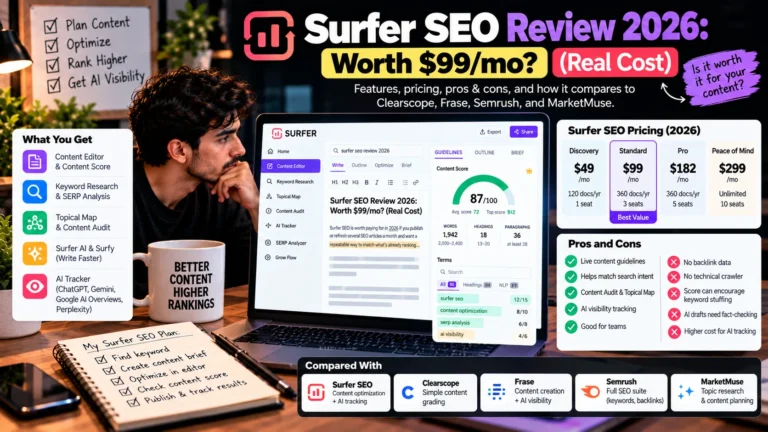
2. AI-powered SEO and digital marketing services
AI-powered SEO services help businesses improve keyword research, on-page SEO, content briefs, ad copy, and reporting.
- Who pays: Local businesses, e-commerce stores, and startups.
- Tools: Google Search Console, Semrush, and Ubersuggest.
- Costs: Google Search Console is free. Check current paid plans on the official SEO tool websites.
- Where to find clients: LinkedIn, local businesses, and digital marketing agencies.
- First step: Audit a business website and share three specific, actionable SEO improvements.
- Main risk: SEO results take time. Promise measurable deliverables, not guaranteed rankings.
3. Social media management and content repurposing
AI-assisted content repurposing turns podcasts, webinars, and long videos into short clips, carousels, and platform-specific captions.
- Who pays: Coaches, podcasters, B2B founders, and small businesses.
- Demand signal: Upwork’s 2026 report found demand for social media strategy grew 36% year over year. Source.
- Tools: Canva, Descript, Buffer, and Metricool. Free and paid options are available; check current plans.
- Where to find clients: LinkedIn, personalized Instagram outreach, and local business groups.
- First step: Turn one public podcast episode into five sample posts, respecting the creator’s rights and permissions.
- Main risk: Reach and engagement fluctuate, and clients may leave if expectations are unrealistic. Focus on deliverables and useful performance reporting rather than guaranteed growth.
Pro tip: Use your own content workflow as a case study. Track how long one batch takes before and after AI assistance, then show prospects the measured difference.
4. AI graphics, presentations, and design services
AI design services create pitch decks, social graphics, ebook layouts, and brand concepts that you refine for clients.
- Who pays: Startups, consultants, real estate agents, and course creators.
- Demand signal: Upwork reported AI image generation and editing grew 95% year over year in its 2026 skills report.
- Tools: Canva, Adobe Firefly, Midjourney, and Gamma.
- Costs: Check current subscriptions, usage limits, and commercial-use terms before choosing a tool.
- Where to find clients: LinkedIn, Fiverr, and startup communities.
- First step: Redesign a public flyer as a portfolio concept, clearly labeling it as unofficial.
- Main risk: Check licensing and client usage rights. Purely AI-generated material may not qualify for U.S. copyright protection; human authorship can affect eligibility.
5. AI video editing and short-form production
AI video services turn long videos into short clips, captions, and social-ready content, with human review for quality and accuracy.
- Who pays: Podcasters, YouTubers, coaches, and B2B companies.
- Demand signal: Upwork reported AI video generation and editing grew 329% year over year in 2026.
- Tools: Descript, CapCut, OpusClip, Runway, and HeyGen.
- Costs: Check current subscriptions, generation credits, and export limits.
- Where to find clients: YouTube creator business contacts, podcast communities, and LinkedIn.
- First step: Turn one public video into three sample clips, respecting copyright and usage permissions.
- Main risk: Obtain permission before cloning someone’s voice or likeness, and agree on revision limits before starting.
Example workflow: For a faceless Reel, test a script in ChatGPT, create visuals with an appropriate video tool, edit captions in CapCut, and review the final video before publishing. Track the actual time required for each step rather than claiming unmeasured time savings.
6. AI automation services for small businesses
AI automation connects business tools to handle repetitive tasks, such as capturing leads, drafting replies, updating records, and notifying staff.
- Who pays: Marketing agencies and local businesses, including real estate firms, gyms, and home-service companies.
- Demand signal: Upwork reported AI integration grew 178% and AI chatbot development grew 71% year over year in its 2026 report.
- Tools: Zapier, Make, n8n, and the OpenAI API.
- Costs: Account for platform subscriptions, API usage, hosting, and maintenance.
- Where to find clients: LinkedIn agency owners and businesses with inefficient lead-response processes.
- First step: Build a demo that captures a form submission, categorizes the lead, logs it in Google Sheets, and alerts the business.
- Main risk: Workflows can fail when integrations change. Protect customer data, test failure scenarios, and document ongoing support requirements.
Pro tip: Sell the business outcome, not the tool stack. “Every new inquiry gets a reply within five minutes” is easier to buy than “I’ll connect Zapier to the OpenAI API.”
7. AI-assisted website development and coding
AI-assisted development uses coding tools to speed up website and application work, while the developer remains responsible for testing, security, and maintenance.
- Who pays: Small businesses, startups, and agencies needing website updates or development support.
- Demand signal: Upwork’s 2026 report lists full-stack development and web design among its most in-demand coding and web development skills.
- Tools: GitHub Copilot, Cursor, Claude, WordPress, and Next.js.
- Costs: Check current coding-tool subscriptions, hosting, domains, and deployment expenses.
- Where to find clients: Local businesses with outdated websites, agency partnerships, and freelance marketplaces.
- First step: Create a responsive homepage redesign as an unofficial portfolio concept.
- Main risk: AI-generated code can contain bugs and security vulnerabilities. Review, test, and maintain everything you deliver.
8. Digital products, templates, and educational resources
AI-assisted digital products include Canva templates, spreadsheets, ebooks, planners, and prompt libraries that customers can purchase online.
- Who pays: Creators, freelancers, students, and small business owners seeking practical resources.
- Tools: Canva, Notion, and AI assistants for drafting; Gumroad, Etsy, and Shopify for selling.
- Costs: Check marketplace fees, payment processing, subscriptions, and applicable seller policies.
- First step: Build a simple template that solves one specific problem and test it with potential buyers.
- Main risk: A product can be easy to create but difficult to sell without an audience or a clear distribution plan. Review marketplace rules and disclose AI use where required.
Product ideas to test: SEO checklists, content calendars, or AI automation templates. Validate demand with a few potential buyers before investing in a large product library.
9. Affiliate marketing and content websites built responsibly
Affiliate marketing earns commissions when readers purchase products through tracked links. AI can assist with research and drafting, but useful content still needs original insight, accurate information, and editorial review.
- Who pays: Affiliate merchants pay commissions according to their program terms.
- Tools: WordPress, Google Search Console, AI assistants, and affiliate program dashboards.
- Costs: Budget for hosting, a domain, content production, and the time needed to build an audience.
- Rules to know: Google’s spam policies prohibit scaled content abuse designed to manipulate search rankings, regardless of whether content is generated by AI or humans. The FTC also requires clear disclosure of material connections, including affiliate relationships, when applicable. See its endorsement guidance.
- First step: Choose a niche you understand and publish a small set of useful, well-researched articles.
- Main risk: Search traffic and affiliate revenue are uncertain. Rankings can fluctuate, and building an audience may take substantial time.
Pro tip: Use Google Search Console to track impressions, clicks, and queries for each article, so you can see which topics earn traffic before writing more of them. If you share income results publicly, use verified figures with dates.
10. AI apps, micro-SaaS products, and specialized tools
A micro-SaaS product is a small software service that solves a specific problem for a defined audience, often through a paid subscription or usage-based pricing.
- Who pays: Users with recurring needs, such as creators generating captions or businesses automating routine tasks.
- Tools: Next.js, Supabase, Stripe, AI APIs, and coding assistants.
- Costs: Include development, hosting, API usage, payment processing, support, and maintenance.
- Where to find customers: Relevant online communities, product directories, existing audiences, and search traffic.
- First step: Build one focused tool, measure whether people return to use it, and validate willingness to pay before expanding.
- Main risk: Development is only part of the job. Customer acquisition, ongoing costs, reliability, and competition determine whether the product becomes sustainable.
Pro tip: If you’re building tools such as a Reel script generator, caption generator, or carousel maker, track usage, repeat visits, feedback, and operating costs. Use those real measurements to decide which tool deserves further development.
Which AI Income Model Is Right for You?
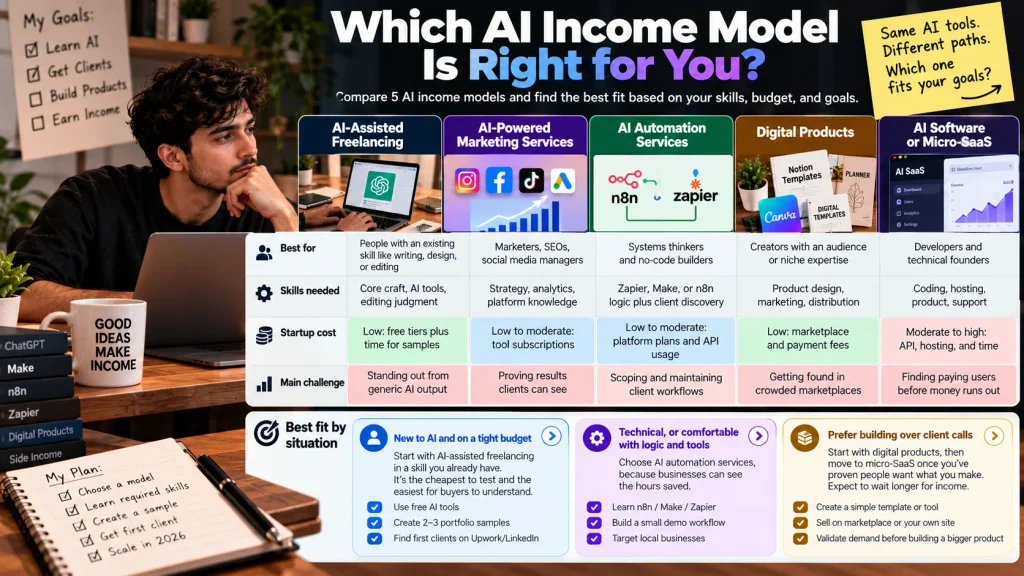
The right AI income model depends on three things: the skill you already have, how much you can spend upfront, and whether you’d rather sell your time or build an asset. This table compares the five broad models side by side.
| AI income model | Best for | Skills needed | Startup cost | Main challenge |
| AI-assisted freelancing | People with an existing skill like writing, design, or editing | Core craft, AI tools, editing judgment | Low: free tiers plus time for samples | Standing out from generic AI output |
| AI-powered marketing services | Marketers, SEOs, social media managers | Strategy, analytics, platform knowledge | Low to moderate: tool subscriptions | Proving results clients can see |
| AI automation services | Systems thinkers and no-code builders | Zapier, Make, or n8n logic plus client discovery | Low to moderate: platform plans and API usage | Scoping and maintaining client workflows |
| Digital products | Creators with an audience or niche expertise | Product design, marketing, distribution | Low: marketplace and payment fees | Getting found in crowded marketplaces |
| AI software or micro-SaaS | Developers and technical founders | Coding, hosting, product, support | Moderate to high: API, hosting, and time | Finding paying users before money runs out |
Best fit by situation:
- New to AI and on a tight budget: start with AI-assisted freelancing in a skill you already have. It’s the cheapest to test and the easiest for buyers to understand.
- Technical, or comfortable with logic and tools: AI automation services, because businesses can see the hours saved.
- Prefer building over client calls: digital products first, then micro-SaaS once you’ve proven people want what you make. Expect to wait longer for income.
A model you can sell this month beats a better one you’ll get to “someday.”
What Are the Best AI Income Ideas for Beginners?
The best AI income ideas for beginners are services where the buyer already understands the deliverable and the tool costs are low: content writing, social media repurposing, and simple design work. A beginner can produce samples in days, mistakes are cheap to fix, and none of these need coding.
Three starting points that need no code
Writing services, repurposing, and Canva-based design share one advantage. A small business owner instantly knows what “five LinkedIn posts from your podcast” means. Compare that with “an agentic workflow,” which needs a sales call just to explain.
Build a three-sample portfolio in one week
A portfolio of three samples is enough to start outreach. Create them for real, public businesses in the niche you want, and label them clearly as spec work. Never present a sample as a client project.
Validate demand before paying for tools
Validating demand means confirming people will pay before you invest. Search Upwork and LinkedIn for job posts that match your service, talk to five potential buyers, and try to pre-sell one small package. If nobody bites after real outreach, change the offer, not the tool stack.
Can You Make Money with AI With No Money?
You can start some AI businesses without spending cash, mostly service businesses built on free tool tiers. You can’t start any business with zero resources, though. You still need time, a computer, reliable internet, and weeks of skill-building, and some models, like video and micro-SaaS, need paid tools fairly quickly.
Free tool vs. free tier vs. zero-cost business
These three terms are often confused.
A free tool costs nothing to use. A free tier is a limited version of a product that may have usage caps or restricted features. A zero-upfront-cost business starts without paying for tools or subscriptions, but still requires time, effort, and possibly existing equipment.
Before using any free AI plan for client work, check the provider’s current pricing and terms for usage limits, commercial-use rights, and licensing restrictions.
The costs nobody lists
Time is a major cost: learning tools, building samples, and finding clients before earning revenue. Freelance marketplaces and payment processors also charge fees. Check the official Upwork fee guide, Fiverr payment terms, Stripe pricing, and PayPal fees before setting your prices.
Taxes matter, too. In the U.S., you generally must pay self-employment tax if your net self-employment earnings reach $400 in a year. The standard rate is 15.3% for Social Security and Medicare, in addition to any applicable income tax. Source: IRS self-employment tax guidance.
This is general information, not tax advice. Consult a qualified tax professional about your situation.
Which AI Tools Are Best for Making Money?
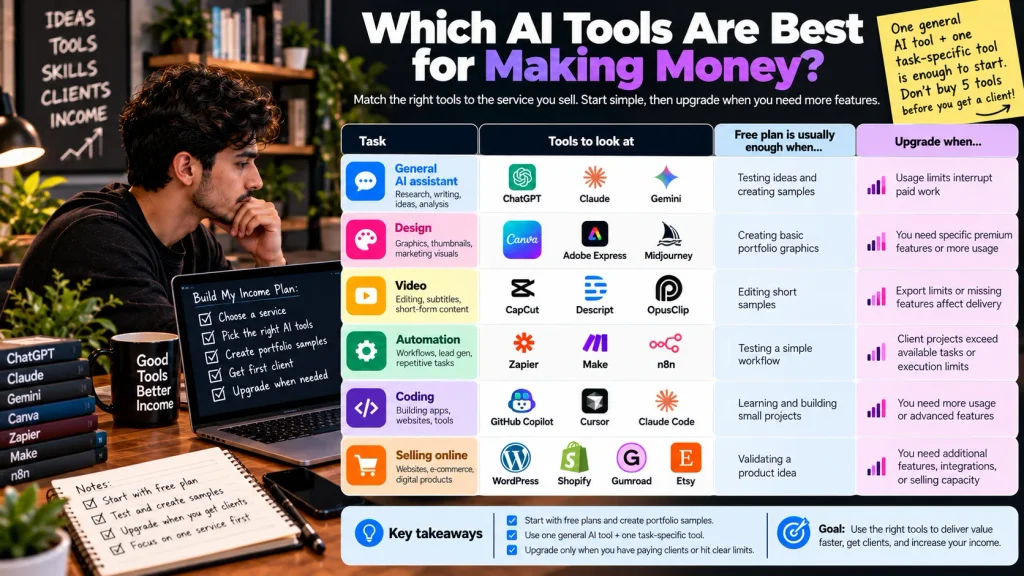
The best AI tools for making money are the ones that match the service you sell. Most beginners need one general AI assistant plus one task-specific tool. Paying for five subscriptions before you have a client is an easy way to lose money before you’ve made any.
AI tools: When should you upgrade?
| Task | Tools to look at | Free plan is usually enough when | Upgrade when |
| General AI assistant | ChatGPT, Claude, Gemini | Testing ideas and creating samples | Usage limits interrupt paid work |
| Design | Canva, Adobe Express, Midjourney | Creating basic portfolio graphics | You need specific premium features or more usage |
| Video | CapCut, Descript, OpusClip | Editing short samples | Export limits or missing features affect delivery |
| Automation | Zapier, Make, n8n | Testing a simple workflow | Client projects exceed available tasks or execution limits |
| Coding | GitHub Copilot, Cursor, Claude Code | Learning and building small projects | You need more usage or advanced features |
| Selling online | WordPress, Shopify, Gumroad, Etsy | Validating a product idea | You need additional features, integrations, or selling capacity |
Disclosure: This article was prepared with assistance from Claude, an Anthropic product included in this comparison. Tools are discussed based on their relevance to the task, not affiliation. None of the links in this article are affiliate links.
How Do You Get Your First Paying AI Client?
You get your first paying AI client by choosing one service for one type of customer, proving you understand their specific problem, and asking for a small, clearly scoped first project. Blasting 500 copy-paste DMs feels productive. It mostly gets you ignored, or flagged as spam.
- Choose one service and one customer group. “Short-form clips for real estate agents” is a business. “AI services” is not.
- Identify a specific business problem. Look for something visible from the outside: unanswered reviews, a slow website, no video on Instagram.
- Create two or three relevant samples. Make them for businesses like your target, and label them as samples.
- Define a clear deliverable and scope. For example: “10 captioned shorts per month from your existing videos, two revision rounds.”
- Find prospects through the right channel. LinkedIn suits B2B, Instagram suits creators and local brands, and Google Maps lists local businesses.
- Write a personalized, non-spammy message. Mention one thing you noticed about their business, show a relevant sample, and make a small ask.
- Agree on deliverables, timelines, revisions, and payment in writing before you start. Take a deposit for new clients.
- Collect feedback and improve the offer. Ask what nearly stopped them from saying yes, then fix that in your next pitch.
Sample outreach message (illustrative)
This is an example message, not a real client or a message with measured results:
Subject: Quick idea for [Business]’s Google reviews
Hi [Name], I noticed [Business] gets steady five-star reviews on Google, but most of them don’t have a reply, including a recent one asking about weekend hours.
I put together a simple setup that drafts a reply to each new review so you can approve it in one click. I recorded a two-minute video showing how it would look on your actual listing: [link].
If it’s useful, I can set it up this week for a flat fee. If not, no worries at all.
[Your name]
It works as a template because it names a problem the owner can verify in ten seconds, shows effort before asking for anything, and keeps the task small.
Pro tip: For website and AI automation services, personalize each pitch around one visible business problem, such as a slow website or a missing lead follow-up process. Offer a short video audit showing the issue and a practical solution. Track replies and booked calls so you can improve your outreach based on real results.
How Much Money Can You Make with AI?
There’s no reliable “typical” income for making money with AI. What you earn depends on the service, your experience, demand in your niche, how well you find clients, your expenses, and your hours. Anyone quoting a standard monthly figure without a named, checkable source is guessing or selling something.
Revenue, expenses, and profit are different numbers
Revenue is what clients pay you. Expenses are tools, platform fees, and hardware. Profit is what’s left, and tax comes out of profit.
Here’s the thing — the “$10K month” screenshots you see online usually show revenue. Nobody screenshots their Stripe fees.
An illustrative example (not a market average)
Here’s a made-up example with every assumption shown, so you can see how the math works:
- Assumption: four content-repurposing clients at $500 per month each. This price is illustrative, not a market rate.
- Revenue: $2,000 per month.
- Assumed expenses: $80 in tools and $100 in platform and payment fees (an assumed 5%).
- Net before tax: $1,820.
- Estimated self-employment tax: about $257 (15.3% applied to 92.35% of net earnings, simplified to one month).
- Time: 40 hours of delivery plus an assumed 20 hours of sales and admin.
That’s roughly $1,563 before income tax across 60 hours, or about $26 per hour. Not bad for a side business. Not the number on the screenshot either. Your numbers will differ, and they should come from your own tracking.
Why this guide doesn’t publish an “average AI income”
Many pages on this topic list income ranges with no source. Upwork’s data measures how much total freelancer earnings grew across its marketplace, which tells you about demand, not about what one new freelancer will make. Until a transparent source publishes individual earnings data, a range would be invented.
What Mistakes Should You Avoid When Making Money with AI?
The biggest mistakes when making money with AI fall into four groups: selling low-quality output, ignoring legal and trust rules, spending before validating demand, and falling for “AI income” programs.
Quality mistakes
Selling generic AI output loses clients, because they can produce the same thing themselves.
AI models also make things up with total confidence: statistics that don’t exist, citations to studies nobody wrote, links that 404. Check every claim, number, and link before delivery. Never send work you haven’t read in full.
Legal and trust mistakes
Copyright: The U.S. Supreme Court declined to hear Thaler v. Perlmutter in March 2026, leaving the lower-court ruling on human authorship in place. AI-assisted work may qualify for copyright protection when it includes sufficient human-authored expression. Keep drafts and edit history. Source: U.S. Copyright Office.
Privacy: Don’t upload client data, contracts, or private emails to AI tools without checking data settings and obtaining required permission.
Fake reviews: The FTC’s 2024 rule prohibits certain fake reviews and testimonials, including AI-generated ones that falsely imply real customer experiences. Never fabricate testimonials or make unsupported income and performance claims. Source: FTC.
Business mistakes
Spending before validating is the classic one: say, a $300 course and four subscriptions before a single sales conversation.
Depending on one platform or one AI provider is the quieter risk. If your whole service runs on one API and the provider raises prices or changes its terms, your margins change with it.
And don’t disappear after delivery. Fixing a broken form field the same day is how a one-off project turns into a retainer.
Red flags in “AI income” programs
“AI income” programs that promise big earnings are now a regular FTC target.
In March 2026, Air AI and its owners agreed to a settlement that bans them from marketing business opportunities. The FTC had alleged deceptive claims about business growth, earnings potential, and refund guarantees, and said some business owners lost as much as $250,000. Automators AI and Click Profit faced similar FTC cases.
Walk away from any program that:
- Promises a specific income, or shows earnings screenshots without explaining how typical they are (a nice car in the thumbnail is not an earnings disclosure).
- Sells a “done-for-you” AI store or business that supposedly runs without you.
- Pushes urgency, like “price doubles tonight.”
- Offers a refund guarantee with conditions designed to be impossible.
- Can’t provide the disclosure documents the FTC’s Business Opportunity Rule requires covered sellers to give buyers.
You can report suspected scams at ReportFraud.ftc.gov.
What I’d Do If I Were Starting Today: A 30-Day Plan
If I were starting from zero today, I’d spend 30 days validating one offer, not trying to build a business. The goal of this plan is to learn whether real buyers respond to your service. It doesn’t guarantee a paying client or any income in 30 days.
My pick: I’d start with AI automation services for small businesses because combining website improvements with automated lead follow-ups solves a clear business problem and offers a practical way to demonstrate value.
Week 1: Choose a service and learn the tools
Pick one service from the list above and one customer type. Learn the one or two tools that service actually needs, using free tiers. By day 7, you should be able to describe your offer in one sentence a stranger understands.
Week 2: Build sample work and a basic portfolio
Create three samples for real, public businesses in your target niche, labeled as spec work. Put them on one simple page: a Google Doc, a Notion page, or a portfolio site.
Week 3: Research prospects and start personalized outreach
Build a list of 30 to 50 prospects who visibly have the problem you solve. Send 20 personalized messages, each mentioning something specific about that business. This number is an editorial suggestion, not a benchmark.
Week 4: Refine, follow up, and evaluate
Follow up once with anyone who didn’t reply, then stop. Look at what happened. Replies with questions mean the problem is real. Silence across the board usually means the offer, the niche, or the message needs to change.
In month one, count replies and conversations, not revenue.
FAQ
How can I make money with AI as a beginner?
Start by selling a service you can already do, such as writing, social media posts, or simple design, and use AI to deliver it faster. Build three sample pieces for real businesses in your niche and send personalized outreach. Skip expensive tools and courses until someone has paid you.
Can I make money with AI for free?
You can start some AI service businesses without spending money by using free tiers of tools like ChatGPT, Claude, Canva, and CapCut. You still need time, a computer, and internet access. Free tiers often have usage limits or commercial-use restrictions, so check each tool’s terms before client work.
What is the easiest way to make money with AI?
The easiest way to make money with AI is usually AI-assisted freelancing in a skill you already have, such as writing or design. Buyers already understand the deliverable, and the tool costs are low. “Easiest” still means weeks of outreach before a first sale, not instant income.
Which AI tools can I use to earn money?
Most people need one general AI assistant, such as ChatGPT, Claude, or Gemini, plus one tool for their service. That might be Canva for design, Descript or CapCut for video, Zapier or n8n for automation, or GitHub Copilot or Cursor for coding. Choose the tool after you choose the service.
How much money can I make using AI?
There’s no reliable typical figure, because income depends on your service, niche, experience, pricing, expenses, and hours. Track revenue, expenses, and profit separately. Treat any specific monthly number promised by a course or influencer as marketing, not data.
Can I make money selling AI-generated content?
Yes, but platforms and the law set limits. Amazon KDP requires disclosure of AI-generated text, images, and translations, and U.S. copyright protection requires human authorship, so purely AI-generated work may not be protected. Products sell better and are safer when you add real expertise and editing.
How do I get clients for AI services?
Pick one service for one customer type, find businesses that visibly have the problem you solve, and send personalized messages that show a relevant sample. LinkedIn works well for B2B services, Instagram for creators and local brands, and Upwork or Fiverr for buyers already searching. Ask for a small, clearly scoped first project.
The Bottom Line
The most useful thing to know about how to make money with AI is this: AI makes you faster, but only a paying customer with a real problem makes you money.
So don’t start with a tool. Start with one service and one type of customer. Today, pick one model from this guide, create one small sample for a real business, and send it to one person who might actually need it. Validate demand before you spend on subscriptions or courses.
If you want to go deeper, explore FluxGrowth’s guides on AI automation for small businesses and AI tools for digital marketing. Which model are you picking first?